jijosh at
Llms.txt is a Markdown file you put at https://yoursite.com/llms.txt to give AI assistants and agents a short, curated guide to your site: a title, a one-paragraph summary and links to the pages that matter, ideally in clean Markdown. It is a community proposal, not an official web standard. It does not block or allow AI crawlers (that is robots.txt’s job), and Google says you do not need it to appear in its AI features. It is worth an hour of work if AI tools regularly answer questions about your product, documentation or policies.
Where llms.txt comes from
The proposal was written by Jeremy Howard of Answer.AI and is maintained in the AnswerDotAI/llms-txt repository on GitHub, which calls it an informal overview open for community input. The current text is version 2. Its reasoning is simple: web pages are built for people, wrapped in navigation, adverts and JavaScript, and turning them back into clean text is hard for a language model with a limited context window. A small file with the essentials and links to plain Markdown versions of key pages saves the agent that work.
The proposal says the file is used mostly on demand, when an agent needs information while helping a user, rather than for training, and that it is most common in software documentation, where coding agents use it to find API references.
llms.txt vs robots.txt vs sitemap.xml
| File | Who reads it | What it does |
|---|---|---|
robots.txt | Crawlers, including AI crawlers | Says which paths automated tools may fetch. The only one of the three that controls access. |
sitemap.xml | Search engines | Lists every indexable page so none are missed |
llms.txt | AI assistants and agents, when they choose to | A short, curated summary with links to the most useful pages; nothing is blocked or allowed by it |
If your goal is to stop AI companies using your content, llms.txt will not help; use robots.txt rules for the relevant crawlers (see How to use robots.txt). The proposal itself makes the same distinction: robots.txt says what access is acceptable, llms.txt offers context.
The llms.txt format
The file is Markdown, but in a fixed order so that programs can parse it as well as models can read it:
- An H1 with the name of the site or project. This is the only required part.
- A blockquote with a short summary containing the key facts needed to understand the rest.
- Optional details: paragraphs or lists, but no headings.
- Zero or more H2 sections of links. Each list item is a Markdown link,
[name](url), optionally followed by a colon and a note. - By convention, a section called Optional for links an agent can skip when it is short of space.
Here is a file for a made-up web studio, the one we used in our tests:
# Example Web Studio

> Example Web Studio builds and hosts WordPress sites for small shops in Kerala. This file lists the pages that answer most customer questions.

Prices are in INR and include GST. We do not offer domain transfers by phone.

## Services

- [WordPress care plan](https://www.example.com/services/care.md): What the monthly plan covers, response times and exclusions
- [Shop setup](https://www.example.com/services/shop.md): WooCommerce setup steps and what the customer must provide

## Policies

- [Refund policy](https://www.example.com/refunds.md): When refunds apply and how to ask for one

## Optional

- [Company history](https://www.example.com/about.md)
Version 2 of the proposal adds three ideas. The file can sit at any path, not only the root: /docs/llms.txt covers everything under /docs/, and agents should use the most specific file. Pages can offer a Markdown copy at the same URL with .md added (page.html.md) or replacing the extension (page.md). And pages can point to both with standard link relations, in HTML or as an HTTP header:
Link: </refunds.md>; rel="alternate"; type="text/markdown", </llms.txt>; rel="describedby"Check your file with the reference parser
The project publishes a Python package, llms-txt on PyPI. We installed version 0.0.7 in a Python 3.14 container and parsed the example above with parse_llms_file(). It returned the title, the summary, the details and each section with its links and notes:
"title": "Example Web Studio",
"summary": "Example Web Studio builds and hosts WordPress sites for small shops in Kerala. ...",
"info": "Prices are in INR and include GST. We do not offer domain transfers by phone.",
"sections": {
 "Services": "[{'title': 'WordPress care plan', 'url': 'https://www.example.com/services/care.md', 'desc': 'What the monthly plan covers, ...'}, ...]",
 "Policies": ...,
 "Optional": "[{'title': 'Company history', 'url': 'https://www.example.com/about.md', 'desc': None}]"
Then we added a common mistake, a plain bullet point under an H2 heading:
## Company

- Founded: 2013

AttributeError: 'NoneType' object has no attribute 'groupdict'
The whole parse failed, not just that line. Language models will still read such a file, but any tool that follows the format will not. Put facts that are not links in the details part above the first H2, and make every list item under an H2 start with a link.
Serve it with the right content type
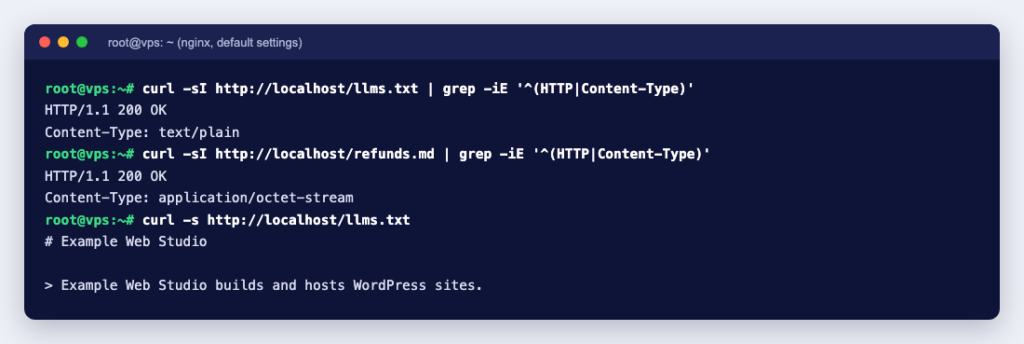
Upload llms.txt to your site’s document root, the same folder as robots.txt. A .txt file is served as text/plain everywhere, but Markdown copies of your pages are another matter. We served the same files from nginx 1.31.6 and Apache 2.4.68 with their default settings:
nginx   llms.txt     Content-Type: text/plain
nginx   refunds.md   Content-Type: application/octet-stream
apache  llms.txt     Content-Type: text/plain
apache  refunds.md   (no Content-Type header at all)
Neither server’s default MIME list maps .md, so a browser would download the file and a strict client may refuse it. The fix on nginx is a location that sets the type for .md files only. The empty types { } block follows the pattern in the nginx types documentation; putting a types block at server level instead would replace the whole MIME list for that site:
location = /llms.txt {
    charset utf-8;
}
location ~ \.md$ {
    types { }
    default_type "text/markdown; charset=utf-8";
}
location = /refunds.html {
    add_header Link '</refunds.md>; rel="alternate"; type="text/markdown", </llms.txt>; rel="describedby"';
}
On Apache, the same result comes from an .htaccess file in the site’s folder (the directives need AllowOverride FileInfo, which the mod_mime documentation lists for AddType):
AddType text/markdown .md
AddCharset utf-8 .md .txt
<Files "refunds.html">
    Header set Link "</refunds.md>; rel=\"alternate\"; type=\"text/markdown\", </llms.txt>; rel=\"describedby\""
</Files>
After these changes both servers answered text/markdown; charset=utf-8 for the .md file, text/plain; charset=utf-8 for llms.txt, sent the Link header on the HTML page, and still served CSS as text/css. In cPanel you can also add the type through the interface: see Add a new MIME type in cPanel and How to edit the .htaccess file in cPanel File Manager.
llms.txt on WordPress
You can upload a hand-written file to the WordPress root, or let a plugin build one. The Yoast SEO plugin page lists “LLMs.txt management”. We tested Yoast SEO 28.6 on WordPress 7.1.2 in Docker, with one page and one post. After switching the feature on, Yoast wrote a real file, llms.txt, into the WordPress folder:
# Example Shop: WordPress shops for small businesses in Kerala

Generated by Yoast SEO v28.6, this is an llms.txt file, meant for consumption by LLMs.

## Pages
- [Refund policy](http://wp.example.test/refund-policy/)

## Posts
- [How we build shops](http://wp.example.test/2026/09/30/how-we-build-shops/)

## Categories
- [Uncategorized](http://wp.example.test/category/uncategorized/)

## Optional
- [Sitemap index](http://wp.example.test/sitemap_index.xml)
A few things we noticed. The site tagline became part of the H1 and there was no summary blockquote, so the file says little about what the business does. The links point to the normal HTML pages, not Markdown. Yoast scheduled a weekly WordPress cron event, wpseo_llms_txt_population, to rebuild the file, and its settings store a selection mode (automatic by default) with slots for your about, contact, terms, privacy and shop pages if you prefer to choose them.
We then edited the file by hand and ran the cron event. Yoast did not overwrite our change. It marked the file as not managed by Yoast, and the admin notice it uses for that case reads: “An existing llms.txt file wasn’t created by Yoast or has been edited manually. Yoast won’t overwrite it.” So decide on one approach: let the plugin own the file, or turn the feature off and maintain your own. Either way, remove leftovers such as the “Uncategorized” category before you rely on it.
Does llms.txt help SEO or AI visibility?
Be realistic. Google’s guide to AI features and your website says there are no additional requirements to appear in AI Overviews or AI Mode, and that you do not need to create new machine-readable files, AI text files or markup. Normal SEO basics still decide that. Chrome’s Lighthouse has an llms.txt audit among its agentic browsing checks, but according to Chrome’s documentation it only flags a server error when fetching the file and marks the audit “Not Applicable” when the file is missing, because providing it is optional.
Where llms.txt does pay off is when agents already come looking for your content: developer documentation, product specifications, support policies, anything a coding assistant or chat tool might be asked about. A clear summary and a handful of accurate links make it more likely that an agent quotes your current terms instead of an old page.
llms.txt checklist
- One H1 with your site or company name, then a blockquote summary of two or three sentences.
- Facts that are not links go above the first H2; every item under an H2 is
[name](url): note. - Link to pages that are accurate and stable, and to Markdown versions where you have them. Leave out anything that changes daily, such as prices, unless you update the file whenever they change.
- Put secondary links under
## Optional. - Check the headers with
curl -I https://yoursite.com/llms.txt: status 200 andtext/plain, andtext/markdownfor any.mdfiles. - Test it the way the proposal suggests: give an AI assistant only your llms.txt and ask it questions about your business.
- Keep robots.txt and your sitemap as they are; llms.txt replaces neither.
llms.txt is a small text file with modest, specific benefits: it helps agents that look for it find your best pages quickly, and costs almost nothing to maintain if you keep it short. On shared hosting you can upload it with the control panel’s file manager, next to robots.txt. On a KVM VPS you control the web server yourself, so add the nginx locations above, run nginx -t and reload.