Ithal P R
Every shared AzuraCast station we sell is now set up straight from WHMCS. When an order is approved, one click creates the station, the customer’s own login and the right permissions, and the welcome email tells them where to start. Suspensions, plan changes and cancellations follow the billing on their own. This is how we built it, the decisions we made along the way, and what we learned once real stations were running on it.
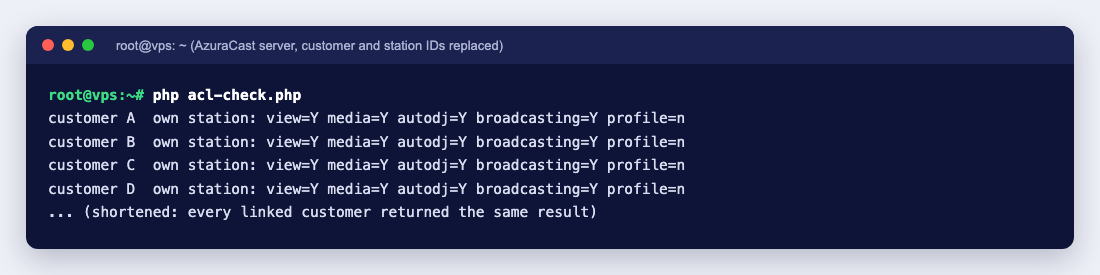
Above: a permission check we ran on our AzuraCast server after launch, using AzuraCast’s own access rules. Every customer can manage their own station, and only the station profile stays with us (customer and station IDs replaced, output shortened).
The problem: shared AzuraCast was a manual job
AzuraCast is a free, open source radio panel, and a single AzuraCast server can host many stations side by side. That makes it a good fit for shared radio hosting. The work around it, though, was all by hand. For every new order, someone on our team created the station, created the login, set the limits and sent the details. When an invoice went unpaid, WHMCS could not suspend the station itself, so it raised a task for staff instead. Cancellations, plan changes and password resets were the same.
Manual setup is slow for the customer, and it leaves room for small mistakes, such as a limit set too high or a login with more access than it should have. On a shared server, those mistakes affect everyone else on it.
Why we wrote our own WHMCS module
We looked at the community AzuraCast modules for WHMCS first. They gave us useful ideas, but the ones we found did not carry a licence that let us reuse their code, and none matched how we wanted to separate customers on a shared server. So we wrote our own server module from AzuraCast’s documented API and its source code. That way we know every call it makes and every permission it grants.
One service, one station, one role
The design rule is simple. Each WHMCS service is exactly one AzuraCast station, and the customer’s login gets a role that only covers that station:
- The station is created with the limits of the plan the customer bought.
- The role holds the customer’s permissions for that one station, and nothing on the server as a whole. The module never grants AzuraCast’s “administer all” permission.
- The login is the customer’s own. If they already have an AzuraCast login with us, the new station is added to it, so they see all their stations in one place. The module refuses to attach a station to an administrator’s email address.
What customers can change, and what stays with us
Customers get everything they need to run a station day to day:
- Upload, organise and delete music
- Build and schedule playlists for AutoDJ
- Start, stop and restart broadcasting
- Add DJ accounts for live shows, mount points, relays, webhooks and podcasts
- See listener reports and station logs
The one thing we keep is the station profile. In AzuraCast, the profile form is where the streaming server type, the port and the listener limit live, next to the station name. Those settings decide how the station uses the shared server, so letting anyone change them would let one station take resources from the others. A customer who wants a new station name or another setting changed opens a ticket, and our team does it.
Plan limits come straight from the WHMCS product
Each WHMCS product carries the limits for its plan, and the module applies them when it creates the station or changes the plan:
- Streaming server: Icecast or SHOUTcast
- Maximum listeners and maximum bitrate
- Number of mount points and HLS streams
- Storage quota for the music library
- AutoDJ on, or live broadcasting only
Because the limits live in the product, adding a new plan is a matter of creating a product, not changing code.
The whole service lifecycle, handled by WHMCS
- Create: when the order is approved, the module creates the station, the role and the login, then WHMCS sends a welcome email with the panel address, the login details and five first steps that use AzuraCast’s own menu names. If any step fails, the module undoes what it already made, so no half-built station is left behind.
- Suspend and unsuspend: an unpaid invoice disables the station, and payment brings it back, without anyone on our team stepping in.
- Change plan: an upgrade or downgrade applies the new plan’s limits to the existing station, music and playlists included.
- Terminate: removes the station and its role. It only removes the login if the module created it and the customer has no other station on it, so a cancellation never locks someone out of another station.
- Client area: customers see whether the station is online, its listen address, mount points and public player link, with Start, Stop and Restart buttons and a password change.
- One-click login: a button in the client area signs the customer into their panel with a link that works for five minutes and is refused while the service is suspended.
Behind the scenes, the module talks to AzuraCast with an API key that is stored encrypted in WHMCS and hidden in every log, together with customer passwords. It can also work with several AzuraCast servers in one WHMCS server group, so new stations can be placed on another server as we grow.
How we tested it before it touched a real station
We built a throwaway AzuraCast server on our test machine and ran the module against it with 38 checks. They covered every lifecycle step, and the things that must fail: a customer login was refused when it tried to edit the station profile, open the administration pages or reach another customer’s station. Only after all of them passed did we connect the module to our live AzuraCast server.
Moving existing customers over without breaking anything
Our existing AzuraCast customers already had stations, music and listeners, so we did not recreate anything. We linked each existing service in WHMCS to the station it already had, without changing the station itself. The module marks those logins as “not created by the module”, so a later cancellation can never delete a login a customer has used for years. We then gave every existing customer the same set of permissions as new customers, so everyone works the same way.
What we learned after launch
A few days after launch, a test on our side reported that a customer login could not do anything at all: no uploads, no AutoDJ, no buttons. Rather than guess, we asked AzuraCast itself. We ran every linked customer login through AzuraCast’s own permission check, the same code the panel uses when someone clicks a button. Every one of them could manage music, playlists and broadcasting on its own station, which is the result in the screenshot at the top. Real customers were uploading music on the same day, which matched.
The cause was the test itself. It had used an old login that belonged to no station and had no role, and in AzuraCast a login without a role can see nothing and change nothing. Two lessons came out of it. Test with a login the module created, or with the one-click login on a real service. And when something looks like a permission problem, check it the way AzuraCast checks it, instead of reading settings by eye.
What this means if you host your station with us
- Your station is set up as soon as your order is approved, with your own login and the plan limits already in place.
- You manage music, AutoDJ, live DJs and broadcasting yourself, and you can log in from your client area in one click.
- Your station is kept apart from other stations on the server, so one station’s settings cannot slow yours down.
- If an invoice is paid late, your station comes back on its own once it is paid.
To get started after your station is ready, these guides walk through the first steps: what to do after your first AzuraCast login, how to upload music, how to create a playlist and how to set up AutoDJ.
Shared AzuraCast hosting starts at $10 a month, with Icecast or SHOUTcast. If you need full control of the panel, including the settings we keep on shared servers, an AzuraCast VPS gives you your own AzuraCast installation.
Want the same automation for your radio business?
Our AzuraCast module for WHMCS is not limited to our own servers. If you run a radio hosting business, or want to sell AzuraCast stations to your own customers, we can set it up on your WHMCS and your AzuraCast servers and adapt it to your plans and the way you work.
We also take on custom development and integration work: WHMCS modules and hooks, connecting AzuraCast or other streaming panels to your billing, and automating the manual steps in your provisioning and support. Tell us what you need on our contact page, or see our custom business solutions, and we will come back with a plan and a quote.