Ithal P R
Private domain registration (also sold as WHOIS privacy, domain privacy or ID protection) puts the privacy service’s contact details in the public WHOIS and RDAP record instead of yours. It is less essential than it used to be: under ICANN’s Registration Data Policy, now in force for generic domains, registrars often already hide the registrant’s name, street address, phone and email. But that redaction is only required where the law demands it, the organisation, state and country can still show, and a privacy service adds a forwarding address on top. It is not available for every extension: the .IN registry does not permit privacy protection at all.
What a public domain record shows today
Every domain has registration data: who holds it, how to contact them, which registrar manages it, and key dates. Anyone can look it up through WHOIS or its successor, RDAP (Registration Data Access Protocol). For generic domains such as .com, .org and .net, ICANN’s Registration Data Policy sets out what is collected and what may be published:
- Redaction is required when applicable law, such as data-protection law, requires it.
- Redaction is allowed when the registrar or registry has a commercially reasonable purpose, or cannot technically limit it to the people the law covers. All three records we checked below were redacted.
- When they redact, the fields that must be hidden include the Registrant Name, Street, Postal Code and Phone. The City may be hidden. The email is replaced by an anonymised address or a link to a web form that forwards messages.
- The organisation must be published if you agree to it; if you do not, the registrar may hide it. If you enter a company name, the policy says that organisation is treated as the domain holder.
- State or province and country are not on the must-redact list, so they usually stay visible.
We checked three real records
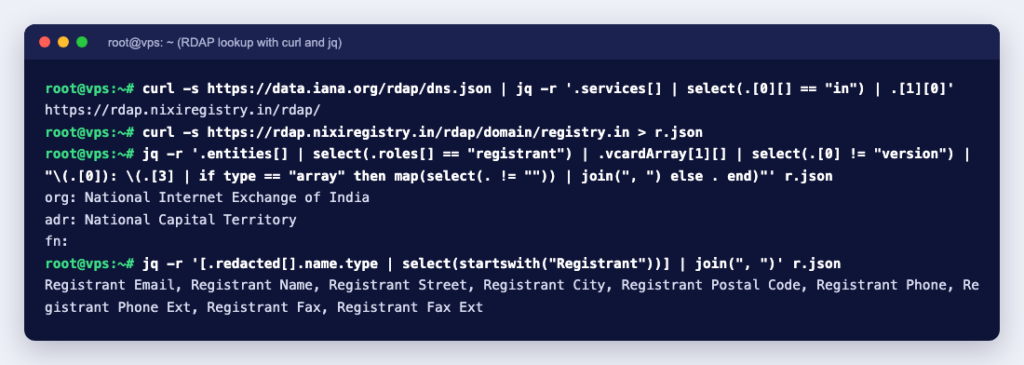
We queried RDAP for three well-known domains with curl and jq, starting from IANA’s RDAP bootstrap file to find each registry’s server, then following the link to the registrar’s server. Trimmed to the registrant contact:
wikipedia.org  (registrar record)
  fn:    REDACTED REGISTRANT
  org:   REDACTED FOR PRIVACY
  adr:   region "CA", street, city and postal code REDACTED FOR PRIVACY
  tel:   REDACTED FOR PRIVACY
  email: REDACTED FOR PRIVACY

icann.org  (registrar record)
  org:   Internet Corporation for Assigned Names and Numbers
  adr:   region "CA", everything else empty
  redacted: Registry Registrant ID, Registrant Name, Registrant Street, Registrant City,
            Registrant Postal Code, Registrant Phone, Registrant Email

registry.in  (.IN registry record)
  org:   National Internet Exchange of India
  adr:   region "National Capital Territory"
  redacted: Registry Registrant ID, Registrant Email, Registrant Name, Registrant Street,
            Registrant City, Registrant Postal Code, Registrant Phone, ...
None of the three showed a person’s name, street, phone or email. All three showed the state or region, and two showed the organisation; the registrar for wikipedia.org now hides the organisation as well. The redacted list is a standard RDAP extension, defined in RFC 9537, that names each hidden field. For an individual who registers a domain in their own name, this default redaction already hides most of what matters. For a sole trader who typed a business name into the organisation field, that name and the state stay public.
Privacy service vs proxy service
ICANN’s 2013 Registrar Accreditation Agreement defines two kinds of service, and the difference matters for ownership:
| Privacy service | Proxy service | |
|---|---|---|
| Who is the legal registrant | You | The proxy provider, which licenses the domain to you |
| What the public record shows | Alternative, reliable contact details supplied by the provider | The provider’s own details as the registrant |
| Main risk | Low: you stay the holder | You depend on the provider’s terms to prove the domain is yours |
Registrar add-ons are sold under names such as “privacy protection” or “ID protection”; read the terms to see which kind you are buying. The Registration Data Policy says that for a domain using an affiliated or accredited privacy or proxy service, the registrar and registry must publish the full contact data of that service, which may include a pseudonymised email that forwards to you. ICANN’s page About Privacy/Proxy Registration Service lists what providers under the 2013 agreement must publish, including their terms and an abuse contact.
.IN and other country-code domains
ICANN’s rules cover generic domains. Country-code domains follow their own registry’s rules, and they differ. The .IN Registry’s Advisory LA 02 says plainly that “Services like Privacy Protection are not permitted” and that proxy registrations, privacy protection or inaccurate registrant details can lead to suspension or deletion of the domain. As our lookup showed, the .IN registry’s RDAP service does redact the registrant’s name, street, phone and email itself. So for .in and .co.in, give your real details and rely on the registry’s redaction; do not look for an add-on. For other country codes, check the registry’s policy before you order.
What domain privacy does not do
- It does not hide you from your registrar or the registry. They still hold your real data, and ICANN’s policy requires them to publish a process for “Disclosure Requests” and to consider each properly formed request, for example from law enforcement or a trademark owner, on its merits.
- It does not hide your server. DNS is public: anyone can look up your A and MX records and see which hosting and mail servers you use.
- It does not replace accurate data. Under the 2013 Registrar Accreditation Agreement, wilfully giving inaccurate details, not updating them within seven days of a change, or not answering the registrar’s accuracy checks for over fifteen days is a material breach and a basis for suspending or cancelling the domain. Fake details also make it hard to prove ownership in a dispute or recover a hijacked domain.
- It does not stop all spam. Mail sent through the forwarding address or web form still reaches you.
Do you need private domain registration?
| Your situation | Suggestion |
|---|---|
| Individual, .com or other generic domain | Worth considering if your registrar does not redact by default; it also hides your state and country and gives a forwarding address |
| Business that wants to look established | Often fine without privacy: a visible organisation name can add trust, and personal fields are often redacted anyway |
| Domain registered with a home address | Check your record now; if the street shows, turn on privacy or ask your registrar about redaction |
| .in, .co.in and other .IN domains | Not permitted; use real details and rely on the registry’s own redaction |
How to check what your domain shows
- Look the domain up over RDAP. Our free WHOIS lookup asks the registry’s RDAP service first and shows the registrar, the registration and expiry dates, the status codes and the name servers. ICANN made RDAP the definitive source of generic domain registration data in place of WHOIS, and its own lookup service at lookup.icann.org also follows the link to the registrar’s record, where any published contact details appear.
- Look at both the registry record and the registrar record. For .com, the registry’s RDAP answer lists only the registrar and a link; the contact details come from the registrar’s server.
- Check the Registrant Name, Organisation, Street, State and Country, Phone and Email. Anything that shows is public.
- If you entered an organisation by mistake or no longer want it published, update the contact details in your registrar’s panel.
From a terminal, the RDAP server for most extensions is listed in IANA’s bootstrap file, and a single request returns the JSON record:
curl -s https://data.iana.org/rdap/dns.json        # find the RDAP server for the extension
curl -s https://rdap.nixiregistry.in/rdap/domain/registry.in
Whatever you choose, keep your registrant email correct: your registrar’s notices, such as renewal reminders, go there, and a lost domain is far harder to fix than a spam folder. The Ucartz domain search page lists privacy protection for private domain registration among its domain features; it cannot be used on .IN domains, whose registry does not permit it. See How to buy a domain from Ucartz for the steps, and what happens after a domain expires if you are worried about losing one.