Anita Sreelal

Minecraft Java server plugins run on Paper (and other Bukkit-compatible servers), not on the vanilla server or Fabric. To install one, put its .jar file in the server’s plugins folder and restart. A sensible first set for a new survival server is LuckPerms for permissions, CoreProtect for logging and rollbacks, WorldEdit and WorldGuard for building and protecting areas, and Chunky for pre-generating the world. Paper already includes the spark profiler. We installed all of these on Paper 26.3, the current stable release, and on the older 26.2; the output below is what we saw. One catch: CoreProtect’s current release does not start on 26.3 yet.
Plugins, mods and datapacks
- Plugins run only on the server, so players join with a normal, unmodified game. They need a plugin server such as Paper.
- Mods change the game itself. They need a mod loader such as Fabric or NeoForge on the server, and many also have to be installed in each player’s game; see How to Install Minecraft Mods and Make a Modded Server.
- Datapacks work on the vanilla server too and change game data such as recipes and advancements, without extra server software.
If you have not chosen your server software yet, Minecraft Server Software Compared explains the options. The rest of this post assumes Paper.
How to install a Minecraft plugin
These steps follow PaperMC’s own “Adding plugins” guide, and they are what we did on our test server (Paper 26.3 build 252, the current stable build, and Paper 26.2, both on Java 25 in containers; PaperMC’s download API lists Java 25 as the minimum for both):
- Download the plugin from a trusted source. PaperMC points to Hangar (Paper’s plugin repository), Modrinth, BukkitDev and GitHub. Make sure the file ends in
.jar; if it is a.zip, extract it and take the jar for Bukkit or Paper. - Check the Minecraft version the plugin supports. More on this below.
- Upload the jar to the
pluginsfolder next to your server jar, with SFTP or your panel’s file manager. - Restart the server. Paper lists the plugins it found before the world loads.
- Check it loaded: type
pluginsin the console (or/pluginsin game). In game, enabled plugins show in green and failed ones in red. If one is missing, readlogs/latest.logfrom the start of the plugin loading lines.
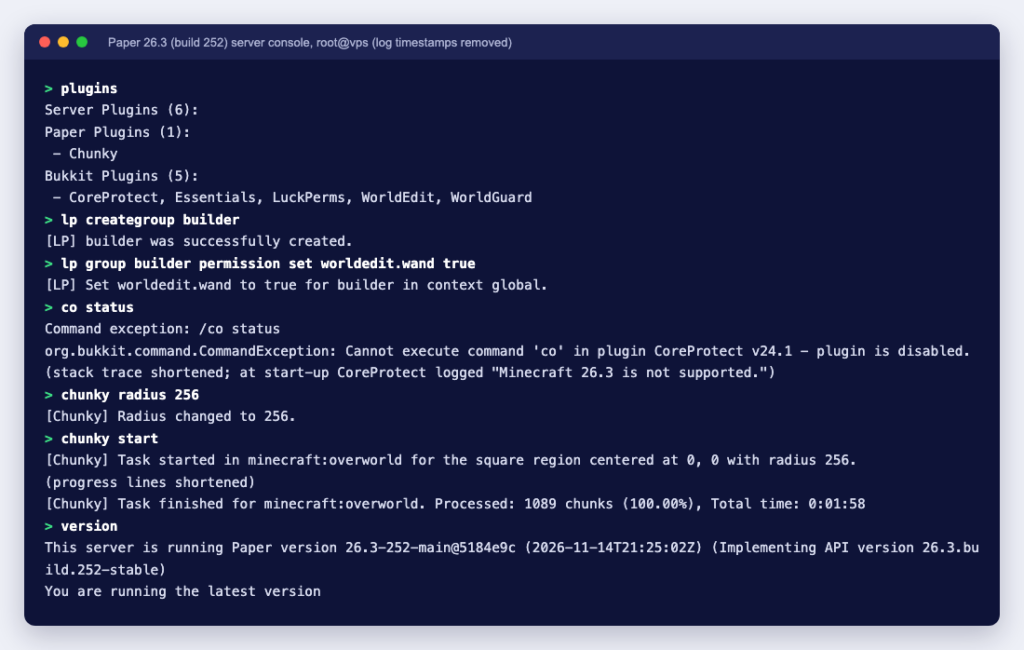
On our Paper 26.3 server the start-up log listed all six plugins we had uploaded. Chunky now ships as a Paper plugin, so it appears in a list of its own:
[PluginInitializerManager] Paper plugins (1):
 - Chunky (1.5.66)
[PluginInitializerManager] Bukkit plugins (5):
 - CoreProtect (24.1), Essentials (2.22.0), LuckPerms (5.5.71), WorldEdit (7.4.6+7648-00664b0), WorldGuard (7.0.21+2424-da30a99)
Each plugin creates its own folder inside plugins on first start, for example plugins/LuckPerms and plugins/WorldGuard, with its configuration files. Edit those while the server is stopped, or use the plugin’s own reload command.
Do not use /reload to add plugins
On Paper 26.2 and 26.3, typing reload in the console runs the vanilla command, which reloads datapacks only (on 26.3 the log showed “Reloading!” and “Loaded 1866 advancements”). The old plugin reload lives on as /bukkit:reload, and Paper warns against it:
Are you sure you wish to reload your server? This command will be removed soon. Doing so may cause bugs and memory leaks. It is recommended to restart instead of using /bukkit:reload. To confirm, please type /bukkit:reload confirmRestart instead. The very first start, which also creates the world, took 85 seconds on our single-core test VPS (“Done (84.723s)!”); later restarts are quicker.
A starter set of plugins, tested
| Plugin (version tested) | What it does | First command to try |
|---|---|---|
| LuckPerms 5.5.71 | Permissions: groups such as builder or moderator, and what each may do | lp creategroup builder |
| CoreProtect CE 24.1 (supports up to 26.2) | Logs block changes and lets you roll back griefing | co inspect, co rollback |
| WorldEdit 7.4.6 | In-game map editor for large builds | //wand (in game) |
| WorldGuard 7.0.21 | Protected regions: a new region blocks building by anyone who is not a member | /rg define spawn (in game) |
| Chunky 1.5.66 | Pre-generates chunks so exploring does not cause lag | chunky radius 2000, chunky start |
| spark (built into Paper) | Profiler for finding lag | spark profiler, then spark profiler stop |
All five downloadable plugins are open source on GitHub: LuckPerms, CoreProtect, WorldEdit, WorldGuard and Chunky.
LuckPerms: set up groups first
LuckPerms stores its data in a local H2 database by default. We created a group and gave it one WorldEdit permission from the console:
> lp creategroup builder
[LP] builder was successfully created.
> lp group builder permission set worldedit.wand true
[LP] Set worldedit.wand to true for builder in context global.
> lp info
[LP] Running LuckPerms v5.5.71 by Luck.
[LP] -  Server Version:
[LP]      26.3-252-5184e9c (MC: 26.3) - 26.3.build.252-stable
[LP] -  Storage:
[LP]      Type: H2
Give players permissions through groups rather than making them operators, and keep operator status for yourself and trusted admins (see Minecraft server commands for op and the whitelist).
CoreProtect: your undo button
On Paper 26.2, co status showed the Community Edition using SQLite and a working WorldEdit integration. The “Invalid donation key” line it prints is normal for the free edition:
Version: CoreProtect Community Edition v24.1.
License: Invalid donation key. (Please check config.yml)
Database: Using SQLite. (Initial DB: 24.1)
WorldEdit: Integration enabled.
On Paper 26.3 the same release refused to start. CoreProtect 24.1 is listed on Modrinth and Hangar for Minecraft versions up to 26.2, and it logged:
[CoreProtect] Minecraft 26.3 is not supported.
[CoreProtect] CoreProtect Community Edition was unable to start.
After that, co status only returned an error saying the plugin is disabled. Until a CoreProtect release for 26.3 appears, a server that depends on it for rollbacks should stay on 26.2 or run without it.
In game, /co inspect toggles an inspector that shows who changed a block. The CoreProtect documentation gives rollbacks such as /co rollback u:Notch t:1h, which undoes one player’s changes from the last hour within a default radius of 10 blocks; add #preview to see the result first, or r:#global for the whole world.
WorldGuard needs WorldEdit
WorldGuard’s plugin.yml lists depend: [WorldEdit], so it will not load without WorldEdit. Install both together. According to the EngineHub documentation, you get the selection wand with //wand (a wooden axe by default), left-click and right-click two corners, then run /rg define spawn; the new region automatically prevents building by anyone you have not added as a member or owner.
Chunky: pre-generate before players arrive
Generating new terrain while players explore is one of the heaviest things a server does. Chunky does it in advance:
> chunky radius 256
[Chunky] Radius changed to 256.
> chunky start
[Chunky] Task started in minecraft:overworld for the square region centered at 0, 0 with radius 256.
[Chunky] Task running for minecraft:overworld. Processed: 530 chunks (48.67%), ETA: 0:00:53, Rate: 10.4 cps, Current: 1, 0
[Chunky] Task finished for minecraft:overworld. Processed: 1089 chunks (100.00%), Total time: 0:01:58
A radius of 256 blocks is 1,089 chunks; a real server would use a few thousand blocks, which takes much longer and uses disk space, so run it during quiet hours and pair it with a world border.
spark is already there
We did not install spark, yet spark in the console answered “spark v1.10.191” on Paper 26.3 while the plugin list showed only our six. Paper bundles it, so you do not need a separate profiler plugin to find the cause of lag.
Check versions before you install
Plugins are written against a server API, and new Minecraft versions break some of them. Our test caught this twice. CoreProtect would not start on 26.3, as shown above. EssentialsX, a popular all-in-one commands plugin, is listed on Modrinth for Minecraft versions up to 26.1.2 in its current release, 2.22.0; on Paper 26.2 and 26.3 it enabled but logged:
[Essentials] You are running an unsupported server version!An unsupported plugin may work, or may fail in odd ways later. Paper 26.3 is now the stable release, and PaperMC’s download API marks 26.2 as unsupported since 3 November 2026, so a new server should start on 26.3. Before you upgrade an existing server, check that each plugin you rely on lists the new version, and back up the world and the plugins folder first.
Plugin safety and performance
- Only install plugins you trust. PaperMC’s documentation warns that plugins get “full and unrestricted access to not only your server but also the machine that it runs on”. Avoid re-uploaded or “cracked” premium plugins.
- Do not run the server as root. Our test container ran as root, and Paper printed a boxed warning: “YOU ARE RUNNING THIS SERVER AS AN ADMINISTRATIVE OR ROOT USER. THIS IS NOT ADVISED.” Create a normal user for the server on a VPS.
- Back up before adding or updating plugins. Stop the server and copy the world folders and
pluginsfolder, including plugin databases. - Add plugins one at a time and check the log after each restart, so you know which one caused a problem.
- Watch memory. Plugins keep data in RAM; if the server starts to lag, profile it with spark and read How to Give Minecraft More RAM.
Want Bedrock Edition players to join your Java server? Geyser describes itself as a bridge that lets Bedrock Edition clients connect to Java Edition servers. Its setup guide says Bedrock connections use UDP, on port 19132 by default, so that port must be open for UDP as well as your Java port (Minecraft server port 25565 covers the Java side).
Plugins turn a plain server into a community server, and a small, well-chosen set is easier to keep running than dozens of overlapping ones. A Ucartz Minecraft VPS gives you full root access for plugins and your own settings, DDoS protection, and a free Vanilla, Paper or Bedrock installation on request. If you would rather have our engineers set up plugins and permissions, that is custom work billed by time, from $8 per 15 minutes or $28 per hour.