Ithal P R

DNS propagation is the delay between changing a DNS setting and everyone on the internet seeing the change. Nothing is really pushed around the world. Your DNS host updates its own servers straight away, but the resolvers run by ISPs and public DNS services keep answering from their cache until the old record’s TTL (time to live) runs out. A normal record change, such as a new IP address, shows up within that record’s TTL, often 5 minutes to an hour. A nameserver change can take up to 48 hours, because .com and many other registries publish nameserver records with a two-day TTL.
What really happens when you change a DNS record
Two kinds of DNS server are involved in every lookup:
- Authoritative nameservers hold your zone: the A, MX, TXT and other records you edit at your DNS host. They answer with the current data the moment you save it.
- Recursive resolvers do the lookups for visitors: your ISP’s DNS, 1.1.1.1, 8.8.8.8 or the resolver on an office network. They cache each answer so they do not have to ask again for every visitor.
How long a resolver may keep an answer is set by the TTL on the record. RFC 1035 defines it as the time interval that the record may be cached before the source of the information should again be consulted. So “propagation” is simply thousands of caches expiring at different times. A resolver that looked up your domain one second before your change keeps the old answer for almost the full TTL; one that never asked sees the new answer at once.
We tested it: a record change behind a caching resolver
To watch this happen, we ran two BIND 9.20.29 servers in a Debian 13 container: one authoritative for a test zone, example.test, and one caching resolver in front of it, the role your ISP plays. The zone used a TTL of 30 seconds. We looked up www through the resolver, then changed its address from 192.0.2.10 to 198.51.100.20 and reloaded the zone:
== resolver, first query
www.example.test.   30   IN  A  192.0.2.10
   (record changed to 198.51.100.20 on the authoritative server)
== resolver 12 s later
www.example.test.   18   IN  A  192.0.2.10
== resolver 34 s later
www.example.test.   30   IN  A  198.51.100.20
The authoritative server gave the new address immediately. The resolver kept serving the old one, counting the TTL down from 30 to 18, and only fetched the new record once the cached copy expired. In an earlier run with a 300-second TTL, the resolver still returned the old address 20 seconds after the change, with 280 seconds left. With a TTL of 86400 (one day), the same resolver would have kept the old address for up to a day.
“Does not exist” is cached too
In the same test we looked up shop.example.test before creating it, then added it:
== new name before it exists
status: NXDOMAIN
example.test.  30  IN  SOA  ns1.example.test. admin.example.test. 1 3600 600 86400 60
   (shop.example.test added on the authoritative server)
== resolver 12 s later
status: NXDOMAIN
example.test.  18  IN  SOA  ns1.example.test. admin.example.test. 1 3600 600 86400 60
== resolver 64 s later
shop.example.test.  30  IN  A  198.51.100.30
This is negative caching. According to RFC 2308, the TTL of a “no such name” answer is the lower of two values in the zone’s SOA record: its own TTL and its last field, the MINIMUM (here 30 and 60, so 30 seconds). The RFC suggests one to three hours as a sensible value. The practical lesson: if you visit a new subdomain before its record exists, your resolver may remember that it does not exist for as long as that SOA value says.
How long DNS propagation takes
| What you changed | What sets the delay | Longest wait |
|---|---|---|
| An existing A, AAAA, CNAME, MX or TXT record | The TTL of the old record | That TTL: 300 means 5 minutes, 3600 means 1 hour |
| A new record for a name that did not exist | Negative caching (SOA TTL or MINIMUM, whichever is lower) | Only matters if someone looked the name up before you created it |
| Nameservers (moving DNS to another provider) | The NS records in the registry’s zone, plus the old provider’s own NS TTL | Up to 48 hours for .com |
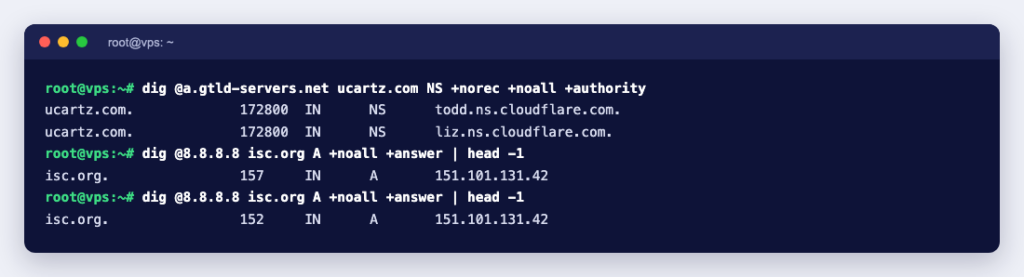
You can see the two-day figure yourself. Asking a .com registry server for a domain’s delegation returns the NS records with a TTL of 172800 seconds, which is 48 hours:
$ dig @a.gtld-servers.net ucartz.com NS +norec +noall +authority
ucartz.com.   172800  IN  NS  todd.ns.cloudflare.com.
ucartz.com.   172800  IN  NS  liz.ns.cloudflare.com.
Once the registry lists your new nameservers, a resolver that cached the old delegation just before may keep using the old nameservers for up to those 48 hours. Some resolvers shorten long TTLs: Google says in its Public DNS FAQ that record TTLs are generally limited to six hours even if the actual TTL is longer. You cannot rely on every resolver doing that.
How to check DNS propagation
Work from the source outwards. We ran these with dig 9.20.29 on Debian 13; the dig, nslookup and host guide shows the Windows and macOS equivalents.
- Find your nameservers:
dig yourdomain.com NS +short. If they are not the servers of the DNS host where you made the edit, the edit will never go live. What Is a Nameserver? explains which one to change. - Ask the authoritative server directly:
dig @ns1.yourdns.example yourdomain.com A +norec. Theaa(authoritative answer) flag in the reply tells you this is the source. If the answer here is wrong, waiting will not fix it. - Ask a few public resolvers:
dig @1.1.1.1,@8.8.8.8and@9.9.9.9. The TTL in each answer is how many seconds that cache will keep the current answer. - Check your own computer last. Your operating system and browser cache DNS as well; flush the local DNS cache before deciding the change has not spread.
One public resolver address is not one cache. When we asked 8.8.8.8 for isc.org twice, eight seconds apart, the first answer had 36 seconds left and the second had 126:
$ dig @8.8.8.8 isc.org A +noall +answer
isc.org.   36   IN  A  151.101.131.42
...
$ dig @8.8.8.8 isc.org A +noall +answer
isc.org.   126  IN  A  151.101.195.42
Large public resolvers run many separate caching servers behind the same address, so during a change you can get the new answer on one query and the old one on the next. Online “propagation checker” sites do the same lookups from resolvers in many countries; they are handy, but they only show a sample.
How to make DNS changes take effect faster
You cannot force every cache on the internet to refresh, but you can plan the change so the old answers expire quickly:
- Lower the TTL in advance. Set the record’s TTL to 300 seconds at least one full old TTL before the move. If the TTL is 86400, lower it a day ahead, or the resolvers holding the old value will not notice the lower TTL in time.
- Make the change and confirm it on the authoritative server with
+norec. - Keep the old server running until the old TTL has passed. Some visitors and mail servers will still be sent to the old address in the meantime.
- Refresh the big public caches if you are in a hurry. Google offers a Flush Cache tool for Google Public DNS; it works per name and record type, and Google advises flushing the main domain first if the registrar or DNS hosting changed recently. Cloudflare’s 1.1.1.1 FAQ points to a similar Purge Cache tool. Neither touches your ISP’s resolver.
- Raise the TTL again once everything works. Longer TTLs mean fewer lookups and fewer chances for a slow DNS answer.
For a nameserver change you cannot shorten the registry’s 48-hour TTL. The safe method is to make both DNS hosts give the same answers: copy every record to the new provider first, check it with dig @new-nameserver, then switch the nameservers at the registrar and leave the old zone in place for at least two days. Then it does not matter which nameservers a resolver is still using. If you run your own nameservers, Understanding DNS zone files explains where the TTL and SOA values live.
If your DNS is on Cloudflare with the proxy switched on, the Cloudflare TTL documentation says proxied records always have a TTL of 300 seconds that you cannot edit, and DNS-only records can go down to 60 seconds on non-Enterprise plans. Cloudflare also warns that your own local DNS cache may take longer to update than that.
Still seeing the old site? Check these
- A hosts file entry. If you tested the new server by editing your hosts file, remove the line afterwards, or your computer ignores DNS for that name.
- The edit went to the wrong DNS host. Records edited at a registrar or hosting panel only count if the domain’s nameservers point there.
- A router or office DNS cache. Test from mobile data or with
dig @1.1.1.1to rule it out. - It is not DNS at all. If
digalready returns the new IP address, the old page is coming from the browser cache or a CDN, not from DNS.
DNS propagation is waiting for caches, and the TTL tells you exactly how long. Lower it before a move, check the authoritative answer first, and keep the old server and old DNS zone running until the longest TTL has passed. If you are registering a new name or moving a domain, start with a domain search at Ucartz, and see how long a domain transfer takes if you are moving registrars as well.