Ria Febin
The TLS handshake is the short conversation a browser and a web server have before any HTTPS page data is sent. In it they agree on a TLS version and cipher, create shared encryption keys, and the server proves with its certificate that it really is the site you asked for. With TLS 1.3 this takes one network round trip; with the older TLS 1.2 it takes two. People still call it the “SSL handshake”, but SSL itself is long retired: RFC 9325 says implementations must not negotiate SSL 2 or SSL 3.
What the handshake has to achieve
The TLS 1.3 standard, RFC 8446, splits the handshake into three phases:
- Key exchange: agree on the cryptographic parameters and create shared keying material. Everything after this phase is encrypted.
- Server parameters: settle the remaining options, such as which application protocol (HTTP/2 or HTTP/1.1) to use and whether the client must show a certificate too.
- Authentication: the server proves it owns the private key for its certificate, and both sides confirm that nobody tampered with the messages so far.
If any part fails, the connection is closed, often with a TLS alert message, and no page data is sent at all. That is what the browser reports as a handshake or secure connection error.
The TLS 1.3 handshake, step by step
To see the real messages, we ran nginx 1.31.6 in a Docker container with a test certificate for shop.example.test and connected with the OpenSSL 3.5.8 s_client tool. The -msg option prints every handshake message (we removed the record-header lines):
$ openssl s_client -connect shop.example.test:443 -servername shop.example.test -tls1_3 -msg -brief
>>> TLS 1.3, Handshake [length 05c0], ClientHello
<<< TLS 1.3, Handshake [length 04ba], ServerHello
<<< TLS 1.3, ChangeCipherSpec [length 0001]
<<< TLS 1.3, Handshake [length 000a], EncryptedExtensions
<<< TLS 1.3, Handshake [length 01bd], Certificate
<<< TLS 1.3, Handshake [length 0050], CertificateVerify
<<< TLS 1.3, Handshake [length 0034], Finished
>>> TLS 1.3, ChangeCipherSpec [length 0001]
>>> TLS 1.3, Handshake [length 0034], Finished
Protocol version: TLSv1.3
Ciphersuite: TLS_AES_256_GCM_SHA384
Negotiated TLS1.3 group: X25519MLKEM768
>>> is the client sending, <<< is the server answering. Here is what each message does:
- ClientHello: the client sends a random number, the TLS versions and cipher suites it supports, and its half of a key exchange in the
key_shareextension. It also names the site it wants (SNI, server name indication) and the protocols it can speak (ALPN, for exampleh2for HTTP/2). - ServerHello: the server picks the version and cipher suite and sends its own key share. From these two messages both sides calculate the same secret, and every message after this point is encrypted.
- EncryptedExtensions: the answers to the client’s other requests, such as the chosen ALPN protocol.
- Certificate and CertificateVerify: the server sends its certificate chain, then a signature over the whole handshake made with the certificate’s private key. That signature is the proof of identity: a copied certificate is useless without the key.
- Finished (both sides): a MAC over the entire handshake. If anyone changed a single byte on the way, the values would not match and the connection would stop.
The two ChangeCipherSpec lines are not real TLS 1.3 messages. RFC 8446 (Appendix D.4) describes this “middlebox compatibility mode”: dummy records that make the handshake look like TLS 1.2 so that old firewalls and proxies let it through.
Note the group X25519MLKEM768 and the large ClientHello (0x05c0, 1,472 bytes). OpenSSL 3.5 added hybrid post-quantum key exchange and offers it by default. The OpenSSL documentation warns that in rare cases the bigger ClientHello no longer fits in one TCP segment and badly behaved firewall software can break the handshake, so keep this in mind if a firewall is in the path and only new clients fail.
The TLS 1.2 handshake: one extra round trip
The same server and client, forced to TLS 1.2 with -tls1_2:
>>> TLS 1.2, Handshake [length 00d4], ClientHello
<<< TLS 1.2, Handshake [length 0045], ServerHello
<<< TLS 1.2, Handshake [length 01ba], Certificate
<<< TLS 1.2, Handshake [length 0074], ServerKeyExchange
<<< TLS 1.2, Handshake [length 0004], ServerHelloDone
>>> TLS 1.2, Handshake [length 0025], ClientKeyExchange
>>> TLS 1.2, ChangeCipherSpec [length 0001]
>>> TLS 1.2, Handshake [length 0010], Finished
<<< TLS 1.2, Handshake [length 00da], NewSessionTicket
<<< TLS 1.2, Handshake [length 0010], Finished
Protocol version: TLSv1.2
Ciphersuite: ECDHE-ECDSA-AES256-GCM-SHA384
(The server also sends a ChangeCipherSpec before its Finished; OpenSSL shows it only as a bare record header, so it is not in the list.) In TLS 1.2 the client does not send a key share in its first message. It has to wait for the server’s hello, certificate and key exchange, then send its own key exchange, and only after the server’s Finished comes back can the page be requested. The certificate also travels unencrypted, so anyone watching the network can read it.
| TLS 1.2 | TLS 1.3 | |
|---|---|---|
| Round trips for a full handshake | 2 | 1 |
| Certificate sent | In the clear | Encrypted |
| Key exchange | ECDHE, DHE or static RSA | (EC)DHE, PSK, or both; static RSA and static Diffie-Hellman removed, so every public-key exchange has forward secrecy |
| Ciphers | Many, including legacy CBC suites | AEAD only (AES-GCM, ChaCha20-Poly1305, AES-CCM) |
| Resumed connection | 1 round trip (abbreviated handshake) | 1 round trip, or 0-RTT with early data |
We timed it: 1 round trip versus 2
To make the difference visible, we added 100 ms of delay to the server container’s network with Linux tc netem, so every round trip took about 100 ms, and asked curl 8.22.0 to report how long the TLS part took. Three runs of each gave the same picture:
| Protocol | TLS handshake time | Round trips |
|---|---|---|
| TLS 1.3 | 102 to 106 ms | 1 |
| TLS 1.2 | 205 to 213 ms | 2 |
The handshake time is curl’s time_appconnect minus time_connect. The cryptography itself took a few milliseconds; nearly all the time was waiting for packets. That is why the round-trip count matters so much for visitors far from your server, and why moving from TLS 1.2 to 1.3 makes the first page load feel faster on slow or distant connections.
Session resumption and 0-RTT
After a handshake the server can send a NewSessionTicket. curl showed two of them arriving after our TLS 1.3 handshake. On the next visit the client presents the ticket, and the server can skip the certificate step. We saved the session with -sess_out and reconnected with -sess_in:
>>> TLS 1.3, Handshake [length 06ef], ClientHello
<<< TLS 1.3, Handshake [length 04c0], ServerHello
<<< TLS 1.3, Handshake [length 000a], EncryptedExtensions
<<< TLS 1.3, Handshake [length 0034], Finished
>>> TLS 1.3, Handshake [length 0034], Finished
Reused, TLSv1.3, Cipher is TLS_AES_256_GCM_SHA384
No Certificate and no CertificateVerify this time. TLS 1.2 resumption behaved the same way: ServerHello, then Finished from both sides, one round trip instead of two.
TLS 1.3 can go one step further with 0-RTT (early data): a returning client sends its first request together with the ClientHello. RFC 8446 warns that 0-RTT data is not forward secret and that “there are no guarantees of non-replay between connections”, so an attacker could resend it. For that reason nginx has ssl_early_data off by default, and the nginx SSL module documentation says requests sent in early data are subject to replay attacks. Leave it off unless your application only accepts safe, repeatable requests in early data.
How to see a TLS handshake yourself
With curl, the verbose flag prints each handshake step and the result:
$ curl -sv https://shop.example.test/ -o /dev/null
* ALPN: curl offers h2,http/1.1
* TLSv1.3 (OUT), TLS handshake, Client hello (1):
* TLSv1.3 (IN), TLS handshake, Server hello (2):
* TLSv1.3 (IN), TLS handshake, Encrypted Extensions (8):
* TLSv1.3 (IN), TLS handshake, Certificate (11):
* TLSv1.3 (IN), TLS handshake, CERT verify (15):
* TLSv1.3 (IN), TLS handshake, Finished (20):
* TLSv1.3 (OUT), TLS handshake, Finished (20):
* SSL connection using TLSv1.3 / TLS_AES_256_GCM_SHA384 / X25519MLKEM768 / id-ecPublicKey
* ALPN: server accepted h2
* SSL certificate verified via OpenSSL.
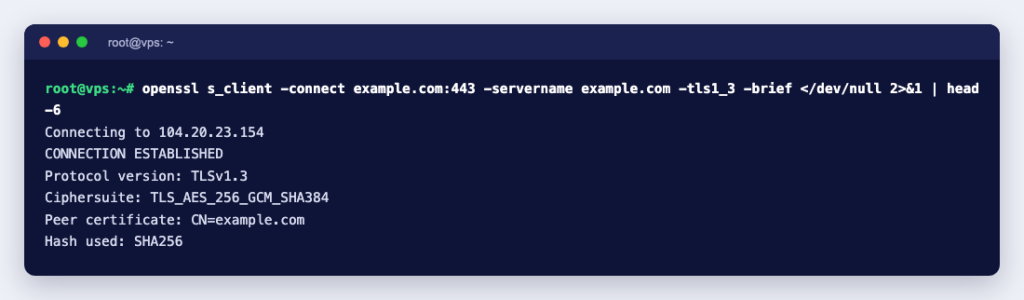
To check which versions a server accepts, try each one with OpenSSL (on Windows, see how to install OpenSSL):
openssl s_client -connect example.com:443 -servername example.com -tls1_3 -brief </dev/null
openssl s_client -connect example.com:443 -servername example.com -tls1_2 -brief </dev/null
Always pass -servername. Many sites share one IP address, and without SNI the server does not know which certificate to send. Our server refused an old TLS 1.1 attempt like this:
error:0A00042E:SSL routines:ssl3_read_bytes:tlsv1 alert protocol version:ssl/record/rec_layer_s3.c:918:SSL alert number 70That refusal is correct. RFC 8996 says TLS 1.0 and TLS 1.1 must not be used, and OpenSSL 3.5 would not even offer TLS 1.1 from the client side until we lowered its security level.
Handshake settings worth checking on your server
- Protocols: allow TLS 1.2 and TLS 1.3 only. In nginx that is
ssl_protocols TLSv1.2 TLSv1.3;, which is also the default in current nginx versions. RFC 9325 says implementations must support TLS 1.2, should support TLS 1.3, and must prefer TLS 1.3 when they have it. - A complete certificate chain: send the intermediate certificates with your own, or some clients will fail to verify it. SSL certificate not trusted covers chain, name and expiry problems.
- Session resumption: nginx sends session tickets by default (
ssl_session_tickets on), but its session cache isnoneunless you set one, for examplessl_session_cache shared:SSL:10m;. - Expiry: an expired certificate fails every handshake. Check the expiry date with OpenSSL and automate renewal.
- Ports: HTTPS normally uses TCP 443, and mail services have their own TLS ports. The HTTPS and SSL port list has the full set.
When the handshake does fail, the error message usually points to the cause: a version mismatch, plain HTTP on a TLS port, a certificate and key that do not match, or a firewall in the way. SSL Handshake Failed: Causes and How to Fix It walks through each one with the exact messages. If you need a certificate for your site, Ucartz offers DV, OV and wildcard SSL certificates with free installation help.