jijosh at

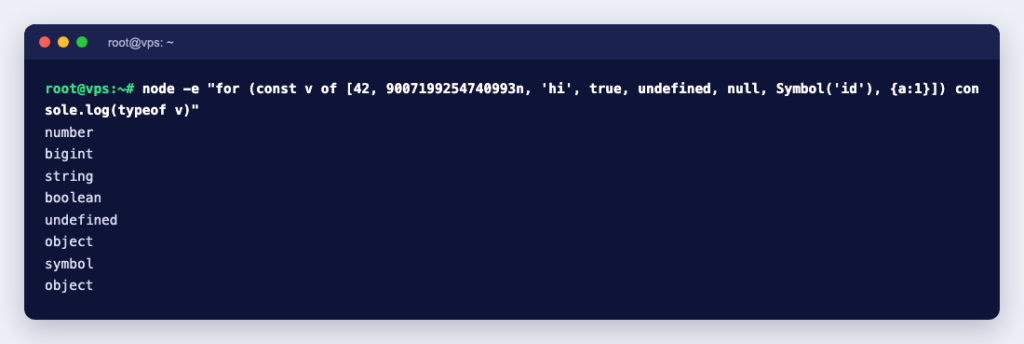
JavaScript has eight data types. Seven are primitives: string, number, bigint, boolean, undefined, symbol and null. The eighth is object, which covers everything else, including arrays, functions, dates and maps. Primitives are simple, unchangeable values; objects are collections of properties that you pass around by reference. You check a value’s type with typeof, with two famous quirks: typeof null is "object", and functions report "function" even though they are objects.
The eight JavaScript data types at a glance
The list comes from MDN’s guide to JavaScript data types and data structures. The typeof column is real output from Node.js 24.21.0:
| Type | Example | typeof result | Kind |
|---|---|---|---|
| String | "hello" | “string” | Primitive |
| Number | 42, 3.14 | “number” | Primitive |
| BigInt | 9007199254740993n | “bigint” | Primitive |
| Boolean | true | “boolean” | Primitive |
| Undefined | undefined | “undefined” | Primitive |
| Symbol | Symbol("id") | “symbol” | Primitive |
| Null | null | “object” (a historical bug) | Primitive |
| Object | {a: 1}, [1, 2], new Date(0) | “object” | Object |
| Object (function) | function f() {} | “function” | Object |
JavaScript is dynamically typed: a variable has no fixed type, and the same variable can hold a number now and a string later. MDN also calls it weakly typed, meaning it converts types automatically when an operation mixes them, instead of throwing an error. Both facts explain most type bugs you will meet.
The seven primitive types
String
Text, written in single quotes, double quotes or backticks (template literals, which can hold ${expressions}). MDN says strings are stored as UTF-16 code units and are immutable: once created, a string cannot be changed. Methods such as toUpperCase() return a new string. In our test, s[0] = "z" on "abc" silently did nothing, and s was still "abc"; in strict mode the same line threw TypeError: Cannot assign to read only property '0' of string 'abc'.
Number
There is no separate integer type. Every number is a double-precision 64-bit IEEE 754 value, which MDN says can only store integers safely between -(2^53 – 1) and 2^53 – 1, that is up to Number.MAX_SAFE_INTEGER, 9007199254740991. Number also includes three special values: Infinity, -Infinity and NaN (“not a number”), which, oddly, has the type “number”. Decimal fractions are approximations:
> 0.1 + 0.2
0.30000000000000004
> 0.1 + 0.2 === 0.3
false
> 1 / 0
Infinity
> NaN === NaN
false
> Number.isNaN(NaN)
true
For money, store whole units (paise or cents) as integers rather than decimal amounts, and use Number.isNaN() to test for NaN, since NaN is not equal even to itself.
BigInt
Whole numbers of any size, written with an n suffix. MDN describes BigInt as able to represent integers with arbitrary magnitude. The difference shows as soon as you pass 2^53:
> 2 ** 53 + 1
9007199254740992
> 2n ** 53n + 1n
9007199254740993n
> 1n + 1
TypeError: Cannot mix BigInt and other types, use explicit conversions
The plain number version is wrong by one, with no error. This matters on servers: a MySQL BIGINT column goes up to 9,223,372,036,854,775,807 (and to 18,446,744,073,709,551,615 unsigned), according to the MySQL 8.4 manual. Large IDs read into an ordinary JavaScript number can lose their last digits, so keep them as strings or BigInt.
Boolean
true or false. Any value can be turned into a boolean, and the results are not always what you expect: in our test Boolean("false") and Boolean([]) were true, while Boolean("") and Boolean(0) were false. A non-empty string is always true, whatever it says.
Undefined and null
Both mean “nothing”, with a difference MDN puts neatly: undefined indicates the absence of a value, while null indicates the absence of an object. A variable you declared but never assigned, a missing function argument and a missing property are all undefined. null is what you set on purpose to say “no value here”. They are loosely equal (null == undefined is true) but not strictly equal.
The typeof null === "object" result is a bug from the first version of the language. MDN’s typeof reference explains that values were stored with a type tag, the tag for objects was 0, and null was the NULL pointer, so it got tag 0 too. A fix was proposed and rejected. To test for null, use value === null.
Symbol
A unique value, mainly used as an object key that cannot clash with any other key. Two symbols with the same description are still different: Symbol("id") === Symbol("id") returned false. If you need a shared symbol, Symbol.for("id") returns the same one each time (that comparison returned true).
Objects: everything else
Plain objects, arrays, functions, dates, maps, sets, regular expressions and class instances are all objects. Two things set them apart from primitives:
- They are mutable. You can add, change and delete properties.
- Variables hold a reference. After
const o2 = o, both names point at the same object, soo2.n = 2changedo.nas well in our test. To get an independent copy, usestructuredClone(), which in Node.js 24 also kept aDateas a real Date.
typeof cannot tell an array from a plain object; both give "object". Use Array.isArray(value) for arrays and value instanceof Date for dates. Classes are functions too: typeof class A {} returned "function".
Type conversion: where bugs come from
Because JavaScript converts types automatically, the same operator can do different things. These lines are from our Node.js run:
> "5" + 1          // + with a string joins text
'51'
> "5" - 1          // - converts to numbers
4
> true + 1
2
> "" == 0          // loose equality converts
true
> "" === 0         // strict equality does not
false
> Number("42px")
NaN
> parseInt("42px", 10)
42
Three habits prevent most of these problems:
- Use
===and!==instead of==and!=. - Convert input explicitly. Form fields, query strings and environment variables always arrive as strings; wrap them in
Number()and check the result withNumber.isNaN(). - Check for missing values on purpose:
value === null,value === undefined, orvalue == nullwhen you mean either.
Data types and JSON
If your code sends data to a browser or an API, it goes through JSON, and JSON has fewer types than JavaScript. According to MDN’s JSON.stringify reference, undefined, functions and symbols are dropped from objects (and become null in arrays), NaN and Infinity become null, dates become ISO strings, and a BigInt throws. Our test confirmed it:
> JSON.stringify({ u: undefined, s: Symbol("x"), n: null, d: new Date(0), nan: NaN })
'{"n":null,"d":"1970-01-01T00:00:00.000Z","nan":null}'
> JSON.stringify({ big: 1n })
TypeError: Do not know how to serialize a BigInt
So a date that goes out as a Date comes back as a string, and a BigInt must be converted (usually to a string) before you send it.
Quick reference: how to check each type
- String, number, bigint, boolean, symbol, undefined:
typeof value === "string"and so on. - Null:
value === null. - Array:
Array.isArray(value). - Function:
typeof value === "function". - Whole number:
Number.isInteger(value); safe for exact maths:Number.isSafeInteger(value)(it returnedfalsefor2 ** 53).
The same eight types apply in the browser and in Node.js on a server, so the rules above hold wherever your code runs. If you are deploying a Node.js app, our npm commands cheat sheet covers installing and running it, JavaScript minification helps front-end code load faster, and a KVM VPS gives you full root access to run Node.js and your database side by side.