Short answer: a web application is a program you use through a web browser. Part of it runs on a server, where it receives your request, reads or changes data in a database and builds a response. The other part runs in your browser as HTML, CSS and JavaScript. Unlike a plain website that shows the same page to everyone, a web app reacts to what you do: you log in, search, buy, upload or edit. Webmail, online shops, booking systems and control panels such as cPanel are all web applications. Where you host one depends mostly on the language its server part is written in.
Website or web application?
MDN’s client-server overview draws the line clearly. A static site returns the same hard-coded content every time a page is requested. A dynamic site generates its content based on the request URL and data. Web applications are dynamic, but the line is blurry in practice: a WordPress blog is a web application behind the scenes, even if most visitors only read it.
| Static website | Web application | |
|---|---|---|
| Content | The same for every visitor | Built for each request and user |
| Server work | Sends files | Runs code, talks to a database |
| Typical examples | Brochure site, portfolio, documentation | Shop, webmail, CRM, booking system, dashboard |
| Hosting needs | Any web hosting | A runtime for its language, usually a database |
| Maintenance | Very little | Updates, backups, security patches |
How a web application handles a request
- Your browser sends an HTTP request. MDN’s rule of thumb: a
GETrequest fetches data, while a request that changes data, such as saving a form, should be aPOST. - The web server (Apache, nginx, LiteSpeed) passes the request to the application code.
- The application works out what the request is for, from the URL and any form data.
- It reads or writes the database.
- It builds the response, usually by filling an HTML template, or by returning JSON for JavaScript in the browser to use.
- The web server sends the response back with a status code, such as 200 for success.
Three common shapes of web app
- Server-rendered. The server builds a full HTML page for every click. Most PHP applications, including WordPress, work this way.
- Single-page application (SPA). MDN defines an SPA as a web app that loads a single document and then updates its content with JavaScript APIs such as Fetch. It can feel faster, but MDN lists trade-offs: SEO and more work to handle state, navigation and performance monitoring.
- Progressive web app (PWA). According to MDN, a PWA is built with web technologies but feels like an installed app: it can be installed on the device and, through service workers, keep working with a poor connection. Service workers only run in secure contexts, so a PWA needs HTTPS (browsers make an exception for
http://localhostduring development).
A tiny web app, written two ways
The language decides how the app runs on the server, and that decides the hosting you need. Here is the same small app in PHP and in Node.js. Both return a greeting as JSON, using the name from the URL.
PHP: upload a file and it runs
<?php
// hello.php: builds its answer for each request
$name = $_GET['name'] ?? 'visitor';
header('Content-Type: application/json');
echo json_encode([
    'message' => 'Hello, ' . $name,
    'time'    => date('H:i:s'),
]);
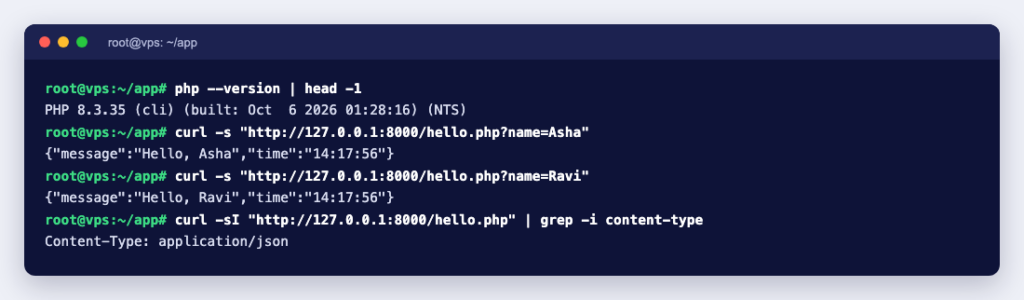
Requesting hello.php?name=Asha under PHP 8.3 returned:
{"message":"Hello, Asha","time":"18:07:48"}The host’s web server runs the PHP code for each request, so you do not have to keep a program of your own running. That is why PHP apps run happily on ordinary shared hosting.
Node.js: a program that keeps running
// app.js
const http = require('node:http');

const server = http.createServer((req, res) => {
  const url = new URL(req.url, 'http://localhost');
  const name = url.searchParams.get('name') || 'visitor';
  res.writeHead(200, { 'Content-Type': 'application/json' });
  res.end(JSON.stringify({ message: `Hello, ${name}` }));
});

server.listen(3000, '127.0.0.1');
This app is its own small web server. It must be started with node app.js and kept running, and it listens on port 3000 on the server itself. Visitors reach it through a web server acting as a reverse proxy, which also handles HTTPS. An nginx site for it looks like this:
server {
    listen 80;
    server_name app.example.com;

    location / {
        proxy_pass http://127.0.0.1:3000;
        proxy_set_header Host $host;
        proxy_set_header X-Forwarded-For $proxy_add_x_forwarded_for;
        proxy_set_header X-Forwarded-Proto $scheme;
    }
}
We ran this with Node.js 24.21 behind nginx 1.31.6. A request to /?name=Asha through nginx came back HTTP/1.1 200 OK with {"message":"Hello, Asha"}. To keep a Node.js, Python or Go app running after a reboot or a crash, run it as a service: see how to run a custom script as a systemd service, or run it in a container with Docker Compose. If the app stops, nginx answers with a 502 error: 502 Bad Gateway explained.
Where to host a web application
| Your app | What it needs | Good fit |
|---|---|---|
| Static files or an SPA that talks to someone else’s API | A place to serve files over HTTPS | Web hosting |
| PHP with MySQL or MariaDB (WordPress, many CMS, shop and CRM apps) | PHP, a database, email | Web hosting with cPanel |
| Node.js, Python, Go, Java or Ruby | A long-running process, a reverse proxy, often Redis or background workers | A VPS with root access |
| Self-hosted tools such as n8n, Odoo or Nextcloud | Docker or several services, regular updates | A VPS, or managed hosting if you prefer not to maintain it |
| High traffic, large databases, AI features | Guaranteed CPU, RAM and disk, sometimes a GPU | A dedicated or GPU server |
If you are not sure how big a server to start with, server requirements explained walks through CPU, RAM and storage.
Before you launch
- HTTPS everywhere. Logins and forms must not travel in plain text, and PWAs will not work without it.
- Backups of both files and database, stored somewhere other than the same server, and a restore you have actually tried.
- An update routine for the app, its plugins or packages, and the language runtime.
- Secrets out of the code: database passwords and API keys in environment variables or a config file outside the web root.
- Logs you know how to read, so you can tell a bug from an attack.
- Only the ports you need open. In the Node.js example, port 3000 listens on
127.0.0.1, so only nginx can reach it.
For a PHP application, our premium web hosting gives you cPanel, multiple PHP versions and MySQL databases. For Node.js, Python or anything that needs its own processes, a KVM VPS gives you full root access to set it up your way. And if you would rather hand over the setup, our engineers are available by the hour.