Ashily Shaji
DNSSEC (DNS Security Extensions) adds digital signatures to DNS records so a resolver can check that an answer really came from the domain’s DNS servers and was not changed on the way. It protects against forged DNS answers, such as cache poisoning that sends visitors to a fake server. It does not encrypt anything and does not stop DDoS attacks. To use it, your DNS host signs your zone, and you add a DS record at your domain registrar. You can check any domain with dig or delv in a few seconds.
What DNSSEC does, and what it does not
Plain DNS has no way to prove an answer is genuine, so a resolver cannot tell a forged reply from a real one. DNSSEC fixes that. According to RFC 4033, the extensions provide origin authentication and integrity for DNS data, including a signed way to prove that a name does not exist. The same RFC is clear about the limits:
- No confidentiality. DNSSEC was never designed to hide queries. Anyone on the path can still see which names you look up. Encrypted transports such as DNS over TLS or HTTPS solve a different problem.
- No DDoS protection. RFC 4033 says DNSSEC provides no protection against denial of service attacks, and signed servers face extra load from cryptographic work.
- No protection after the answer. DNSSEC proves the IP address is the one the domain owner published. HTTPS still has to protect the connection to that address.
How DNSSEC works: the chain of trust
DNSSEC is defined mainly in RFCs 4033, 4034 and 4035, with NSEC3 added in RFC 5155; RFC 9364 gives the overview. It adds a few record types:
| Record | Where it lives | What it does |
|---|---|---|
| DNSKEY | Your zone | Publishes the public keys used to sign the zone |
| RRSIG | Your zone | A signature for each set of records (A, MX, TXT and so on) |
| DS | The parent zone, such as .com, set through your registrar | A hash of your key, which links your zone to the parent |
| NSEC or NSEC3 | Your zone | Signed proof that a name or record type does not exist |
A validating resolver checks the RRSIG on your A record with your DNSKEY. It trusts your DNSKEY because the DS record in the .com zone matches it. It trusts the .com zone because the root zone holds a DS for .com, and it trusts the root because it is configured with the root zone’s key, the trust anchor. That is the chain of trust. If any link is missing, the domain is simply unsigned. If a link is wrong, validation fails and the resolver refuses to answer.
How to check if a domain has DNSSEC
We ran these checks from a Debian 13 container with the BIND 9.20.29 tools (apt install bind9-dnsutils). We added @1.1.1.1 to each command to query a public validating resolver; without it, the tools use the resolver your system is set to.
1. Look for a DS record
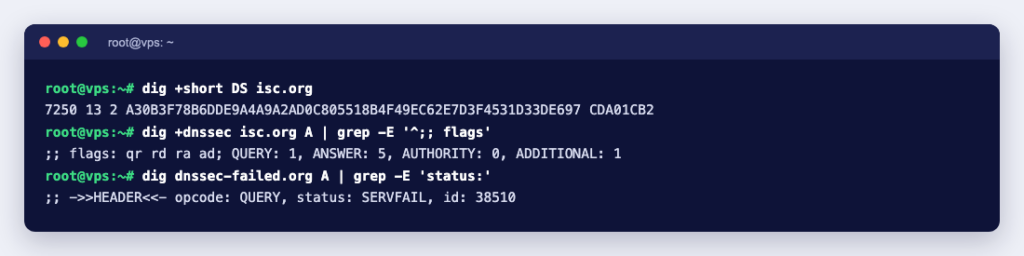
$ dig +short DS isc.org
7250 13 2 A30B3F78B6DDE9A4A9A2AD0C805518B4F49EC62E7D3F4531D33DE697 CDA01CB2
A DS record in the parent means DNSSEC is switched on for the domain. The fields are the key tag (7250), the algorithm (13, which is ECDSA P-256 with SHA-256) and the digest type (2, SHA-256). No output means the domain is not signed.
2. Ask for signatures and look for the ad flag
$ dig +dnssec isc.org A
;; flags: qr rd ra ad; QUERY: 1, ANSWER: 5, AUTHORITY: 0, ADDITIONAL: 1
...
isc.org.   300  IN  A      151.101.3.42
isc.org.   300  IN  RRSIG  A 13 2 300 20261007083945 20260923082238 27566 isc.org. OXvaMtH9...
The RRSIG line is the signature, with its expiry and start times. The ad (authenticated data) flag means the resolver validated the answer. An unsigned domain returns the same query with no RRSIG and no ad flag. The ad flag is only as trustworthy as the resolver you asked, so for a proper test, validate locally.
3. Validate it yourself with delv
$ delv isc.org A
; fully validated
isc.org.   300  IN  A      151.101.3.42
...
delv does the validation itself. Its manual says it validates using a built-in trust anchor for the root zone, so it does not depend on the resolver’s ad flag. “fully validated” is the answer you want; for wikipedia.org, which is not signed, delv printed “; unsigned answer”.
What a broken DNSSEC domain looks like
dnssec-failed.org is kept deliberately broken for testing. Its DS record does not match its keys:
$ dig dnssec-failed.org A
;; ->>HEADER<<- opcode: QUERY, status: SERVFAIL, id: 22145
; EDE: 9 (DNSKEY Missing): (no SEP matching the DS found for dnssec-failed.org.)

$ dig +cd dnssec-failed.org A
;; ->>HEADER<<- opcode: QUERY, status: NOERROR, id: 38252
dnssec-failed.org.  300  IN  A  96.99.227.255

$ delv dnssec-failed.org A
;; resolution failed: failure
This is the important lesson. A validating resolver answers SERVFAIL, so for its users the site and its email simply stop working. The +cd (checking disabled) flag proves the records exist and the problem is the signatures. The extended error (EDE) line tells you why. If your own domain ever shows SERVFAIL on some networks but works with +cd, look at DNSSEC first.
Which port does DNSSEC use?
The same as ordinary DNS: port 53, over UDP and TCP. There is no separate DNSSEC port. What changes is the size of the answers. RFC 7766 notes that DNSSEC has increased response sizes, that signed responses routinely exceed 1,500 bytes, and it makes TCP support a requirement for DNS software. So if you run your own name server, allow both UDP and TCP port 53 in the firewall. If TCP 53 is blocked, signed answers too large for UDP cannot be fetched at all.
How to enable DNSSEC for your domain
Two parties are involved: whoever hosts your DNS zone (the name servers your domain uses) and your registrar. The steps are always the same:
- Sign the zone at your DNS host. This creates the DNSKEY and RRSIG records and gives you the DS details: key tag, algorithm, digest type and digest.
- Add the DS record at your registrar, in the domain’s DNSSEC or DS settings. Some DNS hosts do this for you when they are also the registrar.
- Wait and test with
dig DSanddelvas above.
Where to click depends on the DNS host:
- Cloudflare DNS. According to Cloudflare’s DNSSEC documentation, you enable DNSSEC in the DNS settings, then add the DS record it shows at your registrar. Cloudflare adds the DS itself only for domains registered with Cloudflare and for .ch and .cz. It prefers algorithm 13, the same ECDSA algorithm as in the examples above.
- cPanel servers. The cPanel DNSSEC documentation says the server must use PowerDNS as its nameserver. The administrator enables the Manage DNSSEC feature in WHM’s Feature Manager, and users create keys in cPanel » Domains » Zone Editor. Switching a cPanel server to PowerDNS is covered in Installing PowerDNS through Name Server Selection.
- Your own BIND server. BIND 9.20 can sign and maintain a zone with one line. We tested this zone definition:
zone "example.test" {
    type primary;
    file "/var/lib/bind/example.test.zone";
    dnssec-policy default;
    inline-signing yes;
};
Seconds after starting, BIND had created a key and signed every record:
$ rndc dnssec -status example.test
dnssec-policy: default
...
key: 19355 (ECDSAP256SHA256), CSK
  published:      yes - since ...
  key signing:    yes - since ...
  zone signing:   yes - since ...

$ dig @127.0.0.1 example.test DNSKEY +noall +answer | dnssec-dsfromkey -f - example.test
example.test. IN DS 19355 13 2 422097AECED89938C32A1B4A02CC7BE5C1E785AFFE00FBE09A20516A7990CDDA
The DS line is what you give your registrar. The BIND DNSSEC guide notes that dnssec-policy needs inline signing or dynamic DNS, that BIND handles key rollovers itself, and that you confirm the DS is live with rndc dnssec -checkds published example.test unless you configure parental-agents so BIND checks for you.
The mistake that takes domains offline
The classic way to break a signed domain is to move it to new name servers while the old DS record is still at the registrar. The new DNS host has different keys, the DS no longer matches, and validating resolvers return SERVFAIL, exactly like dnssec-failed.org above. Cloudflare’s documentation says to make sure DNSSEC is disabled at the registrar before changing name servers, and to wait for the old DS record’s TTL to expire; it suggests 24 to 48 hours. The cPanel documentation gives the same basic rule: to disable DNSSEC, remove the DS record from the registrar.
A safe order when you move DNS hosting:
- Remove the DS record at the registrar.
- Wait until
dig +short DS yourdomain.comon public resolvers returns nothing and the old TTL has passed. - Change the name servers.
- Once the new DNS host answers, sign the zone there and add its new DS record.
Should you turn DNSSEC on?
For most domains, yes, once you understand the moving parts: it removes a whole class of spoofing attacks, and managed DNS hosts, cPanel with PowerDNS and BIND’s dnssec-policy all handle the signing for you. Be more careful if you run your own name servers without monitoring, or if you move DNS providers often; a forgotten DS record hurts more than no DNSSEC at all. If you are new to name servers, start with What Is a Nameserver? and our guide to dig, nslookup and host. If you want to run your own signed DNS server, a KVM VPS with full root access gives you the control BIND or PowerDNS needs.