Ashily Shaji

HTTP 304 Not Modified means “you already have the latest copy”. A browser, CDN or crawler that has a file in its cache asks the server whether it has changed, usually by sending the file’s ETag or last-modified date. If nothing has changed, the server replies 304 with headers only and no body, and the client uses its cached copy. A 304 is not an error. It saves bandwidth and makes repeat visits faster. It only becomes a problem when visitors keep seeing old content after you have changed a file, or when you expected a 304 and always get a full 200.
What the 304 status code means
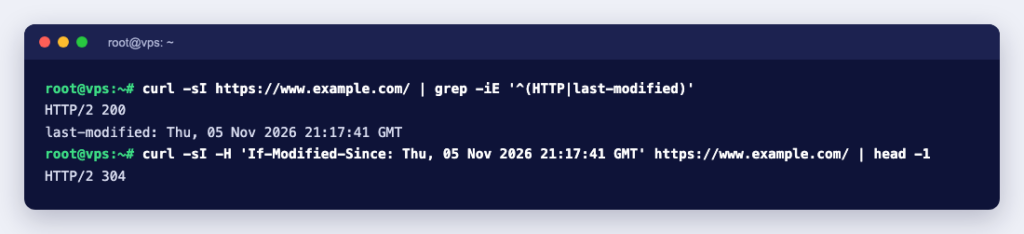
RFC 9110, the HTTP standard, says a 304 indicates that a conditional GET or HEAD request “would have resulted in a 200 (OK) response if it were not for the fact that the condition evaluated to false”. In plain terms, the client said “send this only if it differs from my copy”, and it does not. The same section says a 304 ends with the headers: it cannot contain content.
A client makes a request conditional with one of two headers, both built from what the server sent the first time:
| Server sends (first response) | Client sends back later | Server answers 304 when |
|---|---|---|
ETag: "6abcaa5d-1a90" | If-None-Match: "6abcaa5d-1a90" | The current ETag matches |
Last-Modified: <date> | If-Modified-Since: <same date> | The file has not changed since that date |
If both headers arrive, the ETag wins. RFC 9110 says a server must ignore If-Modified-Since when the request contains If-None-Match, because the ETag comparison is the more accurate test.
See a 304 for yourself
We served a 6,800-byte stylesheet from nginx 1.31.6 (the nginx:alpine Docker image) and requested it with curl 8.22.0. The first request is a normal 200 with both validators:
$ curl -sI http://web/style.css
HTTP/1.1 200 OK
Content-Type: text/css
Content-Length: 6800
Last-Modified: Wed, 30 Sep 2026 06:21:17 GMT
ETag: "6abcaa5d-1a90"
Sending the ETag back gives a 304, and the transfer is empty:
$ curl -sI -H 'If-None-Match: "6abcaa5d-1a90"' http://web/style.css
HTTP/1.1 304 Not Modified
Last-Modified: Wed, 30 Sep 2026 06:21:17 GMT
ETag: "6abcaa5d-1a90"

$ curl -s -o /dev/null -w '%{http_code} %{size_download} bytes\n' -H 'If-None-Match: "6abcaa5d-1a90"' http://web/style.css
304 0 bytes
The same file without the header downloaded 6,800 bytes. If-Modified-Since with the Last-Modified date also returned 304. Then we added one line to the stylesheet and sent the old ETag again:
HTTP/1.1 200 OK
Content-Length: 6819
Last-Modified: Wed, 30 Sep 2026 06:21:29 GMT
ETag: "6abcaa69-1aa3"
The ETag changed, so the server sent the whole new file. nginx builds the ETag for a static file from its modification time and size in hexadecimal (1a90 is 6800, 1aa3 is 6819). Apache does much the same: the FileETag default is MTime Size.
Where you see 304 responses
- Access logs. Lines with status 304 and a response size of 0 or close to it are repeat visitors whose browsers checked their cache. That is good news, not an error to fix.
- Browser developer tools. The Network panel shows 304 for revalidated files. MDN’s 304 reference notes that the network panels of many developer tools create extra requests that lead to 304 responses, so you may see more of them there than real visitors cause.
- Search engine crawling. Google’s crawler documentation says its crawling infrastructure supports both ETag with If-None-Match and Last-Modified with If-Modified-Since. It recommends ETag because it has no date formatting issues, and suggests setting both.
When a 304 is a problem, and how to fix it
Visitors still see the old version
A correct 304 never serves stale content: if the file changed, the validator changes and the server sends a 200. When people see an old stylesheet or page, the cause is usually that the browser did not ask at all. With Cache-Control: max-age=N, MDN explains, the response stays fresh for N seconds, and a fresh copy is used without contacting the server. Fixes:
- Put a version in the file name or URL of CSS and JavaScript (
style.css?v=2orstyle.2.css) when you change it. A new URL is a new cache entry. - For HTML that changes often, send
Cache-Control: no-cache. MDN defines it as: the response can be stored, but must be validated with the origin server before each reuse. That is exactly the 304 check. - Use
no-storeonly for pages that must never be kept, such as account pages. It stops caching and 304s altogether. - To check your own browser, clear the browser cache or open the page in a private window.
You never get a 304
If every repeat request returns a full 200, one of these is usually the reason:
- The page is dynamic. PHP, WordPress and other applications build the page on each request and do not send an ETag or Last-Modified unless the application or a caching plugin adds them. A static file gets validators from the web server; a script does not.
- Validators are switched off. In nginx,
etag off;removes the ETag andif_modified_since off;makes nginx treat every response as modified. We tested both: withetag offthe If-Modified-Since check still gave a 304; with both off, every request returned 200. - The ETag differs between servers. Because the ETag comes from the file’s modification time, two load-balanced servers holding the same file with different timestamps give different ETags, and a request that reaches the other server gets a 200. Deploy so that timestamps match, or rely on Last-Modified.
- Compression or a CDN changed the ETag. With
gzip on, our nginx sentETag: W/"6abcaa5d-1a90", a weak ETag, for the compressed version. Sending that weak value back still returned 304, so this is normal. Cloudflare’s ETag documentation says it either converts strong ETags to weak ones or removes them, unless you turn on “Respect Strong ETags”, and that it removes an ETag that is not in the correct double-quoted format.
Adding 304 support to a dynamic page
For an API response or a report that is expensive to send but cheap to fingerprint, you can answer 304 yourself. This PHP example makes an ETag from the content and compares it with the one the client sent:
<?php
$body  = "Stock report: 42 items\n";          // normally built from the database
$etag  = '"' . md5($body) . '"';
header('ETag: ' . $etag);
header('Cache-Control: no-cache');            // store it, but check with the server first
if (trim($_SERVER['HTTP_IF_NONE_MATCH'] ?? '') === $etag) {
    http_response_code(304);                  // headers only, no body
    exit;
}
echo $body;
With PHP 8.3.33’s built-in server, the first request returned 200 with the report and ETag: "fe4f248f88a93b929ccdbec997504946"; the same request with that value in If-None-Match returned HTTP/1.1 304 Not Modified and no body. Two notes: this still builds the page, so it saves bandwidth rather than server time, and a production version should also accept a list of ETags and the * value that RFC 9110 allows in If-None-Match.
304 compared with other 3xx codes
304 sits in the 3xx “redirection” class, but it does not send the visitor anywhere. RFC 9110 describes it as redirecting the client to its own stored copy. Real redirects such as 301 and 302 send the client to a different URL with a Location header; see 302 Found vs 301, 307 and 308 if that is what you need.
In short, a 304 in your logs means caching is working. Set sensible Cache-Control headers, version your CSS and JavaScript files, and check validators with curl -I when something looks wrong. If you want full control over nginx or Apache headers, a KVM VPS gives you root access to the server configuration. For WordPress on shared hosting, a page cache such as LiteSpeed Cache is the bigger win, because it saves PHP from building the page at all.