

Short answer: A/B split testing shows two versions of a page to different visitors at the same time and measures which one gets more of the result you want: sign-ups, sales, clicks. To run a test well, change one thing, split visitors at random, keep each visitor on the same version, decide the length in advance, then keep the winner and remove the test. Google’s rules for doing this without hurting your search rankings are short: no cloaking, rel="canonical" on variant URLs, 302 redirects rather than 301, and end the test promptly.
How an A/B test works
Google Search Central defines A/B testing as testing two or more variations of a change, for example different fonts on a button, to see which increases clicks. Multivariate testing changes several things at once and looks at the effect of each and of the combinations. Every combination in a multivariate test needs enough visitors of its own, so most small and medium sites are better off with simple A/B tests.
The mechanics are the same whatever tool you use:
- A new visitor arrives and is assigned to version A or B at random.
- The assignment is remembered, usually in a cookie, so the visitor sees the same version on every visit.
- Each visit, and each conversion, is recorded together with the version.
- At the end you compare the conversion rate of A with B.
Plan the test before you build it
- Pick one goal. “More enquiries from the contact form”, not “a better page”.
- Change one thing. A headline, the button text, the length of a form. If you change five things and B wins, you will not know why.
- Write down what you expect and why, before you see any numbers.
- Decide how long it runs. Google notes that the time needed for a reliable test depends on your conversion rates and how much traffic your site gets. Run whole weeks, so weekdays and weekends are both included, and do not stop the first time one version pulls ahead.
- Change nothing else during the test: no redesign, no new ad campaign aimed at one page.
Three ways to split traffic
| Method | How it works | Good for | Watch out for |
|---|---|---|---|
| JavaScript testing tool | A script in the page swaps text or elements in the visitor’s browser | Quick changes to copy and buttons, no server access needed | Visitors may briefly see the original before the script changes it; visitors who block scripts are left out |
| Server-side split | The web server or application picks the version before sending the page | Whole-page changes, fast pages, no flicker | Needs server access; page caches must not mix the versions up |
| Separate URLs | Visitors are redirected from the original URL to a variant URL | Completely different page designs | Use a 302 redirect and rel="canonical" to the original |
If you run WordPress, the WordPress plugin directory lists A/B testing plugins; check that a plugin works with your caching plugin before you rely on it. If you already use Matomo for analytics, A/B Testing is a premium feature: included in Matomo’s Cloud Business plan, or bought from its marketplace for a self-hosted Matomo.
Split traffic with nginx
If your site runs on nginx and you have root access, you can split traffic without any extra software. The split_clients module exists for exactly this: it hashes a string you choose and maps the result to a value by percentage. This configuration sends new visitors to index-a.html or index-b.html at random and uses a cookie to keep them there:
# Keep the variant a visitor already has (from the cookie)
map $cookie_ab_variant $ab_saved {
    default "";
    a       a;
    b       b;
}

# New visitors: split 50/50
split_clients "${remote_addr}${http_user_agent}${msec}" $ab_new {
    50%     a;
    *       b;
}

map $ab_saved $ab_variant {
    ""      $ab_new;
    default $ab_saved;
}

log_format abtest '$remote_addr [$time_local] "$request" $status variant=$ab_variant';

server {
    listen 80;
    root /usr/share/nginx/html;
    access_log /var/log/nginx/abtest.log abtest;

    location = / {
        add_header Set-Cookie "ab_variant=$ab_variant; Path=/; Max-Age=2592000; SameSite=Lax";
        add_header Cache-Control "private, no-store";
        try_files /index-$ab_variant.html =404;
    }
}
How it works:
- The first
mapaccepts onlyaorbfrom the cookie, so a tampered cookie is ignored. In our test, a cookie ofzzzwas treated as a new visitor. split_clientshashes the visitor’s IP, browser string and the current time. Adding the time makes the choice random per new visitor, instead of putting everyone behind the same office IP into one group.- The second
mapuses the saved variant if there is one, otherwise the new random one. - The
Set-Cookieheader remembers the variant for 30 days (2,592,000 seconds), andCache-Control: private, no-storestops shared caches from storing one version and handing it to everybody. - The
log_formatwrites the variant into a separate access log.
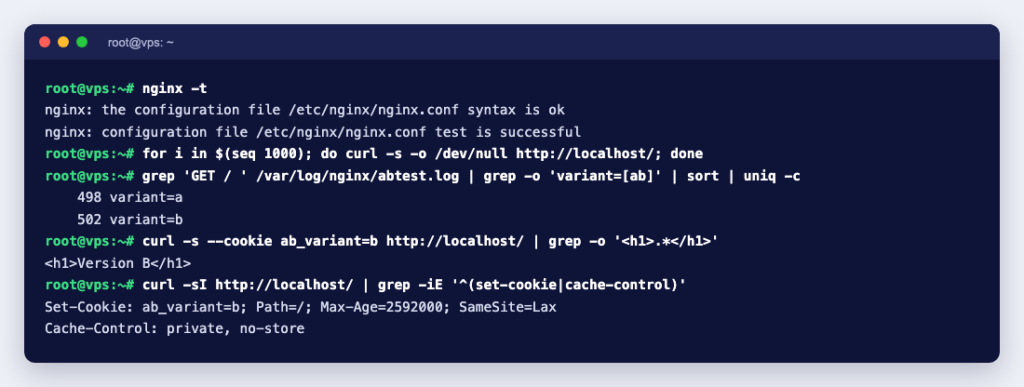
We tested this on nginx 1.31.6. nginx -t reported the configuration as valid. 1,000 requests without a cookie were split 501 to A and 499 to B, and three requests carrying the cookie ab_variant=b all got version B. The response headers were:
Set-Cookie: ab_variant=b; Path=/; Max-Age=2592000; SameSite=Lax
Cache-Control: private, no-store
To count conversions, log the variant on your “thank you” page too (the same access_log line in the server block does that) and count by variant:
grep 'GET / ' /var/log/nginx/abtest.log | grep -o 'variant=[ab]' | sort | uniq -c
grep 'GET /thank-you' /var/log/nginx/abtest.log | grep -o 'variant=[ab]' | sort | uniq -c
These count page views, not unique people, and they include bots. For anything beyond a quick check, record the variant in your analytics tool as well and compare conversions per visitor there.
Keep search engines happy
These rules come from Google’s guide to minimising A/B testing impact in Google Search:
- No cloaking. Do not show one set of pages to Googlebot and another to people. Treat Googlebot like any other visitor; the nginx example above does.
- Use
rel="canonical", notnoindex, on alternate URLs, pointing to the original page. Google says the canonical link matches your intent more closely. - Redirect with 302, not 301, if the test sends visitors from the original URL to a variant URL. A 302 says the move is temporary. See what a 302 redirect is.
- End the test when you have your answer. Update the site with the winning version and remove every part of the test. Google warns that a test left running for an unnecessarily long time may be seen as an attempt to deceive search engines.
Google also says small changes, such as the size, colour or position of a button, or the wording of a call to action, often have little or no effect on how the page appears or ranks in search.
Common mistakes
| Mistake | What goes wrong |
|---|---|
| A page cache or CDN caches the test page | Everyone gets whichever version was cached first, and the test measures nothing |
| Stopping as soon as B looks better | With few visitors the numbers swing a lot, so an early lead proves little; stick to the length you planned |
| Testing during a sale or an unusual week | The winner may only win under those conditions |
| Sending different traffic to each version | An email campaign linking only to B makes B look better for the wrong reason |
| Forgetting to remove the test | Extra code on every page, and Google’s warning about long-running tests |
Before a big test, try it on a copy of your site first: how to create a staging environment for WordPress shows how. For server-side splits like the nginx example you need root access to the web server, which a KVM VPS gives you.