Ithal P R
A parked domain is a domain name that is registered but not used for a website of its own. Visitors see a placeholder page, often from the registrar or a parking service, that says “coming soon”, offers the domain for sale or shows adverts. In web hosting the term has a second meaning: in cPanel, a “parked domain” (now called an alias) is an extra domain that shows the same website as your main domain. This guide covers both, and shows the DNS records that stop spammers from using a parked domain in fake email.
Meaning 1: domain parking
Google’s advertising help describes a parked domain as “a web address that was purchased but not thoroughly developed”, typically with little or no content because the site is in development or the domain is waiting for a new owner. ICANN, which coordinates the domain system, says parked pages “can present in several ways, from traditional pages with a few advertisements, to pages showing that the domain is for sale, to pages indicating that the domain has been suspended”.
People park domains for ordinary reasons:
- to reserve a name for a project that is not ready yet;
- to protect a brand, for example the .net, .in or misspelt versions of their main domain;
- to sell the name later, with a “for sale” notice on the parked page;
- to earn money from advertising on names that already get typed-in traffic.
How parked pages make money, and the risks
Advertising parked pages show links related to the domain name. According to an ICANN policy brief, some registrars park a newly registered domain on such a page until the owner sets up a website, and each click earns money for the registrar and, depending on the parking programme, for the domain owner too. This model is shrinking. Google has announced the end of parked domains as an ad surface in its search partner network, and Google Ads policy does not allow ads that link to parked pages showing only ads and links.
ICANN’s security team also looked at “zero-click” redirection, where a visitor to a parked domain is sent on to another site through a chain of advertising brokers without clicking anything. Most redirects in its random sample looked harmless, but 5.5 percent showed some potential for harm. That is a good reason not to leave your own spare domains on an ad-parking service, where you do not control where visitors end up.
Meaning 2: parked domains in cPanel (aliases)
Older cPanel versions had a “Parked Domains” page. Current cPanel calls the same thing an alias: according to cPanel’s documentation, an alias is “a second domain that points to a Main Domain”, so both names show the same website. You create one under Domains, Create A New Domain, and leave Share document root ticked. cPanel warns that this setting is permanent: untick it and you get an addon domain with its own folder instead. Our step-by-step guide shows how to park a domain in cPanel.
Other panels use their own names for the same idea. In Virtualmin, which runs our shared hosting, it is an alias virtual server; Virtualmin’s documentation says an alias “allows a domain to act exactly like another, sharing the same website and email addresses”. DirectAdmin calls it a domain pointer or alias (see how to create a domain alias in DirectAdmin).
| Option | What visitors see | Use it for |
|---|---|---|
| Alias (parked domain) | Your main website, under the second name | Email on the second domain, spelling variants |
| Redirect | They land on your main domain | Extra domains you own for brand protection |
| Addon domain | A separate website with its own folder | A second, different site in the same account |
| Subdomain | A section such as shop.example.com | Parts of one site; see What Is a Subdomain? |
For search engines, a redirect is usually better than an alias. If example.net and example.com show the same pages, you have two copies of your site. Google’s guide to redirects and Google Search recommends picking one preferred (canonical) address and redirecting the others to it; a permanent 301 redirect tells Google to show the target in search results. So add the alias if you want email on it, then redirect its web traffic to the main domain. Our KB article on the difference between parked, addon and subdomains has more detail.
Stop spammers using your parked domain
A domain that never sends email is still easy to forge in the “From” line. Four DNS records tell receiving mail servers that any mail claiming to come from it is fake, and that nothing should be delivered to it. We loaded this zone into BIND 9.20 on Debian 13 (SOA and NS records left out here):
@            IN A   192.0.2.10
; this domain sends and receives no email
@            IN MX  0 .
@            IN TXT "v=spf1 -all"
_dmarc       IN TXT "v=DMARC1; p=reject;"
*._domainkey IN TXT "v=DKIM1; p="
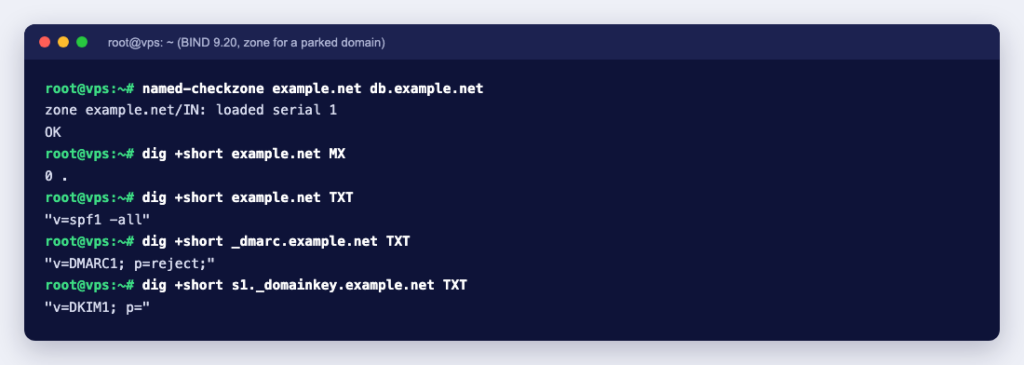
named-checkzone reported OK, and the records answered as expected:
$ dig +short example.net MX
0 .
$ dig +short example.net TXT
"v=spf1 -all"
$ dig +short _dmarc.example.net TXT
"v=DMARC1; p=reject;"
$ dig +short s1._domainkey.example.net TXT
"v=DKIM1; p="RFC 7505 says a domain with a null MX must not publish any other MX record, and RFC 7208 gives "v=spf1 -all" as the record for domains that send no mail. RFC 6376 states that an empty p= value means the key has been revoked. To see the null MX working, we sent a message to the test domain from Postfix 3.10 on the same machine. It bounced at once instead of sitting in the queue:
to=<info@example.net>, relay=none, dsn=5.1.0, status=bounced (Domain example.net does not accept mail (nullMX))Only use these records on a domain with no mailboxes. If you later start using it for email, remove them first, and build up DMARC step by step as described in how to publish DMARC and tighten the policy safely.
Checklist for a domain you are not using yet
- Turn on auto-renew, so the name does not expire and get parked by someone else.
- Decide what visitors should see: a simple holding page on your hosting, or a 301 redirect to your main site.
- Point the domain at the right place by setting its nameservers. What Is a Nameserver? shows how to find and change them.
- If the domain will not send or receive email, publish the four records above.
- Check it from outside with
digor an online DNS lookup after the change has spread.
Whether you are protecting a brand or saving a name for later, you can search and register domains with us and point them at any Ucartz hosting plan when you are ready. If you are unsure which extension to add alongside your main one, What Is a TLD? explains the options.