Vishnu
Cybersquatting is registering or using a domain name that matches or closely imitates someone else’s trademark, in bad faith, to profit from it. The squatter might try to sell the domain to the brand owner at a high price, show ads to people who meant to visit the real site, or use the name for phishing. For .com, .org and other generic domains, a trademark owner can file a complaint under ICANN’s UDRP and have the domain transferred or cancelled. The cheapest protection is to register your key names early, renew them on time and watch for lookalikes.
What counts as cybersquatting
There is no single worldwide law, but the rules used for domain disputes all look for the same three things. ICANN’s Uniform Domain Name Dispute Resolution Policy (UDRP), paragraph 4(a), requires the complainant to prove all three:
- The domain name is identical or confusingly similar to a trademark or service mark in which the complainant has rights.
- The domain holder has no rights or legitimate interests in the name.
- The domain has been registered and is being used in bad faith.
Paragraph 4(b) lists typical signs of bad faith: registering the name mainly to sell it to the trademark owner or a competitor for more than your out-of-pocket costs; registering it to block the owner, as part of a pattern of doing so; registering it mainly to disrupt a competitor; or using it to attract visitors for commercial gain by creating confusion with the brand.
That also tells you what is not cybersquatting. Owning a domain that someone else would like is not enough. Paragraph 4(c) protects holders who used the name for a genuine business before any dispute, who are commonly known by that name, or who make legitimate non-commercial or fair use of it. Buying generic words to resell is a normal domain business; the problem starts when a name targets a particular brand.
Common types of cybersquatting
| Type | What it looks like | Usual goal |
|---|---|---|
| Brand in another extension | The brand’s name under .net, .shop or a country code the owner never registered | Sell it back, or catch visitors who guess the extension |
| Typosquatting | A missing, doubled or swapped letter (omission, repetition, transposition) | Ad revenue from mistyped visits, or phishing |
| Homoglyphs | Letters that look alike, such as v for u | Phishing links that pass a quick glance |
| Brand plus a word | brand-login, brand-support, brand-offers | Phishing and fake customer support |
| Expired names | A domain the owner forgot to renew, registered by someone else | Trade on the old site’s traffic and links, or sell it back |
| Name squatting | A person’s name, often a public figure’s | Sell it, or trade on their reputation |
The expired-domain case is the one small businesses cause themselves. A registrar keeps a lapsed name for the owner for a limited time, then it goes back on the market; this article explains the stages after expiry. Once someone else holds it, getting it back can take a dispute.
How to find lookalike domains of your brand
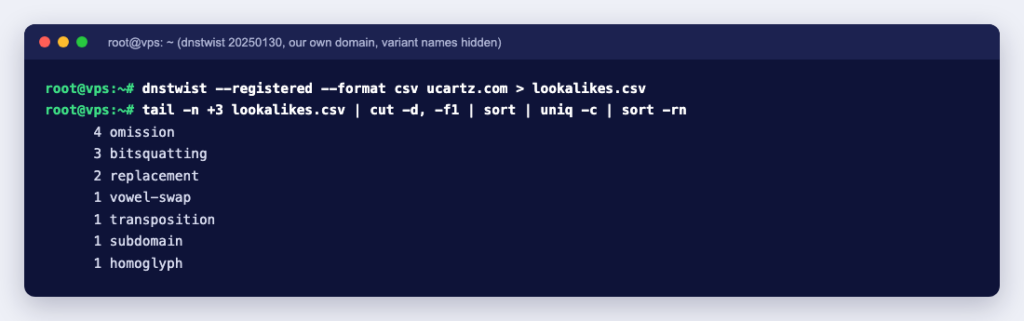
You do not need a paid monitoring service to get started. dnstwist is an open-source tool that generates typo, homoglyph and other variants of a domain and checks which ones exist in DNS. We ran version 20250130 in a Python container:
pip install dnstwist dnspython
dnstwist --registered --format csv yourbrand.com
--registered shows only names that resolve, and the CSV output has the columns fuzzer,domain,dns_a,dns_aaaa,dns_mx,dns_ns, so you see how each variant was made and where it points. Install dnspython as well: without it, dnstwist warned that its DNS features were limited and our first scan was far too slow to finish. For our own domain, the scan found 13 registered variants, made by omission, bitsquatting (a single changed bit), a homoglyph, a transposition, a vowel swap and more. Several pointed at domain-parking or for-sale services, and others at ordinary websites and mail services, which is the useful lesson: a registered lookalike is not proof of cybersquatting. Look at what the site does before acting.
For each suspicious name, look it up to see the registrar, the creation date and the abuse contact. Our guide to the whois command shows the command-line route; the owner’s personal details are usually redacted, but the registrar and dates are not. A domain created last week that copies your logo is a very different case from one registered years ago by a company with a similar name.
What to do if someone is squatting on your name
- Collect evidence first. Screenshots of the site with dates, the lookup result, any emails offering the domain for sale, and proof of your trademark and its first use.
- Report active abuse straight away. If the domain hosts phishing, malware or a fake shop, contact the registrar’s abuse address from the lookup, and the web host if you can identify it. This is the fastest route when customers are at risk; it does not need a trademark case.
- Consider asking or buying. For a parked domain, a polite offer through the registrar’s contact form can cost less than a dispute. Keep any reply: the UDRP treats registering a name mainly to sell it to the brand owner for more than its costs as a sign of bad faith, so a high asking price can support a later complaint.
- File a dispute under the policy that covers the extension (below). You need a trademark or, for .in, a name or mark in which you have rights.
- Go to court when the case is complex or you need remedies the dispute policies do not offer. A UDRP proceeding does not stop either side from going to court.
The dispute options compared
| Procedure | Covers | Bad faith test | Result if you win |
|---|---|---|---|
| UDRP | Domains at ICANN-accredited registrars: .com, .net, .org and other generic extensions | Registered and used in bad faith | Transfer to you, or cancellation |
| URS | Many generic extensions, for clear-cut cases only | Same three elements, proved by clear and convincing evidence | Suspension for the rest of the registration period; no transfer |
| INDRP | .in domains | Registered or used in bad faith, or for an unlawful purpose | Transfer to you, or cancellation |
| Court action | Depends on the country | Depends on the law | Whatever the court can order under local law |
Some details worth knowing before you file:
- UDRP. You file with one of the providers ICANN approves; its current list names ADNDRC, CIIDRC, the Czech Arbitration Court, FORUM and WIPO. Under the UDRP Rules, the holder has 20 days to respond and the panel normally decides within 14 days of its appointment. After a decision to transfer, the registrar waits ten business days, and does not act if the holder shows it has started a court case in that time. Paragraph 4(i) limits the remedies to transfer or cancellation, so there are no damages.
- URS. ICANN describes the Uniform Rapid Suspension System as a lower-cost, faster path for the most clear-cut cases. Under its procedure, a winning complaint gets the domain suspended for the balance of its registration period, pointing to an information page, with an option to extend it by one year. It never moves the name to you, so check with the provider that the extension is covered and decide whether suspension is enough.
- INDRP for .in. The .IN Registry runs the .IN Domain Name Dispute Resolution Policy. It appoints an arbitrator from its panel, proceedings follow India’s Arbitration and Conciliation Act, 1996, and remedies are cancellation or transfer. Note the “or”: registration or use in bad faith can be enough, which is wider than the UDRP.
- United States. The Anticybersquatting Consumer Protection Act (15 U.S.C. 1125(d)) makes a person liable who, with a bad faith intent to profit from a mark, registers, traffics in or uses a confusingly similar domain name; courts can order forfeiture, cancellation or transfer.
One warning in the other direction. The UDRP Rules define reverse domain name hijacking as using the policy in bad faith to try to take a domain from its rightful holder, and a panel that finds this declares the complaint an abuse of the proceeding. If the other side registered the name before your brand existed, or uses it for a real business of its own, a complaint can backfire.
How to protect your brand from cybersquatting
- Register your main names early: your brand in .com, your country code (such as .in) and any extension you plan to use. Our guide to choosing a TLD helps you decide which matter.
- Add the obvious typos of a short, valuable brand, and point them at your main site.
- Register the trademark. Every dispute route above starts with proving rights in the name.
- Never let a domain lapse. Turn on auto-renew, keep a valid card on file and keep the contact email current; ICANN’s verification emails go to that address.
- Lock the domain with the registrar’s transfer lock and protect the registrar account with a strong password and two-factor sign-in, so the name cannot be moved out from under you. If that has already happened, see how to recover a hijacked domain.
- Scan for lookalikes with dnstwist every few months, and tell customers which domain you send email from.
Cybersquatting is much cheaper to prevent than to undo: a few extra registrations and a renewal habit cost far less than any dispute. You can check which versions of your name are still free with a domain search at Ucartz and register them in one account.