Ithal P R
Database migration means one of two things. Most often it is moving a database to a new place: another server, a newer version or a different database engine. In software development it also means schema migrations, small versioned scripts that change a database’s structure step by step. For a move, the main strategies are dump and restore during a short maintenance window, or replication to the new server followed by a quick switch. Whichever you choose, test the restore first, verify the data after the move and keep the old database until you are sure.
Two meanings of “database migration”
- Data migration: moving the database itself. Typical reasons are a new hosting server, an upgrade (for example to MySQL 8.4), a switch between MySQL and MariaDB, or splitting the database onto its own server as traffic grows.
- Schema migrations: the way application frameworks manage changes to tables. The Rails guide on Active Record migrations describes them as a feature that “allows you to evolve your database schema over time”. Each change is a file in your code, and Rails records the version of every migration it has run in a
schema_migrationstable, so it knows which ones are still pending and can roll back the last one.
Most of this post is about the first meaning, with a tested example. Schema migrations come back at the end, because they matter during a move too.
Database migration strategies
| Strategy | How it works | Downtime | Best for |
|---|---|---|---|
| Dump and restore (“big bang”) | Stop writes, export with mysqldump or similar, import on the new server, switch the application | As long as the dump, copy and import take | Small and medium databases, same or similar engine |
| Replication, then cut over | Copy the data once, keep the new server in sync with replication, then point the application at it | Seconds to minutes for the switch | Large or busy databases where a long window is not acceptable |
| Phased (table by table or service by service) | Move parts of the data and the code that uses them in stages | Small per stage, but a longer project | Big applications being split up or re-platformed |
For MySQL, the replication documentation describes copying data from a source server to one or more replicas, asynchronously by default. That is what makes the second strategy possible: the new server catches up while the old one stays live. Be careful with size, too. The mysqldump manual says it is “not intended as a fast or scalable solution” for substantial amounts of data, that restoring can be very slow, and suggests the MySQL Shell dump utilities, with parallel threads and compression, for large databases.
Step-by-step migration plan
- Take stock. Note the source engine and version, the database size, character sets and collations, stored procedures, views, triggers, events and the user accounts that connect to it.
- Prepare the target. Install the target version, match the important settings, and create the users and grants. A dump of one database does not contain user accounts; our test dump had no
CREATE USERorGRANTlines at all. - Rehearse. Take a dump, restore it on the new server and run the application against it. This is where version and engine differences show up, as in the example below.
- Plan the cut-over. Choose a quiet time, put the site in maintenance mode or stop writes, and lower the TTL of any DNS name the application uses to reach the database.
- Migrate and verify. Run the final dump and restore (or let replication catch up), then compare row counts and checksums before you let traffic in.
- Switch and watch. Update the application’s database host and credentials, test the key functions, and watch the error logs.
- Keep a way back. Leave the old database untouched, read-only if possible, until the new one has run cleanly for a while.
A tested example: MariaDB 11.8 to MySQL 8.4
Moving between MariaDB and MySQL looks easy because the tools share a history. We tried it in containers with a small shop database on MariaDB 11.8.9: two tables with 1,000 orders, a view and a stored procedure. The dump used the usual options:
mariadb-dump --single-transaction --routines --triggers --events shop > shop.sql--single-transaction gives a consistent snapshot of InnoDB tables without locking them, and --routines is needed because, as the mysqldump manual notes, stored procedures and functions are not dumped by default (triggers are). The first import into MySQL 8.4.11 failed straight away:
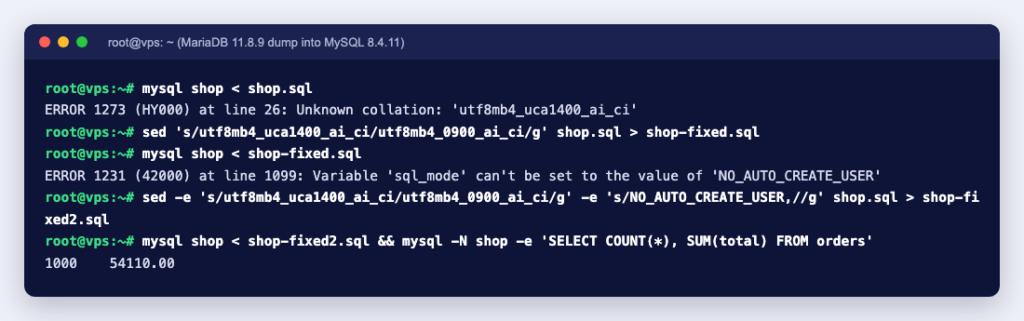
$ mysql shop < shop.sql
ERROR 1273 (HY000) at line 26: Unknown collation: 'utf8mb4_uca1400_ai_ci'
MariaDB 11.8 had created the tables with its utf8mb4_uca1400_ai_ci collation, which MySQL does not have. After replacing it with MySQL’s utf8mb4_0900_ai_ci, the import got much further and then stopped again:
$ sed 's/utf8mb4_uca1400_ai_ci/utf8mb4_0900_ai_ci/g' shop.sql > shop-fixed.sql
$ mysql shop < shop-fixed.sql
ERROR 1231 (42000) at line 1099: Variable 'sql_mode' can't be set to the value of 'NO_AUTO_CREATE_USER'
The stored procedure’s saved sql_mode included NO_AUTO_CREATE_USER, a mode MySQL 8.4 no longer accepts. This second error is the dangerous kind. The tables and all 1,000 orders had already been imported, so a quick SELECT COUNT(*) looked fine, but the procedure was missing and the view still held the placeholder the dump creates first, returning a row of NULLs. The import had stopped halfway without anything looking obviously broken. After removing that mode as well, the import finished and both servers gave identical results:
$ sed -e 's/utf8mb4_uca1400_ai_ci/utf8mb4_0900_ai_ci/g' -e 's/NO_AUTO_CREATE_USER,//g' shop.sql > shop-fixed2.sql
$ mysql -N shop -e "SELECT COUNT(*), SUM(total) FROM orders; SELECT * FROM order_totals; CALL top_customer();"
1000    54110.00
2       334     18047.00
3       333     18360.00
1       333     17703.00
3
Three lessons from a 42 KB dump: always rehearse, read every error the import prints, and check more than the row count. Views and routines also keep their DEFINER (here root@localhost), so the user named there should exist on the new server too.
Verifying the copy
For a MySQL-to-MySQL move, we dumped the migrated database with mysqldump 8.4.11, compressed it, restored it into a second database and compared checksums:
$ mysqldump --single-transaction --routines --events --triggers shop | gzip > shop.sql.gz
$ gunzip < shop.sql.gz | mysql shop_copy
$ mysql -e "CHECKSUM TABLE shop.orders, shop_copy.orders"
Table              Checksum
shop.orders        2919645447
shop_copy.orders   2919645447
According to the CHECKSUM TABLE manual, different checksums almost certainly mean the tables differ, but the value depends on the table’s row format and can change between versions, so between different versions compare row counts and a few key queries as well. In our test the MariaDB original gave the same checksums, but do not count on that.
For the everyday commands, see how to back up a database with mysqldump and import and export from the Linux terminal. If you prefer a browser, phpMyAdmin can import smaller dumps.
Common problems when migrating a database
- Collation and character set errors between engines or versions, as above. Search the dump for
COLLATEbefore you start. - SQL modes and removed features saved with routines, or used by old application queries.
- Missing users and grants, which show up as “Access denied” in the application.
- The application still points at the old server. Configuration files, environment variables and cron jobs all hold connection details. For WordPress, the database host lives in
wp-config.php; see using WordPress with a remote database. - Writes during the dump. Anything written to the old database after the final dump is lost unless you stopped writes or used replication.
- Imports that time out in a web tool. Large files belong on the command line; MySQL import methods and common issues covers the usual errors.
Schema migrations during a move
If your application uses schema migrations, freeze them during a server move: finish or roll back any pending migration first, move the database, then run the framework’s status command on the new server to confirm that its list of applied migrations matches the code. In Rails that list is the schema_migrations table, and other frameworks keep a similar table. Changing the structure and the location of a database at the same time makes any problem much harder to trace.
A database migration goes well when the risky part happens in a rehearsal, not on the night. If you are moving to a new server, a KVM VPS gives you root access to install the exact MySQL or MariaDB version you need. If you would rather hand the job over, Ucartz server management covers migrations as on-demand work.