jijosh at

A static website sends every visitor the same ready-made files. A dynamic website builds each page when it is requested, usually with a server-side language such as PHP and a database. Static sites are faster to serve, cheaper and harder to break into, but every change means editing and uploading files. Dynamic sites let you log in, search, sell and edit content from a dashboard, at the cost of more server work and more upkeep. A brochure site or portfolio can be static; a shop, a blog you update often or anything with user accounts is dynamic.
What “static” and “dynamic” mean
MDN’s client-server overview gives clean definitions. A static site returns the same hard-coded content whenever a particular resource is requested: the server finds the file on disk and sends it. A dynamic site can generate its content based on the request URL and data. In MDN’s product-site example, the server looks up the product in a database and inserts the data into an HTML template to build the page.
The words describe how the server produces a page, not how lively the page looks. A static page can have animations, a slider and a contact form that posts to an outside service. A dynamic page can look completely plain. And every dynamic site still has a static part: MDN notes that CSS, JavaScript and images are served straight from disk in exactly the same way.
See the difference in one test
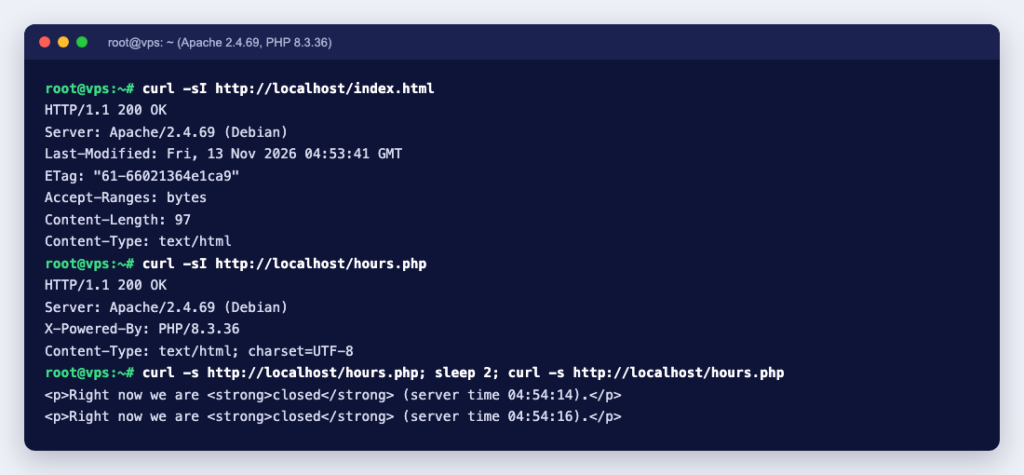
We put two versions of an “opening hours” page on the same server (Apache 2.4.69 with PHP 8.3.36, in a container). The static one is a plain index.html. The dynamic one, hours.php, works out whether the business is open right now:
<?php
// Built on every request
$open = (int)date('G') >= 9 && (int)date('G') < 18 && (int)date('N') <= 5;
?>
<p>Right now we are <strong><?= $open ? 'open' : 'closed' ?></strong>
(server time <?= date('H:i:s') ?>).</p>
Requesting the PHP page twice, two seconds apart, gave two different pages:
<p>Right now we are <strong>closed</strong> (server time 04:54:14).</p>
<p>Right now we are <strong>closed</strong> (server time 04:54:16).</p>
The response headers show how differently the server treats the two. For the static file (curl -I):
HTTP/1.1 200 OK
Server: Apache/2.4.69 (Debian)
Last-Modified: Fri, 13 Nov 2026 04:53:41 GMT
ETag: "61-66021364e1ca9"
Accept-Ranges: bytes
Content-Length: 97
Content-Type: text/html
And for the PHP page:
HTTP/1.1 200 OK
Server: Apache/2.4.69 (Debian)
X-Powered-By: PHP/8.3.36
Content-Type: text/html; charset=UTF-8
The static file carries Last-Modified and an ETag, so browsers and caches can ask “has it changed?” When we sent that ETag back in an If-None-Match header, Apache answered 304 Not Modified with no body at all. The PHP page has none of that: the server cannot know in advance what the script will produce, so it runs the code every time. This is the heart of the speed difference.
Notice also that the server said “closed” at 04:54 because its clock runs on UTC. Dynamic sites depend on server settings like the time zone in a way static files never do.
Static vs dynamic websites compared
| Static website | Dynamic website | |
|---|---|---|
| How pages are made | Written in advance, stored as files | Built per request from code, templates and a database |
| Content changes | Edit the files and upload them again | Edit in a dashboard or admin panel |
| Speed | Very fast; files can be cached anywhere | Slower per page unless you add caching |
| Server needs | Any web server | A language runtime (PHP, Node.js, Python) and usually a database |
| Security surface | Small: no code runs on the server | Larger: the application, plugins and database need updates |
| Features | Pages, images, simple forms via outside services | Logins, search, carts, comments, bookings, member areas |
| Typical examples | Portfolio, landing page, documentation | WordPress blog, online shop, forum, web app |
The middle ground
The line is less sharp than the table suggests. Three common set-ups mix the two:
- Static site generators. You write content in Markdown with templates, and a tool builds the whole site into plain HTML before you upload it. Hugo describes itself as a static site generator written in Go; Jekyll, written in Ruby, says it produces a complete static website ready to be served by Apache, Nginx or another web server. You get templates and layouts like a dynamic site, but the server only ever sends files.
- Dynamic sites with page caching. A WordPress site with a page cache builds each page once, saves the HTML and serves that copy to the next visitors. Personal pages, such as carts and account pages, must be kept out of the cache.
- Static pages with dynamic parts in the browser. The HTML is static, and JavaScript fetches live data (prices, stock, comments) from an API. The page is static on the server but changes on screen.
Which one should you choose?
A static site is the better fit when:
- the content changes a few times a year, not every day
- you or your developer are comfortable editing HTML or running a site generator
- you want the lowest maintenance: no plugins to update, no database to back up
- the site must stay fast under sudden traffic, such as a launch page
Choose a dynamic site when:
- non-technical people will add posts, products or pages through an editor
- visitors log in, buy, book, comment or search
- content depends on who is asking or when, like prices, stock or opening hours
- you need a large site with categories, tags and archives that update themselves
If you are unsure, start with what you can maintain. A small static site that stays up to date beats a dynamic one with a year of missed updates.
Hosting each type
- Static: any web hosting plan works. Upload the files to the web root, and make sure the home page is called
index.html. - Dynamic with PHP (WordPress, most CMSs): shared hosting with PHP and MySQL or MariaDB is enough for most sites. Check the PHP version your application needs.
- Dynamic with Node.js, Python or heavy traffic: these apps usually run as a process that stays running. Some shared hosting can run them, but a VPS gives you full control. Our guide to how much RAM, CPU and storage a high-traffic website needs helps with sizing.
You can try either kind on your own computer first: How to Host a Website on Localhost covers the PHP built-in server, Docker and XAMPP. When you are ready to go live, Ucartz web hosting runs both static sites and PHP applications, with free SSL, phpMyAdmin and a choice of PHP versions, and your first hosting order comes with a 30-day money-back guarantee on your first purchase of that service.