

Short answer: in MySQL and MariaDB, use RENAME TABLE old_name TO new_name;. In PostgreSQL and SQLite, use ALTER TABLE old_name RENAME TO new_name;. In SQL Server, use EXEC sp_rename 'dbo.old_name', 'new_name';. Renaming is quick because the data is not copied, but it can break anything that still uses the old name: views, application code, stored queries and, in WordPress, user roles. Take a backup first and check what refers to the table. We ran every command below on MySQL 8.4.11, MariaDB 11.8.9, PostgreSQL 18.6 and SQLite 3.46.1.
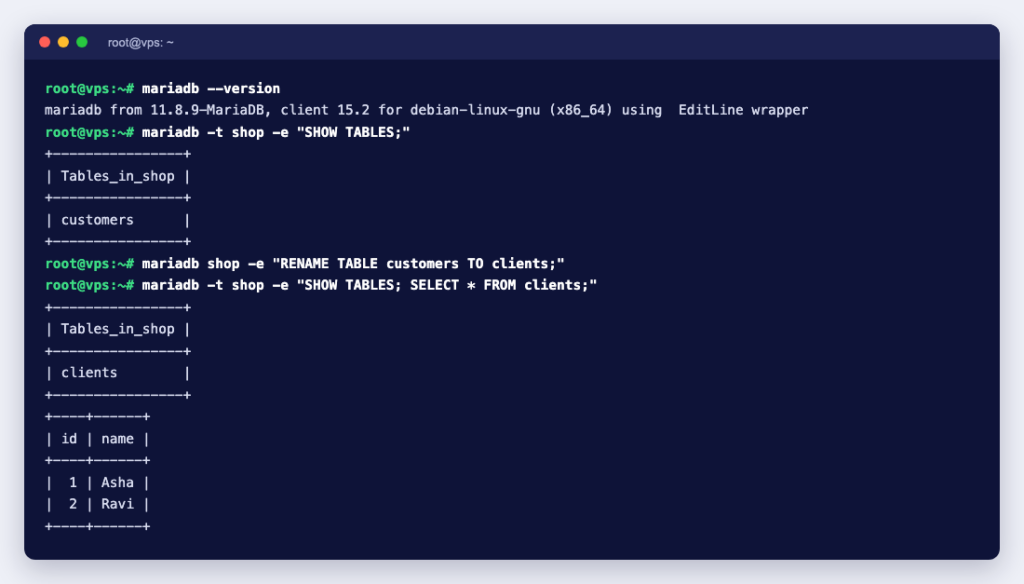
The syntax for each database
| Database | Command | Notes |
|---|---|---|
| MySQL | RENAME TABLE customers TO clients; | ALTER TABLE customers RENAME TO clients; also works |
| MariaDB | RENAME TABLE customers TO clients; | Also accepts RENAME TABLE IF EXISTS |
| PostgreSQL | ALTER TABLE customers RENAME TO clients; | ALTER TABLE IF EXISTS skips a missing table |
| SQLite | ALTER TABLE customers RENAME TO clients; | Updates views and foreign keys that refer to it |
| SQL Server | EXEC sp_rename 'dbo.customers', 'clients'; | The new name is a one-part name, without dbo. |
You need the right privileges. The MySQL manual lists ALTER and DROP on the old table plus CREATE and INSERT for the new name. If you get an access denied error on shared hosting, check the privileges your database user has been given in the control panel.
MySQL and MariaDB
A plain rename:
RENAME TABLE customers TO clients;RENAME TABLE can rename several tables in one statement, working left to right. MySQL documents that the operation is atomic: no other session can use the tables while it runs, and if any part fails, nothing changes. That makes it the right tool for swapping in a freshly built copy of a table:
CREATE TABLE products_new LIKE products;
-- fill products_new, check it, then:
RENAME TABLE products TO products_old, products_new TO products;
After the swap, SELECT * FROM products returned the new rows straight away. For MariaDB, its documentation says the statement has been atomic for InnoDB, MyISAM and Aria since 10.6.1.
You can also move a table into another database on the same server by naming the database:
RENAME TABLE shop.products_old TO archive.old_products;That worked, but the same move failed for a table with a trigger:
ERROR 1435 (HY000): Trigger in wrong schemaWhat happens to foreign keys and views
We created an orders table with a foreign key to customers, and a view that joins the two. After RENAME TABLE customers TO clients, InnoDB had updated the foreign key by itself:
CONSTRAINT `orders_ibfk_1` FOREIGN KEY (`customer_id`) REFERENCES `clients` (`id`)The view was not updated. Both MySQL and MariaDB returned this when we queried it:
ERROR 1356 (HY000): View 'shop.order_list' references invalid table(s) or column(s) or function(s) or definer/invoker of view lack rights to use themThe fix is to recreate the view with the new table name using CREATE OR REPLACE VIEW. Also note that, according to the MySQL manual, privileges granted on the old table name are not moved to the new name.
MySQL errors you might see
ERROR 1146 (42S02): Table 'shop.missing' doesn't exist: a typo, or the wrong database is selected.ERROR 1050 (42S01): Table 'orders' already exists: the new name is taken. Rename or drop the other table first.ERROR 1064 (42000)onRENAME TABLE IF EXISTS: MySQL 8.4 does not supportIF EXISTShere; MariaDB does, and only returns a note if the table is missing.Table 'shop.Customers' doesn't existwhen the table iscustomers: on Linux, with the defaultlower_case_table_names=0, table names are case-sensitive. Code written on Windows or macOS often trips over this after moving to a Linux server.
PostgreSQL
ALTER TABLE customers RENAME TO clients;
ALTER TABLE IF EXISTS missing RENAME TO x;
-- NOTICE:  relation "missing" does not exist, skipping
PostgreSQL behaved differently from MySQL with the same test tables. The view kept working, and pg_get_viewdef showed it now read JOIN clients c, because PostgreSQL views point at the table itself rather than its name. Two things kept their old names, though: the sequence behind the SERIAL column (nextval('customers_id_seq'::regclass)) and the primary key index (customers_pkey). They still work, but you can rename them too if you want consistent names. New rows still got their IDs from the renamed sequence in our test:
ALTER SEQUENCE customers_id_seq RENAME TO clients_id_seq;
ALTER INDEX customers_pkey RENAME TO clients_pkey;
To move a table into another schema, use SET SCHEMA. Putting a schema in the new name, as in RENAME TO archive.customers, is a syntax error. The ALTER TABLE reference covers both forms.
ALTER TABLE clients SET SCHEMA archive;SQL Server
SQL Server uses a stored procedure. We could not run SQL Server in our test environment, so this part is taken from Microsoft’s sp_rename reference:
EXEC sp_rename 'Sales.SalesTerritory', 'SalesTerr';According to Microsoft, the new name must be a one-part name, so do not repeat the schema in the second argument. Renaming does not update views, stored procedures or triggers that refer to the table; Microsoft suggests listing them first with sys.sql_expression_dependencies. In SQL Server Management Studio, Microsoft’s steps are: right-click the table in Object Explorer, choose Design, open View, then Properties, change the Name and save. If you do not have SSMS yet, see how to install SQL Server Management Studio.
Real example: changing the WordPress table prefix
A common reason to rename tables on a hosting account is changing WordPress’s wp_ prefix, for example when two sites share one database. We tested it on WordPress 7.1.2 with MariaDB. Renaming the tables and changing $table_prefix in wp-config.php was not enough: the site loaded, but wp user list showed the admin user with no role, and the dashboard said:
Sorry, you are not allowed to access this page.WordPress stores the role definitions and each user’s roles under keys that include the prefix. These two statements fixed it, and the admin role and dashboard came straight back (here the new prefix is wpx_):
UPDATE wpx_options SET option_name = 'wpx_user_roles'
  WHERE option_name = 'wp_user_roles';
UPDATE wpx_usermeta SET meta_key = CONCAT('wpx_', SUBSTRING(meta_key, 4))
  WHERE meta_key LIKE 'wp\_%';
Do not rename every option that starts with wp_. Our test database also had options such as wp_page_for_privacy_policy and wp_force_deactivated_plugins, which start with wp_ by name, not because of the table prefix. Only wp_user_roles needs changing in the options table.
Checklist before you rename a table
- Back up the database. On cPanel, see how to back up a database with phpMyAdmin.
- Find everything that uses the name: application code, views, triggers, stored procedures, cron jobs and reports.
grep -r "customers" /path/to/appis a quick start. - Stop writes or use a maintenance window if the application updates the table constantly.
- Rename, then update the code and recreate any views that broke.
- Test the application, including logins and admin pages, not just the home page.
On cPanel hosting you can run these statements from the SQL tab in phpMyAdmin: see running SQL queries with phpMyAdmin. To rename a whole database rather than a table, cPanel has its own tool: how to rename a database in cPanel. And if you would rather have someone else plan a risky schema change on a live site, our engineers are available by the hour.