
Short answer: a fully qualified domain name (FQDN) is the complete name of one host on the internet, with every part spelled out from the host up to the top-level domain, for example mail.example.com. Strictly speaking it ends with a dot, mail.example.com., where the final dot stands for the root of the DNS. In everyday use the dot is left off. For server owners the FQDN matters in four places: the server’s hostname, the name a mail server introduces itself with, SSL certificates and DNS zone files, where a missing dot is a classic mistake.
The parts of an FQDN
| Part | In mail.example.com. | What it is |
|---|---|---|
| Host label | mail | The individual machine or service |
| Domain | example | The name you registered |
| Top-level domain | com | The TLD, such as .com, .in or .org |
| Root | the final . | The top of the DNS tree, usually not written |
Each part between the dots is called a label. RFC 9499, the IETF’s DNS terminology document, explains the ambiguity: strictly, a fully qualified name includes the empty root label and is written www.example.net., but names written without the final dot are still called fully qualified. The same document sets the limits: each label can be up to 63 octets, and the whole name at most 255 octets in DNS wire format.
The opposite of an FQDN is a partially qualified or relative name, such as plain mail. It only means something in context, for example on a network whose search domain is example.com.
FQDN, hostname, domain name and URL
| Term | Example | Meaning |
|---|---|---|
| Short hostname | web1 | The machine’s own name, without a domain |
| Domain name | example.com | The registered name; it can also be an FQDN when it points at a server itself |
| FQDN | web1.example.com | Host plus domain plus TLD: one exact host |
| URL | https://web1.example.com/status | Protocol, FQDN and path: one exact resource |
The FQDN is the part of a URL between https:// and the first slash. If you are unsure how a subdomain fits in, our guide What Is a Subdomain? covers it: web1.example.com is a subdomain of example.com and also the FQDN of the server called web1.
Why the trailing dot matters
Most of the time you never see the root dot. It matters in two places.
DNS zone files
RFC 1035 says names in a zone file that end with a dot are absolute; names without one are relative and get the zone’s origin added. So in the zone for example.com, forgetting the dot changes the meaning. We loaded a test zone containing these records (SOA and NS records left out here) with BIND 9.20:
$ORIGIN example.com.
www     IN CNAME example.com.
shop    IN CNAME example.com
@       IN MX  10 mail.example.com
mail    IN A   203.0.113.30
named-checkzone accepted the file and reported OK, with only a warning about the mail server:
zone example.com/IN: example.com/MX 'mail.example.com.example.com' has no address records (A or AAAA)Printing the zone as BIND understood it showed the damage:
example.com.        3600 IN MX     10 mail.example.com.example.com.
shop.example.com.   3600 IN CNAME  example.com.example.com.
www.example.com.    3600 IN CNAME  example.com.
Only www, written with the dot, is right. Mail and the shop would both break. Web-based DNS editors in control panels usually add the dot for you, but if you edit zone files by hand, write every full name with its final dot.
Search domains
When /etc/resolv.conf contains search example.com, a short name like www is tried as www.example.com. In our test, getent hosts www returned the addresses of www.example.com. With a final dot, www. is treated as complete and is not expanded, so dig +search www. returned nothing. The dot is how you tell software “this name is already complete”.
Setting your server’s FQDN on Linux
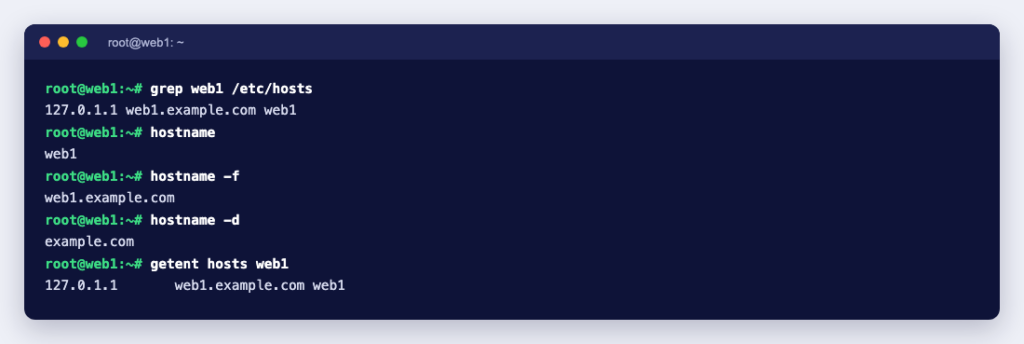
On a server, hostname shows the short name and hostname -f the FQDN. According to the Debian hostname manual, the FQDN is the name the system’s resolver returns for the hostname, and the usual way to set it is a line in /etc/hosts like this:
127.0.1.1 web1.example.com web1The order on that line is important. We tested both orders on Debian 13 with the hostname package, version 3.25:
/etc/hosts line | hostname -f | hostname -d |
|---|---|---|
127.0.1.1 web1 web1.example.com | web1 | (empty) |
127.0.1.1 web1.example.com web1 | web1.example.com | example.com |
With the short name first, the server does not know its own domain. That is harmless for a web server, but mail software and control panels read this value. For the full procedure, see how to set or change the hostname in Linux.
Where a correct FQDN matters
- Control panels. cPanel’s Change Hostname documentation says the hostname must be an FQDN that uniquely identifies the server, such as
hostname.example.com. It must not begin withwwwor a number, must be 60 characters or fewer, must not be a name a cPanel account will use, and should resolve to the server’s main IP address with an A record. See also why the hostname needs to resolve. - Mail servers. RFC 5321 says the name a server gives in its EHLO greeting must be a primary host name that resolves to an address. Postfix takes its default
myhostnamefrom the system’s FQDN, according to the Postfix documentation. Google’s sender guidelines add that the sending IP address needs a PTR record pointing to a hostname, and that hostname needs an A or AAAA record pointing back to the same IP. Here is how to set reverse DNS for a server. - SSL certificates. Certificates are issued for exact names. A wildcard such as
*.example.commatches only one label in that position, according to RFC 9525, so it coverswww.example.combut nota.b.example.com, and notexample.comitself. - Hostnames with digits. RFC 1123 allows a host name to start with a digit, so
1web.example.comis valid DNS. cPanel still refuses a hostname that begins with a number, so check your software’s own rules.
Quick checks for your server
hostname          # short name, e.g. web1
hostname -f       # FQDN, e.g. web1.example.com
dig +short web1.example.com A      # does the FQDN resolve?
dig +short -x 203.0.113.10 # reverse DNS for your IP- Pick a name under a domain you control, such as
server1.yourdomain.com, not your main website name. - Create an A record for it pointing to the server’s IP address.
- Set the hostname and the
/etc/hostsline, full name first. - If the server sends email, ask your provider to set the PTR record for the IP to the same FQDN.
- Confirm with
hostname -fand thedigcommands above.
If you manage your own DNS, What Is a Nameserver? explains where these records live. And if you are setting up a server that sends mail, our email server hosting comes with port 25 open, so a correctly named server can deliver mail directly.