Ashily Shaji

A server cluster is two or more servers, called nodes, that work together so they look like one service to your users. If one node fails, another takes over its work (high availability), or the load is shared between them all the time (load balancing), or both. Clusters remove single points of failure, but they add complexity: you need shared or replicated data, a way for nodes to agree on who is in charge, and monitoring. For many sites, one well-run server with backups is enough; a cluster makes sense when downtime costs more than the extra servers and the work to run them.
Types of server clusters
“Cluster” covers several quite different set-ups. Red Hat’s High Availability documentation defines a cluster simply as “two or more computers (called nodes or members) that work together to perform a task”. What that task is decides the type:
| Type | What it does | Typical tools |
|---|---|---|
| High availability (failover) | A service runs on one node; if that node fails, it is restarted on another | Pacemaker and Corosync, keepalived |
| Load balancing | A load balancer spreads requests over several identical nodes | Nginx, HAProxy |
| Database cluster | Several database servers keep copies of the same data | MariaDB Galera Cluster, MySQL and PostgreSQL replication |
| Storage cluster | Several servers share or replicate disks so data survives a node failure | GFS2, distributed file systems |
| Compute (HPC) cluster | Many nodes split one big calculation or a queue of jobs | Job schedulers, Hadoop and Spark |
| Container cluster | A control plane schedules containers onto worker nodes | Kubernetes |
Real systems often combine types. A busy web shop might have two load balancers in a failover pair, several web nodes behind them and a three-node database cluster.
The words you will meet
- Node: one server in the cluster, physical or virtual.
- Failover: moving a service from a failed node to a healthy one, automatically or by hand.
- Heartbeat: the regular messages nodes send each other to show they are alive. In Red Hat’s stack, Corosync handles membership and messaging between nodes.
- Virtual or floating IP: an IP address that moves to whichever node is active, so clients never need a new address. keepalived does this with VRRP, the Virtual Router Redundancy Protocol defined in RFC 5798.
- Quorum: the rule for deciding which nodes may carry on after a failure. According to Red Hat, “a cluster has quorum when more than half of the cluster nodes are online.”
- Split brain: what quorum prevents. Red Hat describes it as the cluster being separated from communication while “each part continues working as separate clusters, potentially writing to the same data”.
- Fencing (STONITH): cutting a misbehaving node off, for example by powering it off through its management interface, before another node takes over its data. Red Hat states that without a fence device “data integrity cannot be guaranteed”.
Why clusters usually have three nodes or more
Quorum is a majority vote. The Corosync votequorum manual uses “50% of the votes + 1”: with one vote per node, this is how many failures each size survives:
| Nodes | Votes needed for quorum | Nodes that can fail |
|---|---|---|
| 2 | 2 | 0 (without special settings) |
| 3 | 2 | 1 |
| 4 | 3 | 1 |
| 5 | 3 | 2 |
| 8 | 5 | 3 |
Two things stand out. A plain two-node cluster cannot lose either node and keep quorum, which is why Corosync has a special two_node: 1 setting (it also turns on wait_for_all, so both nodes must be seen once before the cluster starts). And a fourth node adds cost without surviving more failures than three, so odd numbers are common. MariaDB’s Galera documentation, for example, builds its examples and failure scenarios around three-node clusters.
Try it: a small load-balanced cluster with Nginx
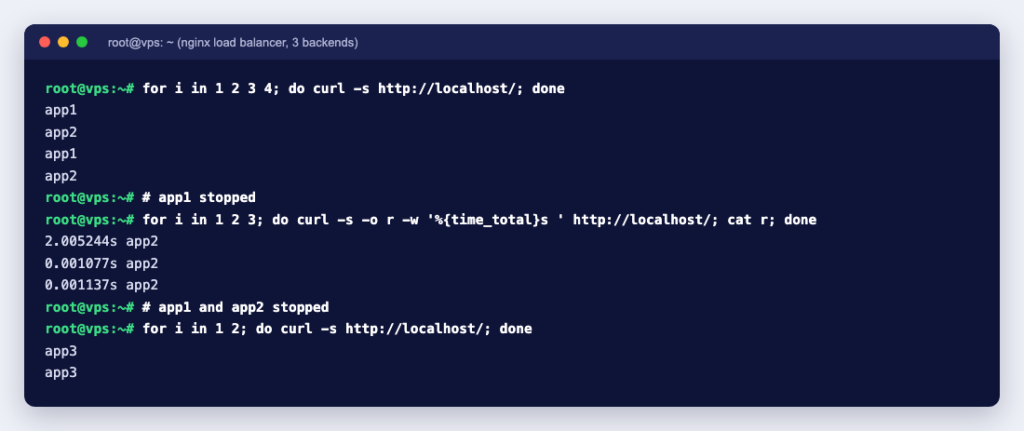
The quickest way to see failover is a load balancer in front of a few web nodes. We ran this in Docker with Nginx 1.31.6: three web containers (b04-app1 to b04-app3), each serving a page that names itself, and one Nginx load balancer with this configuration:
upstream app_nodes {
    zone app_nodes 64k;
    server b04-app1:80 max_fails=1 fail_timeout=10s;
    server b04-app2:80 max_fails=1 fail_timeout=10s;
    server b04-app3:80 backup;
}

server {
    listen 80;
    location / {
        proxy_pass http://app_nodes;
        proxy_connect_timeout 2s;
    }
}
What happened:
All nodes up:        app1, app2, app1, app2, app1, app2
app1 stopped:        app2 (after 2.06 s), then app2, app2, app2 (0.05 s each)
app1 and app2 down:  app3 (the backup), app3
Three lessons from that small test, all matching the Nginx upstream documentation:
- Round-robin needs a shared zone. Without the
zoneline, every request in our test went to app1, because each Nginx worker process kept its own rotation. Thezonedirective keeps the group’s run-time state “shared between worker processes”. - Failover is automatic but not free. “If an error occurs during communication with a server, the request will be passed to the next server”. Users never saw an error, but the first request after app1 died waited for the 2-second connect timeout. Nginx then marked app1 unavailable for
fail_timeout(10 seconds by default) and later requests were fast again. The log saidupstream server temporarily disabled while connecting to upstream. - Checks are passive. Open-source Nginx only notices a dead node when a real request fails. According to the documentation, periodic active health checks are part of the commercial subscription. keepalived, by contrast, includes its own “Layer 4 to Layer 7 checkers” according to its project page.
This is only the web layer. The load balancer itself is now a single point of failure, which is why it is usually doubled with keepalived and a floating IP; see How to set up highly available Nginx with keepalived.
What a cluster does not fix
- It is not a backup. Replication copies a deleted table or an encrypted disk to every node within seconds. Keep separate, versioned backups.
- Shared dependencies still fail together. Nodes in one rack or one data centre share power, network and upstream links. Nodes in different locations add latency between them, which matters for synchronous database replication.
- Your application must allow it. Sessions stored in local files, uploads saved to one node’s disk and cron jobs that must run once all need rethinking: move sessions to a shared store such as Redis, put uploads on shared or object storage, and run scheduled jobs on one node only.
- Floating IPs need network support. A virtual IP only works if your provider’s network lets the address move between your servers. Ask before you design around one.
Do you need a cluster? A quick checklist
- Would an hour of downtime cost more than a second or third server for a year?
- Has one server’s CPU, memory or disk I/O become the limit, even after tuning and caching?
- Do you need to patch and reboot without a maintenance window?
- Do you, or someone you pay, have the time and skills to monitor several nodes and test failover regularly?
If you answered no to most of these, a single server sized properly, with off-server backups, monitoring and a tested restore plan, is simpler and often more reliable in practice. How much RAM, CPU and storage do you need for a high-traffic website? helps with the sizing.
Planning a cluster? Our dedicated servers come managed or unmanaged, and our server management team can design, build and monitor load balancing and failover for you.