jijosh at

Pick a VPS when your workload fits comfortably in a slice of a server and you want to pay as little as possible; pick a dedicated server when you need the whole machine’s CPU, memory, disk speed or a GPU every hour of the day, or when other tenants’ load would hurt you. In money terms, a good VPS costs $10 to $40 a month and a dedicated server $50 to several hundred, so the question is whether your workload has outgrown what the cheaper option can deliver.
The Real Difference
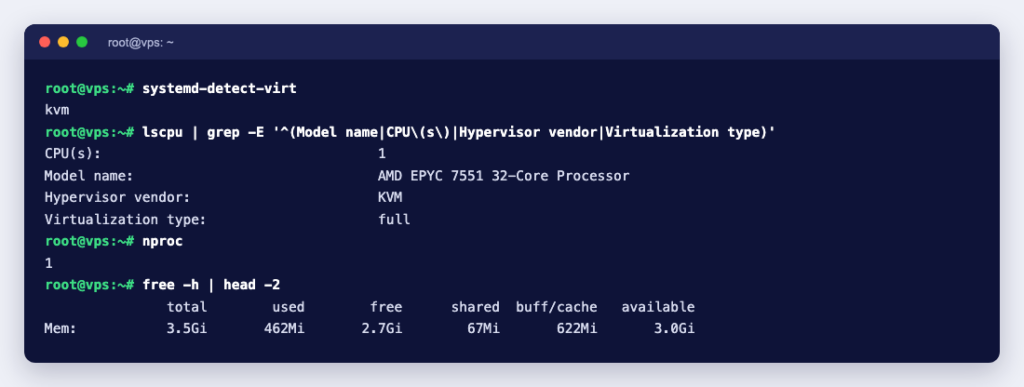
A VPS is a virtual machine. A hypervisor such as KVM splits one physical server into several, and each gets a fixed number of virtual CPU cores, memory and disk. A dedicated server is the physical machine itself, used only by you. You can see the difference from inside the server. The screenshot above is a 1-core KVM VPS on our test machine: the processor is a 32-core AMD EPYC, but the VPS sees one core of it, and Linux reports that it runs under KVM. On a dedicated server, systemd-detect-virt prints none and nproc shows every thread the CPU has. That one command is the quickest way to check what a provider really sold you.
Side by Side
| VPS | Dedicated server | |
|---|---|---|
| Hardware | A share of a server | The whole server |
| Typical price | $10 to $40 a month | $50 to $800+ a month, more with GPUs |
| Performance | Good, but neighbours can affect disk and CPU | Consistent; nothing else on the machine |
| Delivery | About a minute once the order is approved | 3 to 46 business hours |
| Upgrades | Move to a bigger plan quickly | New hardware or a new server |
| GPU | Not on our VPS; elsewhere often a partial card | Whole cards, up to four per server |
| Custom OS and hardware | From the provider’s templates | Any OS; RAID, disks and RAM to order |
| Best for | Sites, apps, bots, VPNs, development | Busy databases, game servers, streaming, AI, many sites |
What Each Costs at Ucartz
Prices from our store on 23 November 2026, in US dollars a month:
- KVM VPS: Lite $10 (1 core, 4 GB RAM, 50 GB NVMe), Standard $20 (2 cores, 8 GB, 100 GB), Pro $30 (4 cores, 16 GB, 200 GB), Elite $40 (8 cores, 32 GB, 400 GB), all with unmetered traffic in the USA.
- Low-cost dedicated: from $51.99, for example a 6-core Xeon with 32 GB of ECC memory.
- Unmanaged dedicated: from $74 up to $822.99 for a 48-core AMD EPYC.
- GPU dedicated: from $222.99 for an 8 GB Tesla P4 to $7,114.99 for four 96 GB RTX PRO 6000 Blackwell cards.
Notice the overlap: the $40 VPS Elite has 8 cores and 32 GB of memory, which is as much memory and more cores than some $60 dedicated servers. Below about $50 a month a VPS almost always gives you more for the money. Above it, a dedicated server starts to win because nothing is shared.
When a VPS Is Enough
- One to a few websites, including busy WordPress sites with caching.
- Automation tools like n8n, bots, APIs and small databases.
- A VPN, a mail relay, monitoring or a development server.
- Anything where you want to start small and resize later.
When You Need a Dedicated Server
- Your VPS is always busy. CPU above 70 percent most of the day, or steal time (
stintop) above a few percent, means you are fighting for the host’s CPU. - Disk is the bottleneck. Large databases and many small writes do best on NVMe that nobody else shares.
- Game servers with many players, where steady single-core speed matters more than anything.
- Streaming and large downloads, which need a full 1 Gbps or 10 Gbps port.
- You host for others, such as an agency with dozens of client sites or a reseller.
- Compliance, where a customer or auditor wants your data on hardware no one else uses.
- AI and GPU work. Most AI models need a whole GPU with enough memory to hold the model.
GPU Work: Why It Usually Means Dedicated
Small models can run on a CPU-only VPS, slowly; our post Can You Run an LLM on a CPU-Only VPS? shows what to expect. Once you need real speed, the model has to fit in GPU memory, and that means a whole card. As a guide, an 8B model at 4-bit needs about 5 GB, a 32B model about 20 GB and a 70B model about 42 GB. Our GPU servers run from 8 GB to 384 GB of GPU memory, with the best card for each job listed on our GPU dedicated servers page.
A Simple Way to Decide
- Start on a VPS if you are not sure. It is cheap and quick to resize.
- Watch CPU, memory, disk wait and steal time for a few weeks.
- When the largest VPS you would pay for is still busy, or you need a GPU, move to dedicated.
- If you have no time to manage either, choose a managed plan.
Our server calculator suggests a VPS or dedicated plan from what you plan to run.
Frequently Asked Questions
Is a dedicated server faster than a VPS?
Not always. A new VPS on a modern CPU can beat an old dedicated server. A dedicated server is more consistent, because no other customer shares its CPU, disks or network.
How much more does a dedicated server cost than a VPS?
With us, a VPS costs $10 to $40 a month and a dedicated server from $51.99. You pay more for having the whole machine to yourself, not for more cores.
Can I move from a VPS to a dedicated server later?
Yes. You order the dedicated server, copy your data across and point your domain to the new IP. Plan it for a quiet hour. On a managed dedicated server our team moves it for you free for up to 200 GB of data (see our free migration service); on an unmanaged server you can hire one of our engineers to do it.
Can I run Windows on both?
Yes. On our VPS, Windows Server is available on the Pro and Elite plans as Microsoft’s 180-day evaluation edition, installed by our engineers. Dedicated servers offer Windows on most plans, licensed where the plan supports it.
How do I check whether my server is a VPS or dedicated?
Run systemd-detect-virt. It prints the hypervisor name, such as kvm, on a VPS and none on a dedicated server.