Ria Febin

A bare metal server costs anywhere from about $50 to well over $7,000 a month, and the gap is almost entirely hardware: the CPU generation, how much memory and NVMe you get, the network port, the location and, at the top end, the GPUs. The price usually covers the physical machine, its power and network port, one or more IPv4 addresses and root access. Backups, management, control panel licences and extra IP blocks are usually extra, so compare those before you compare headline prices.
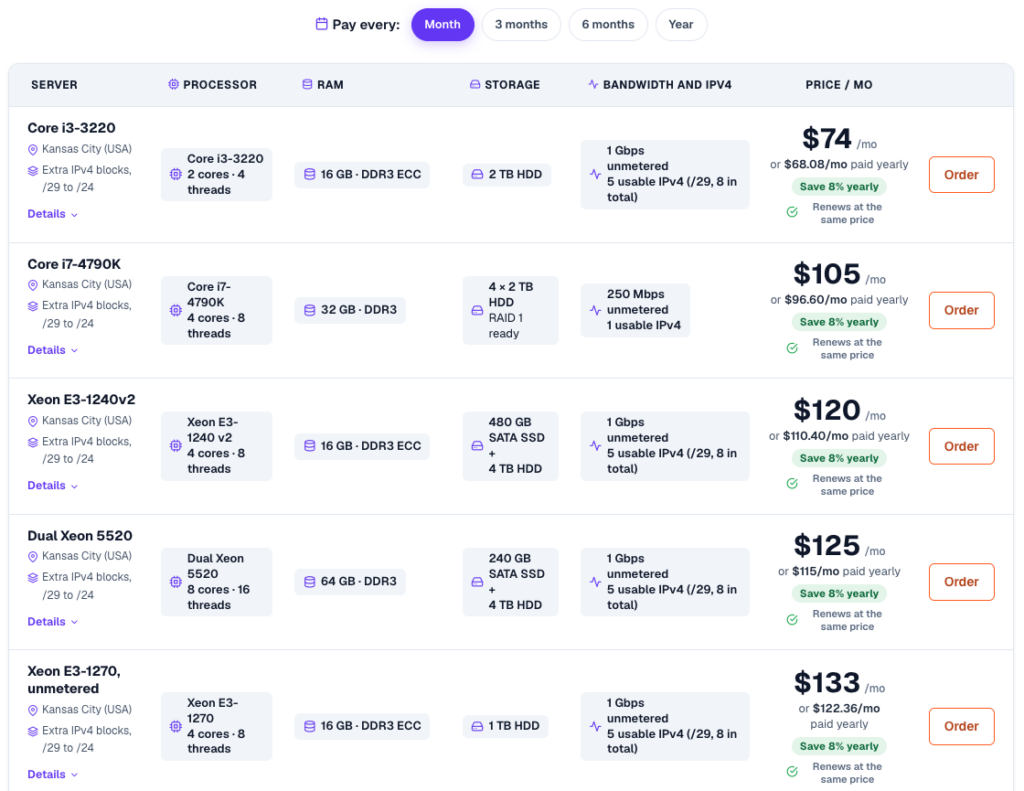
This guide breaks down what a bare metal price includes, what pushes it up, the costs people forget, and real price ranges from our own store as of November 2026, from budget servers to multi-GPU machines for AI.
What Is a Bare Metal Server?
A bare metal server is a whole physical server that only you use. There is no hypervisor splitting it between customers, so every CPU core, every gigabyte of RAM and every disk belongs to your workload. “Bare metal” and “dedicated server” describe the same thing; cloud providers tend to say bare metal, traditional hosts say dedicated. Some cloud platforms also sell bare metal by the hour through an API, while most hosting companies bill it by the month.
The opposite is a VPS, where one large server is divided into virtual machines. If you are deciding between the two, see Dedicated Server vs VPS: When Each Makes Sense.
What a Bare Metal Price Normally Includes
- The hardware: CPU, RAM and disks exactly as listed, not shared with anyone.
- Power, cooling and rack space in the data centre.
- A network port (for example 1 Gbps) with either unmetered traffic or a monthly allowance such as 10 TB or 30 TB.
- IPv4 addresses: usually one usable address, sometimes a small block of five.
- Operating system installation from the provider’s list, and root or administrator access.
- Hardware replacement: if a disk or power supply fails, the provider swaps it.
What Is Usually Not Included
- Backups. On an unmanaged server the data is yours to protect. A RAID 1 mirror protects against one failed disk, not against deletion or ransomware.
- Server management: updates, security hardening, monitoring and fixing what breaks.
- Software licences: cPanel, Plesk, DirectAdmin, Windows Server and similar are billed on top, usually at the vendor’s price.
- Extra IP addresses: larger blocks are a monthly add-on.
- DDoS protection: some servers include it, many do not. Ask before you assume.
Bare Metal Server Prices in 2026: Real Ranges
These are monthly prices from the Ucartz store on 23 November 2026, in US dollars, with no setup fee. They show how wide the market is and what each budget buys.
| Type | Monthly price | What you get at the entry level |
|---|---|---|
| Low-cost bare metal | $51.99 to $153.99 | Older Xeon or Ryzen, 32 GB RAM, unmetered 300 to 500 Mbps |
| Unmanaged dedicated | $74 to $822.99 | From a 4-thread Core i3 up to a 48-core AMD EPYC 9455 |
| Game servers | $140.99 to $317.99 | High-clock Ryzen, NVMe, game DDoS protection on every plan |
| Managed dedicated (free control panel) | $131.99 to $276.99 | Server plus our management and a free panel such as Virtualmin or HestiaCP |
| Managed cPanel dedicated | $232.99 to $377.99 | Managed server with a cPanel licence for 100 accounts |
| GPU bare metal | $222.99 to $7,114.99 | From one 8 GB Tesla P4 to four 96 GB RTX PRO 6000 Blackwell cards |
What Pushes the Price Up
CPU generation and core count
The processor is the biggest single factor. A ten-year-old Xeon E3 and a current Ryzen 9 or EPYC can differ by four to eight times in benchmark score. Older chips are fine for a VPN, backups or a small website. For databases, game servers, video transcoding or many busy sites, a newer CPU usually costs less per unit of work even though the monthly price is higher. Compare the PassMark CPU score, not just the core count.
Memory and storage
DDR5 costs more than DDR4, ECC memory more than non-ECC, and NVMe more than SATA SSD or hard disks. Large hard disks are the cheapest way to get capacity for backups and media; NVMe is what makes databases and busy sites feel fast. Two disks in RAID 1 also cost more than one, and are worth it for anything you cannot afford to lose to a disk failure.
Network port and traffic
A 1 Gbps unmetered port is common now, but some budget servers have 250 to 500 Mbps, and some plans meter traffic at 10 to 30 TB a month. A 10 Gbps port with 100 TB or more costs considerably more. Streaming, downloads and large backups are where this matters. Our guide to unmetered vs unlimited bandwidth explains the difference.
Location
The same hardware costs more in Singapore, Tokyo, Seoul or Sydney than in the US or western Europe, because power, space and bandwidth cost more there. On our country pages, entry servers start at $97.99 a month in Germany and $116.99 in the UK, but at $200.99 in Japan and $256.99 in South Korea.
GPUs
A GPU changes the price more than anything else. What you pay for is mostly GPU memory (VRAM) and memory bandwidth, because those decide which AI models fit and how fast they answer. As a rough guide to what each tier runs:
- 8 GB (Tesla P4, RTX 5060), from $222.99: transcoding, small models up to about 7B to 8B parameters at 4-bit.
- 24 to 32 GB (RTX 3090, RTX PRO 4000 Blackwell, RTX 5090), from $369.99: models up to about 32B at 4-bit, Stable Diffusion, rendering.
- 64 GB across four Tesla V100 cards, $1,345.99: models up to about 70B at 4-bit split over the cards.
- 96 GB on one RTX PRO 6000 Blackwell, $1,983.99: 70B at 8-bit or 120B-class models at 4-bit on a single card.
- 384 GB on four RTX PRO 6000 Blackwell, $7,114.99: the largest open models.
Older cards cost less but check software support: NVIDIA’s CUDA 13 no longer supports the Pascal and Volta generations (Tesla P4 and V100), so new frameworks will eventually leave them behind. Our GPU dedicated servers page lists the best card for each job and how we estimate what fits.
Costs People Forget to Compare
- Setup fees. Some providers charge one month’s rent or more to set up a server. Spread it over a year and it changes which offer is cheaper.
- Extra IPv4. Prices for IPv4 blocks vary a lot. In our store a /29 (five more usable addresses) is $63 a month and a /24 (253 usable) is $512 a month, on plans that support extra blocks.
- Licences that rise. cPanel has announced new prices from 16 December 2026, and Plesk from 1 January 2027. A panel licence can cost as much as a budget server.
- Bandwidth overage on metered plans, if you go past the monthly allowance.
- Renewal price. Check that the price you pay in month 13 is the same as month 1. Ours renew at the same price.
- Management. If nobody on your team can patch and secure a Linux server, add the cost of someone who can, or choose a managed plan.
Is Bare Metal Cheaper Than Cloud?
For a workload that runs all day, every day, usually yes. Cloud instances are priced for flexibility: you can start and stop them by the hour, but a large instance left running for a month often costs more than a dedicated server with more cores and memory, and cloud data transfer is usually billed per gigabyte. Cloud makes sense for short bursts, testing and services that scale up and down. Bare metal makes sense for steady load, large databases, streaming and GPU work that runs for weeks. Our post Dedicated vs Cloud Hosting covers this in more detail.
How to Choose Without Overpaying
- Measure what you use today: peak CPU, RAM, disk space and monthly traffic.
- Add room for a year of growth, roughly 30 to 50 percent.
- Pick the location closest to your users.
- Choose the CPU by benchmark score for your kind of work, then the cheapest plan that meets it.
- Add the extras you will really need (IPs, licences, backups, management) and compare the total.
- If the load is steady, pay for 6 or 12 months to save; if you are unsure, start monthly.
If you would like a second opinion, our free server calculator suggests a plan from what you plan to run, or you can browse low-cost bare metal servers and unmanaged dedicated servers directly.
Frequently Asked Questions
Is a bare metal server the same as a dedicated server?
Yes. Both mean a physical server used by one customer. Cloud platforms usually call it bare metal and bill by the hour; hosting companies usually call it a dedicated server and bill by the month.
What is the cheapest bare metal server worth buying?
Around $50 to $75 a month buys a reliable older Xeon with 16 to 32 GB of RAM, which is enough for a VPN, backups, a game server for friends or a handful of small sites. Below that, hardware is often more than ten years old with slow disks.
How much does a GPU bare metal server cost?
In our store, from $222.99 a month for an 8 GB Tesla P4, $369.99 for a 24 GB RTX 3090, $1,983.99 for a 96 GB RTX PRO 6000 Blackwell and $7,114.99 for four of them. GPU memory is the main thing you pay for.
Do bare metal servers have setup fees?
Some providers charge them, especially for custom builds. Ucartz charges no setup fee on dedicated servers.
Can I pay yearly for a lower price?
Yes. Our dedicated servers can be paid monthly or every 3, 6 or 12 months, saving 3%, 5% or 8%. Prepaid terms are not refundable, so start monthly if you are still testing.