Ria Febin
A real estate business in Australia cut its administrative processing time by 97 percent, turning a four to five minute manual task into one that takes 10 to 20 seconds, by connecting WhatsApp to its CRM and spreadsheets through n8n and AI. This is a documented third party implementation, built by the automation agency System AI for its client The Srama Group, published as an n8n customer case study. We did not build it. We are covering it here because it is a clear, verifiable example of what workflow automation with n8n can actually deliver, and because the same pattern applies well beyond real estate.
The problem: good software, disconnected by manual work
The Srama Group already had the tools most real estate businesses use. WhatsApp for talking to customers. Zoho CRM for tracking leads. Google Sheets for property records. None of that was the problem.
The gap was between the applications. Every enquiry or property update that arrived on WhatsApp still had to be read, understood, and typed into the right system by hand: check whether the customer already existed in the CRM, add notes or create a new lead, then separately enter property details into a spreadsheet and cross check them against listing portals. Each of these steps took around four to five minutes. Individually that is nothing. Repeated across every enquiry, every day, it became a real drag on a growing business, and it meant virtual assistants spent most of their time on data entry rather than anything that needed judgment.
Why a simple WhatsApp to CRM link was not enough
A basic integration can forward a WhatsApp message into a CRM field. That is not what this needed. Messages arrived unstructured: some were new enquiries, some were property updates, and some were voice notes instead of text. The workflow had to work out what a message actually was before deciding what to do with it, decide whether a customer record already existed or needed creating, and turn a voice note into usable text before any of that logic could run. That combination, understanding loosely structured input, branching logic, and multiple application integrations, is exactly where an AI step inside a workflow earns its place instead of being used everywhere by default.
How the workflow is built
According to the published case study, the implementation combines:
- n8n as the workflow engine that receives messages, runs the logic, and coordinates every connected application.
- WhatsApp, via Twilio, as the interface employees actually type into.
- AI for voice transcription, translation, and interpreting what an incoming message is about.
- Zoho CRM for customer leads and notes.
- Google Sheets as the property tracker.
- LangSmith for logging AI execution and tracking cost.
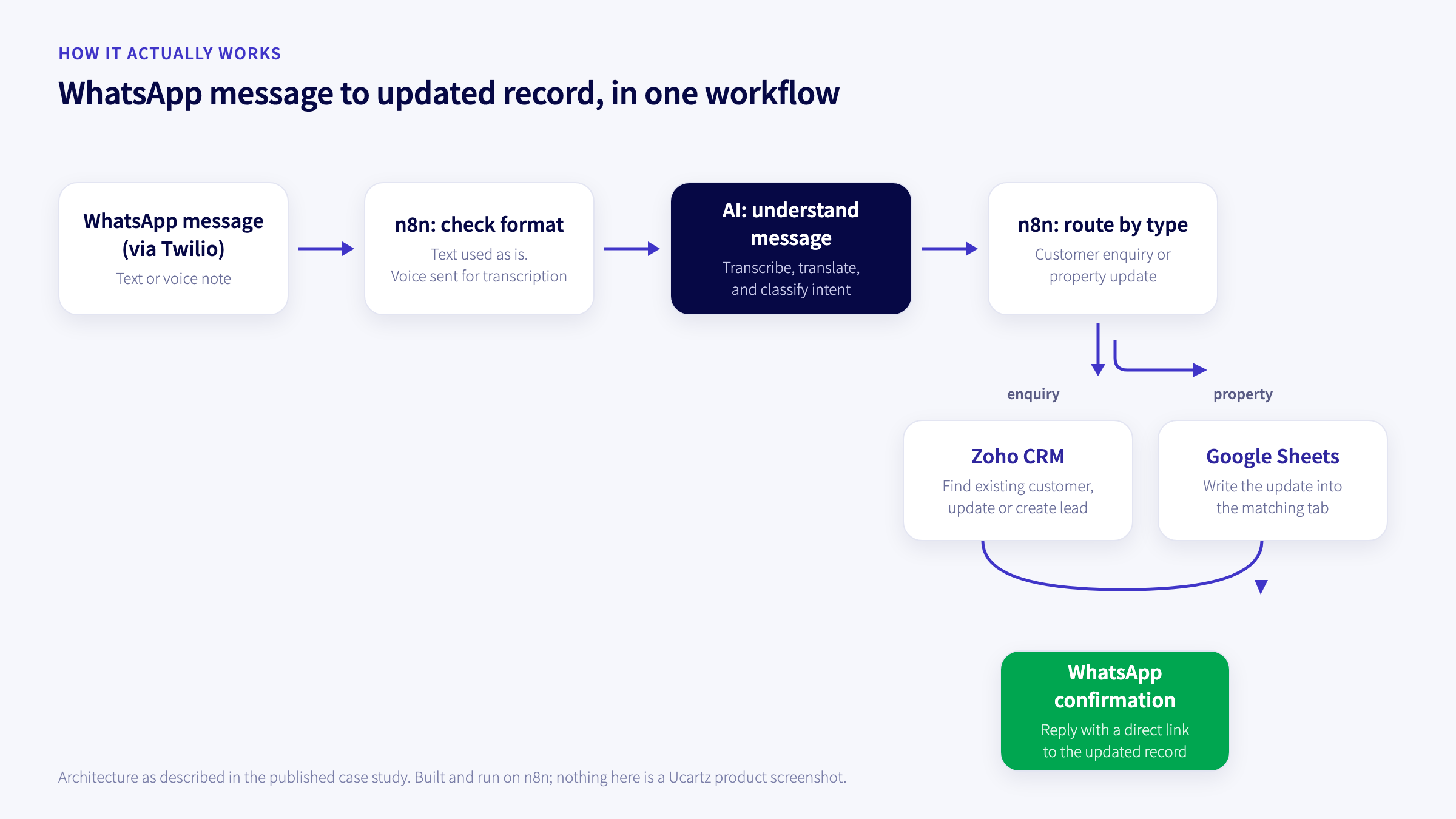
The case study describes the flow this way: a message arrives on WhatsApp and is checked for format first. Text is used as is; a voice note is downloaded and transcribed, with translation where needed. Once the content is text, the workflow classifies it as either a customer enquiry or a property update and routes it down the matching path. A customer message checks Zoho CRM for an existing record, updating it with notes if found or creating a new lead if not, which avoids the duplicate records a blind forward would create. A property message is written into the correct tab of the Google Sheets tracker, and the employee gets a WhatsApp reply confirming the update with a direct link to that exact tab, so nothing has to be taken on faith.
The build itself is split into separate sub workflows for message handling, CRM updates, property updates, and responses, rather than one large workflow doing everything. That is a practical choice more than a technical one: smaller, named workflows are easier to debug when one specific step misbehaves, and easier to hand off or extend later.
The reported results
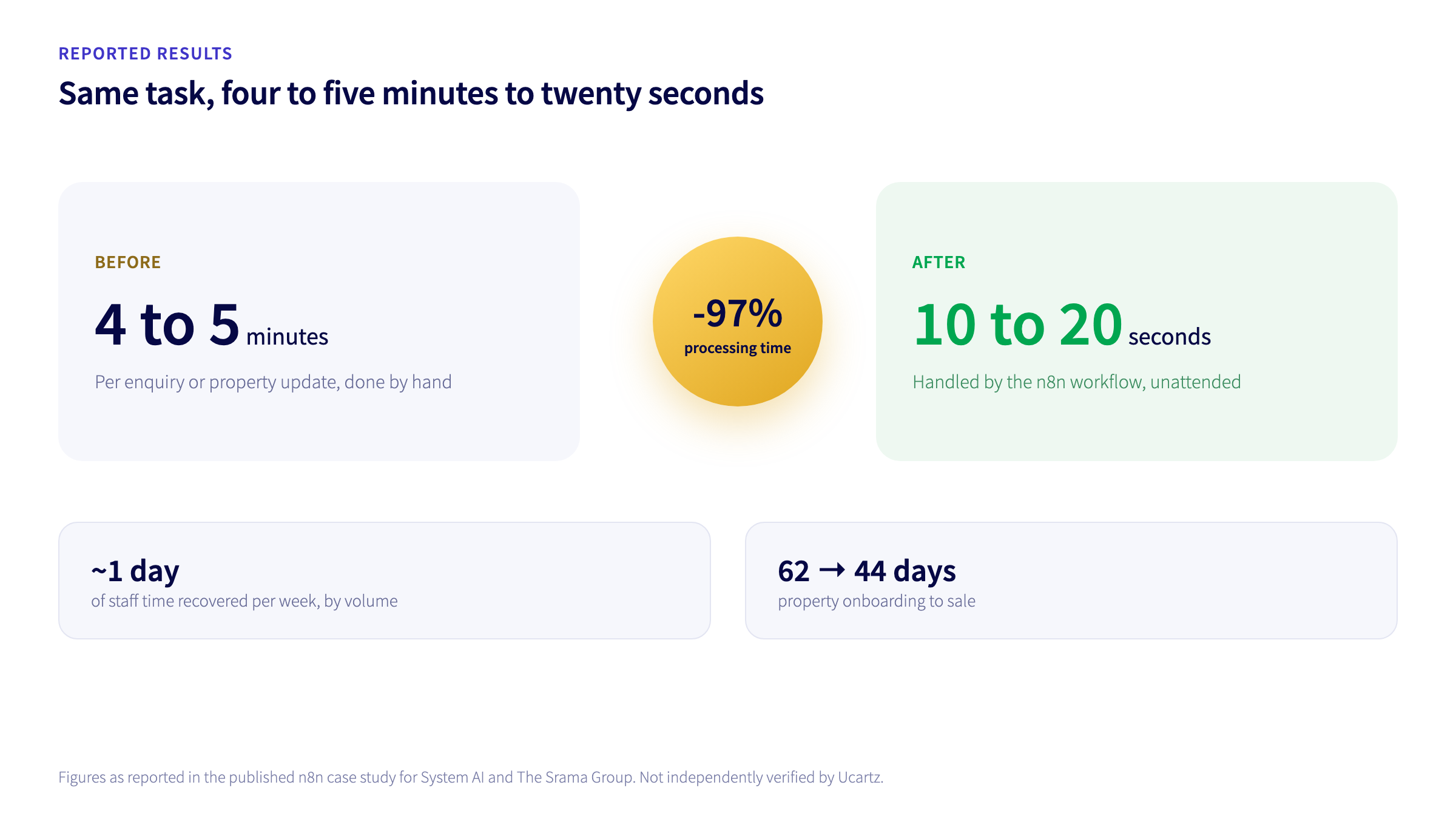
| Metric | Reported result |
|---|---|
| Administrative processing time | Reduced by 97 percent |
| Time per task | Four to five minutes down to 10 to 20 seconds |
| Staff time recovered | Around one working day per week |
| Property onboarding to sale | 62 days down to 44 days |
These figures are as reported in the original n8n case study; we have not independently verified them, and we are not claiming them as our own results.
What actually made this work
A few choices in this build are worth copying regardless of the industry.
- It started with a measurable problem, not a tool. The goal was never “add AI.” It was cutting a specific, repeated five minute task down to something that did not need a human at all.
- Staff kept using the tool they already had. WhatsApp stayed the interface. Nobody had to learn a new system to keep working.
- AI was used for the one part that genuinely needed it. Routing, CRM writes, and spreadsheet updates are plain workflow logic. AI only handled voice transcription, translation, and figuring out what a message was about. That keeps the automation cheaper to run and easier to reason about than routing everything through a model.
- Nothing replaced the existing CRM or spreadsheet. n8n connected them instead of forcing a migration.
- Every action was verifiable. A confirmation message with a direct link to the updated row means a mistake gets caught the same day, not discovered in a quarterly audit.
Where this pattern applies outside real estate
The same shape, a messaging interface plus AI classification plus a CRM or spreadsheet, shows up in most businesses that run on a handful of disconnected tools:
- IT and hosting support: classify incoming requests, enrich them with account details, and route them to the right team automatically.
- Ecommerce: tie order updates, payment confirmations, and stock changes together across a storefront, a CRM, and a messaging channel.
- Professional services: turn a new client enquiry into an onboarding checklist, document request, and task list without anyone copying details between systems.
- Sales teams: capture a lead, qualify and enrich it, and assign it to the right rep the moment it arrives, with follow up reminders set automatically.
The underlying work is always the same: find the repetitive step, decide where the information actually needs to live, and build a workflow that moves it there with a human only checking the parts that matter.
What a production workflow like this still needs
A demo that works once is not the same as a workflow running unattended every day. Anyone building something similar should plan for:
- Validation on anything an AI step extracts before it changes a customer or financial record.
- Duplicate checks so a repeated message cannot create a second lead or a second row.
- Error handling that records a failure and recovers instead of silently dropping a message when a connected app is down.
- Credential security for every API key the workflow holds, with access limited to what each step actually needs.
- Human approval on anything high impact; an AI step should not be the final word on a decision that matters.
- Monitoring and cost tracking once the workflow is live, not just while it is being built.
How Ucartz approaches this kind of build
We treat n8n automation as engineering work, not a one afternoon integration. Depending on what a business actually needs, that can include self hosted n8n deployment, mapping the existing process before building anything, connecting the APIs and applications already in use, AI powered message or document processing, WhatsApp and CRM automation, AI agents scoped to specific tasks, and ongoing monitoring once a workflow is live. For businesses with their own data handling requirements, workflows can also run against a private or dedicated AI model instead of a shared public one.
We are not claiming to have built the System AI and The Srama Group workflow described above. We are sharing it because it is a well documented, independently published example worth learning from, and because if a repetitive process like this is costing your team real time every week, it is very likely solvable the same way.
If that sounds like your business, our n8n automation and AI agent service page has the details, or you can open a ticket to talk through a specific workflow with an engineer.
Source: this article is based on the publicly published n8n customer case study “How System reduces AI data entry operations time by 97% with n8n,” delivered by System AI for The Srama Group. The implementation, figures, and architecture described are theirs, not ours; read the original at n8n.io/case-studies/system-ai.