 Binila Treesa Babu
Every time your application calls OpenAI, Anthropic, or any managed AI API, you pay per token. At low volume this is manageable. At production volume thousands of requests per day across multiple users the monthly bill becomes the dominant infrastructure cost.
Developers building internal tools, automation pipelines, customer-facing chatbots, or document processing systems hit this ceiling faster than expected. A workflow that summarizes 10,000 support tickets per month at GPT-4o pricing costs hundreds of dollars in API fees alone, before you factor in the hosting, database, and application server costs sitting underneath it.
The alternative is running a model on your own server. Until recently this required expensive GPU hardware an NVIDIA A100 or at minimum an RTX 3090 which put self-hosted AI out of reach for most projects. That changed with quantization and a new generation of small, efficient models specifically designed to run on CPU hardware.
TinyLlama, Microsoft Phi, and quantized Mistral 7B run on standard VPS servers with 4-8GB of RAM. No GPU required. No per-token cost. No rate limits. Your model runs on your infrastructure, under your control, at fixed monthly cost.
This guide shows you how to get each one running on a Ucartz VPS.
What Quantization Actually Means
A standard large language model stores each parameter as a 32-bit floating point number. A 7 billion parameter model therefore needs approximately 28GB of memory just to load far beyond a standard VPS.
Quantization reduces the precision of each parameter. A 4-bit quantized model stores each parameter in 4 bits instead of 32. A 7B model in 4-bit quantization needs approximately 4GB of RAM within reach of a mid-range VPS.
The quality tradeoff is real but smaller than you expect. For tasks like summarization, classification, question answering, and instruction following, a 4-bit quantized 7B model performs comparably to the full-precision version on most benchmarks. The gap is noticeable only on complex multi-step reasoning tasks that require high numerical precision.
For practical applications customer support bots, document summarization, lead qualification, content generation quantized models at 4-bit or 8-bit precision deliver results that are indistinguishable from the full model in production use.
Model Selection: Which One Fits Your VPS
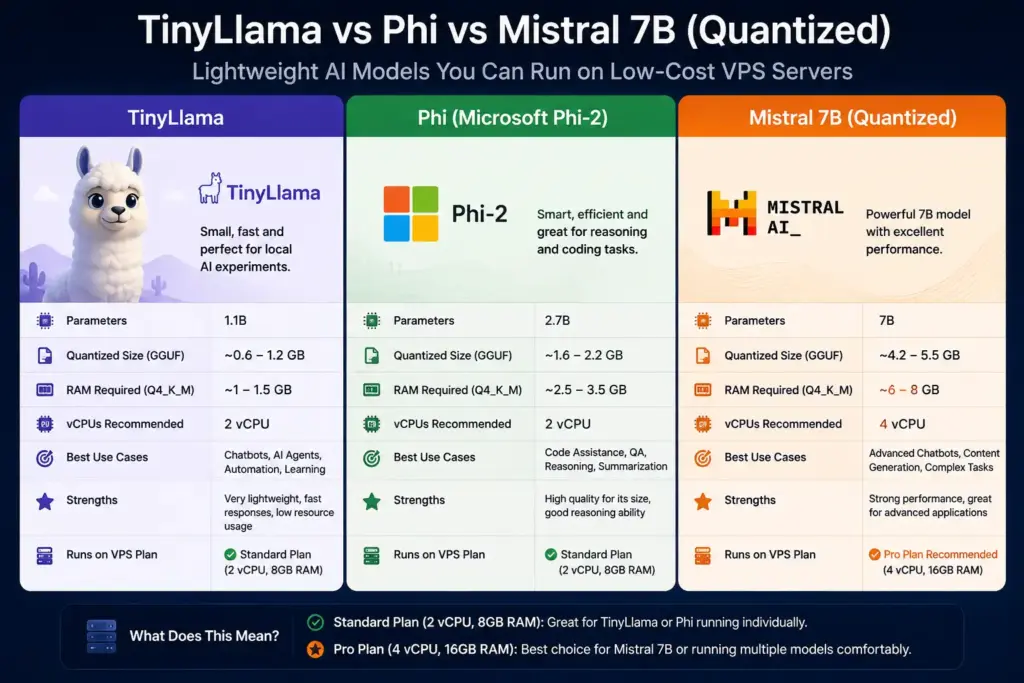
Three models stand out for low-cost VPS deployment in 2026. Each targets a different resource profile and use case.
TinyLlama 1.1B compact language model trains on the same data distribution as Llama 2 but uses 1.1 billion parameters instead of 7 billion. It runs on a 2GB RAM VPS and responds in under 2 seconds on a single CPU core. Use it for classification, short text generation, intent detection, and any task where speed and low memory matter more than deep reasoning.
Microsoft Phi-2 and Phi-3-mini are small models trained on high-quality synthetic data that punch significantly above their parameter count. Phi-3-mini at 3.8 billion parameters performs on par with GPT-3.5 on many reasoning and coding benchmarks. It needs 4GB of RAM in quantized form. Use it for code generation, structured output, question answering, and tasks requiring more reasoning depth than TinyLlama provides.
Mistral 7B Instruct Q4 is the quantized version of Mistral’s flagship open-source model. At 4-bit quantization it needs approximately 4-5GB of RAM and runs on CPU at 3-8 tokens per second depending on server spec. It handles complex instructions, multi-turn conversations, document summarization, and most tasks where you currently use a managed API. Use it when output quality is the priority and you have at least 8GB of RAM available.
VPS Specifications for Each Model
| Model | RAM Needed | Ucartz Plan | Price |
|---|---|---|---|
| TinyLlama 1.1B Q4 | ~2GB | VPS Lite | $10/mo |
| Phi-3-mini Q4 | ~4GB | VPS Lite | $10/mo |
| Mistral 7B Q4 | ~5GB | VPS Standard | $20/mo |
| All 3 models simultaneously | ~10GB+ | VPS Pro | $30/mo |
A Ucartz VPS Standard plan with 2 vCPUs and 8GB RAM can comfortably run lightweight models like TinyLlama or Phi individually. The Standard plan (2 vCPUs, 8GB RAM at $20/mo) runs Mistral 7B alone but does not have enough memory to load all three models at once
Step 1 – Prepare Your VPS
Connect to your Ucartz VPS:
ssh root@YOUR_VPS_IPUpdate packages:
apt update && apt upgrade -yInstall Python and build tools:
apt install python3 python3-pip python3-venv build-essential cmake -yCreate a project directory:
mkdir ~/ai-models
cd ~/ai-models
python3 -m venv venv
source venv/bin/activate
Step 2 – Install llama.cpp via Python Bindings
llama.cpp is a C++ inference engine optimized for running quantized models on CPU. It is the most efficient way to run GGUF-format quantized models on a VPS without a GPU. The Python bindings (llama-cpp-python) let you call it directly from Python scripts and Flask APIs.
pip install llama-cpp-pythonFor servers with multiple CPU cores, install with OpenBLAS support for faster matrix operations:
CMAKE_ARGS="-DLLAMA_BLAS=ON -DLLAMA_BLAS_VENDOR=OpenBLAS"
pip install llama-cpp-python --force-reinstall --no-cache-dir
Install OpenBLAS first if it is not already present:
apt install libopenblas-dev -yStep 3 – Download TinyLlama
Install the Hugging Face Hub CLI for model downloading:
pip install huggingface-hubDownload the TinyLlama GGUF quantized model:
huggingface-cli download
  TheBloke/TinyLlama-1.1B-Chat-v1.0-GGUF
  tinyllama-1.1b-chat-v1.0.Q4_K_M.gguf
  --local-dir ./models/tinyllama
The Q4_K_M suffix means 4-bit quantization with K-quant mixed precision the best balance of quality and size in the 4-bit range. The file is approximately 700MB.
Test TinyLlama with a Python script:
from llama_cpp import Llama

llm = Llama(
    model_path="./models/tinyllama/tinyllama-1.1b-chat-v1.0.Q4_K_M.gguf",
    n_ctx=2048,
    n_threads=4
)

output = llm.create_chat_completion(
    messages=[
        {"role": "system", "content": "You are a helpful assistant."},
        {"role": "user", "content": "Classify this lead: Budget $5000, wants an ecommerce website, timeline 2 months."}
    ]
)

print(output['choices'][0]['message']['content'])
Save as test_tinyllama.py and run:
python3 test_tinyllama.pyFirst run loads the model into memory takes 5-10 seconds. Inference runs immediately after. On a 4-core VPS you see responses in 2-4 seconds for short prompts.
Step 4 – Download Phi-3-mini
huggingface-cli download
  microsoft/Phi-3-mini-4k-instruct-gguf
  Phi-3-mini-4k-instruct-q4.gguf
  --local-dir ./models/phi3
The file is approximately 2.2GB. Test Phi-3-mini:
from llama_cpp import Llama

llm = Llama(
    model_path="./models/phi3/Phi-3-mini-4k-instruct-q4.gguf",
    n_ctx=4096,
    n_threads=4
)

output = llm.create_chat_completion(
    messages=[
        {
            "role": "system",
            "content": "You are a coding assistant. Return only code, no explanation."
        },
        {
            "role": "user",
            "content": "Write a Python function that validates an email address using regex."
        }
    ]
)

print(output['choices'][0]['message']['content'])
Phi-3-mini handles code generation noticeably better than TinyLlama. For workflows that generate SQL queries, Python scripts, or structured JSON output, Phi-3-mini is the better choice at the 4GB RAM tier.
Step 5 – Download Mistral 7B Quantized
huggingface-cli download
  TheBloke/Mistral-7B-Instruct-v0.2-GGUF
  mistral-7b-instruct-v0.2.Q4_K_M.gguf
  --local-dir ./models/mistral
The file is approximately 4.1GB. Ensure your VPS has at least 8GB RAM before loading Mistral the model needs 5GB for parameters plus additional memory for context and processing.
Test Mistral 7B:
from llama_cpp import Llama

llm = Llama(
    model_path="./models/mistral/mistral-7b-instruct-v0.2.Q4_K_M.gguf",
    n_ctx=4096,
    n_threads=4,
    verbose=False
)

output = llm.create_chat_completion(
    messages=[
        {
            "role": "system",
            "content": "You are a support ticket triage assistant. Classify tickets as high, medium, or low priority. Return JSON only."
        },
        {
            "role": "user",
            "content": "Ticket: My VPS has been completely unreachable for 2 hours. SSH times out and the website shows connection refused."
        }
    ]
)

print(output['choices'][0]['message']['content'])
Expected output:
{
  "priority": "high",
  "category": "technical",
  "action": "Escalate to infrastructure team immediately"
}
Mistral 7B follows complex system prompts reliably and produces consistent structured output which is what makes it suitable for production automation tasks.
Step 6 – Build a Multi-Model API Server
Build a single Flask API that serves all three models and lets callers choose which one to use per request:
from flask import Flask, request, jsonify
from llama_cpp import Llama
import time

app = Flask(__name__)

print("Loading models...")

models = {
    "tinyllama": Llama(
        model_path="./models/tinyllama/tinyllama-1.1b-chat-v1.0.Q4_K_M.gguf",
        n_ctx=2048,
        n_threads=4,
        verbose=False
    ),
    "phi3": Llama(
        model_path="./models/phi3/Phi-3-mini-4k-instruct-q4.gguf",
        n_ctx=4096,
        n_threads=4,
        verbose=False
    ),
    "mistral": Llama(
        model_path="./models/mistral/mistral-7b-instruct-v0.2.Q4_K_M.gguf",
        n_ctx=4096,
        n_threads=4,
        verbose=False
    )
}

print("All models loaded. API ready.")

@app.route('/chat', methods=['POST'])
def chat():
    data = request.get_json()

    if not data:
        return jsonify({"error": "No JSON body"}), 400

    model_name  = data.get('model', 'tinyllama')
    system      = data.get('system', 'You are a helpful assistant.')
    prompt      = data.get('prompt', '')
    max_tokens  = data.get('max_tokens', 200)

    if not prompt:
        return jsonify({"error": "Missing 'prompt' field"}), 400

    if model_name not in models:
        return jsonify({
            "error": f"Unknown model: {model_name}",
            "available": list(models.keys())
        }), 400

    llm = models[model_name]
    start = time.time()

    output = llm.create_chat_completion(
        messages=[
            {"role": "system", "content": system},
            {"role": "user",   "content": prompt}
        ],
        max_tokens=max_tokens
    )

    elapsed = round(time.time() - start, 2)
    response_text = output['choices'][0]['message']['content']

    return jsonify({
        "model":     model_name,
        "prompt":    prompt,
        "response":  response_text,
        "time_sec":  elapsed
    })

@app.route('/health', methods=['GET'])
def health():
    return jsonify({
        "status":          "ok",
        "models_loaded":   list(models.keys())
    })

if __name__ == '__main__':
    app.run(host='0.0.0.0', port=5000)
Save as api.py. Open port 5000:
ufw allow 5000Start the server:
python3 api.pyLoading all three models takes 30-60 seconds on first start. After that, the API responds to requests without reloading.
Step 7 – Test All Three Models
From a separate terminal, test each model:
# TinyLlama: fast classification
curl -X POST http://YOUR_VPS_IP:5000/chat
  -H "Content-Type: application/json"
  -d '{
    "model": "tinyllama",
    "prompt": "Is this a good lead? Budget: $500, wants a custom ERP system, timeline: 1 week.",
    "max_tokens": 100
  }'
# Phi-3-mini: code generation
curl -X POST http://YOUR_VPS_IP:5000/chat
-H "Content-Type: application/json"
-d '{
"model": "phi3",
"system": "Return only Python code, no explanation.",
"prompt": "Write a function to check if a string is a valid IPv4 address.",
"max_tokens": 200
}'# Mistral 7B: complex instruction following
curl -X POST http://YOUR_VPS_IP:5000/chat
-H "Content-Type: application/json"
-d '{
"model": "mistral",
"system": "You are a support triage agent. Return JSON only with fields: priority, category, action.",
"prompt": "Customer says: my dedicated server has been down for 3 hours, I am losing sales.",
"max_tokens": 150
}'The health endpoint confirms all models are loaded:
curl http://YOUR_VPS_IP:5000/health{
"status": "ok",
"models_loaded": ["tinyllama", "phi3", "mistral"]
}Step 8 – Run as a Persistent Service
Create a systemd unit file so the API starts automatically on boot:
nano /etc/systemd/system/ai-models.service[Unit]
Description=Lightweight AI Models API
After=network.target
[Service]
User=root
WorkingDirectory=/root/ai-models
Environment=PATH=/root/ai-models/venv/bin
ExecStart=/root/ai-models/venv/bin/python3 api.py
Restart=always
RestartSec=15
StandardOutput=journal
StandardError=journal
[Install]
WantedBy=multi-user.targetEnable and start:
systemctl daemon-reload
systemctl enable ai-models
systemctl start ai-models
systemctl status ai-models
Check logs:
journalctl -u ai-models -fConnect to n8n Workflows
Your local AI API integrates directly with n8n. Add an HTTP Request node:
Method: POST
URL: http://YOUR_VPS_IP:5000/chat
Body (JSON):
{
  "model": "mistral",
  "system": "You are a support triage assistant. Return JSON only.",
  "prompt": "{{$json.ticket_message}}",
  "max_tokens": 200
}
This replaces any OpenAI or OpenRouter call in your n8n workflow with your local model. The response structure is identical your downstream nodes do not need to change.
Choosing the Right Model for Each Task
| Task | Best Model | Reason |
|---|---|---|
| Lead classification | TinyLlama | Fast, low memory, sufficient for simple decisions |
| Intent detection | TinyLlama | Binary or categorical output needs no deep reasoning |
| Code generation | Phi-3-mini | Trained on high-quality code data |
| Structured JSON output | Phi-3-mini or Mistral | Better instruction following |
| Document summarization | Mistral 7B | Handles longer context and complex instructions |
| Support ticket triage | Mistral 7B | Consistent structured output at higher quality |
| Multi-turn conversation | Mistral 7B | Maintains context across turns better |
Run TinyLlama for high-volume, low-complexity tasks where speed matters. Use Mistral 7B for tasks where output quality directly affects user experience or business decisions. Use Phi-3-mini for code-related tasks at the middle ground of speed and quality.
Memory Management for Low-RAM VPS
If you run a 2GB or 4GB VPS, load only one model at a time. Modify the API to load models on demand and unload them after a period of inactivity:
import gc
import time

loaded_model = None
loaded_model_name = None
last_used = time.time()
MODEL_TIMEOUT = 300  # unload after 5 minutes of inactivity

def get_model(name):
    global loaded_model, loaded_model_name, last_used

    if loaded_model_name != name:
        # Unload current model
        loaded_model = None
        gc.collect()

        # Load requested model
        loaded_model = Llama(
            model_path=MODEL_PATHS[name],
            n_ctx=2048,
            n_threads=4,
            verbose=False
        )
        loaded_model_name = name

    last_used = time.time()
    return loaded_model
This approach trades startup latency 10-30 seconds when switching models for lower memory usage. Acceptable for internal tools where switching models is infrequent.
Common Mistakes on Low-Cost VPS Deployments
Loading all models simultaneously on a 4GB VPS – TinyLlama plus Phi-3-mini plus Mistral 7B together need over 10GB of RAM. Loading all three on a 4GB VPS triggers the OOM killer, which terminates the Python process without a clear error. Load one model at startup and add others only after confirming available memory with free -h.
Using 8-bit quantization on a server without AVX2 – Some older VPS hardware does not support AVX2 CPU instructions, which llama.cpp uses for 8-bit operations. If you see illegal instruction errors, switch to Q4_K_M quantization, which uses wider hardware support.
Not setting n_threads correctly – By default llama.cpp uses all available CPU threads. On a shared VPS where other processes compete for CPU, this causes latency spikes. Set n_threads to half your vCPU count and measure inference speed this often produces better sustained throughput than using all cores.
Downloading full-precision models instead of GGUF – The Hugging Face model hub hosts both full-precision PyTorch models and GGUF quantized files. Full-precision 7B models are 14-28GB and cannot load on a standard VPS. Always download the .gguf file from a TheBloke repository or the official GGUF variants hosted by model creators.
Not monitoring disk space – Model files are large. Three models together use 7-8GB of storage. Combined with the OS, swap file, Python packages, and application logs, a 20GB VPS disk fills faster than expected. Check disk usage after downloading models with df -h and set up a log rotation policy for application logs.
Conclusion
Running AI models no longer requires enterprise GPU infrastructure. Lightweight models like TinyLlama, Phi, and quantized Mistral 7B are changing how developers build AI applications by making local inference affordable and accessible. With the right Ucartz VPS hosting configuration, developers can experiment with AI agents, automation systems, chat interfaces, and internal tools without spending hundreds of dollars per month on cloud GPUs. The real advantage is self-hosted AI gives better privacy, predictable costs, and flexibility that hosted APIs often cannot provide.
FAQ
Can lightweight AI models run on a VPS?
Yes, lightweight and quantized AI models can run efficiently on modern VPS servers with enough RAM and CPU resources.
Which lightweight AI models are best for low-cost servers?
TinyLlama, Phi, Gemma, and quantized Mistral 7B are popular choices for affordable AI deployments.
Do I need a GPU VPS for AI models?
No, many smaller AI models can run on CPU-only VPS servers using quantized formats like GGUF.
How much RAM is needed for Mistral 7B quantized?
Most quantized Mistral 7B models require around 8GB–16GB RAM depending on context size and optimization.
Why are developers self-hosting AI models?
Self-hosting reduces API costs, improves privacy, and gives developers more infrastructure control.
Are CPU-based AI servers practical?
Yes, CPU-based inference is becoming practical for lightweight models and internal AI applications.