Ria Febin
JavaScript is the programming language that makes web pages interactive. HTML gives a page its structure, CSS its look, and JavaScript its behaviour: menus that open, forms that check what you typed, content that updates without reloading. Every web browser runs it, and with runtimes such as Node.js it also runs on servers. Its official standard is called ECMAScript (ECMA-262), and despite the name it has nothing to do with the Java language.
JavaScript meaning in plain words
MDN, the Mozilla developer documentation, describes JavaScript as a lightweight interpreted (or just-in-time compiled) programming language that is best known as the scripting language for web pages but is also used outside the browser, for example in Node.js. MDN’s beginner guide, What is JavaScript?, calls it the third layer of the web’s layer cake:
| Layer | Job | Example |
|---|---|---|
| HTML | Structure and meaning | A button labelled “Order bread” |
| CSS | Appearance | The button is green with rounded corners |
| JavaScript | Behaviour | Clicking the button checks stock and shows the result |
The name causes confusion. MDN is explicit: do not confuse JavaScript with Java; JavaScript is not “interpreted Java”, and the two languages are very different. MDN also notes that both names are trademarks of Oracle; the standard that defines the language is called ECMAScript.
What JavaScript does on a web page
Here is a small but realistic script. It waits for a click, asks the server for stock information without reloading the page, and updates the text:
const button = document.querySelector('#order');
const note = document.querySelector('#note');

button.addEventListener('click', async () => {
  note.textContent = 'Checking stock...';
  const response = await fetch('/api/stock?item=bread');
  const data = await response.json();
  note.textContent = data.inStock ? 'In stock: order placed' : 'Sorry, sold out';
});
You load it from the HTML with <script defer src="page.js"></script>; according to MDN, the defer attribute runs the script after the document has been parsed, so the button exists when the code looks for it. (We checked the file’s syntax with node --check in Node.js 24.21.0.)
Most of the power comes from APIs, ready-made building blocks the browser provides: the DOM for changing the page, fetch for talking to servers, plus APIs for storage, audio, video, maps and graphics. Common uses include:
- Form checks before sending, such as a missing email address
- Menus, tabs, sliders and pop-ups
- Loading new content without a full page reload (search suggestions, live chat, carts)
- Whole web applications built with frameworks such as React, Vue or Angular
- Analytics tools and cookie consent banners
MDN also explains a basic browser security measure: each tab runs its code in a separate environment, so in most cases code in one tab cannot directly affect another tab or another website.
JavaScript on the server: Node.js
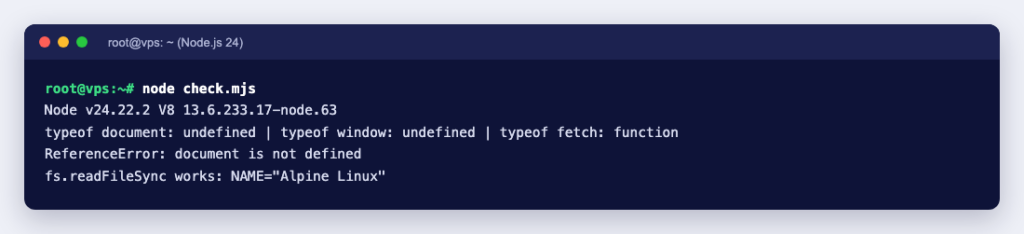
The same language runs outside the browser, but the surroundings change. We ran a short check in Node.js 24.21.0 (the current LTS line, codename Krypton) in Docker:
Node v24.21.0 V8 13.6.233.17-node.53
typeof document: undefined | typeof window: undefined | typeof fetch: function
ReferenceError: document is not defined
fs.readFileSync works: NAME="Alpine Linux"
There is no page, so document and window do not exist and using them throws an error. Instead Node gives JavaScript things a browser never allows, such as reading files and opening network ports. fetch exists in both. This is a small web server in plain Node.js, no framework:
import http from 'node:http';
const server = http.createServer((req, res) => {
  res.writeHead(200, { 'Content-Type': 'application/json' });
  res.end(JSON.stringify({ message: 'Hello from JavaScript on the server', path: req.url }));
});
server.listen(3000, () => console.log('Listening on http://localhost:3000'));
$ curl -i http://localhost:3000/menu
HTTP/1.1 200 OK
Content-Type: application/json
{"message":"Hello from JavaScript on the server","path":"/menu"}That is why one team can write both the front end and the back end of a site in the same language. Packages for both come from npm; see the npm commands cheat sheet.
ECMAScript versions and what your runtime supports
The language is defined by the ECMAScript specification, ECMA-262, and a new edition comes out every year. According to the specification’s own introduction, ECMAScript 2026 is the 17th edition, and it added features such as Math.sumPrecise, Iterator.concat, Array.fromAsync and Error.isError. A feature being in the standard does not mean every browser or runtime has it yet. In our Node.js 24.21.0 test:
| ECMAScript 2026 feature | Available in Node.js 24.21.0? |
|---|---|
Array.fromAsync | Yes |
Error.isError | Yes |
Math.sumPrecise | No (undefined) |
Iterator.concat | No (undefined) |
Check MDN’s browser compatibility table for any feature before you rely on it, and test on the Node.js version your server really runs.
JavaScript vs TypeScript
TypeScript is JavaScript with type annotations, for example qty: number, that catch mistakes before the code runs. Browsers do not run TypeScript directly; it is turned into plain JavaScript first. Recent Node.js versions can run TypeScript files that use only simple, erasable type syntax. The Node.js TypeScript documentation says type stripping is on by default since v23.6.0 and v22.18.0: Node replaces the type syntax with whitespace and does no type checking. We ran the same three-line file on two versions:
interface Order { item: string; qty: number }
const order: Order = { item: 'bread', qty: 2 };
console.log(`TypeScript file ran: ${order.qty} x ${order.item}`);

Node.js v24.21.0:  TypeScript file ran: 2 x bread
Node.js v18.20.8:  SyntaxError: Unexpected identifier
The Node.js release page lists Node.js 18 as end-of-life and says production applications should only use Active LTS or Maintenance LTS releases. If a server still runs Node 18, plan the upgrade.
Everything in browser JavaScript is public
Browser code is downloaded to every visitor as plain text. To show how plainly, we put a file with a made-up key on nginx and fetched it like any visitor would:
$ curl -i http://b08-jsweb/app.js
HTTP/1.1 200 OK
Content-Type: application/javascript
const API_KEY = "sk-test-123";- Never put passwords, API keys or database details in browser JavaScript. Call your own server, and keep the secret there.
- Check input again on the server. Browser checks help the visitor, but anyone can skip them.
- Keep scripts small. Minified files load faster; What is JavaScript minify explains how.
- Load third-party scripts only from sources you trust; they run with the same access to the page as your own code.
Hosting JavaScript
Browser JavaScript is just files, so any web hosting serves it: upload your .js files next to your HTML and CSS, as with Ucartz web hosting. Server-side JavaScript is different. A Node.js app is a program that must keep running, usually behind a web server such as nginx and a process manager that restarts it after a crash or reboot. That calls for a server where you can install software and run long-lived processes, such as a KVM VPS with full root access. Whichever you use, remember the simple split: JavaScript in the browser makes pages interactive, JavaScript on the server does the work you cannot trust to the browser.