jijosh at

A domain is your website’s address, such as example.com, which you register for a set period. Hosting is the server space where your website’s files, database and often your email actually live. You need both for a website, and DNS connects them: the domain’s DNS records tell browsers which hosting server to go to. You can buy both from one company or from different ones, and you can change hosting without changing your domain.
Domain vs hosting side by side
| Domain name | Web hosting | |
|---|---|---|
| What it is | A name in the DNS that people type or click | Space and computing power on a server connected to the internet |
| What it holds | Nothing but DNS records that point elsewhere | Your pages, images, database, scripts and mailboxes |
| Who sells it | A domain registrar | A hosting provider |
| How long | Registered for a period, typically one to ten years, then renewed | Usually billed monthly or yearly |
| Can you move it? | Yes, to another registrar, by a domain transfer | Yes, by copying your site to a new host and updating DNS |
| If it lapses | The address stops working and you may lose the name | The site goes offline, even though the name still exists |
The one-to-ten-year term comes from ICANN’s guide to renewing domain names. For the hosting side in more detail, see What Is Hosting?.
How a domain and hosting connect
When someone types your domain into a browser, the browser asks DNS where that name lives. The answer comes from the domain’s DNS records, and four of them matter most:
- NS (nameservers): which DNS servers hold the domain’s records. You set these at your registrar.
- A and AAAA: the IPv4 and IPv6 address of the web server. This is the link to your hosting.
- CNAME: an alias, often used so that
www.example.comfollowsexample.com. - MX: the servers that receive email for the domain. They can point somewhere different from the website.
That split is why your website, your email and your DNS can each be with a different company while all using the same domain. What Is a Nameserver? explains how to find and change the first link in the chain.
See it for yourself: where is a domain registered and hosted?
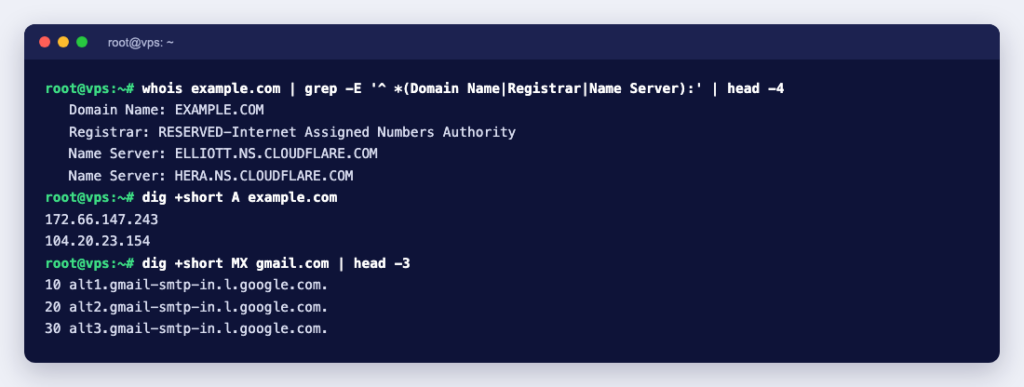
You can look up both halves for any domain with two free command-line tools, whois and dig. We ran these against example.com from a Debian 13 container (whois 5.6.3, DiG 9.20.29).
The domain side: the registration record shows the registrar, the domain’s status and its nameservers. It also lists the creation and expiry dates, which we have left out here:
$ whois example.com
   Domain Name: EXAMPLE.COM
   Registrar: RESERVED-Internet Assigned Numbers Authority
   Domain Status: clientDeleteProhibited https://icann.org/epp#clientDeleteProhibited
   Domain Status: clientTransferProhibited https://icann.org/epp#clientTransferProhibited
   Domain Status: clientUpdateProhibited https://icann.org/epp#clientUpdateProhibited
   Name Server: ELLIOTT.NS.CLOUDFLARE.COM
   Name Server: HERA.NS.CLOUDFLARE.COM
The clientTransferProhibited status is the registrar lock that stops anyone moving the domain to another registrar until the owner removes the lock. ICANN’s EPP status code guide explains each status.
The hosting side: the A record gives the web server’s address, and the MX record shows where mail goes:
$ dig +short A example.com
172.66.147.243
104.20.23.154

$ dig +short MX example.com
0 .

$ dig +short MX gmail.com
5 gmail-smtp-in.l.google.com.
10 alt1.gmail-smtp-in.l.google.com.
20 alt2.gmail-smtp-in.l.google.com.
The MX answer 0 . is a “null MX”, defined in RFC 7505: example.com declares that it accepts no email at all. gmail.com, by contrast, lists mail servers in order of preference. For your own domain, the MX records point to whoever hosts your mailboxes, which may or may not be your web host.
Three common set-ups
- Domain and hosting at the same provider. The simplest option: one account, one bill, and the DNS is usually set up for you.
- Domain at one company, hosting at another. Either change the domain’s nameservers to your host’s, so the host manages all your DNS, or keep DNS at the registrar and create an A record pointing to the hosting server’s IP address.
- Website and email apart. The A record points to your web host and the MX records to a separate email service such as Google Workspace. This is common when a business wants its email to stay put while the website moves.
What happens when things change
You move to a new host
The domain stays exactly where it is. You copy the site to the new server, then update the A record (or the nameservers) to point there. Visitors switch over as DNS caches expire, so keep the old hosting running until the move is complete. Our migration checklist covers the order of steps for a WordPress site.
You change your domain name
Your hosting stays the same; you add the new domain to it and redirect the old one. The redirects are what protect your search rankings: see how to change your domain without losing SEO.
Your domain expires
Your hosting may still be paid for, but nobody can reach it by name, and your email stops arriving too. For generic domains such as .com, ICANN’s expired registration rules require the registrar to send reminders about a month and a week before expiry, and to interrupt the domain’s DNS before deleting it, so a broken website is often the first sign. After that there is usually a period when you can still renew or restore it, often for an extra fee; if you miss it, someone else can register the name. ICANN also advises keeping your contact details with the registrar up to date so the reminders actually reach you.
Your hosting expires
The domain still exists and still points at the old server, but the site and any mailboxes on that hosting stop working. Keep your own backups so you can restore the site elsewhere if you ever need to.
Checklist when you buy a domain and hosting
- Register the domain with your own name and an email address you check, not one on the same domain.
- Turn on auto-renew for the domain, and keep a payment method on file.
- Keep the registrar lock on unless you are transferring the domain.
- Note where your DNS is managed: at the registrar or at the host. Changes only work in the place the nameservers point to.
- Choose a hosting plan that matches what you run: a simple site, WordPress, or an application that needs its own server.
Not sure which ending to pick? What Is a TLD? compares the options. When you are ready, find a name with our domain search and pair it with web hosting that includes free SSL and email on your domain.