
Every online radio station whether it streams music 24/7 or hosts live shows runs on radio hosting.
Without it, your audio has nowhere to stream, no listeners can connect, and Auto DJ won’t work.
Radio hosting is the technology that delivers your live or scheduled audio to listeners over the internet using streaming servers like Shoutcast, Icecast, or AzuraCast. It manages bandwidth, listener connections, audio quality, and uptime so your station stays online without interruptions.
In this guide, you’ll learn what radio hosting is, how online radio streaming works, and what you actually need to run a reliable internet radio station, even if you’re starting from scratch.
What is Radio Hosting
Radio hosting -A server that receives audio from your source (DJ console, microphone, software), encodes it, and broadcasts it simultaneously to thousands of listeners worldwide.To understand the basics in more depth, check our online radio hosting guide.
What Radio Hosting Infrastructure Includes
Server resources:
Dedicated processing power runs streaming software continuously without interruption.
Storage space houses music library, jingles, and automation playlists.
RAM handles simultaneous listener connections and encoding processes.
Streaming software:
Shoutcast, Icecast, or AzuraCast server software manages audio distribution.
Encoder converts audio sources into streaming-compatible formats.
Auto DJ system plays scheduled content when no live broadcast occurs.
Network infrastructure:
High-bandwidth connections deliver audio to hundreds or thousands of listeners simultaneously.
Low-latency routing ensures minimal delay between broadcast and listener reception.
DDoS protection prevents malicious attacks from disrupting streams.
How Radio Hosting Differs from TraditionalHosting
Radio hosting streams continuous audio to listeners. Traffic is push-based (server continuously sends audio stream).
Traditional Radio vs Online Radio
Traditional FM/AM broadcasting:
Requires FCC licensing and expensive equipment. Transmission towers broadcast signals over designated frequencies within limited geographic ranges.
Signal quality degrades with distance from tower. Mountains and buildings block reception.
Limited to local/regional audiences. Cannot reach international listeners without additional towers.
Online radio streaming:
No broadcast license required for internet-only stations. Anyone can start streaming with proper hosting.
Signal quality remains consistent regardless of listener location. Internet connection determines quality, not distance.
Global reach from single server. Listeners worldwide access your stream simultaneously.
Comparison table:
| Feature | Traditional Radio | Online Radio |
| License required | Yes (FCC) | No (for internet-only) |
| Equipment cost | $50,000-500,000+ | $10-500/month |
| Geographic reach | Local/regional | Global |
| Startup time | Months-years | Days-weeks |
| Listener capacity | Unlimited in range | Depends on bandwidth |
| Signal consistency | Variable | Stable with good hosting |
How Online Radio Streaming Works: Step-by-Step
Understanding the flow helps you choose the right hosting.
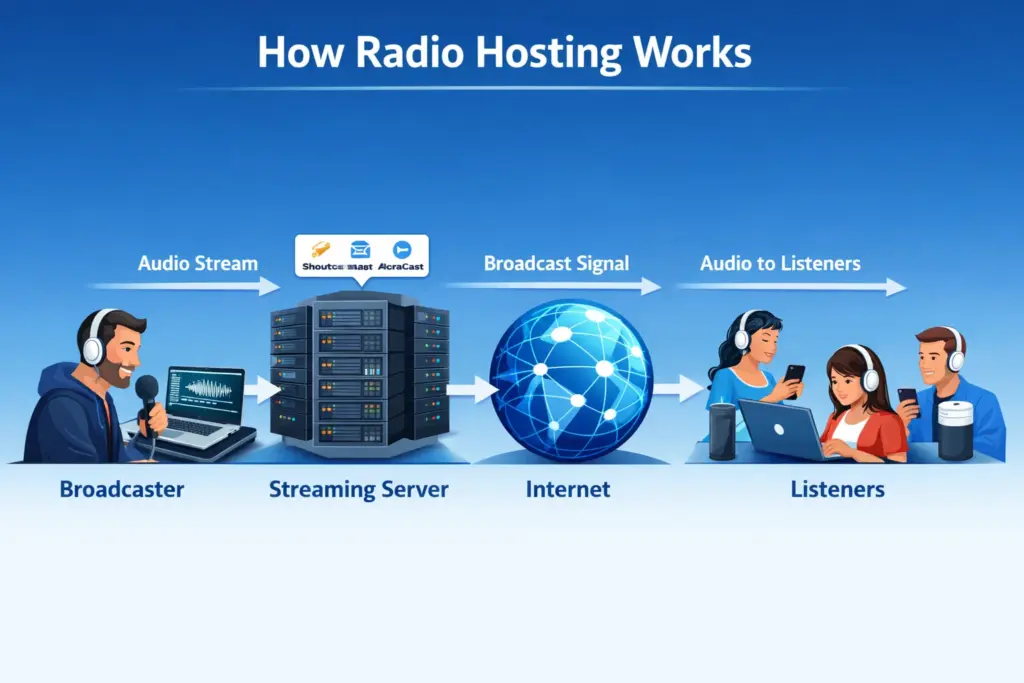
Step 1: Audio Source
Your broadcast starts with audio input. This comes from one of these sources:
Live DJ:
- DJ uses mixer/console with microphone
- Console connects to broadcasting software (OBS, Shoutcast client, etc.)
- DJ controls what listeners hear in real-time
Automation Software:
- Software plays pre-programmed music playlists
- Auto DJ handles broadcast while DJ sleeps/works elsewhere
- No live operator required
Hybrid Setup:
- Auto DJ plays during off-hours
- Live DJ takes over during prime time
- Seamless transition between automated and live
Microphone/Podcast Recording:
- Record podcast or show locally
- Upload to radio hosting platform
- Platform broadcasts on schedule
Step 2: Streaming Server Receives Audio
Your audio travels from source to the radio hosting server.
The connection:
- Audio source sends stream via RTMP protocol (most common)
- Server receives audio stream continuously
- Server buffers small amount of audio (usually 10-30 seconds)
- This buffer prevents stuttering if connection briefly drops
Server software types:
Shoutcast:
Most widely recognized streaming server software. Simple configuration suitable for beginners.
Supports MP3 streaming with broad player compatibility.
Provides real-time listener statistics and logs.
Icecast:
Open-source alternative offering more flexibility than Shoutcast.
Supports multiple formats: MP3, AAC, Ogg Vorbis, and Opus.
Allows multiple mount points for different quality streams.
AzuraCast:
Modern web-based radio management platform built on Icecast foundation.
Provides complete web interface for station management.
Includes built-in Auto DJ, scheduler, and analytics dashboard.
Step 3: Encoding and Compression
Raw audio is massive. A 1-hour uncompressed broadcast = 600MB+. This needs compression.
Compression formats:
- MP3: Universal standard. Works everywhere (phones, cars, websites)
- AAC: Better quality per bitrate. Apple/iTunes use this
- OGG Vorbis: Open source, excellent quality, less universal support
- FLAC: Lossless (full quality), massive file size, limited support
Bitrate explanation:
Bitrate = How much audio data per second.
| Bitrate | Quality | Use Case |
| 32 kbps | Poor (like AM radio) | Music talk/news only |
| 64 kbps | Fair (like FM radio) | Music stations, podcasts |
| 128 kbps | Good (CD-like) | Most music stations |
| 192 kbps | Very good | Professional music radio |
| 320 kbps | Excellent (near CD) | Premium/audiophile streaming |
Rule of thumb: 128 kbps MP3 sounds like FM radio and works for almost all cases.
Bandwidth calculation:
128 kbps stream × 1,000 listeners = 128,000 kbps = 128 Mbps bandwidth usage
This is why hosting matters each listener consumes bandwidth.

Step 4: Distribution to Listeners
The server broadcasts to every listener simultaneously.
How listeners access your stream:
Web player (easiest):
- Website visitor clicks “Play” button
- Stream loads in browser
- No app download required
Mobile apps:
- Listeners use TuneIn, Radio Garden, or custom app
- Listeners search for your station
- Click to stream
Smart speakers:
- Alexa, Google Home, etc.
- Listener says “Play [station name]”
- Audio plays through speaker
Radio directories:
- TuneIn, RadioJavan, ShoutCast directory
- Listeners discover and play stations
- Expands audience beyond your website
What Does a Radio Hosting Server Actually Do?
Streaming servers perform multiple critical functions beyond simple audio distribution.
Handles Listener Connections
Server manages each individual listener connection simultaneously.
Connection management:
Accepts incoming listener requests authenticating access if required.
Allocates bandwidth per listener ensuring stream delivery.
Maintains connection stability through buffering and error correction.
Gracefully handles listener disconnections freeing resources immediately.
Concurrent listener limits:
Server capacity determines maximum simultaneous listeners.
Budget hosting: 50-100 listeners typical.
Mid-range hosting: 250-1,000 listeners.
Premium hosting: 5,000-10,000+ listeners.
Unlimited listener plans use bandwidth caps instead of connection limits.
Manages Bandwidth Usage
Bandwidth determines operational costs and listener capacity.
Bandwidth calculation formula:
Bandwidth = Bitrate × Listeners × Time
Example: 128kbps stream with 200 listeners for 1 hour: 128 kbps × 200 × 3,600 seconds = 92,160,000 kilobits = 11.52 GB
Bandwidth monitoring:
Real-time dashboards display current bandwidth consumption.
Alerts notify when approaching monthly allocation limits.
Historical graphs show usage patterns identifying peak listening times.
Bandwidth optimization:
Lower bitrates reduce consumption without sacrificing quality for voice content.
Stream scheduling concentrates live shows when audiences largest.
Multiple bitrate options let listeners choose quality matching their connection.
Ensures Low Latency & Uptime
Listeners expect minimal delay and constant availability.
Latency considerations:
Typical internet radio latency: 10-30 seconds behind live source.
HLS (HTTP Live Streaming) adds 10-20 seconds for segment buffering.
Low-latency protocols like RTMP reduce delay to 2-5 seconds.
Uptime guarantees:
Quality hosts provide 99.9% uptime SLAs (8.76 hours downtime/year maximum).
Premium hosting achieves 99.99% uptime (52.6 minutes downtime/year).
Redundant infrastructure prevents single points of failure.
Server monitoring detects issues triggering automatic failover.
Uptime impact on listeners:
Radio.co’s 2024 listener behavior study found 73% of listeners permanently abandon stations experiencing frequent outages.
Single 4-hour outage loses average 12% of regular audience according to Streamitter research.
Listener Statistics and Logging
Server tracks who listens and when.
Typical stats:
- Current listeners (real-time)
- Peak concurrent listeners (all-time high)
- Total listener hours
- Geographic breakdown (which countries)
- Device types (mobile vs desktop)
- Listener retention (how long they stay)
This data helps you understand audience and sell advertising.
Auto DJ and Playlist Management
Server can play music automatically without live DJ.
Auto DJ features:
- Upload playlists or link to music library
- Server plays songs in order or random
- Can schedule different playlists by time of day
- Logs every song played (for royalties)
- Prevents dead air (always playing something)
This runs 24/7 without human operator.
Types of Online Radio Hosting
Different platforms serve different needs.You can choose scalable AzuraCast Shoutcast Icecast hosting based on your station’s requirements.
Shoutcast Hosting
Shoutcast remains one of the most widely recognized solutions for online radio broadcasting. The SHOUTcast Internet radio broadcasting platform provides tools and documentation for broadcasters worldwide. Developed by Nullsoft (Winamp creators).
Best for: Beginners, simple music stations
How it works:
- You stream audio to the Shoutcast server
- Server broadcasts to listeners
- Works on any device/app that supports MP3
Advantages:
- Widely supported (almost all radio apps recognize Shoutcast)
- Simple setup (minimal configuration)
- Low cost ($5-30/month)
- Scalable (add more bandwidth as needed)
Limitations:
- Fewer statistics than modern platforms
- Basic playlist management
- Limited branding options
Providers: Shoutcast Directory (official), Radionomy, OpenStreamHosting
Icecast Hosting
Icecast is an open-source streaming server that supports multiple formats such as MP3, OGG, AAC, and Opus. You can learn more from the official Icecast streaming server project.
Best for: Developers, stations needing customization
How it works:
- Similar to Shoutcast but with more codec options
- Supports MP3, OGG, AAC, FLAC
- More detailed configuration available
Advantages:
- Open-source (free software)
- Supports more audio formats
- Better metadata handling
- Customizable
- No licensing fees
Limitations:
- Requires technical knowledge
- Steeper learning curve
- Less built-in UI
- Smaller community than Shoutcast
Providers: Icecast.org , some hosting providers offer managed Icecast
AzuraCast Hosting
What it is: Modern, web-based radio station management. User-friendly dashboard.
Best for: Non-technical users, station owners prioritizing ease
How it works:
- Web-based control panel (login from browser)
- Drag-and-drop playlist management
- Built-in Auto DJ
- Analytics included
- One-click setup
Advantages:
- Extremely user-friendly interface
- All features in one dashboard
- Auto DJ, scheduling, analytics, listeners
- Mobile-responsive
- Active development and updates
- Good support community
Limitations:
- Requires more server resources than Shoutcast
- Fewer customization options for advanced users
- Smaller directory of listeners
Providers: AzuraCast officially, hosting companies offering AzuraCast plans
Comparison: Shoutcast vs Icecast vs AzuraCast
| Feature | Shoutcast | Icecast | AzuraCast |
| Ease of use | Medium | Hard | Very easy |
| Setup time | 30 min | 1-2 hours | 5-10 min |
| Audio formats | MP3 mainly | MP3, OGG, AAC, FLAC | MP3, OGG, AAC |
| Auto DJ | Basic | None (add-on) | Built-in, advanced |
| Analytics | Basic | Minimal | Excellent |
| User dashboard | Limited | Command-line | Full web interface |
| Cost | $5-30/mo | $0+ | $10-50/mo |
| Best for | Beginners | Developers | Most users |
| Community size | Large | Medium | Growing |
Free vs Paid Radio Hosting
Free Radio Hosting
Free options:
- Shoutcast free plan (limited listeners)
- Icecast self-hosted (on your own server)
- AzuraCast self-hosted (on your own server)
Free limitations:
- Listener caps (often 100-500 concurrent listeners maximum)
- Ads injected into stream (your listeners hear ads)
- Uptime not guaranteed (server goes down randomly)
- Bandwidth limits (stream stops if exceeded)
- Limited support (help from community, not company)
- No analytics or basic reporting
- Data loss risk (no backups)
When free works:
- Testing before commitment
- Hobby stations with <100 listeners
- Development/learning only
Paid Radio Hosting
Paid plans include:
- Unlimited (or very high) listener capacity
- No ads (your stream stays clean)
- 99.9%+ uptime guarantee
- Generous bandwidth (100-500+ Mbps)
- Professional support (24/7 for enterprise plans)
- Detailed analytics and reporting
- Auto DJ with advanced scheduling
- Regular backups
- DDoS protection
When Free Hosting Makes Sense
Free hosting serves specific limited use cases appropriately.
Acceptable free hosting scenarios:
Testing concept before full launch investment.
Personal hobby stations without monetization goals.
Educational projects with minimal audience.
Temporary event broadcasting (conferences, festivals).
Migration planning:
Start free gathering initial listeners.
Migrate to paid hosting before hitting listener caps.
Timing: When reaching 50% of free plan limits consistently.
Who Needs Radio Hosting?
Radio hosting serves many use cases.
Internet Radio Stations
Traditional FM moved online. Kiss FM, BBC Radio, NPR all stream online. New stations launch globally every day on platforms like TuneIn.
Who runs them: Radio companies, community broadcasters, independent entrepreneurs
Needs: 24/7 uptime, high listener capacity, advanced analytics
DJs and Live Streamers
Electronic musicians broadcast live sets 2-3 times weekly. Beatport Radio and Twitch users stream audio DJ sets.
Who: DJs, music producers, Twitch streamers
Needs: Low-latency streaming, chat integration, easy setup
Religious and Community Radio
Churches, synagogues, mosques broadcast sermons and music. Community centers run local stations. Universities operate student-run college radio.
Who: Religious organizations, nonprofits, educational institutions
Needs: Affordable plans, easy scheduling, community-focused analytics
Podcasters and Audio Networks
Podcast networks started radio-like broadcasts. Joe Rogan, Spotify Studios, iHeartRadio produce live shows.
Who: Podcast networks, audio creators, production companies
Needs: Integration with podcast apps, scheduling, audience analytics
Businesses Running Branded Radio
Airlines stream branded music. Hotels run lobby radio. Fitness gyms broadcast workout mixes.
Who: Retail, hospitality, entertainment businesses
Needs: Branding, playlist control, licensing compliance
How Ucartz Can Help with Radio Hosting
Ucartz provides radio streaming infrastructure:
Managed Radio Hosting Plans:
- AzuraCast pre-configured ($25-100/month)
- Automatic backups included
- 99.99% uptime SLA
- 24/7 support for streaming issues
- Easy DNS integration for streaming URLs
- Bandwidth scaling (pay for what you use)
Dedicated Server for Radio:
- Host your own Shoutcast or Icecast ($100-500/month)
- Full server control
- Unlimited bandwidth options
- 99.99% uptime SLA
- 24/7 expert support
Conclusion
Online radio hosting is affordable and accessible. Anyone can launch a broadcast.
Start with AzuraCast hosting if you want simplicity. Choose Shoutcast if you want industry standard. Build on a dedicated server if you need scale.
Your audience is waiting. The infrastructure to reach them costs under $50/month.
Launch your station today.
FAQ
Do I need hosting to run an online radio?
Yes. Online radio requires a streaming server to distribute audio to listeners over the internet. Radio hosting provides the bandwidth, server software, and infrastructure needed to broadcast reliably.
How many listeners can one server handle?
It depends on server bandwidth and bitrate. For example, a server with 1 Gbps bandwidth can support about 3,000 listeners at 128 kbps, or more at lower bitrates.
Can I use Auto DJ without going live?
Yes. Auto DJ allows you to stream pre-recorded playlists 24/7 without being live. The server automatically plays scheduled tracks, jingles, and programs.
Is radio hosting legal?
The hosting itself is legal, but broadcasting music requires proper licensing. You must obtain music licenses from the relevant copyright organizations in your country before streaming copyrighted content.
What bitrate is best for streaming?
128 kbps MP3 or AAC offers the best balance between sound quality and bandwidth usage. Lower bitrates save bandwidth, while higher bitrates improve audio quality for music-focused stations.