Ashily Shaji
A URI (Uniform Resource Identifier) is any string that identifies a resource. A URL (Uniform Resource Locator) is a URI that also tells you how to reach the resource, such as https://www.ucartz.com/domain-search. So every URL is a URI, but not every URI is a URL: urn:isbn:... names a book without saying where to get it. In everyday web work the two words are used for the same thing, and the standard browsers follow has settled on “URL”.
URI, URL and URN side by side
The terms come from RFC 3986, the standard that defines generic URI syntax. It describes a URL as the subset of URIs that, besides identifying a resource, describe its “primary access mechanism”, in other words its network location. A URN (Uniform Resource Name) is a URI meant to stay the same forever, even if the thing it names moves or disappears.
| Term | What it does | Example |
|---|---|---|
| URI | Identifies a resource. The umbrella term. | Any of the examples below |
| URL | Identifies a resource and says how to fetch it (protocol, host, path) | https://shop.example.com/products/list?page=2 |
| URN | Names a resource in a namespace, with no location | urn:oasis:names:specification:docbook:dtd:xml:4.1.2 |
| Other URIs | Schemes that start an action rather than fetch a page | mailto:info@example.com, tel:+1-816-555-1212 |
The boundaries are softer than the table suggests. RFC 3986 says a scheme does not have to be just a “name” or just a “locator”; it depends on how carefully the identifiers are assigned. That is why the RFC itself recommends that new documents use the general term “URI” rather than “URL” or “URN”. RFC 8141 defines URNs today: URIs under the urn scheme, with a registered namespace such as isbn, intended to be persistent and location-independent. You can see every registered scheme, from https to mailto and tel, in the IANA URI Schemes registry.
The parts of a URI
RFC 3986 gives this example of the five components:
foo://example.com:8042/over/there?name=ferret#nose
\_/   \______________/\_________/ \_________/ \__/
 |           |            |            |        |
scheme   authority       path        query   fragment
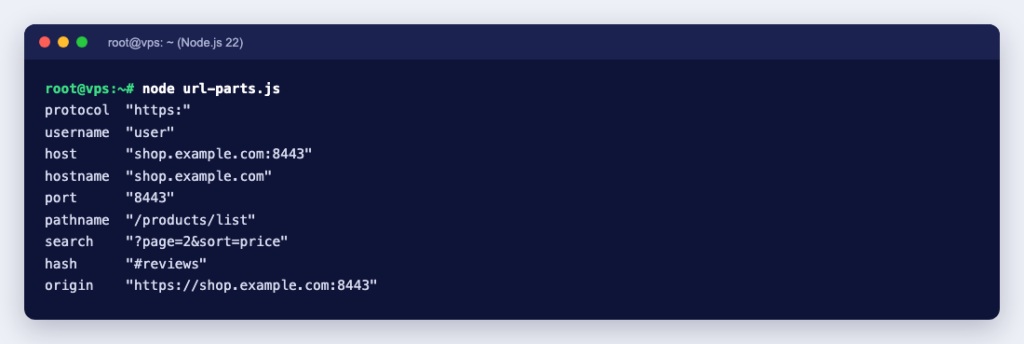
Only the scheme and the path are required, and the path may be empty. To see how software splits a real address, we parsed one with the URL class in Node.js 24.21.0, which, according to the Node.js documentation, implements the same WHATWG URL Standard that web browsers use:
const u = new URL('https://user@shop.example.com:8443/products/list?page=2&sort=price#reviews');

protocol  "https:"
username  "user"
host      "shop.example.com:8443"
hostname  "shop.example.com"
port      "8443"
pathname  "/products/list"
search    "?page=2&sort=price"
hash      "#reviews"
origin "https://shop.example.com:8443"- Scheme:
https,ftp,mailtoand so on. It decides how the rest is read. - Authority: optional user information, the host (a domain name or IP address) and an optional port. Without a port, HTTPS uses TCP 443 by default, according to RFC 9110.
- Path: the resource on that host, often but not always a file or folder.
- Query: everything after
?, usuallyname=valuepairs. - Fragment: everything after
#, a part inside the resource, such as a heading on a page.
Non-web URIs parse too, they just have no host. Node reported mailto:info@example.com with protocol "mailto:", pathname "info@example.com" and origin "null", and the URN example came back with protocol "urn:" and the rest as its path. For the older, reader-friendly tour of a web address (subdomains, TLDs and paths), see our post What is a URL?
Two standards, two habits
RFC 3986 is not the only rulebook. Browsers follow the WHATWG URL Standard, a living standard whose stated goals include aligning RFC 3986 with how browsers really behave and “Standardize on the term URL. URI and IRI are just confusing.” So the web platform says URL, while many protocol documents still say URI: HTTP’s own specification, RFC 9110, talks about the “target URI” of a request.
The difference is not only about names. We gave the same inputs to Node.js (WHATWG rules) and to Python 3.14.7’s urllib.parse:
| Input | Node.js URL | Python urllib.parse |
|---|---|---|
https://example.com/my file.pdf | Space encoded: /my%20file.pdf | Space kept: /my file.pdf |
HTTPS://Shop.Example.COM:443/A | https://shop.example.com/A (lowercased, default port dropped) | netloc kept as Shop.Example.COM:443 |
\\evil.example relative to https://shop.example.com/ | https://evil.example/ (backslash read as slash) | https://shop.example.com/\\evil.example |
/products/list on its own | TypeError: Invalid URL (needs a base) | Parsed with an empty scheme and host |
Neither is wrong. The Python documentation says it plainly: the WHATWG spec describes what web browsers require, RFC 3986 is more general, and Python’s functions “incorporate some aspects of both, but cannot be claimed compliant with either”. It also warns that urlsplit() does not validate input. The backslash row is the one to remember: if a server-side check and the browser read the same link differently, an allow-list of redirect targets can be bypassed. Validate URLs with the same parser that will finally use them.
Relative references: URIs without a scheme
Links such as ../images/logo.png or /contact are what RFC 3986 calls relative references. They only become full URIs once they are resolved against a base, usually the address of the current page. Using the RFC’s own base, http://a/b/c/d;p?q, both Node.js and Python produced the results the RFC lists:
"g"        http://a/b/c/g
"../g"     http://a/b/g
"/g"       http://a/g
"?y"       http://a/b/c/d;p?y
"#s"       http://a/b/c/d;p?q#s
"../../g"  http://a/g
"//g"      http://g     (Node.js adds a slash: http://g/)
A reference starting with // keeps only the scheme of the base and replaces the host, which is why a stray double slash in a template can send visitors to a different site.
Which parts reach your web server
RFC 3986 says the fragment is separated from the rest of the URI before it is dereferenced and is handled only by the user agent. We checked with nginx in Docker, requesting http://b08-web/index.html?page=2#reviews with curl and with Node.js fetch. The access log shows the same thing for both:
"GET /index.html?page=2 HTTP/1.1" 200 896 "-" "curl/8.22.0"
"GET /index.html?page=2 HTTP/1.1" 200 896 "-" "node"
The request line carries only the path and query (HTTP/1.1 calls this the “origin-form”), the host travels in the Host header, and #reviews never leaves the client. So you cannot redirect, log or rewrite based on a fragment on the server; that needs JavaScript in the page.
Case matters too. RFC 3986 says the scheme and host are case-insensitive, and other parts are case-sensitive unless the scheme says otherwise. On the same nginx server, HTTP://B08-WEB/index.html returned 200, but /Index.html returned 404.
Practical checklist for website owners
- Say “URL” for web addresses. It is what browsers, JavaScript and most readers use. Use “URI” when you are writing about identifiers in general or quoting an RFC.
- Keep paths lowercase. On a Linux server
/Aboutand/aboutare different URLs, and two versions of a page split your links. - Pick one canonical form (https, with or without www, trailing slash or not) and redirect the others with a 301. See How to do URL redirection, or redirects in WordPress.
- Encode spaces and special characters in file names, or better, avoid them. The URL parser browsers use turns a space into
%20, but not every tool does. - Do not put secrets in the query string. The path and query appear in server logs, as our nginx log shows.
- Use rewrites for clean URLs rather than exposing script names: Rewrite URLs with mod_rewrite and Apache shows how.
In short: URI is the family name, URL is the member you type into a browser, and URN is the rarely seen cousin that names things without a location. The part of a URL that you own is the host, so it starts with a domain name. If you are planning a new site, run a domain search, and if you are moving an existing one, read how to change your domain name without losing SEO.