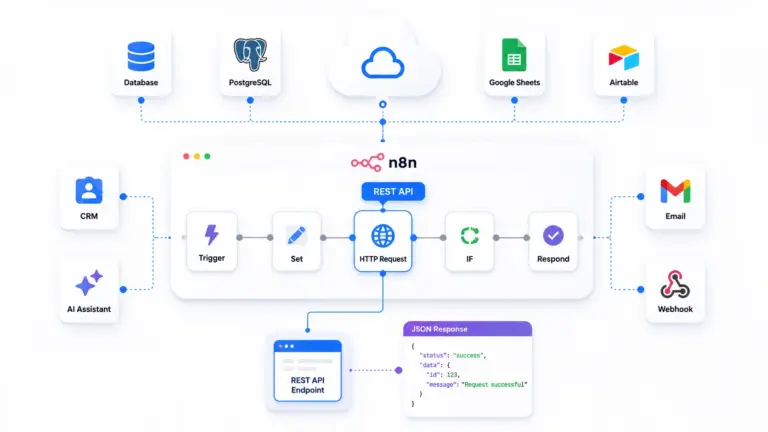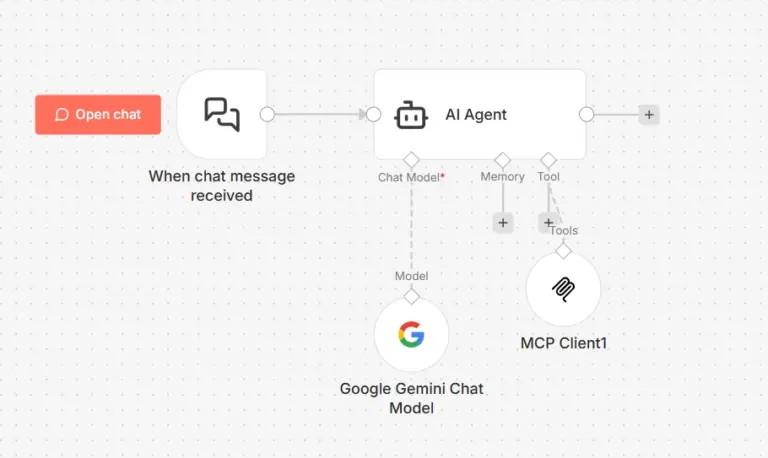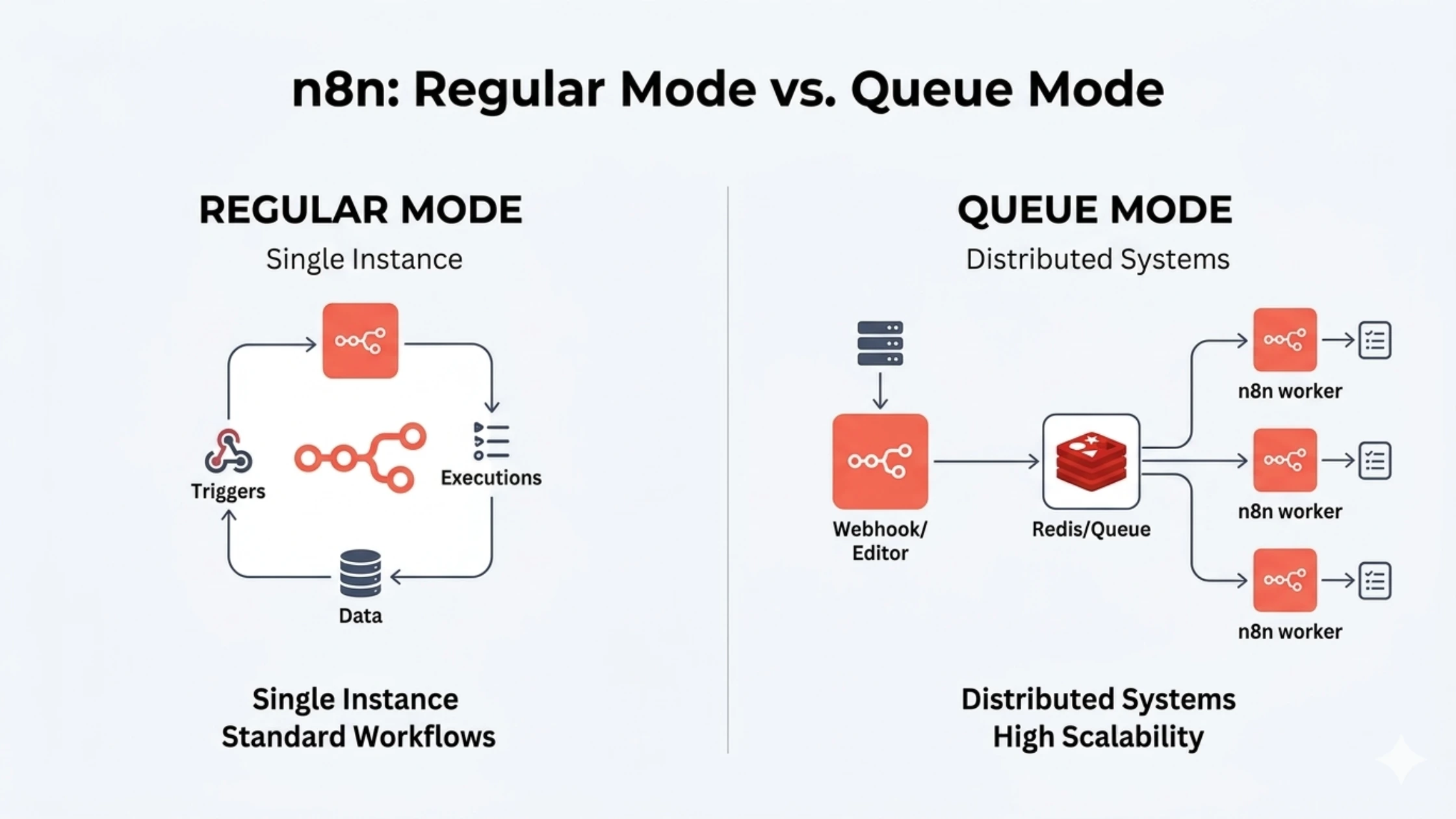

n8n offers two execution modes: Regular Mode and Queue Mode.
Regular Mode runs workflows in a single process, making it ideal for beginners and low-volume automation. Queue Mode uses Redis and multiple workers to process workflows in parallel, making it suitable for high-volume, production-grade automation.
In simple terms:
- Regular Mode = simple, single-threaded execution
- Queue Mode = scalable, distributed execution
If you’re just starting with n8n workflow automation, Regular Mode is enough. But as your workflows grow in complexity and volume, Queue Mode becomes essential for performance, reliability, and scalability.
This guide breaks down both modes in plain language so you can confidently choose the right setup based on your workload.
What Is n8n Regular Mode? (The Default Setup)
Simple Explanation
Regular mode is n8n’s default execution setup. When you first install n8n (via Docker, npm, or any method), you’re running in regular mode unless you explicitly configure otherwise.
How it works:
1. Trigger fires (webhook, schedule, manual)
   ↓
2. n8n main process receives trigger
   ↓
3. Same process executes workflow immediately
   ↓
4. Result returned
Everything happens in a single process. The same n8n instance that serves your web UI also executes your workflows. One person doing everything. Works great when workload is light. Becomes a bottleneck when busy.
WHEN REGULAR MODE WORKS PERFECTLY
PERFECT FOR:
- LEARNING N8N (0-50 WORKFLOWS)
- Simple setup
- Immediate feedback
- Easy debugging
- No infrastructure complexity
- LOW-VOLUME AUTOMATION (< 5,000 EXECUTIONS/DAY)
- Small business workflows
- Personal productivity automation
- Internal team tools
- DEVELOPMENT/TESTING ENVIRONMENTS
- Rapid iteration
- Local Docker setup
- Staging servers
- SIMPLE WORKFLOW PATTERNS
EXAMPLE WORKFLOWS THAT WORK GREAT:
- Form submission → Email notification → Google Sheets
- RSS feed → Filter → Slack message
- Scheduled daily report → Gmail
- Webhook → Database insert → Confirmation
EXAMPLE:
I run a small marketing agency. We have 30 workflows automating client reports, social media posting, and lead tracking. Regular mode handles 2,000-3,000 executions daily without issues. We’re on a $10/month VPS.
LIMITATIONS OF REGULAR MODE
WHERE IT BREAKS DOWN:
- CONCURRENT EXECUTION LIMITS
- Default: 10 parallel workflows
- Configurable via N8N_CONCURRENCY_PRODUCTION_LIMIT
- But increasing this stresses single process
- LONG-RUNNING WORKFLOWS BLOCK OTHERS
SCENARIO:
- Workflow A: Process 10,000 database records (takes 15 minutes)
- Workflow B: Simple webhook (should take 2 seconds)
PROBLEM: If A is running, B might queue/timeout
- NO HORIZONTAL SCALING
- Can’t add more “workers”
- Only vertical scaling (more RAM/CPU on same server)
- Single point of failure
- RESOURCE CONTENTION
- UI requests compete with workflow execution for CPU/RAM
- Heavy workflows make UI unresponsive
SYMPTOMS YOU’VE OUTGROWN REGULAR MODE:
- “Execution queue is full” errors
- Workflows timing out during peak hours
- UI slow when workflows running
- Webhooks missed (returns 504 timeout to sender)
What Is n8n Queue Mode? (The Scalable Architecture)
Simple Explanation
Queue mode separates n8n into two types of processes:
- Main instance (orchestration)
- Serves the web UI
- Receives triggers (webhooks, schedules)
- Adds workflow jobs to queue
- Manages workflow definitions
- Worker processes (execution)
- Pull jobs from queue
- Execute workflows
- Return results to main instance
- Can have multiple workers running
The glue between them: Redis (an in-memory job queue)
Think of it like a restaurant:
Regular mode = Food truck
- One person takes orders and cooks
- Works great for 10-20 customers
- Breaks down when line gets long
Queue mode = Full restaurant
- Host takes orders (main instance)
- Orders go to kitchen ticket system (Redis queue)
- Multiple cooks prepare food (workers)
- Can add more cooks during rush hour
Architecture Diagram (Simplified)
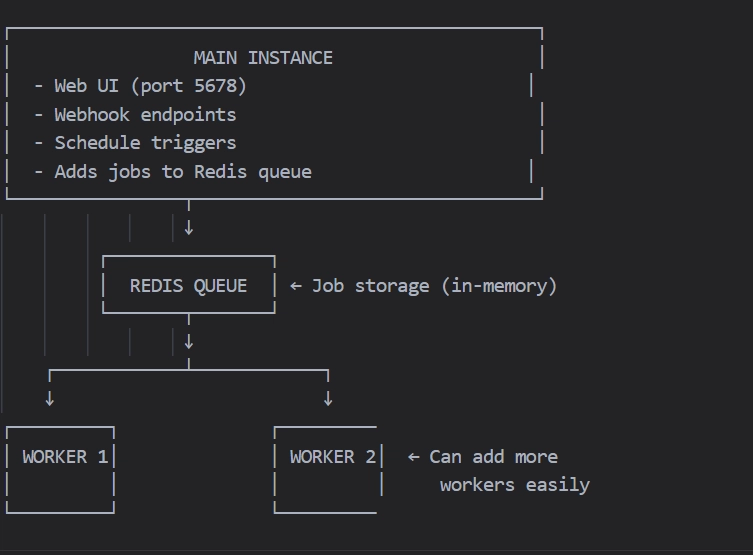
Data flow:
- Webhook hits main instance
- Main creates job:
{workflow_id, execution_data} - Job added to Redis queue
- Available worker pulls job from queue
- Worker executes workflow
- Worker saves results to database
- Main instance displays results in UI
Technical Requirements
What you need for queue mode:
1. Redis server
# Docker example
docker run -d --name redis redis:7-alpine
2. Environment variables (main instance)
EXECUTIONS_MODE=queue
QUEUE_BULL_REDIS_HOST=redis
QUEUE_BULL_REDIS_PORT=6379
QUEUE_BULL_REDIS_PASSWORD=your_redis_password  # if Redis has auth
3. Worker containers
docker run -d
--name n8n-worker-1
-e EXECUTIONS_MODE=queue
-e QUEUE_BULL_REDIS_HOST=redis
n8nio/n8n
worker
4. Shared Database
- Both main and workers must connect to same PostgreSQL (not SQLite)
- Workers need to read workflow definitions
- Results written to shared database
WHEN QUEUE MODE BECOMES NECESSARY
CLEAR INDICATORS:
- HIGH EXECUTION VOLUME (> 10,000/DAY)
Example: E-commerce store
- 500 orders/day
- Each order triggers 5 workflows
- = 2,500 workflow executions/day
- Add webhooks, schedules, etc.
- = 10,000+ total executions/day
- CONCURRENT EXECUTION NEEDS
Scenario: Lead processing system
- Form submissions: 100-200/hour during business hours
- Each must execute immediately (instant email)
- Peak times: 50 simultaneous executions
- Regular mode limit: 10 concurrent
- Result: 40 workflows queued/timeout
- LONG-RUNNING WORKFLOWS
Example: Data processing
- Import 50,000 records from API
- Transform and validate each
- Takes 20-30 minutes
- Blocks other workflows in regular mode
- In queue mode: Runs on dedicated worker
- RELIABILITY REQUIREMENTS
Business-critical automation:
- Missed webhook = lost sale
- Timeout = angry customer
- Need 99.9% execution success rate
- Queue mode provides retry mechanisms
EXAMPLE:
“We’re a SaaS company processing 50,000 user signups monthly. Each signup triggers onboarding workflows (welcome email, account setup, analytics tracking). Regular mode couldn’t keep up during launch campaigns. We migrated to queue mode with 3 workers. Now handle 5,000 signups/day smoothly.”
KEY DIFFERENCES: QUEUE MODE VS REGULAR MODE
| FEATURE | REGULAR MODE | QUEUE MODE |
|---|---|---|
| Setup Complexity | Simple (single container) | Complex (main + Redis + workers) |
| Infrastructure Cost | $5-10/month VPS | $15-40/month (multiple containers) |
| Execution Model | Single process | Distributed workers |
| Concurrent Limit | 10-20 (configurable) | Unlimited (add more workers) |
| Horizontal Scaling | NO | YES (add workers easily) |
| Long Workflow Impact | Blocks other workflows | Isolated per worker |
| UI Performance | Degrades under load | Always responsive |
| Single Point of Failure | Yes (one process) | Partial (main still SPOF) |
| Job Retry Logic | Basic | Advanced (Redis handles retries) |
| Resource Requirements | 1GB RAM, 1 CPU | 2GB+ RAM, 2+ CPU total |
| Database | SQLite or PostgreSQL | PostgreSQL required |
| Best For | < 10k executions/day | 10k-1M+ executions/day |
| Learning Curve | Easy | Moderate |
| Monitoring | Simple (one process) | Complex (multiple processes) |
| Debugging | Straightforward | Harder (distributed logs) |
WHEN SHOULD YOU USE REGULAR MODE?
CLEAR USE CASES
- YOU’RE JUST STARTING WITH N8N
Why:
- Focus on learning workflows, not infrastructure
- Avoid unnecessary complexity
- Iterate quickly without DevOps overhead
Setup time: 15 minutes (Docker Compose)
- LOW WORKFLOW VOLUME (< 5,000 EXECUTIONS/DAY)
Calculation:
Scenarios that stay under 5k/day:
- 10 workflows running every 30 minutes = 480/day
- 50 workflows running hourly = 1,200/day
- 100 webhook triggers/day = 100/day
- Total: ~1,800 executions/day
Plenty of headroom in regular mode.
- SIMPLE WORKFLOWS (< 10 NODES, < 30 SECONDS EXECUTION)
Examples:
[OK] Form -> Validate -> Email -> Google Sheets [OK] RSS -> Filter -> Slack [OK] Webhook -> Database INSERT -> Response [OK] Schedule -> API call -> Transform -> Send
These don’t stress regular mode at all.
- BUDGET-CONSTRAINED (SINGLE VPS)
Cost comparison:
Regular mode:
- 1 VPS: $5-10/month
- Total: $5-10/month
Queue mode:
- 1 VPS for main + Redis: $10/month
- 1-2 VPS for workers: $10-20/month
- Total: $20-30/month
If $10/month matters, stay in regular mode until you actually need to scale.
- DEVELOPMENT/STAGING ENVIRONMENTS
Why:
- Matches production architecture unnecessary
- Faster spin-up/tear-down
- Easier debugging (single process, simple logs)
WHEN SHOULD YOU USE QUEUE MODE?
CLEAR INDICATORS YOU NEED QUEUE MODE
- EXECUTION VOLUME CONSISTENTLY > 10,000/DAY
Why this number matters:
Regular mode comfortable zone: 0-5,000/day Regular mode stressed: 5,000-10,000/day Regular mode breaking: 10,000+/day
At 10k+ daily, you’re hitting:
- Concurrent execution limits
- Database lock contention
- Memory pressure
- CPU saturation
Queue mode designed for this scale.
- PEAK HOUR CONCURRENCY > 20 SIMULTANEOUS EXECUTIONS
Real scenario:
E-commerce flash sale:
- 500 orders in 1 hour
- Each order: 4 workflows (confirmation, inventory, shipping, analytics)
- = 2,000 executions in 60 minutes
- = 33 executions/minute
- Peak: 50 simultaneous
Regular mode max: 10-20 concurrent Result: Workflows queue/timeout/fail
Queue mode handles this by scaling workers.
- LONG-RUNNING WORKFLOWS (> 5 MINUTES)
Problem in regular mode:
Workflow A: Process 10,000 API records (15 minutes) Workflow B: Instant webhook response (2 seconds)
Regular mode: A blocks B Queue mode: A runs on worker-1, B on worker-2 (parallel)
Queue mode isolates long-running jobs.
- BUSINESS-CRITICAL AUTOMATION (DOWNTIME = REVENUE LOSS)
Scenarios:
- E-commerce order processing
- Payment webhooks (Stripe, PayPal)
- Customer onboarding flows
- Real-time inventory sync
- Transactional emails
Missed execution = lost money.
Queue mode provides:
- Job retry logic (Redis built-in)
- Worker redundancy (one crashes, others continue)
- Better monitoring (separate main from workers)
- NEED HORIZONTAL SCALING (NOT JUST BIGGER SERVER)
Vertical scaling limits:
Regular mode on 8GB RAM VPS: Handles ~20k/day max To scale further: Upgrade to 16GB? 32GB? Problem: Diminishing returns + single point of failure
Horizontal scaling:
Queue mode with 3 workers on 2GB each = 6GB total Same cost as 8GB single server But: 3x execution capacity + redundancy Add worker 4, 5, 6 as needed (linear scaling)
Pros and Cons: Making the Decision
Regular Mode
Pros:
Simple setup — Single docker-compose up command
Low cost — $5-10/month VPS sufficient
Easy debugging — Single process, unified logs
Fast iteration — Changes apply immediately
Minimal maintenance — One container to manage
SQLite compatible — No database server needed
Perfect for learning — Focus on workflows, not infrastructure
Cons:
Limited concurrency — Max 10-20 parallel workflows
No horizontal scaling — Can’t add more execution capacity easily
Single point of failure — One process crash = all executions stop
UI performance degradation — Heavy workflows slow interface
Resource contention — Execution competes with UI for CPU/RAM
Long workflows block short ones — No isolation
Queue Mode
Pros:
Unlimited concurrency — Add workers as needed
Horizontal scaling — Linear performance increase with workers
Workflow isolation — Long-running jobs don’t block others
UI always responsive — Execution offloaded to workers
Better reliability — Worker crashes don’t affect main instance
Advanced retry logic — Redis handles job retries automatically
Production-ready — Handles millions of executions/month
Cons:
Complex setup — Requires Redis + multiple containers
Higher cost — $20-50/month for full stack
PostgreSQL required — SQLite not supported
Harder debugging — Distributed logs across workers
More maintenance — Monitor Redis + main + N workers
Overkill for small workloads — Unnecessary complexity under 5k/day
Conclusion
Choosing between Queue Mode and Regular Mode depends on how your automation evolves.
Regular Mode works perfectly when you’re learning, testing, or running a limited number of workflows. It’s fast to set up, easy to manage, and requires minimal infrastructure.
Queue Mode becomes valuable when your system starts handling multiple executions at the same time, long-running tasks, or business-critical workflows. By separating execution into workers and using Redis as a queue, it ensures better reliability and prevents bottlenecks.
A practical approach:
- Start with Regular Mode
- Monitor performance and execution load
- Move to Queue Mode when workflows begin to overlap or slow down
Scaling n8n is not about using the most advanced setup from day one. It’s about adopting the right architecture at the right time. If you’re planning to scale n8n reliably, a KVM VPS hosting from Ucartz provides the performance isolation and flexibility needed for production workloads.
FAQ
1. What is n8n Queue Mode?
n8n Queue Mode is a scalable execution system where workflows are added to a queue (using Redis) and processed by multiple worker instances, allowing parallel execution.
2. What is n8n Regular Mode?
Regular Mode is the default execution mode in n8n where workflows run in a single process without external queue systems.
3. Is Queue Mode faster than Regular Mode?
Yes, Queue Mode handles multiple workflows simultaneously using workers, making it faster and more efficient for high-volume automation.
4. Do beginners need Queue Mode in n8n?
No. Beginners should start with Regular Mode. Queue Mode is only needed when scaling workflows or handling high concurrency.
5. Does Queue Mode require Redis?
Yes. Redis is required to manage the queue and distribute jobs across worker processes.
6. Can I switch from Regular Mode to Queue Mode later?
Yes. You can migrate by updating environment variables and adding Redis and worker containers.
7. What happens if I don’t use Queue Mode for large workflows?
Workflows may slow down, fail, or block each other since everything runs in a single process.
8. Which mode is best for production?
For small setups, Regular Mode works. For scaling systems and high workloads, Queue Mode is recommended.