

Short answer: most Steam games publish a free dedicated server that you download with Valve’s SteamCMD tool. On a Linux VPS you install SteamCMD, create a separate user, download the server with its app ID, run it as a systemd service and open its ports in the firewall. We tested every step below with the Valheim dedicated server on AlmaLinux 9 and checked the SteamCMD package on Ubuntu 24.04.
What you need
- A 64-bit x86 server (Intel or AMD). SteamCMD and most game servers don’t run on ARM.
- Enough RAM and disk for the game. In our test the Valheim server took 2.1 GB of disk and about 1.4 GB of RAM with a fresh world; Counter-Strike 2 needs about 65 GB of disk, Palworld recommends 16 GB of RAM. See how much a game server costs for more games.
- A Linux server: Ubuntu, Debian, AlmaLinux or Rocky Linux. Some servers are Windows only, such as Enshrouded’s.
- Root or sudo access, and the game’s UDP/TCP ports allowed in the firewall.
Step 1: Install SteamCMD
Ubuntu and Debian
SteamCMD is in Ubuntu’s multiverse repository and needs 32-bit support:
sudo add-apt-repository multiverse
sudo dpkg --add-architecture i386
sudo apt update
sudo apt install steamcmd
Accept the Steam licence when asked. The command is then /usr/games/steamcmd. (On Debian, enable the non-free component instead of multiverse.)
AlmaLinux and Rocky Linux
Update the system first: in our test, installing the 32-bit libraries on a server with older packages failed with file conflicts until the system was updated.
sudo dnf upgrade
sudo dnf install glibc.i686 libstdc++.i686 tar
Then download SteamCMD itself (next step) as the game user.
Step 2: Create a user for the game server
Never run a game server as root. Create a user and install everything in its home folder:
sudo useradd -m steam
sudo -iu steam
mkdir ~/steamcmd && cd ~/steamcmd
curl -sSLO https://steamcdn-a.akamaihd.net/client/installer/steamcmd_linux.tar.gz
tar -xzf steamcmd_linux.tar.gz
On Ubuntu with the steamcmd package you can skip the download and use /usr/games/steamcmd instead of ./steamcmd.sh below.
Step 3: Download the game server
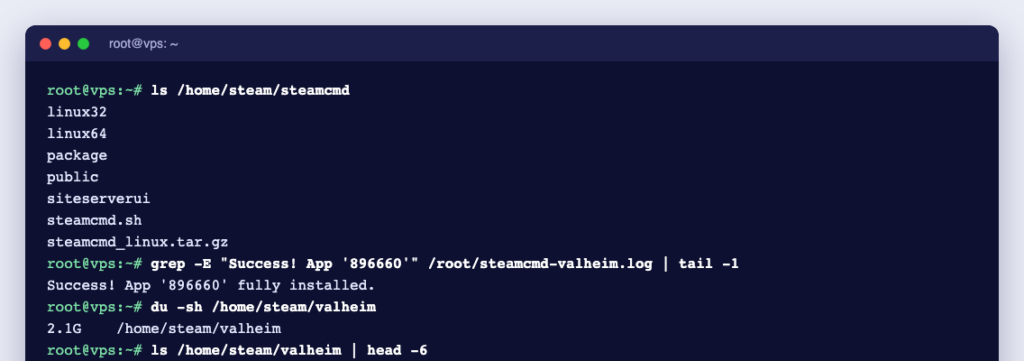
./steamcmd.sh +force_install_dir /home/steam/valheim +login anonymous +app_update 896660 validate +quitSteamCMD updates itself on the first run, then downloads the server. It finishes with Success! App '896660' fully installed. Each game has its own app ID:
| Game | Dedicated server app ID | Runs on Linux |
|---|---|---|
| Valheim | 896660 | Yes |
| Counter-Strike 2 | 730 | Yes (needs a Game Server Login Token to be public) |
| Palworld | 2394010 | Yes |
| Rust | 258550 | Yes |
| Satisfactory | 1690800 | Yes |
| Enshrouded | 2278520 | No, Windows only |
Some games need a Steam account instead of anonymous. Check the game’s server licence too: for example, the ARK: Survival Ascended server is licensed for personal use only.
Step 4: Start the server once
Valheim ships a start_server.sh script. Copy it before editing, because updates overwrite it, and set your own server name, world name and password (at least 5 characters, not part of the server name):
cd /home/steam/valheim
cp start_server.sh my_server.sh
nano my_server.sh
./my_server.sh
Stop it with Ctrl+C, which saves the world. Valheim keeps worlds in ~/.config/unity3d/IronGate/Valheim/worlds_local/.
Step 5: Run it as a service
A systemd service starts the server at boot and restarts it if it crashes. Create /etc/systemd/system/valheim.service:
[Unit]
Description=Valheim dedicated server
After=network-online.target
Wants=network-online.target

[Service]
User=steam
WorkingDirectory=/home/steam/valheim
Environment=LD_LIBRARY_PATH=/home/steam/valheim/linux64
Environment=SteamAppId=892970
ExecStart=/home/steam/valheim/valheim_server.x86_64 -name "My Server" -port 2456 -world "Dedicated" -password "ChangeMe123" -public 0
KillSignal=SIGINT
TimeoutStopSec=60
Restart=on-failure

[Install]
WantedBy=multi-user.target
sudo systemctl daemon-reload
sudo systemctl enable --now valheim
journalctl -u valheim -f # watch the logKillSignal=SIGINT matters: it stops the server the same way as Ctrl+C, so the world is saved. In our test, systemctl stop valheim logged World save (5/5) done before the server shut down. The log shows Game server connected when it is ready (about a minute on a small VPS). Set -public 1 to list the server in the in-game community browser.
Step 6: Open the ports
# AlmaLinux, Rocky Linux
sudo firewall-cmd --permanent --add-port=2456-2458/udp
sudo firewall-cmd --reload

# Ubuntu, Debian
sudo ufw allow 2456:2458/udp
Ports differ per game: check the game’s server guide. Our test server listened on UDP 2457, the port after the game port.
Step 7: Keep it updated and backed up
sudo systemctl stop valheim
sudo -iu steam ~/steamcmd/steamcmd.sh +force_install_dir /home/steam/valheim +login anonymous +app_update 896660 validate +quit
sudo systemctl start valheim
Players usually need the same version as the server, so update after each game patch. Back up the worlds folder regularly while the server is stopped.
Run it on a game VPS
A game server needs to be online all the time, with a fixed IP address and protection against attacks. Our game VPS plans start at $10 a month, run in a USA data centre with DDoS protection, and our team installs one game server for you free on request. For Minecraft, see Minecraft VPS.
Frequently asked questions
Is SteamCMD free?
Yes. SteamCMD and most dedicated servers are free to download; many can be downloaded with the anonymous login.
Can I run several game servers on one VPS?
Yes, if the VPS has enough RAM and CPU for all of them. Give each server its own folder, service and ports.
Why won’t SteamCMD run on my server?
Usually the 32-bit libraries are missing (step 1), or the server has an ARM processor, which SteamCMD doesn’t support.
Sources: Valve: SteamCMD and Iron Gate: a guide to dedicated servers.