A CPU (Central Processing Unit) is often called the brain of the computer. It’s the main component that carries out instructions and processes data, making sure every part of your system works together. Whether you’re opening a program, typing a document, or playing a game, the CPU is the one handling the calculations and sending the right signals to other hardware.
In short, without the CPU, your computer wouldn’t know how to run tasks or respond to commands.
When buying a computer or server, you often hear terms like cores and threads when looking at CPU specifications. But what does a core or a thread mean, and why do they matter? Many people get confused between the two, but understanding them can help you choose the right CPU for your needs. Let’s break it down in simple terms.
What are CPU Cores?
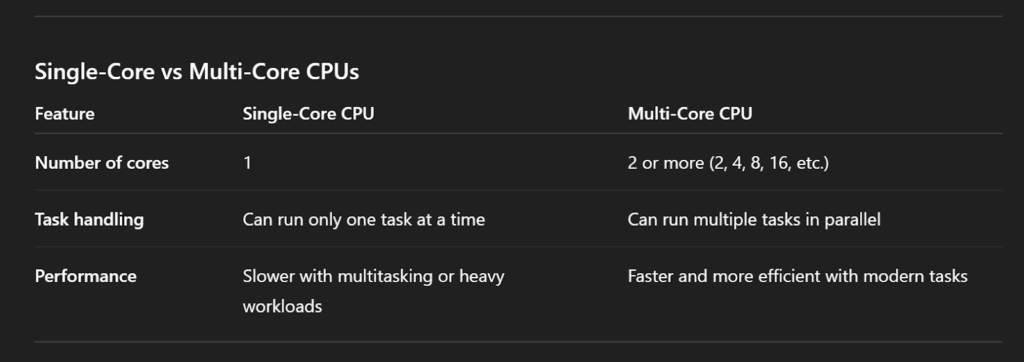
A CPU core is a physical unit inside the processor that carries out tasks. In the early days, CPUs had only one core(single core), meaning they could only perform one task at a time. Modern CPUs now come with multiple cores – such as 2, 4, 8, or even 16 – which means they can handle multiple tasks at once.
Think of cores as workers in a factory. If you have one worker, only one job gets done at a time. If you have four workers, they can split the work and complete tasks faster. In the same way, a CPU with more cores can run more processes in parallel, improving multitasking and performance.Similarly, a CPU with more cores can run more tasks at once, which helps with improving multitasking at the same time and improves performance.
What are CPU Threads?
A CPU thread is like a virtual lane of execution inside a processor core.
While a core is the physical hardware that does the work; the threads are virtual and is the path that tells the core what to do next. A CPU thread represents a single sequence of instructions that a processor core can handle.
Most modern CPUs don’t just run one thread per core. Instead, they use technologies like Hyper-Threading (Intel) or Simultaneous Multi-Threading (SMT) (AMD). These allow a single physical core to process two threads at the same time, making better use of its resources. This doesn’t mean the core magically doubles its performance, but it helps reduce idle time and improves efficiency.So, while cores are the physical hardware, threads are the virtual tasks. The more threads your CPU supports, the better it can handle parallel workloads.
Cores vs Threads: Key Differences
Here’s a quick comparison:
- Cores are physical; threads are logical.
- More cores mean the CPU can do more real work simultaneously.
- With multiple threads, each core can handle tasks more efficiently.
- Cores generally bring a bigger performance boost than threads alone.
For example, if you’re comparing a 4-core/8-thread CPU with a 6-core/6-thread CPU, the second option may perform better in workloads that need raw power, while the first can be more efficient at multitasking.
How Cores and Threads work together
Cores and threads are designed to complement each other. While cores provide the physical power, threads help make better use of that power by improving efficiency.Real-world example:
Imagine you have a CPU with 4 cores and 8 threads. This means there are four physical workers (cores), and each worker has an assistant (thread). The workers do the heavy lifting, while the assistants organise tasks so the workers don’t sit idle. As a result, the CPU can handle more tasks at once and switch between them smoothly.
Multithreaded vs single-threaded apps:
- Single-threaded applications can only use one thread at a time, so having more cores or threads won’t significantly improve performance. Many older programs and simpler apps fall into this category.
- Multithreaded applications are designed to split their workload into multiple threads, allowing them to take full advantage of multi-core CPUs. Examples include video editing software, 3D rendering programs, and modern games.
Why do Cores and Threads matter?
Everyday Use
For light use like web browsing, emails, and office apps, you don’t need many cores or threads. A 2- to 4-core CPU is more than enough.
Gaming
When it comes to gaming, the speed of each core (single-core performance) matters the most. This is because most games are designed to use only a few cores effectively. That’s why a minimum 6-core CPU with 12 threads is considered the sweet spot for gamers. It offers enough power for demanding tasks.
Content Creation
Workloads like video editing, 3D rendering, programming, and music production thrive on having both more cores and more threads. The higher the counts, the more tasks can run in parallel, which means projects finish faster. For creators, a high-core, high-thread CPU can significantly cut down production time and improve overall efficiency.
Servers & Virtual Private Server(VPS)
If you’re running databases, hosting websites, or managing virtual machines, more cores and threads allow your system to handle more users and requests at the same time.
For example, on a VPS that powers a busy eCommerce store, each customer browsing, adding items to their cart, or making a payment creates separate tasks. A multi-core CPU distributes these tasks across different cores, preventing slowdowns during peak hours.
On dedicated servers, multiple cores and threads are especially valuable when hosting several websites, running email servers, or managing many VPS instances. Each workload can tap into its share of cores without affecting others, giving you consistent and reliable performance.
Recommendation:
- Choose a VPS if you’re hosting small to medium websites, blogs, or applications and want cost-effective scalability.
- Choose a Dedicated Server if you need guaranteed performance, full control, and dedicated CPU power for high-traffic websites, enterprise apps, or heavy workloads.
Conclusion
Cores and threads are the backbone of CPU performance. Cores provide the actual processing power, while threads help maximise that power through multithreading. Knowing how they work together gives you the insight to make smarter choices – whether you’re upgrading your computer, optimising workloads, or scaling your server. The right CPU for you depends on your usage – light users don’t need many cores, gamers need strong cores with threads, and professionals or server managers benefit from as many as possible.
If you’re looking for more performance, investing in a multi-core processor with multithreading support can give you the boost you need. This understanding also helps when deciding whether to fine-tune your existing setup or move to a more powerful hosting solution.At Ucartz, we help businesses and individuals choose the right CPU architecture, number of cores, and threading options for their needs. Whether you require a VPS, dedicated server, or a customised server, our team can guide you in selecting the best specification to power your projects.