Ithal P R
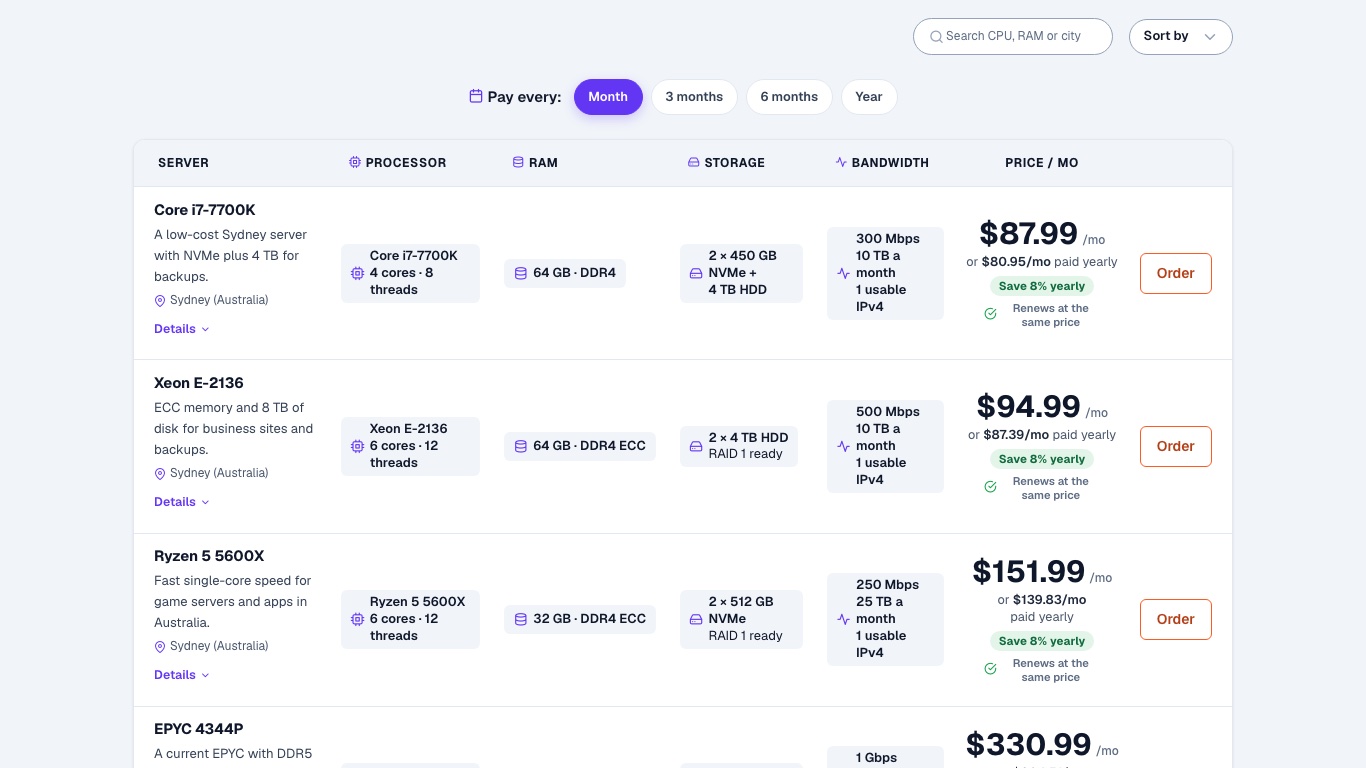
A dedicated server in Sydney suits websites, apps and game servers whose users are in Australia and New Zealand. Microsoft’s published figures put a round trip from Sydney to Melbourne at about 15 ms and to Auckland at about 28 ms, while the same trip to the US west coast takes about 140 ms and to London about 261 ms. A server in Australia also keeps stored personal data in the country, which simplifies one part of the Privacy Act, although it does not settle everything. Check the port speed, monthly traffic, remote console, support and backups before you order. If you already know you want one, see our Australia dedicated servers, from $87.99 a month in Sydney.
Why Sydney is the usual choice for an Australian server
Australia is a long way from the big hosting markets. Most of the world’s cheap server hardware sits in the USA and Western Europe, and every request from an Australian visitor to a server there has to cross the Pacific or go around Asia. Distance adds delay that no hardware upgrade can remove. Sydney is the country’s largest network hub, so a server there is close to most Australian users and a short hop from New Zealand.
Microsoft’s published round-trip statistics between its data-centre regions (30 days to 30 July 2026) show what that means in practice:
| From Sydney to | Median round trip |
|---|---|
| Canberra | 8 ms |
| Melbourne | 15 ms |
| Auckland, New Zealand | 28 ms |
| Singapore | 95 ms |
| Tokyo, Japan | 104 ms |
| Hong Kong | 121 ms |
| Seoul, South Korea | 127 ms |
| California, USA | 140 ms |
| Pune, India | 144 ms |
| Virginia, USA | 202 ms |
| London, UK | 261 ms |
| Netherlands | 264 ms |
For an Australian or New Zealand audience, a Sydney server answers several times faster than one in the USA or Europe. If most of your users are in Asia, Singapore is closer to them; if they are spread across the world, one server in Sydney plus a content delivery network, or a second server near your other users, works better than any single location.
Australian privacy law: what hosting in Australia does and does not do
This section is general information, not legal advice.
- The rules come from the Privacy Act 1988. It sets out the Australian Privacy Principles (APPs), which the Office of the Australian Information Commissioner (OAIC) explains in its guidelines. Not every business is covered by the Act; the OAIC explains who is.
- Sending data overseas has its own principle. APP 8 covers the cross-border disclosure of personal information. According to the OAIC’s guidelines, giving personal information to an overseas recipient, such as a contractor that performs services for you, is in most cases a disclosure to which APP 8 applies.
- Overseas storage is not always a disclosure, but you stay accountable. The OAIC says that in limited cases, for example cloud storage under a binding contract that restricts the provider to storing the data, sending it overseas can count as a “use” instead. Either way, the OAIC notes you may still be held accountable if the overseas recipient mishandles it.
- A server in Australia keeps it simple. When the live server and its backups are in Australia, storing the data there is not an overseas transfer, so you do not have to work through the APP 8 questions for that storage. Backups count too: if they go to storage outside Australia, they are the transfer.
What people run on an Australian dedicated server
- Online shops and SaaS platforms for Australian and New Zealand customers.
- Game servers, where every millisecond of round trip shows up as lag.
- Streaming and radio servers, and origin servers that feed a content delivery network.
- Backup servers that keep an off-site copy of Australian data in Australia.
What to check before you order
| Check | What to ask |
|---|---|
| Hardware | CPU model and generation, ECC memory, NVMe, SSD or hard disks, RAID |
| Port and traffic | Port speed and the monthly transfer allowance; what happens if you go over |
| IP addresses | How many IPv4 addresses are included; reverse DNS for mail servers |
| DDoS protection | Whether the plan includes it; many Australian plans do not |
| Remote console | IPMI or KVM access for when the operating system will not boot |
| Backups | Who takes them, and where they are stored |
| Delivery and hardware failure | How long delivery takes, and how quickly failed parts are replaced |
| Support hours | Whether support covers Australian business hours and weekends |
Australian plans usually come with a monthly transfer allowance instead of unmetered traffic, because international bandwidth costs more there. A quick way to judge one is to turn it into an average speed. A 30-day month has 2,592,000 seconds, so 10 TB a month works out at about 31 Mbps around the clock, and 25 TB at about 77 Mbps. If your traffic is far below the allowance you have room for peaks; if it is close, look at a bigger allowance.
Test the route from your users
Published figures are a guide. Before you commit, ask for a test IP address and measure from where your users are:
mtr -r -w -c 20 203.0.113.10Replace the example address with the test IP. The report shows each hop, with the loss and the average, best and worst round trip, so you can see where delay starts. Our MTR guide explains the columns, and iperf3 helps if you also want to measure throughput between two servers.
Australia dedicated servers at Ucartz
Our Australia dedicated servers are self-managed machines in Sydney with full root access, from an Intel Core i7-7700K with 64 GB RAM at $87.99 a month up to a 24-core AMD EPYC 8224P at $700.99. Each plan lists its processor, memory, disks, monthly traffic, port speed and IPv4 addresses, so you can check it against the list above. If budget matters most, our low-cost dedicated servers include an Intel Xeon E3-1245v2 in Australia at $72 a month with unmetered traffic on a 100 Mbps port. You can pay in Australian dollars, and every plan has no setup fee and saves up to 8% when you pay for 3, 6 or 12 months. To compare Australia with our other locations, see our dedicated server pricing page.
Every server includes Free Basic Managed Support for quick tasks such as boot and access checks, OS reinstalls and DNS pointing, and you can hire our engineers per task or per hour for hardening, migrations or RAID work. Servers are delivered in 2 to 46 business hours, and an IPMI or KVM console is available on request where the data centre offers it. The Sydney plans do not include DDoS protection. Failed hardware is repaired or replaced within 24 hours of confirming the fault, as set out in our service level agreement. Backups on self-managed servers are your responsibility, and dedicated servers are not covered by the 30-day money-back guarantee, so start on monthly billing if you want to test first.