jijosh at
A reseller customer running several websites under one WHM account came to us with an unusual request. They had already built their own AI assistant, one that could already read their 35 hosting accounts locally, and they wanted it safely connected to the live hosting backend, without getting more access than it actually needed.
What they asked for
Their own list of questions was specific: could an authenticated gateway talk to WHM over the API, could it run on a separate server, what permissions and firewall rules would it need, and could their existing sites stay exactly where they were, with no migration.
Why a separate VPS, not the shared server
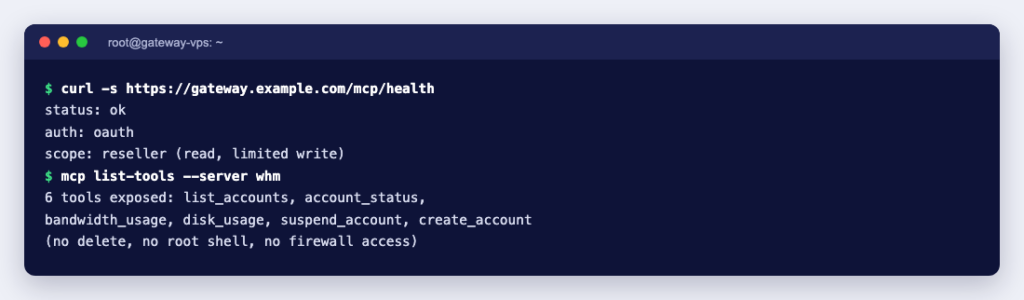
Their account lives on one of our shared cPanel reseller servers, so running any kind of automation gateway directly on it was never an option. One customer’s integration can never be allowed to touch another customer’s data or affect server performance. Instead, we set the MCP (Model Context Protocol) gateway up on its own small VPS, connecting back to their existing reseller account over HTTPS, scoped to exactly the permissions that account already had. Root access and anything outside their reseller scope were never on the table, and none of their 35 accounts needed to move.
Starting read-only, then earning write access
The first working version was a test endpoint with write access enabled only so they could verify it worked, with an explicit warning to back up before testing anything that changes live data. Once the basics were confirmed, we expanded what the assistant could see: account status, bandwidth, package details, disk usage by category. Actions that change something, creating or suspending an account, adjusting a quota, came later, only after the read-only side was proven.
What we deliberately left out: deleting or terminating an account, root shell access, and anything outside the reseller’s own permission scope. That is not a gap, that is the design.
Making it work with a real AI tool, not just a demo
A simple access token does not fit how every AI tool expects to connect. When the customer tried adding the gateway to a mainstream AI assistant, it only offered OAuth or no authentication, nothing in between. Since the integration could write to live hosting data, “no authentication” was not acceptable, so we set up proper OAuth instead and tested the full flow end to end before handing it over.
Where it stands now
The gateway is live, tested for account creation, suspending an account, and checking bandwidth, each confirmed working before handover. The customer is now standardizing several hosting packages across their sites using the same approach: new packages are created and checked first, existing accounts migrated one at a time, nothing old retired until its replacement is verified.
One gateway, more than one AI app
Because MCP is an open, standard way for an AI app to talk to a tool, the same gateway is not locked to the one assistant this customer built. The same reseller-scoped connection can be added to Claude, Gemini, or any other MCP-compatible AI app, each one working against the same permissions, with nothing extra opened up per app. If you already use a specific AI platform and want it talking to your hosting account the same way, ask us and we will connect it for that platform too.
If you are building your own AI tooling and want it talking to your hosting account safely, rather than handing it more access than it needs, open a ticket. We will help you scope exactly what it should be able to do, and nothing more.