Anita Sreelal

There are two different questions hiding behind “the best Linux for virtualization”. If you want a machine that runs virtual machines, the strongest choice today is Proxmox VE, with Debian 13, Ubuntu Server LTS or an Enterprise Linux such as RHEL 10, AlmaLinux 10 or Rocky Linux 10 as plain KVM hosts. If you want the best Linux to run inside a VM or a VPS, pick Ubuntu Server LTS, Debian or Rocky Linux or AlmaLinux. This guide covers both, with versions and support dates checked on 3 November 2026.
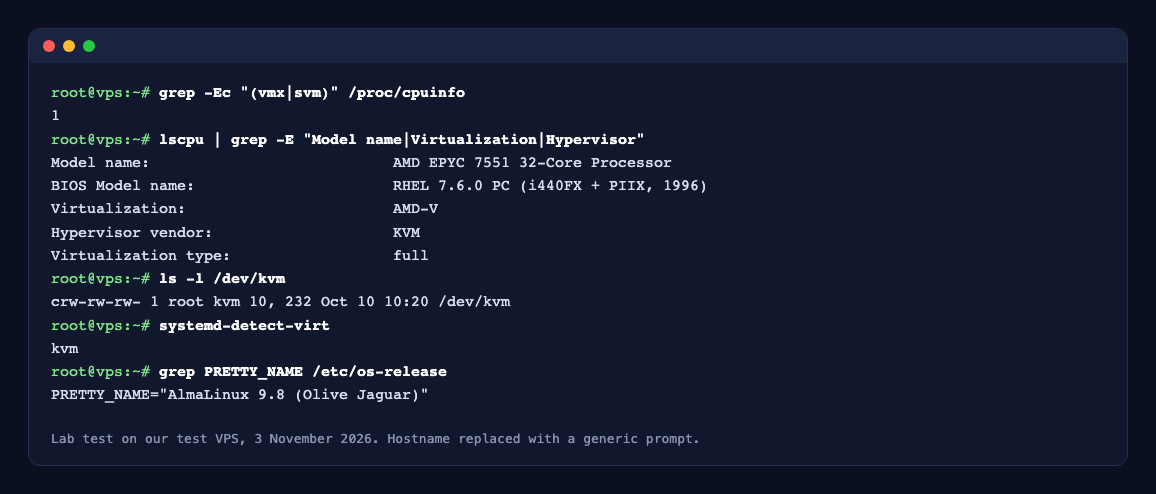
Before you install any hypervisor, check that the CPU exposes hardware virtualization. The screenshot shows the check on our own test VPS: vmx (Intel) or svm (AMD) in /proc/cpuinfo, an AMD-V or VT-x line in lscpu, and a /dev/kvm device. On a dedicated server these are normally present once virtualization is enabled in the BIOS. Inside a VPS they are only there when the provider passes them through (nested virtualization), so check before you plan to run VMs inside a VM.
grep -Ec "(vmx|svm)" /proc/cpuinfolscpu | grep -E "Virtualization|Hypervisor"ls -l /dev/kvmA count above 0 and a /dev/kvm device mean KVM can run. No output from the first command means it cannot.
Quick picks
- Best all-in-one virtualization platform: Proxmox VE 9.2 (KVM virtual machines and LXC containers, web interface, clustering).
- Best plain KVM host: Debian 13 or Ubuntu Server 24.04 or 26.04 LTS, with libvirt and QEMU.
- Best for long, enterprise support: RHEL 10, AlmaLinux 10 or Rocky Linux 10 (supported to 2035).
- Best Xen-based option: XCP-ng 8.3 LTS with Xen Orchestra.
- Best Linux for a VPS: Ubuntu Server LTS, Debian 13 or Rocky Linux.
- Best Linux to try in VirtualBox, VMware or Hyper-V on a laptop: Ubuntu or Fedora for a desktop, Ubuntu Server or Debian for a server lab.
Part 1: the 7 best Linux platforms for running virtual machines
1. Proxmox VE
Proxmox VE is a Debian-based platform built only for virtualization. According to Proxmox, version 9.2 (released 21 May 2026) is based on Debian 13.5 with a 7.0 kernel, QEMU 11.0 and LXC 7.0. It runs full KVM virtual machines and lightweight LXC containers side by side, and includes a web interface, high-availability clustering, live migration, ZFS and Ceph storage. Backups go to Proxmox Backup Server, a separate product.
Proxmox VE is open source (AGPL v3) and free to use. The paid subscription, from €120 per CPU socket per year for the Community tier, adds the Enterprise repository with tested updates; the higher tiers add support tickets. Choose it when you want a ready-made host with a GUI, for a home lab or for a business running many VMs.
2. Debian 13
Debian 13 “trixie” (released 9 August 2025) is what Proxmox itself is built on, so it is a natural plain KVM host: install qemu-system, libvirt-daemon-system and virtinst, and manage VMs with virsh or virt-manager. According to Debian, trixie gets regular security support until August 2028 and Long Term Support until 30 June 2030. Choose it when you want a stable, minimal host and are happy on the command line.
3. Ubuntu Server LTS
Ubuntu Server 24.04 LTS and 26.04 LTS are popular KVM hosts with libvirt, and Ubuntu also offers LXD for containers and VMs. According to Canonical, 26.04 gets standard support until May 2031 and 24.04 until May 2029. Ubuntu Pro extends security maintenance to 10 years and is free for personal use on up to 5 machines. Choose it when your team already knows Ubuntu or you want the widest choice of guides and packages.
4. Red Hat Enterprise Linux 10
RHEL 10 (May 2025) has a 10-year life cycle, to 2035. It runs KVM through libvirt, and its web console (Cockpit) can create and manage VMs. Note one change: Red Hat’s own 10.0 release notes mark virt-manager as deprecated, with the web console meant to replace it. Red Hat’s older virtualization product, Red Hat Virtualization, has been folded into OpenShift Virtualization. Choose RHEL when you need vendor support and certifications.
5. AlmaLinux 10 and Rocky Linux 10
AlmaLinux and Rocky Linux are free rebuilds compatible with RHEL. AlmaLinux 10.2 (26 May 2026) and Rocky Linux 10.2 (29 May 2026) are the current releases, both with security support until 31 May 2035. They run KVM, libvirt and Cockpit the same way as RHEL. The community oVirt project (4.5.7, January 2026) still supports these releases if you need a multi-host manager. Choose them for the RHEL ecosystem without the subscription.
6. XCP-ng
XCP-ng is built on the Xen hypervisor rather than KVM and began as a fork of Citrix XenServer. Version 8.3 is the current LTS release, supported until 30 November 2028, and is managed with Xen Orchestra (web interface and backups), an API or the command line. Choose it if you are moving away from XenServer or VMware and want a Xen-based platform.
7. openSUSE Leap 16 and SUSE Linux Enterprise 16
openSUSE Leap 16.0 (October 2025) is based on SUSE Linux Enterprise Server 16, with a 24-month support period and the new Agama installer. SLES 16 is the supported enterprise version. Both run KVM and libvirt. Choose them if your organisation already uses SUSE.
Part 2: the best Linux to run inside a VM or VPS
Inside a virtual machine the goal is different: you want a small, long-supported system with good drivers for virtual hardware. Ubuntu Server LTS, Debian and Rocky Linux or AlmaLinux all fit, and all include the virtio drivers KVM uses.
- On a VPS or cloud server: Ubuntu Server LTS for the most tutorials and software, Debian for a lean and stable system, Rocky Linux or AlmaLinux for software built and tested for RHEL.
- On Proxmox or another KVM host: the same three; install the QEMU guest agent so the host can shut down and back up the VM cleanly.
- On VMware Workstation or ESXi: VMware recommends the
open-vm-toolspackage from your distribution. VMware Workstation Pro has been free for personal and commercial use since November 2024. - On Hyper-V: the Hyper-V drivers are built into the Linux kernel, so current distributions need no extra download. For a Generation 2 VM with Secure Boot, choose the “Microsoft UEFI Certificate Authority” template, or Linux will not boot.
- On VirtualBox: VirtualBox 7.2 runs every distribution above; install its Guest Additions for shared folders and screen resizing. The base package is GPLv3, while the Extension Pack is free only for personal and educational use.
- For a desktop test VM: Ubuntu Desktop for an easy start, or Fedora 44 for the newest software (Fedora releases are supported for about 13 months).
Support dates at a glance
- Proxmox VE 9: current, end of life to be announced (Proxmox VE 8 ended August 2026)
- Debian 13: security support to August 2028, LTS to 30 June 2030
- Ubuntu 26.04 LTS: standard support to May 2031 (24.04 LTS: May 2029), up to 10 years with Ubuntu Pro
- RHEL 10, AlmaLinux 10, Rocky Linux 10: to 2035
- XCP-ng 8.3 LTS: to 30 November 2028
- openSUSE Leap 16.0: 24 months from October 2025
- Fedora 44: to about June 2027
CentOS Stream is a preview of the next RHEL minor release rather than a long-term host: CentOS Stream 9 ends on 31 May 2027 and Stream 10 on 31 May 2030.
How to choose
- You want a GUI and many VMs on one or a few servers: Proxmox VE.
- You run a handful of VMs and like the command line: Debian 13 or Ubuntu Server LTS with libvirt.
- You need vendor support, compliance or 10 years of updates: RHEL 10, or AlmaLinux or Rocky Linux 10 without the subscription.
- You are leaving XenServer or VMware: XCP-ng or Proxmox VE.
- You just need a server in the cloud: skip the hypervisor and run Ubuntu, Debian or Rocky Linux on a VPS.
Running it at Ucartz
For a single server you do not need your own hypervisor: our KVM VPS plans, from $10 a month, come with Ubuntu, Debian or Rocky Linux, plus Windows Server on the Pro and Elite plans. To run Proxmox VE, XCP-ng or your own KVM host, use a dedicated server (low-cost plans from $30 a month) with full root access. Our Supermicro servers have HTML5 virtual media enabled, so you can boot the Proxmox or XCP-ng installer ISO from your browser. Every plan includes Free Basic Managed Support, and our engineers can install and set up a hypervisor for you through Hire an Expert.