
Introduction
Nextcloud, a fork of ownCloud, is a file sharing server that permits you to store your personal content, like documents and pictures, in a centralized location, much like Dropbox. The difference with Nextcloud is that all of its features are open-source. It also returns the control and security of your sensitive data back to you, thus eliminating the use of a third-party cloud hosting service.
In this tutorial, we will install and configure a Nextcloud instance on an Ubuntu 16.04 server.
Note:
The content here has been updated to reflect the more recently recommended installation procedures as of October 2017.
Prerequisites:
In order to complete the steps in this guide, you will need the following:
- A sudo user and firewall configured on your server: You can create a user with sudo privileges and set up a basic firewall.
- (Optional) A domain name pointed to your server: We will be securing connections to the Nextcloud installation with TLS/SSL. Nextcloud can set up and manage a free, trusted SSL certificate from Let's Encrypt if your server has a domain name. If not, Nextcloud can set up a self-signed SSL certificate that can encrypt connections but won't be trusted by default in web browsers.
Once you have completed the above steps, continue on to learn how to set up Nextcloud on your server.
Installing Nextcloud
We will be installing Nextcloud using the snappy packaging system. This packaging system, available on Ubuntu 16.04 by default, allows organizations to ship software, along with all associated dependencies and configuration, in a self-contained unit with automatic updates. This means that instead of installing and configuring a web and database server and then configuring the Nextcloud app to run on it, we can install the snap package which handles the underlying systems automatically.
To download the Nextcloud snap package and install it on the system, type:
sudo snap install nextcloud
The Nextcloud package will be downloaded and installed on your server. You can confirm that the installation process was successful by listing the changes associated with the snap:
snap changes nextcloud
Output
ID   Status  Spawn                 Ready                 Summary
2    Done    2017-10-03T20:03:09Z  2017-10-03T20:03:26Z  Install "nextcloud" snap
The status and summary indicate that the installation was completed without any problems.
Getting Additional Information About the Nextcloud Snap
If you'd like some more information about the Nextcloud snap, there are a few commands that can be helpful.
The snap info command can show you the description, the Nextcloud management commands available, as well as the installed version and the snap channel being tracked:
snap info nextcloud
Snaps can define interfaces they support, which consist of a slot and plug that, when hooked together, gives the snap access to certain capabilities or levels of access. For instance, snaps that need to act as a network client must have the network interface. To see what snap "interfaces" this snap defines, type:
snap interfaces nextcloud
Output
Slot           Plug
:network       nextcloud
:network-bind  nextcloud
-              nextcloud:removable-media
To learn about all of the specific services and apps that this snap provides, you can take a look at the snap definition file by typing:
cat /snap/nextcloud/current/meta/snap.yaml
This will allow you to see the individual components included within the snap, if you need help with debugging.
Configuring an Administrative Account
There are a few different ways you can configure the Nextcloud snap. In this guide, rather than creating an administrative user through the web interface, we will create one on the command line in order to avoid a small window where the administrator registration page would be accessible to anyone visiting your server's IP address or domain name.
To configure Nextcloud with a new administrator account, use the nextcloud.manual-install command. You must pass in a username and a password as arguments:
sudo nextcloud.manual-install sammy password
The following message indicates that Nextcloud has been configured correctly. The first few lines are present because the PCNTL extension is not included with the Nextcloud snap. These can be safely ignored:
Output
The process control (PCNTL) extensions are required in case you want to interrupt long running commands - see http://php.net/manual/en/book.pcntl.php
Nextcloud is not installed - only a limited number of commands are available
Nextcloud was successfully installed
Now that Nextcloud is installed, we need to adjust the trusted domains so that Nextcloud will respond to requests using the server's domain name or IP address.
Adjusting the Trusted Domains
When installing from the command line, Nextcloud restricts the host names that the instance will respond to. By default, the service only responds to requests made to the "localhost" hostname. We will be accessing Nextcloud through the server's domain name or IP address, so we'll need to adjust this setting to accept these type of requests.
You can view the current settings by querying the value of the trusted_domains array:
sudo nextcloud.occ config:system:get trusted_domains
Output
The process control (PCNTL) extensions are required in case you want to interrupt long running commands - see http://php.net/manual/en/book.pcntl.php
localhost
Currently, only localhost is present as the first value in the array. We can add an entry for our server's domain name or IP address by typing:
sudo nextcloud.occ config:system:set trusted_domains 1 --value=example.com
Output
The process control (PCNTL) extensions are required in case you want to interrupt long running commands - see http://php.net/manual/en/book.pcntl.php
System config value trusted_domains => 1 set to string example.com
If we query the trusted domains again, we will see that we now have two entries:
sudo nextcloud.occ config:system:get trusted_domains
Output
The process control (PCNTL) extensions are required in case you want to interrupt long running commands - see http://php.net/manual/en/book.pcntl.php
localhost
example.com
If you need to add another way of accessing the Nextcloud instance, you can add additional domains or addresses by rerunning the config:system:set command with an incremented index number (the "1" in the first command) and adjusting the --value.
Securing the Nextcloud Web Interface with SSL
Before we begin using Nextcloud, we need to secure the web interface.
If you have a domain name associated with your Nextcloud server, the Nextcloud snap can help you obtain and configure a trusted SSL certificate from Let's Encrypt. If your Nextcloud server does not have a domain name, Nextcloud can configure a self-signed certificate which will encrypt your web traffic but won't be able to verify the identity of your server.
With that in mind, follow the section below that matches your scenario.
Option 1: Setting Up SSL with Let's Encrypt
If you have a domain name associated with your Nextcloud server, the best option for securing your web interface is to obtain a Let's Encrypt SSL certificate.
Start by opening the ports in the firewall that Let's Encrypt uses to validate domain ownership. This will make your Nextcloud login page publicly accessible, but since we already have an administrator account configured, no one will be able to hijack the installation:
sudo ufw allow 80,443/tcp
Next, request a Let's Encrypt certificate by typing:
sudo nextcloud.enable-https lets-encrypt
You will first be asked whether your server meets the conditions necessary to request a certificate from the Let's Encrypt service:
Output
In order for Let's Encrypt to verify that you actually own the
domain(s) for which you're requesting a certificate, there are a
number of requirements of which you need to be aware:

1. In order to register with the Let's Encrypt ACME server, you must
   agree to the currently-in-effect Subscriber Agreement located
   here:

       https://letsencrypt.org/repository/

   By continuing to use this tool you agree to these terms. Please
   cancel now if otherwise.

2. You must have the domain name(s) for which you want certificates
   pointing at the external IP address of this machine.

3. Both ports 80 and 443 on the external IP address of this machine
   must point to this machine (e.g. port forwarding might need to be
   setup on your router).

Have you met these requirements? (y/n)
Type y to continue.
Next, you will be asked to provide an email address to use for recovery operations:
Output
Please enter an email address (for urgent notices or key recovery): your_email@domain.com
Finally, enter the domain name associated with your Nextcloud server:
Output
Please enter your domain name(s) (space-separated): example.com
Your Let's Encrypt certificate will be requested and, provided everything went well, the internal Apache instance will be restarted to immediately implement SSL:
Output
Attempting to obtain certificates... done
Restarting apache... done
You can now skip ahead to sign into Nextcloud for the first time.
Option 2: Setting Up SSL with a Self-Signed Certificate
If your Nextcloud server does not have a domain name, you can still secure the web interface by generating a self-signed SSL certificate. This certificate will allow access to the web interface over an encrypted connection but will be unable to verify the identity of your server, so your browser will likely display a warning.
To generate a self-signed certificate and configure Nextcloud to use it, type:
sudo nextcloud.enable-https self-signed
Output
Generating key and self-signed certificate... done
Restarting apache... done
The above output indicates that Nextcloud generated and enabled a self-signed certificate.
Now that the interface is secure, open the web ports in the firewall to allow access to the web interface:
sudo ufw allow 80,443/tcp
You are now ready to log into Nextcloud for the first time.
Logging in to the Nextcloud Web Interface
Now that Nextcloud is configured, visit your server's domain name or IP address in your web browser:
https://example.com
Note: If you set up a self-signed SSL certificate, your browser may display a warning that the connection is insecure because the server's certificate is not signed by a recognized certificate authority. This is expected for self-signed certificates, so feel free to click through the warning to proceed to the site.
Since you have already configured an administrator account from the command line, you will be taken to the Nextcloud login page. Enter the credentials you created for the administrative user:
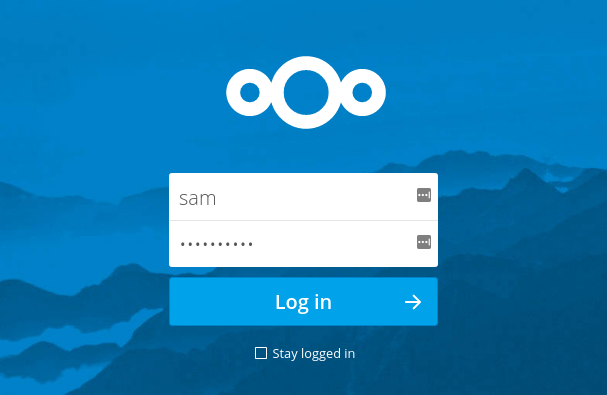
Click the Login button to log in to the Nextcloud web interface.
The first time you enter, a window will be displayed with links to various Nextcloud clients that can be used to interact with and manage your Nextcloud instance:
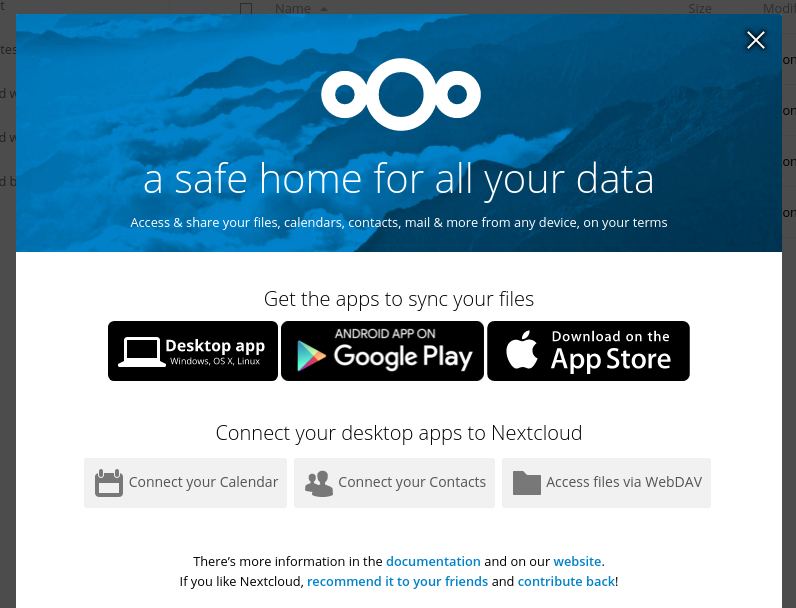
Click the Login button to log in to the Nextcloud web interface.
The first time you enter, a window will be displayed with links to various Nextcloud clients that can be used to interact with and manage your Nextcloud instance:
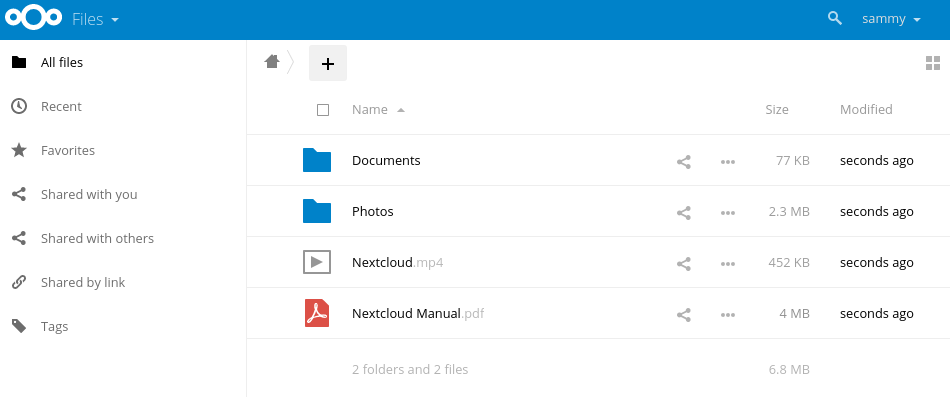
Click through to download any clients you are interested in or exit out of the window by clicking the X in the upper-right corner. You will be taken to the main Nextcloud interface, where you can begin to upload and manage files:
Your installation is now complete and secured. Feel free to explore the interface to get more familiarity with the features and functionality of your new system.
Conclusion
Nextcloud can replicate the capabilities of popular third-party cloud storage services. Content can be shared between users or externally with public URLs. The advantage of Nextcloud is that the information is stored securely in a place that you control.
Explore the interface and for additional functionality, install plugins using Nextcloud's app store.


