
This tutorial will help you to create SFTP only user (without ssh access) on Ubuntu systems. The user can connect the server with SFTP access only and allowed to access the specified directory. User can’t SSH into the server. Follow the below tutorial to create sftp only account.
Step 1 – Create User
First of all, create a user account to use for sftp access. Below command will create a user named sftpuser with no shell access.
$ sudo adduser --shell /bin/false sftpuser
Step 2 – Create a Directory for SFTP
Now, create the directory structure to be accessible by sftp user.
$ sudo mkdir -p /var/sftp/files
Change the ownership of the files directory to sftp user. So that sftpuser can read and write on this directory.
$ sudo chown sftpuser:sftpuser /var/sftp/files
And set the owner and group owner of the /var/sftp to root. The root user has read/write access on this access. Group member and other account have only read and execute permissions.
$ sudo chown root:root /var/sftp
$ sudo chmod 755 /var/sftp
Step 3 – Configure SSH for SFTP Only
Now edit the SSH configuration file in a text editor
$ sudo vim /etc/ssh/sshd_config
And add the following settings at end of the file.
Match User sftpuser
	ForceCommand internal-sftp
	PasswordAuthentication yes
	ChrootDirectory /var/sftp
	PermitTunnel no
	AllowAgentForwarding no
	AllowTcpForwarding no
	X11Forwarding no
Save the configuration and restart SSH service to apply changes.
$ sudo systemctl restart ssh
Step 4 – Test SFTP Connection
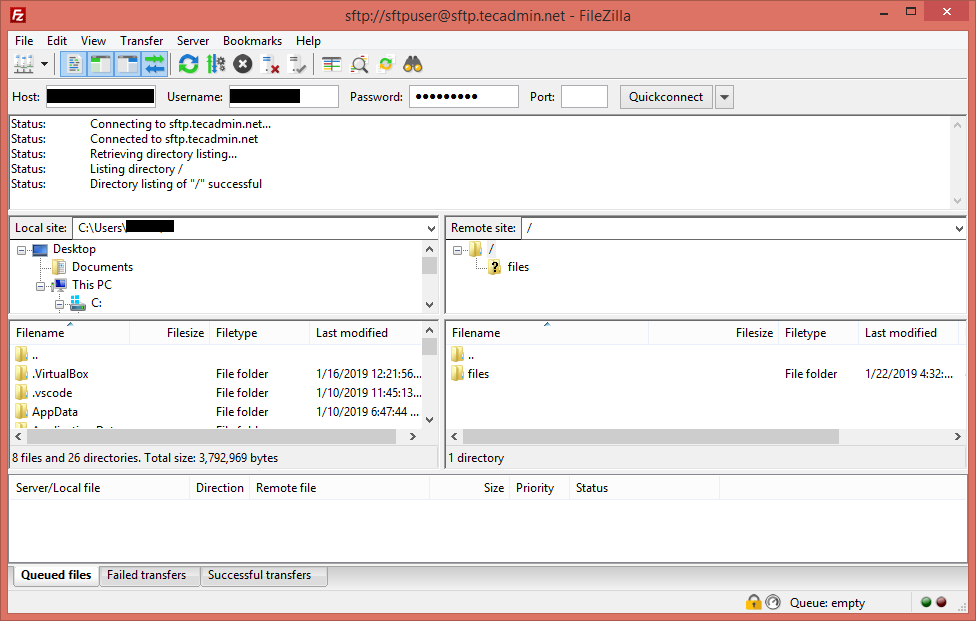
I am using FileZilla for the connection to SFTP instance from my Windows systems. Linux desktop users can also use Filezilla for connection.
For Linux server, users can use sftp command line utility to connect to remote sftp instance.
sftp sftpuser@sftp.rootadminz.net

Connecting to sftp.rootadminz.net...
sftpuser@sftp.rootadminz.net's password:
sftp>
Connect with FileZilla:
As this account is configured for SFTP only connection. So if any user tried to connect via SSH will be disconnected immediately after successful authentication. The user will get below message:
ssh sftpuser@sftp.rootadminz.net

sftpuser@sftp.rootadminz.net's password:
This service allows sftp connections only.
Connection to sftp.rootadminz.net closed.


