 Binila Treesa Babu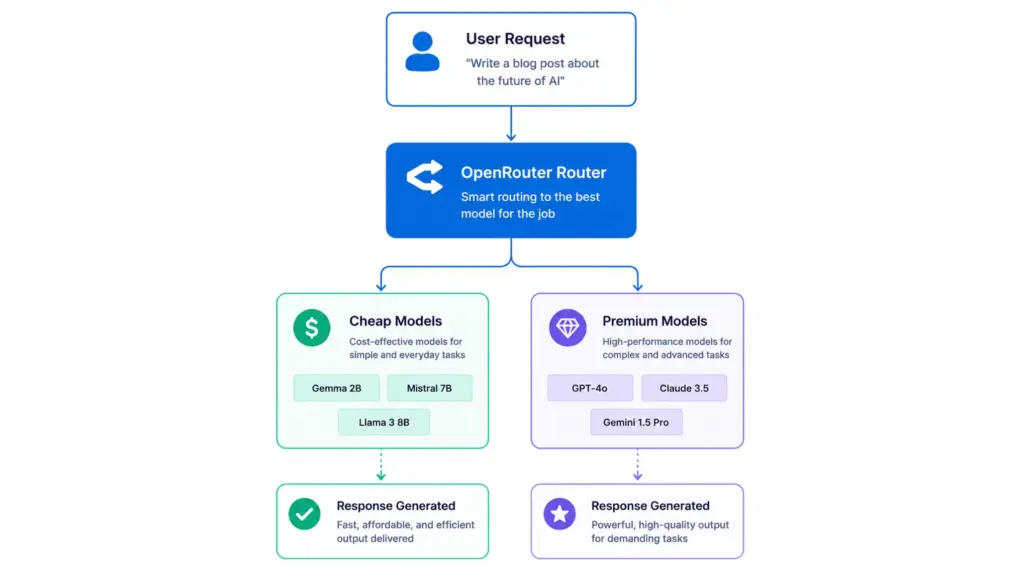
Every request your application sends to GPT-4 costs you. At low volume, the bill is manageable. At production volume, the monthly API cost becomes the dominant expense in your infrastructure stack, often exceeding your server, database, and every other tool combined.
The reason is that most developers and automation builders pick one model and send every request to it regardless of what that request actually requires. It needs a cheap, fast model that handles simple text tasks accurately. Sending those requests to a premium model is the equivalent of hiring a senior architect to sort your mail.
OpenRouter unified interface fixes this by giving you a single API endpoint that routes requests to any model from any provider. You decide which model handles which task based on complexity and cost. Simple tasks go to cheap models. Complex reasoning goes to premium models. The output quality stays high where it needs to and the bill drops significantly everywhere else.
What OpenRouter Is
OpenRouter is a unified API gateway for AI models. You create one account, get one API key, and use one endpoint to access models from OpenAI, Anthropic, Google, Mistral, Meta, DeepSeek, Cohere, and dozens of other providers and open-source model hosts.
The endpoint is:
https://openrouter.ai/api/v1/chat/completionsThe request format is identical to the OpenAI API format. If you have existing code or n8n workflows that call OpenAI, you switch to OpenRouter by changing the base URL and the API key. The model name becomes a provider-prefixed string like openai/gpt-4o or mistralai/mistral-7b-instruct, but the rest of the request structure stays the same.
The key advantage is what happens after you make that switch. Instead of being locked into one provider’s model catalogue, you can route each request in your workflow to the model that best fits that specific step in terms of quality, speed, and cost. OpenRouter also handles provider failover automatically, so if one provider is down, your request falls through to the next model in your fallback list without any changes to your code.
What Model Routing Means
Model routing means directing each AI task in your system to a different model based on what that task requires. The concept is simple once you use an analogy.
A company does not hire a senior consultant to answer basic FAQ emails. The receptionist handles routine questions. The account manager handles client relationships. The senior consultant handles complex strategy problems. Each person is matched to tasks at their level of difficulty and cost.
AI model routing works the same way. A cheap, fast model handles routine tasks. A mid-tier model handles moderately complex tasks. A premium model handles reasoning-heavy or quality-critical tasks. The output quality at each tier is appropriate for the task. The cost at each tier reflects what the task actually requires.
Here is how different common automation tasks map to model tiers:
| Task | Recommended Model | Approximate Cost per 1M Tokens |
|---|---|---|
| Keyword extraction | Llama 3.1 8B | $0.01 |
| JSON formatting | Llama 3.1 8B | $0.01 |
| Text classification | Gemini Flash 1.5 | $0.015 |
| Summarization | DeepSeek Chat | $0.07 |
| Content rewriting | Mistral 7B Instruct | $0.07 |
| Brainstorming | Claude Haiku | $0.25 |
| Lead qualification | GPT-4o-mini | $0.15 |
| Complex reasoning | GPT-4o | $2.50 |
| Legal or technical analysis | Claude Sonnet | $3.00 |
A workflow that currently sends every task to GPT-4 at $2.50 per million tokens can route 80% of its tasks to models costing $0.01 to $0.15 per million tokens. On a workflow processing 50 million tokens per month, that routing decision reduces costs from $125 to under $10.
Why Routing Reduces Costs in Practice
Most AI automation workflows contain a mix of task types. A support automation pipeline might classify the incoming message, extract the key issue, generate a response, and format it for the ticketing system. Only the response generation step genuinely benefits from a premium model. The classification, extraction, and formatting steps produce identical output quality from a model that costs 50 to 100 times less.
Without routing, every step hits your most expensive model. The token costs for classification and JSON formatting are small per request but they compound across thousands of daily requests.
Concrete example with a lead qualification workflow processing 10,000 leads per month:
Without routing, every request goes to GPT-4o at $2.50 input and $10 output per million tokens. Each lead uses approximately 400 tokens total. 10,000 leads equals 4 million tokens. Monthly cost: approximately $37.
With routing:
Step 1 is intent classification using Gemini Flash at $0.015 per million tokens. This step uses 100 tokens per lead. Cost: $0.015 for all 10,000 leads.
Step 2 is data extraction using Llama 3.1 8B at $0.01 per million tokens. This step uses 150 tokens per lead. Cost: $0.015 for all 10,000 leads.
Step 3 is qualification scoring using GPT-4o-mini at $0.15 input and $0.60 output per million tokens. This step uses 150 tokens per lead. Cost: $0.12 for all 10,000 leads.
Total with routing: approximately $0.15 per month instead of $37. That is a 99.6% cost reduction on this specific workflow while maintaining the same output quality because each model is appropriately matched to its task.
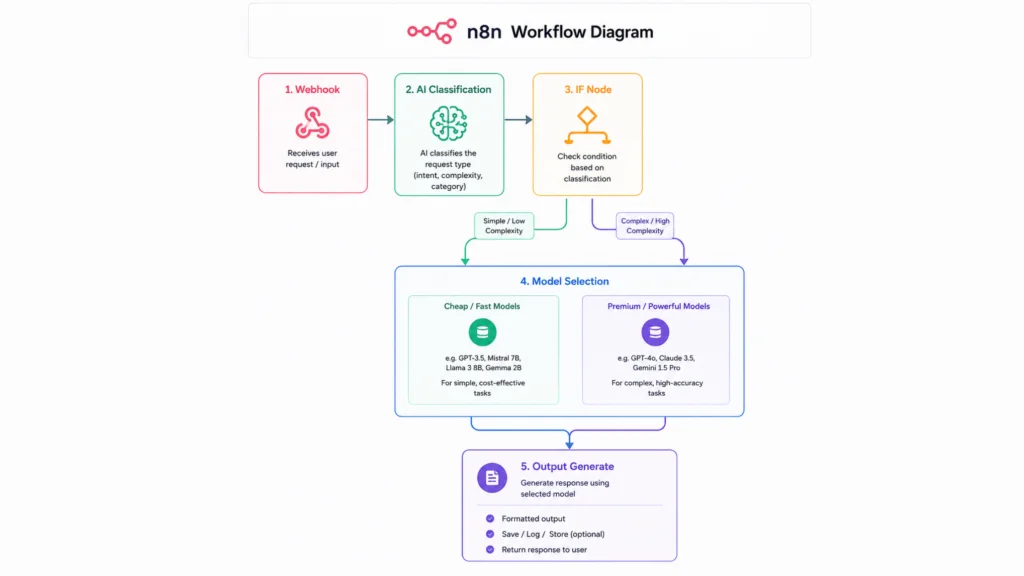
Real Workflow Example: Customer Support Routing
A customer support automation receives incoming messages and needs to classify them, determine urgency, generate a response, and log the ticket. Here is how model routing applies to each step:
Incoming customer message
           ↓
Gemini Flash (classify: billing/technical/general)
           ↓
IF: technical AND urgent
           ↓              ↓
    GPT-4o           Mistral 7B
(complex diagnosis)  (standard response)
           ↓              ↓
    Llama 3.1 8B (format response for ticket system)
           ↓
    Send response + log ticket
The classification step runs on Gemini Flash because it is a simple categorical decision. The response generation branches to GPT-4o only for complex technical issues that need deep reasoning. Standard queries go to Mistral 7B. The final formatting step, which takes the response and structures it as a ticket update, goes to Llama 3.1 8B because JSON formatting requires no reasoning capability.
In a real support system receiving 5,000 messages per month, roughly 70% are standard queries, 20% are billing issues, and 10% are complex technical problems. With this routing setup, only 10% of requests touch GPT-4o. The other 90% run on models costing a fraction of the price.
Building Model Routing in n8n with OpenRouter
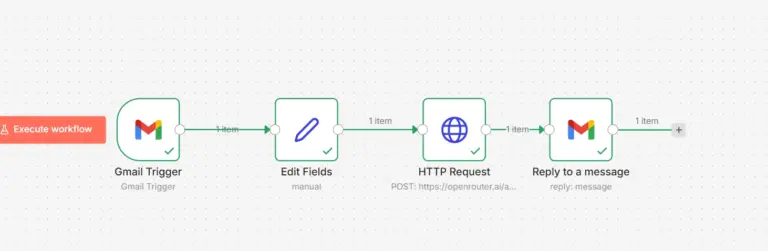
Here is a complete n8n workflow automation that implements cost-based model routing for a content processing pipeline.
The workflow receives content via webhook, classifies the task complexity, routes to the appropriate model, and returns the result.
Step 1: Webhook node
Method: POST
Path: ai-router
Response Mode: Using Respond to Webhook Node
Step 2: HTTP Request node (classification)
This step uses the cheapest capable model to classify the incoming request:
{
  "method": "POST",
  "url": "https://openrouter.ai/api/v1/chat/completions",
  "headers": {
    "Authorization": "Bearer YOUR_OPENROUTER_KEY",
    "Content-Type": "application/json"
  },
  "body": {
    "model": "google/gemini-flash-1.5",
    "messages": [
      {
        "role": "system",
        "content": "Classify the following task as simple or complex. Simple tasks include: summarization, keyword extraction, JSON formatting, title rewriting, basic translation. Complex tasks include: reasoning, analysis, strategy, coding, legal review. Return only one word: simple or complex."
      },
      {
        "role": "user",
        "content": "{{ $json.body.task }}"
      }
    ],
    "temperature": 0.0,
    "max_tokens": 10
  }
}
Step 3: Code node (extract classification)
const content = $json.choices[0].message.content.toLowerCase().trim();
const classification = content.includes("complex") ? "complex" : "simple";

return [{
  json: {
    classification: classification,
    original_task: $('Webhook').item.json.body.task,
    original_input: $('Webhook').item.json.body.input
  }
}];
Step 4: IF node (route by complexity)
Value 1:   {{ $json.classification }}
Operation: Equal
Value 2:   complex
Step 5a: HTTP Request node (complex path using GPT-4o)
{
  "model": "openai/gpt-4o",
  "messages": [
    {
      "role": "system",
      "content": "You are an expert assistant. Complete the following task with high accuracy and depth."
    },
    {
      "role": "user",
      "content": "Task: {{ $json.original_task }}\n\nInput: {{ $json.original_input }}"
    }
  ],
  "temperature": 0.4,
  "max_tokens": 1000
}
Step 5b: HTTP Request node (simple path using Mistral 7B)
{
  "model": "mistralai/mistral-7b-instruct",
  "messages": [
    {
      "role": "system",
      "content": "Complete the following task accurately and concisely."
    },
    {
      "role": "user",
      "content": "Task: {{ $json.original_task }}\n\nInput: {{ $json.original_input }}"
    }
  ],
  "temperature": 0.3,
  "max_tokens": 500
}
Step 6: Edit Fields node (normalize output from both branches)
response_text  →  {{ $json.choices[0].message.content }}
model_used     →  {{ $json.model }}
tokens_used    →  {{ $json.usage.total_tokens }}
Step 7: Respond to Webhook node
{
  "status": "success",
  "classification": "{{ $('Classify Task').item.json.classification }}",
  "model_used": "{{ $json.model_used }}",
  "response": "{{ $json.response_text }}",
  "tokens": "{{ $json.tokens_used }}"
}
The response includes which model handled the request and how many tokens it used. This data feeds your cost tracking over time.
Multi-Tier Routing for Advanced Workflows
For workflows with more than two task types, implement a three-tier routing system:
// Code node: classify into three tiers
const task = $json.body.task.toLowerCase();
const input_length = ($json.body.input || "").length;

let tier;

// Tier 1: trivial tasks under 200 chars
if (input_length < 200 && (
  task.includes("format") ||
  task.includes("extract keywords") ||
  task.includes("classify") ||
  task.includes("label")
)) {
  tier = "tier1";  // Llama 3.1 8B at $0.01/M tokens
}

// Tier 3: complex tasks
else if (
  task.includes("reason") ||
  task.includes("analyze") ||
  task.includes("strategy") ||
  task.includes("debug") ||
  task.includes("review") ||
  input_length > 3000
) {
  tier = "tier3";  // GPT-4o at $2.50/M tokens
}

// Tier 2: everything else
else {
  tier = "tier2";  // Mistral 7B at $0.07/M tokens
}

return [{
  json: {
    tier,
    task: $json.body.task,
    input: $json.body.input
  }
}];
Map each tier to its model in the HTTP Request node using an expression:
// Model selection expression in HTTP Request body
const tierModels = {
  "tier1": "meta-llama/llama-3.1-8b-instruct",
  "tier2": "mistralai/mistral-7b-instruct",
  "tier3": "openai/gpt-4o"
};

return tierModels[$json.tier] || "openai/gpt-4o-mini";
OpenRouter Fallback Configuration
Add model fallback so your workflow continues running if a provider has an outage:
{
  "model": "openai/gpt-4o-mini",
  "models": [
    "openai/gpt-4o-mini",
    "anthropic/claude-haiku-4-5",
    "mistralai/mistral-7b-instruct",
    "meta-llama/llama-3.1-8b-instruct"
  ],
  "route": "fallback",
  "messages": [
    {
      "role": "system",
      "content": "{{ $json.system_prompt }}"
    },
    {
      "role": "user",
      "content": "{{ $json.user_prompt }}"
    }
  ]
}
OpenRouter tries each model in order. The first one that responds successfully handles the request. If GPT-4o-mini is unavailable, Claude Haiku takes over. If Claude Haiku is rate-limited, Mistral 7B handles it. Your workflow never fails because of a single provider outage.
Token Usage Tracking Across Models
Log every request with its model and token count to Google Sheets for cost analysis:
// Code node: calculate estimated cost
const modelCosts = {
  "meta-llama/llama-3.1-8b-instruct": 0.000001,   // $0.01 per 1M
  "google/gemini-flash-1.5":           0.000015,   // $0.015 per 1M
  "mistralai/mistral-7b-instruct":     0.00007,    // $0.07 per 1M
  "openai/gpt-4o-mini":                0.00015,    // $0.15 per 1M
  "openai/gpt-4o":                     0.0025      // $2.50 per 1M
};

const model = $json.model;
const tokens = $json.usage?.total_tokens || 0;
const costPerToken = modelCosts[model] || 0.001;
const estimatedCost = tokens * costPerToken;

return [{
  json: {
    timestamp:      new Date().toISOString(),
    model:          model,
    tokens:         tokens,
    estimated_cost: estimatedCost.toFixed(6),
    workflow:       "ai-router",
    task_type:      $('Classify Task').item.json.classification
  }
}];
After one month of tracking, this sheet shows you exactly where your token budget goes, which tasks route to which models, and where further routing optimization would have the most impact.
Best Model Routing Strategies
Classify before generating. Always run a cheap classification step before the main generation step. The classification call costs fractions of a cent and prevents expensive model calls on tasks that do not need them. The total cost of classification plus cheap model generation is lower than sending everything to a premium model.
Cap prompt length per tier. Long prompts cost more regardless of model. For tier 1 tasks, truncate input to 500 tokens before sending. This prevents accidentally routing a 5,000-token prompt to a cheap model that cannot handle the context window and producing a useless output.
function truncateInput(text, maxTokens) {
  // Approximate 4 chars per token
  const maxChars = maxTokens * 4;
  return text.length > maxChars ? text.substring(0, maxChars) + "..." : text;
}
Use temperature 0.0 for routing decisions. Classification and routing logic must be deterministic. The same input must always produce the same routing decision. Set temperature to 0.0 on every model call that makes a routing decision rather than generating content.
Reserve premium models for user-facing output only. Internal pipeline steps like extraction, classification, and formatting never reach the end user directly. Route all internal steps to cheap models. Only the final response that the user sees needs to come from a premium model if quality is critical.
Test cheap models against your actual data before committing. Benchmark Mistral 7B or Llama 3.1 8B against your specific tasks before assuming you need GPT-4o. For many classification and summarization tasks, the quality difference is negligible and the cost difference is enormous.
Common Mistakes That Increase Costs
Defaulting to GPT-4o for every workflow step. This is the most expensive mistake. Audit every node in your workflow and ask whether the task genuinely requires premium reasoning capability. Most pipeline steps do not.
Sending full conversation history on every turn. Conversational workflows that append every message to the context window grow the prompt length linearly with conversation length. A 20-turn conversation sends 20x more tokens than a single turn. Summarize conversation history every 5-10 turns and send the summary instead of the full transcript.
No token logging. Without logging token usage per workflow step, you cannot identify where costs concentrate. You cannot optimize what you do not measure. Add token tracking from the first day you run a production workflow.
Skipping fallback models. A workflow with no fallback fails completely when a provider has an outage. The outage costs you more in downtime than the marginal cost of having a fallback model configured.
Sending large documents without chunking. Sending a 20-page PDF as a single prompt to a premium model costs significantly more than chunking it, processing each chunk with a cheap summarization model, and synthesizing the summaries with a mid-tier model. Chunk large inputs before they reach any model.
The Future of AI Infrastructure
AI infrastructure is moving toward the same model that cloud computing followed. Early cloud users ran everything on one large server. As the ecosystem matured, teams split workloads across specialized services: CDNs for static assets, databases for persistence, queues for async processing, and compute for application logic. Each component was right-sized for its job.
AI systems are following the same trajectory. Early AI applications hit one premium model for everything. As costs and operational maturity improve, teams are splitting AI workloads across model tiers. Fast, cheap models handle classification and extraction. Mid-tier models handle generation. Premium models handle reasoning. Specialized models handle domain-specific tasks.
Developers who build with model routing from the start ship cheaper products, handle higher request volumes at the same cost, and make it through the growth phase without AI API bills killing their margins. The technical advantage compounds over time because every optimization you build into your routing logic accumulates monthly savings.
The best AI systems in production are not the ones running the most powerful model. They are the ones making the most intelligent decisions about which model to use for each specific task.
Conclusion
Smart model routing is one of the highest-leverage optimizations available to anyone building AI workflows today. The implementation requires one additional classification step and a branching condition in your automation. The return is 70-99% reduction in AI API costs for most production workloads without any reduction in output quality where it matters.
To run this infrastructure reliably, you need a stable server that handles concurrent workflow execution, maintains persistent connections to OpenRouter, and keeps your n8n or Flowise instance running continuously. Ucartz VPS plans give you exactly that. The VPS Lite at $10/month handles light routing workflows. The VPS Standard at $20/month runs full n8n with multi-model routing at production volume. The VPS Pro at $30/month runs n8n, Flowise, and a self-hosted model alongside OpenRouter routing, giving you the complete AI infrastructure stack at a fixed monthly cost with unmetered bandwidth, NVMe storage, and DDoS protection included.
Build the routing logic once on a Ucartz VPS hosting and your AI costs drop permanently while your workflow capacity grows.