Ithal P R
The PHP project released security updates on 21 October 2026 fixing two critical, unauthenticated remote code execution vulnerabilities (CVE-2026-109618 and CVE-2026-109619). If you run a dedicated server or a self-managed (unmanaged) cloud/VPS server with PHP installed, you are responsible for updating it yourself. Update to PHP 8.5.12, 8.4.27, 8.3.36 or 8.2.35 (whichever major version you run) as soon as possible. If you are on one of our fully managed plans, our team handles this for you, see the note below. Further down, there’s a single SSH command for your setup that checks your version and updates it in one step.
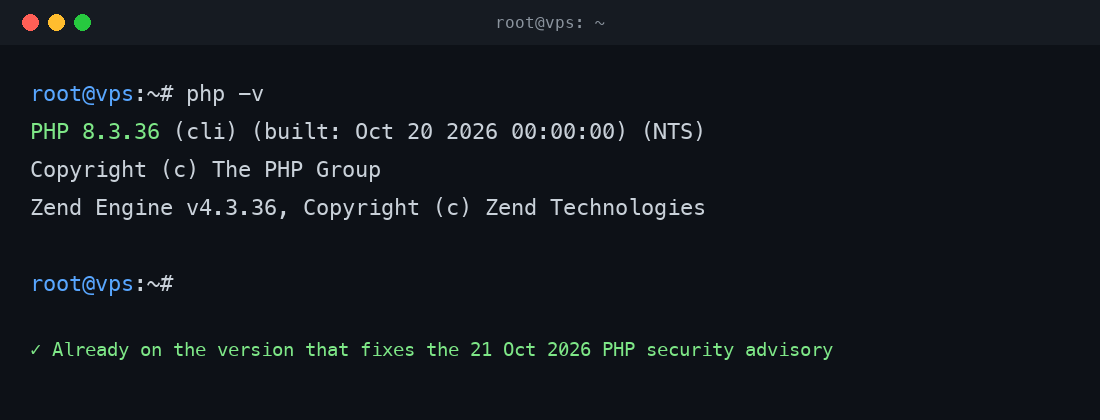
php -v. One of our own VPS instances was already on 8.3.36, the fixed version, when we checked.What the vulnerabilities actually do
Both issues were published by the PHP project on 21 October 2026, both rated CVSS 9.2 (critical), and both can allow an attacker to run arbitrary code on an affected server without needing to log in first.
- CVE-2026-109618, memory handling under out-of-memory conditions can leave internal request data only partially set up. If request cleanup then treats that incomplete data as valid, it can lead to remote code execution. According to PHP’s advisory, this risk is highest on mod_php setups, where a single unauthenticated request can trigger it before any of your own application code even runs.
- CVE-2026-109619, internal state tied to one request can survive after its memory has been freed. If the same worker process handles a later request before that leftover state is reset, the new request may use stale data, which can also lead to remote code execution.
PHP’s own advisory is direct about this: updating is the only complete fix. Settings like memory_limit=-1, a lower post_max_size, or turning off session.upload_progress.enabled only reduce exposure to specific attack paths. None of them make an unpatched server safe on their own.
Which PHP version fixes it
| Your branch | Update to |
|---|---|
| PHP 8.5.x | 8.5.12 |
| PHP 8.4.x | 8.4.27 |
| PHP 8.3.x | 8.3.36 |
| PHP 8.2.x | 8.2.35 |
PHP 8.1 and older no longer receive official updates from the PHP project. The advisory does provide minimal source backports for 7.4, 8.0 and 8.1, but if you’re on one of these end-of-life branches, treat this as a strong reason to plan an upgrade to a supported version rather than relying on a backport indefinitely.
How to check your version
From your server’s command line:
php -vOn a cPanel server with EasyApache PHP, your active version’s binary is under /opt/cpanel/ea-phpXX/root/usr/bin/php (for example ea-php83 for PHP 8.3). Update through WHM’s MultiPHP Manager, or your distribution’s package manager if you installed PHP another way. If you run multiple PHP versions for different sites, check each one.
One command to check and update
If you’d rather not check first and decide separately, you don’t have to. Each line below prints your current version, then updates PHP through your system’s own package manager; if you’re already on the fixed version, the update step changes nothing. Pick the one that matches your server.
cPanel with EasyApache PHP, on AlmaLinux, CloudLinux or another RPM-based OS:
php -v && yum update -y "ea-php*"cPanel with EasyApache PHP, on Ubuntu:
php -v && apt update && apt install --only-upgrade -y "ea-php*"Plain Ubuntu or Debian, PHP from your distribution’s repositories or the Ondřej Surý PPA:
php -v && apt update && apt install --only-upgrade -y php-common php-cli php-fpmAlmaLinux, Rocky or another RHEL-family server, PHP from the Remi repository:
php -v && dnf update -y "php*"These are standard package-manager commands, not a special script, so they behave the same way any other system update does: review what they plan to change if you have a staging copy to test against first, and run php -v again afterwards to confirm the version actually moved.
If you’re on an Ucartz managed plan
Every Ucartz plan includes Free Basic Managed Support, and our Managed cPanel VPS, Managed Webmin VPS, Managed CWP VPS and other fully managed services include PHP and system patching as part of the service. If that’s you, there’s nothing you need to do, our team applies vendor security updates like this one as part of normal maintenance.
If you run a self-managed KVM VPS or an unmanaged dedicated server, PHP patching is on you, the same as any other software you install. It’s one of the trade-offs of full root access: more control, but also more responsibility for keeping what you install up to date.
What to do right now
- Check your PHP version with
php -von every server and every PHP version you run. - If you’re below the fixed version for your branch, update it today.
- Watch your logs for anything unusual in the meantime, PHP’s advisory notes a demonstrated exploit path already exists.
- If you’re not sure which plan you’re on or whether patching is included, open a ticket and our team will confirm.
For a shorter, step-by-step version of the fix with the copy-paste commands and nothing else, see our knowledge base article How to Fix the Critical PHP Security Vulnerabilities (CVE-2026-109618, CVE-2026-109619).
Source: the PHP project’s official 21 October 2026 security release announcement.