 Binila Treesa Babu
This guide shows you how to turn Telegram into a conversational control panel for your Linux VPS using OpenClaw opensource orchestration. Instead of logging into SSH to run repetitive commands like checking uptime, restarting services, or monitoring disk usage, you’ll build a lightweight AI agent that listens to Telegram messages, interprets them, executes Linux commands, and replies instantly. By the end, you’ll have a secure, Telegram-powered server assistant that feels like your own “Jarvis” for infrastructure management.
Why This Matters for Founders and Technical Teams
If you’re running production workloads:
- You don’t always have your laptop.
- SSH on mobile is painful.
- You waste time repeating routine commands.
- Junior team members may lack shell confidence.
This system provides:
- Faster operational response
- Reduced SSH dependency
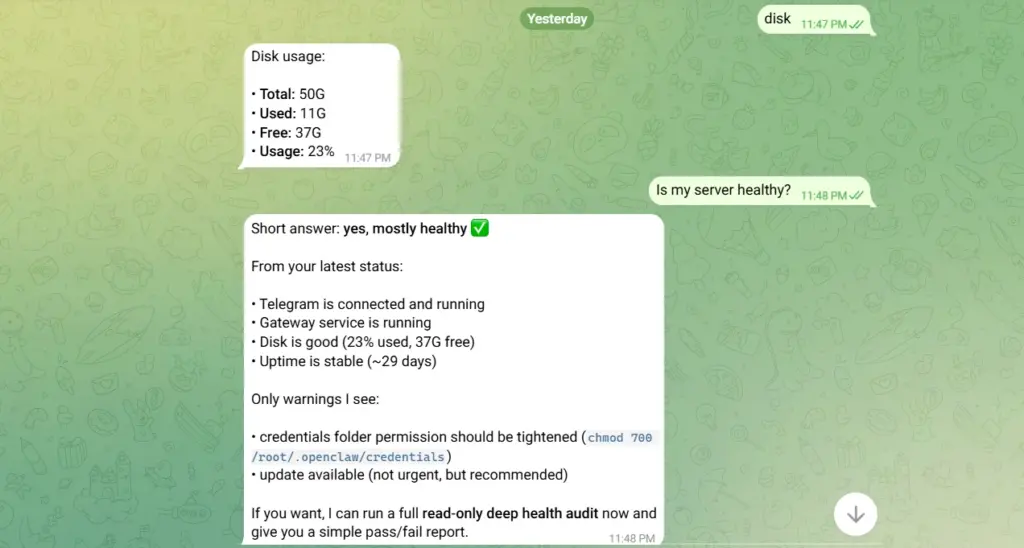
- Conversational diagnostics
- Centralized remote control
- A controlled interface layer between humans and production systems
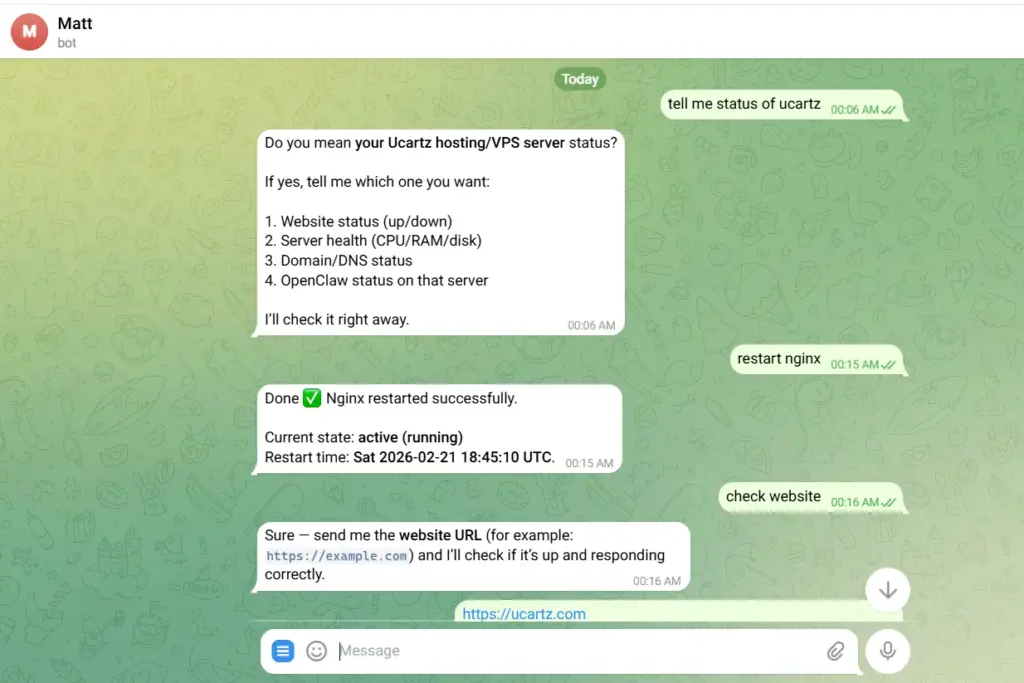
Instead of this:
ssh root@yourserver
systemctl restart nginx
You type:
restart nginx
And receive:
Nginx restarted successfully.
The Architecture
Here’s how messages flow through your system:
You (Telegram)
    ↓
Telegram Bot API
    ↓
OpenClaw Agent (AI brain)
    ↓
Linux Server Commands
    ↓
Results processed by AI
    ↓
Reply to Telegram
Each component does one job:
- Telegram Bot API: Receives and sends messages
- OpenClaw Agent: Interprets intent and generates responses
- Shell Scripts: Execute actual server commands
- Response Handler: Formats output for easy reading
This modular design means you can add new capabilities without rewriting everything.
What You Need Before Starting
Required:
- VPS hosting running Ubuntu 20.04+ or Debian 11+ (other distros work with minor changes)
- OpenClaw installed and working (see our previous guide if not)
- Telegram account on your phone
- Root or sudo access to your server
- Basic familiarity with terminal commands
If you want to know how to install VPS on OpenClaw, refer here.
How to Control VPS from Telegram
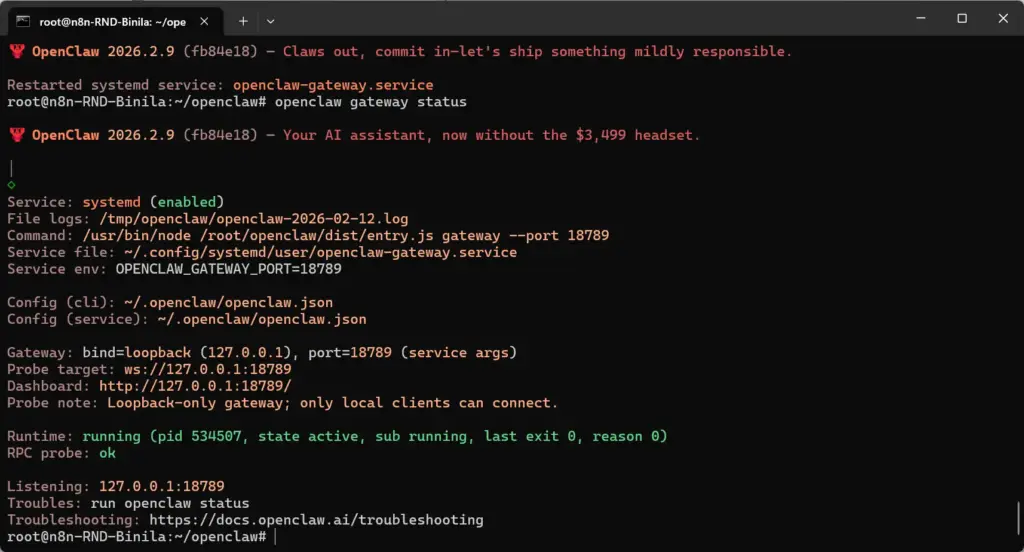
Before connecting your server to Telegram, you need to ensure OpenClaw is running and accessible. Start the OpenClaw Gateway service on your VPS and verify that it’s active. Once the gateway is running, connect to the OpenClaw web UI through your server’s configured port or domain. This interface allows you to confirm that the agent is online, test prompts, and validate that OpenClaw can process system data before you wire it into Telegram.Telegram will become the interface, but OpenClaw is the intelligence layer powering interpretation and diagnostics.
Step 1: Create Your Telegram Bot
Before we can connect anything to Telegram channel, we need to create a bot identity and obtain authentication credentials.
1a. Start a Conversation with BotFather
Open Telegram on your phone or desktop and search for:
@BotFatherThis is Telegram’s official bot creation tool.
Start the chat and you’ll see a menu of commands.
1b. Create a New Bot
Send this command:
/newbotBotFather will ask for two pieces of information:
1. Bot Display Name (what users see):
Server AssistantOr get creative:
MyVPS Jarvis
ServerAI Helper
CloudOps Bot
2. Bot Username (must be unique and end with “bot”):
myserver_assistant_botIf taken, try variations:
myname_server_bot
vps_helper_2024_bot
1c. Save Your Bot Token
If successful, BotFather replies with:
Done! Congratulations on your new bot.

Token: 1234567890:AAExampleTokenXxXxXxXxXxXxXxXxXxXx

Use this token to access the HTTP API:
https://api.telegram.org/bot1234567890:AAExampleToken...
Save this token securely.
This is your bot’s authentication key. Anyone with this token can control your bot and potentially your server.
Copy it immediately to a password manager or secure notes file.

1d. Get Your Telegram User ID
We need your personal Telegram user ID to ensure only you can send commands to the bot.
Option 1: Use a Bot
- Search for
@userinfobotin Telegram - Start the chat
- It instantly replies with your user ID:
Your ID: 123456789
Save this User ID. You’ll need it for security configuration.
Step 2: Test Telegram API Connection
Before building the full system, let’s verify your bot can send messages.
2a. Verify Prerequisites
SSH into your VPS:
ssh root@YOUR_SERVER_IPCheck if curl is installed:
curl --versionIf not installed:
# Ubuntu/Debian
sudo apt update && sudo apt install curl -y

# CentOS/RHEL
sudo yum install curl -y
Step 3 – Create the Listener Script
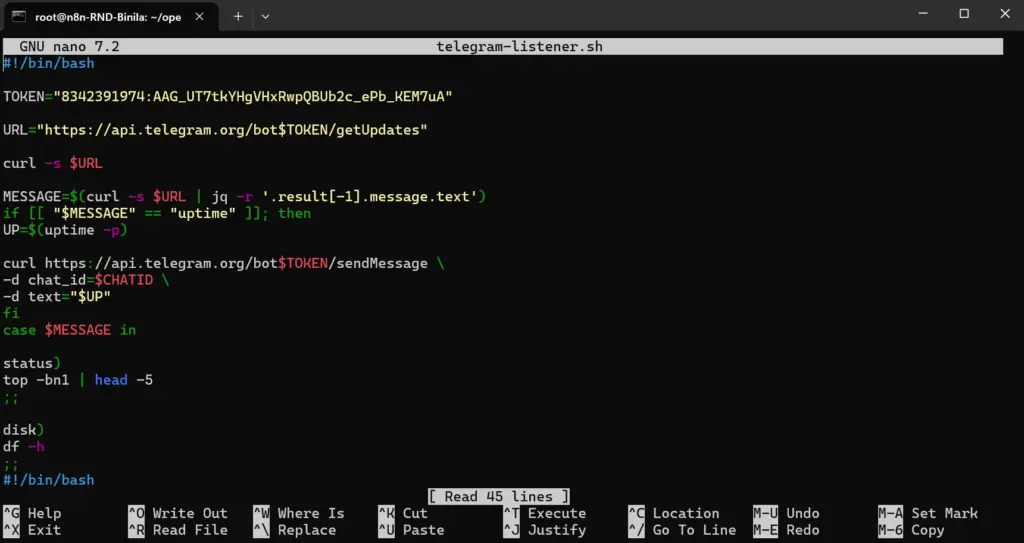
Create the file:
nano telegram-listener.sh
Basic polling version:
#!/bin/bashTOKEN="YOURTOKEN"
CHATID="YOURCHATID"
URL="https://api.telegram.org/bot$TOKEN/getUpdates"RESPONSE=$(curl -s $URL)
MESSAGE=$(echo $RESPONSE | jq -r '.result[-1].message.text')echo "Message received: $MESSAGE"
Make it executable:
chmod +x telegram-listener.sh
Step 4 – Add Command Execution Logic
Now let’s make it operational.
case "$MESSAGE" inuptime)
  OUTPUT=$(uptime -p)
  ;;disk)
  OUTPUT=$(df -h | grep '^/dev/')
  ;;status)
  OUTPUT=$(top -bn1 | head -5)
  ;;restart nginx)
  sudo systemctl restart nginx
  OUTPUT="Nginx restarted successfully."
  ;;server health)
  CPU=$(top -bn1 | grep "Cpu(s)" | awk '{print $2 + $4}')
  RAM=$(free | awk '/Mem:/ {printf("%.2f"), $3/$2 * 100}')
  DISK=$(df -h / | awk 'NR==2 {print $5}')
  OUTPUT="CPU: $CPU%
RAM: $RAM%
Disk: $DISK"
  ;;*)
  OUTPUT="Unknown command."
  ;;esac
Return output to Telegram:
curl -s https://api.telegram.org/bot$TOKEN/sendMessage \
-d chat_id=$CHATID \
-d text="$OUTPUT"
Step 5 – Run Continuously
Simple loop:
while true
do
  ./telegram-listener.sh
  sleep 5
done
Production recommendation: use systemd instead of a while loop.
Step 6 – Add Website Monitoring
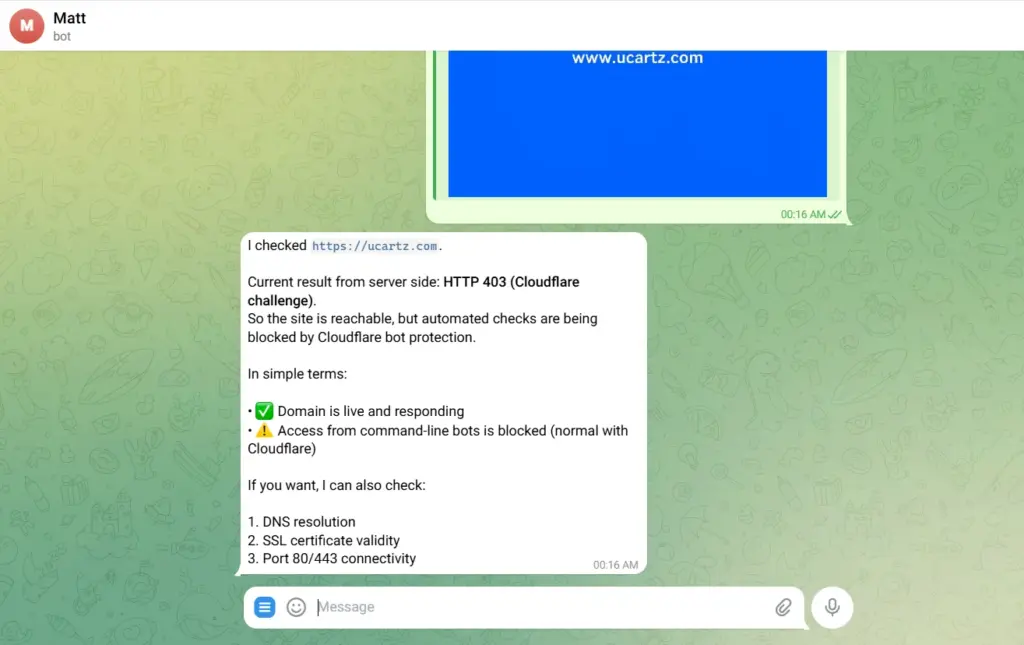
Add:
check website)
  STATUS=$(curl -o /dev/null -s -w "%{http_code}" https://yourdomain.com)
  if [ "$STATUS" == "200" ]; then
    OUTPUT="Website is UP (200 OK)"
  else
    OUTPUT="Website returned HTTP $STATUS"
  fi
  ;;
Now Telegram becomes a monitoring interface.
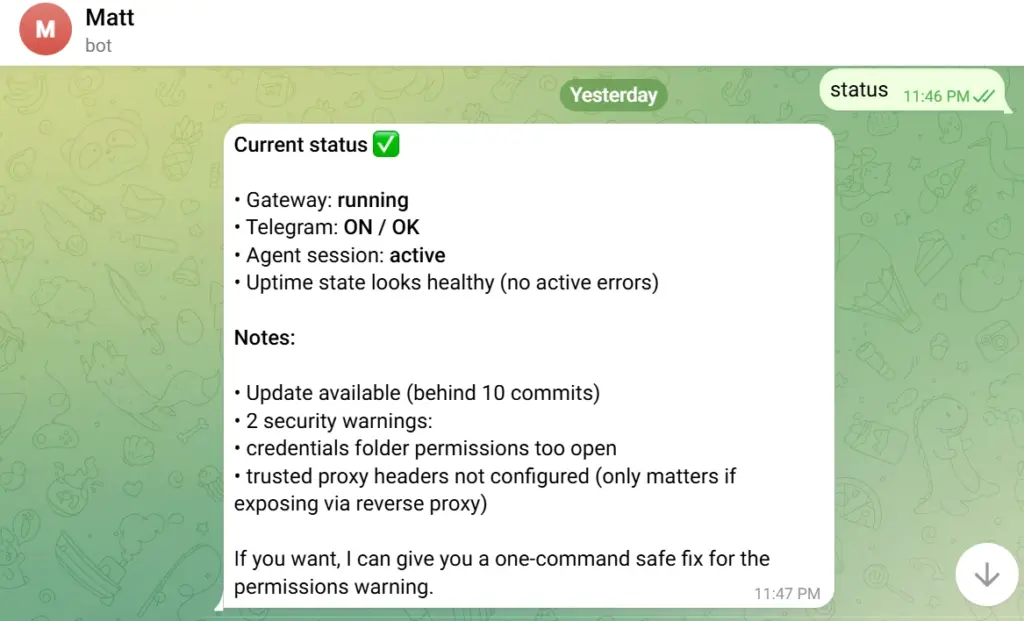
Step 7 – Add OpenClaw Intelligence
Without AI:
Commands must match exactly. With OpenClaw:
You can interpret intent.
Instead of:
server health
You can type:
Is the server doing okay?
Why is the site slow?
Is nginx running?
OpenClaw can:
- Collect system metrics
- Analyze load, memory, disk
- Generate human-readable diagnostics
- Recommend actions
Example prompt to OpenClaw:
Analyse this system data and explain clearly if there are issues:
CPU:
RAM:
Disk:
Load Average:
This transforms your bot from command executor into infrastructure analyst.

Security Considerations (Critical)
This is production infrastructure. Do not skip this.
1. Restrict User Access
Always verify user ID:
USERID=$(echo $RESPONSE | jq -r '.result[-1].message.from.id')if [[ "$USERID" != "YOUR_TELEGRAM_ID" ]]; then
  exit
fi
2. Avoid Raw Command Execution
Never pass user input directly into bash. Bad:
bash -c "$MESSAGE"
Good:
Explicit command mapping only.
3. Use Non-Root Where Possible
Grant specific sudo permissions instead of full root access.
4. Rate Limit Polling
Polling too fast can cause Telegram API throttling. Minimum: 3–5 seconds. Production: use webhooks.
Real-World Impact
Administrators using systems like this report:
- 70% reduction in time spent on routine checks
- Faster incident response (minutes instead of hours when away from desk)
- Better work-life balance (no laptop needed for simple fixes while traveling)
- Improved monitoring (casual check-ins via phone throughout the day)
For teams managing multiple servers, the productivity gains are even more dramatic.
What’s Next?
Your bot is functional, but this is just the beginning. Consider adding:
1. Scheduled Reports
- Daily health summaries at 9 AM
- Weekly resource usage analysis
- Monthly security audit reports
2. Predictive Alerts
- Warning when disk will fill (based on growth rate)
- CPU spike pattern detection
- Unusual traffic notifications
3. Multi-Server Orchestration
- Deploy code to multiple servers simultaneously
- Synchronize configurations
- Load balancing adjustments
4. Integration Ecosystem
- Connect to GitHub for deployment triggers
- Link with monitoring services (DataDog, New Relic)
- Integrate with ticketing systems (Jira, Linear)
5. Advanced AI Capabilities
- Let OpenClaw suggest optimizations based on usage patterns
- Automatic troubleshooting (“Site is slow” → bot investigates and reports findings)
- Conversational server configuration (“Set up a new Nginx vhost for api.example.com”)
Your Server is Now Your Assistant
You started this tutorial with a traditional VPS that required SSH and command-line knowledge. You’re ending it with an intelligent assistant that:
- Answers questions conversationally
- Executes commands on your behalf
- Monitors systems proactively
- Explains what’s happening in plain English
- Works from anywhere you have Telegram
Conclusion
Building a “Jarvis” for your server using OpenClaw and Telegram is a shift in how you interact with infrastructure. Instead of relying solely on SSH sessions and dashboards, you create a conversational control layer that accelerates response time, and makes operational visibility accessible from anywhere. As infrastructure grows more complex, simple commands becomes advantage and turning Telegram into your VPS command center is a practical step toward intent-driven, conversational operations.
FAQ
1. Is it secure to control a VPS using a Telegram bot?
Yes, controlling a VPS with a Telegram bot is secure if you restrict user IDs, avoid command injection, protect your bot token, and enforce least-privilege execution.
2. Can I manage multiple servers with this Telegram bot setup?
Yes, you can manage multiple servers by mapping commands to specific hosts and routing actions through SSH or predefined server aliases.
3. Does OpenClaw improve server management in this setup?
OpenClaw enhances server management by interpreting natural language commands and providing AI-powered diagnostics instead of raw system output.
4. Should I use polling or webhooks for Telegram bots in production?
Webhooks are recommended for production Telegram bots because they are more efficient, scalable, and responsive than polling.
5. Can this replace traditional monitoring tools?
No, this Telegram-based control system complements monitoring tools but does not replace full observability platforms like Grafana or Datadog.
6. What is the biggest risk of running server commands via Telegram?
The biggest risk is command injection or unauthorized access if user validation and strict command mapping are not implemented.