
Short answer: the email domain is the part of an address after the @. In asha@ashasbakery.com, the domain is ashasbakery.com. It decides which mail servers receive messages for that address (through the domain’s MX records) and which servers may send mail in its name (through SPF, DKIM and DMARC). With a free address, the domain belongs to the provider, such as gmail.com. With a custom domain email, it is your own domain, and you choose who hosts the mailboxes.
The parts of an email address
The email message standard, RFC 5322, defines an address as a locally interpreted string, then the @ sign, then an internet domain:
| Part | Example | What it is |
|---|---|---|
| Local part | asha | The mailbox name, chosen by whoever runs the domain |
| @ | @ | The separator |
| Domain | ashasbakery.com | Where the mail goes, looked up in DNS |
Capital letters are treated differently in the two halves. The SMTP standard, RFC 5321, says mail servers must preserve the case of the local part, because for some hosts smith and Smith are different users, though it discourages relying on that. The domain follows normal DNS rules and is not case-sensitive, so ASHASBAKERY.COM and ashasbakery.com are the same.
How the domain decides where email goes
When someone sends you a message, their mail server looks up the MX (mail exchange) records of your domain. RFC 5321 describes the rules:
- Each MX record names a mail server and a preference number. The lowest number is tried first.
- If a domain has no MX records at all, the sender falls back to the domain’s own address record (the “implicit MX”).
- A domain that accepts no email can say so with a “null MX” record,
0 ., defined in RFC 7505.
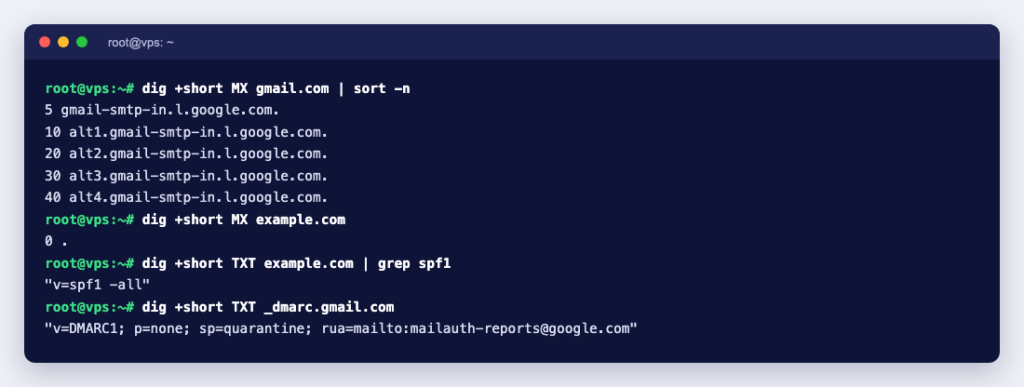
You can see both cases with dig. This is what we got on Debian 13:
$ dig +short MX gmail.com
5 gmail-smtp-in.l.google.com.
10 alt1.gmail-smtp-in.l.google.com.
20 alt2.gmail-smtp-in.l.google.com.
30 alt3.gmail-smtp-in.l.google.com.
40 alt4.gmail-smtp-in.l.google.com.

$ dig +short MX example.com
0 .
gmail.com has five mail servers, tried in order from preference 5. example.com publishes a null MX: it accepts no mail at all. (We sorted the Gmail lines by preference; dig may print them in any order.)
Free address or your own domain?
| Free address (you@gmail.com) | Your own domain (you@yourbusiness.com) | |
|---|---|---|
| Cost | Free | A domain plus email hosting |
| Looks like | A personal account | Your business |
| Keep the address if you change provider | No | Yes: point the MX records at the new host |
| Extra addresses (sales@, support@) | Separate accounts | As many as your plan allows, plus aliases and forwarders |
| Send newsletters or app email from your own servers | Not in the provider’s name: Google asks senders not to impersonate Gmail From: addresses | Yes, once SPF, DKIM and DMARC are set up |
| Who controls the accounts | The provider | You |
The sending row matters more than it used to. Google’s email sender guidelines require every sender to set up SPF or DKIM for their sending domain, and senders of more than 5,000 messages a day to Gmail accounts to set up SPF, DKIM and DMARC, with the From: domain aligned with the SPF or DKIM domain. You can only do that for a domain you control. There is a checklist in requirements for bulk senders.
What you need for email on your own domain
- A domain name. If you already have a website, you can use the same domain.
- Somewhere to host the mailboxes. Common choices are the email included with a web hosting plan, a service such as Google Workspace, or your own mail server.
- DNS records that point mail to that host and prove your mail is genuine (next section).
- Your mail app set up with the host’s IMAP and SMTP details. For the choice between protocols, see POP3 vs IMAP; for ports, SMTP port numbers.
The four DNS records behind a custom email domain
| Record | Where | Example value | What it does |
|---|---|---|---|
| MX | example.com | 10 mail.example.com. | Tells other servers where to deliver your mail |
| SPF (TXT) | example.com | v=spf1 mx -all | Lists the servers allowed to send as your domain; this one allows only your MX hosts (RFC 7208) |
| DKIM (TXT) | selector._domainkey.example.com | A public key from your email host | Lets receivers check a signature on each message (RFC 6376) |
| DMARC (TXT) | _dmarc.example.com | v=DMARC1; p=none; rua=mailto:dmarc-reports@example.com | Says what to do when SPF and DKIM fail, and where to send reports (RFC 9989) |
Your email host gives you the exact values; the ones above only show the format. The DMARC policy p= can be none, quarantine or reject. Start with none, read the reports, and tighten it once you know every service that sends as your domain passes: see how to tighten DMARC safely. For what each record does in more depth, read what SPF, DKIM and DMARC actually do.
Check any domain’s email setup
dig +short MX example.com                 # where mail is delivered
dig +short TXT example.com | grep spf1    # the SPF record
dig +short TXT _dmarc.example.com         # the DMARC policy
For example.com, the SPF record came back as "v=spf1 -all", which says no server may send mail for it: a sensible record for a domain that never sends email. More lookup tools are in DNS lookup commands.
Common mistakes with email domains
- Two SPF records. When you add a new sending service, merge it into your existing SPF record instead of adding a second one. RFC 7208 says a domain must not have more than one, and receivers treat two as a permanent error.
- Losing email when you move your website. If you change nameservers, copy the MX, SPF, DKIM and DMARC records to the new DNS host first, or mail will stop arriving.
- Jumping to
p=rejecttoo early. A service you forgot, such as your invoicing tool, suddenly has its mail rejected. - Letting the domain expire. Your email stops with it, and whoever registers the domain next can receive mail sent to your old addresses.
To get started, find a name with our domain search. Our web hosting plans include email on your domain, and you can also get Google Workspace from us if you prefer Gmail’s interface with your own domain. Setting up Workspace in cPanel? This guide lists every DNS record you need, and how to set up business email covers the rest.