
Short answer: no dedicated server can send an unlimited amount of data, because the network port sets a hard ceiling: a 1 Gbps port can move at most about 324 TB in a 30-day month, even running flat out. “Unmetered” means your monthly transfer is not counted against a cap, so the port speed and the provider’s terms are your limits. “Unlimited” is a marketing word whose meaning is set by the provider’s terms, which may include a fair-use clause. A metered plan gives you a monthly allowance, for example 30 TB on a 1 Gbps port. Choose by working out your real traffic, then check the port speed, the fair-use terms and what happens if you exceed an allowance.
Bandwidth and data transfer are two different numbers
Hosting plans use the word “bandwidth” for two separate things:
- Port speed is a rate, in megabits or gigabits per second (Mbps, Gbps). It is how fast data can flow at any moment, like the width of a pipe.
- Data transfer is a volume, in gigabytes or terabytes per month (GB, TB). It is how much has flowed through the pipe in total.
Note the units: port speeds are in bits, transfer is in bytes, and one byte is eight bits. A plan described as “30TB on 1Gbps” gives you both numbers. A plan described as “unmetered on 1Gbps” gives only the rate, because the volume is not counted.
The ceiling: what a port can carry in a month
Multiply the port speed by the seconds in a month (a 30-day month has 2,592,000) and divide by eight to get bytes:
| Port speed | Per second | Maximum in 30 days at 100% use |
|---|---|---|
| 100 Mbps | 12.5 MB | 32.4 TB |
| 250 Mbps | 31.25 MB | 81 TB |
| 1 Gbps | 125 MB | 324 TB |
| 10 Gbps | 1.25 GB | 3,240 TB |
So “unlimited on 1 Gbps” can never mean more than about 324 TB a month, and a server that really used that much would be running its port at full speed day and night.
It also helps to turn a monthly allowance into an average speed. One TB a month is about 3.1 Mbps around the clock, so 10 TB is about 31 Mbps and 30 TB about 93 Mbps. Unless your traffic is perfectly flat, though, your busiest moments run well above the average. The allowance covers your monthly total; the port speed has to cover your peaks.
Unmetered, unlimited and metered: what to read in the terms
| Plan says | What it means | Questions to ask |
|---|---|---|
| Metered, for example 10 TB on 1 Gbps | A monthly transfer allowance on a port of that speed | Is incoming traffic counted too? What happens above the allowance: extra charges, a slower port or suspension? |
| Unmetered on 1 Gbps | Transfer is not counted; the port speed is the limit | Is the full port speed yours, or shared? Is there a fair-use or acceptable use clause? |
| Unlimited | Whatever the terms say it means | Read the acceptable use policy: which uses are excluded, and what counts as fair use? |
On our own shared and reseller hosting, for example, plans described as unmetered or unlimited have no fixed transfer cap for normal website use but are still subject to fair use and our Acceptable Use Policy, as we explain in what happens if you exceed your bandwidth. Whichever provider you use, read the equivalent terms for the exact server you are buying.
How to estimate your monthly traffic
Multiply what you send by how often you send it. These are worked examples, not typical figures for any particular site:
- Website: average page weight times page views. 2 MB per page and 100,000 page views a month is 200 GB.
- Downloads: file size times downloads. A 1 GB file downloaded 5,000 times is 5 TB.
- Audio streaming: bitrate times listeners times hours. 100 listeners on a 128 kbps stream is 12.8 Mbps; around the clock for 30 days, that is about 4.1 TB.
- Backups and replication: the size of each copy times how often it runs. Count incoming traffic too if your plan does.
Add the parts together, then allow for growth and for your busiest month, not your average one.
Measure the traffic on a server you already run
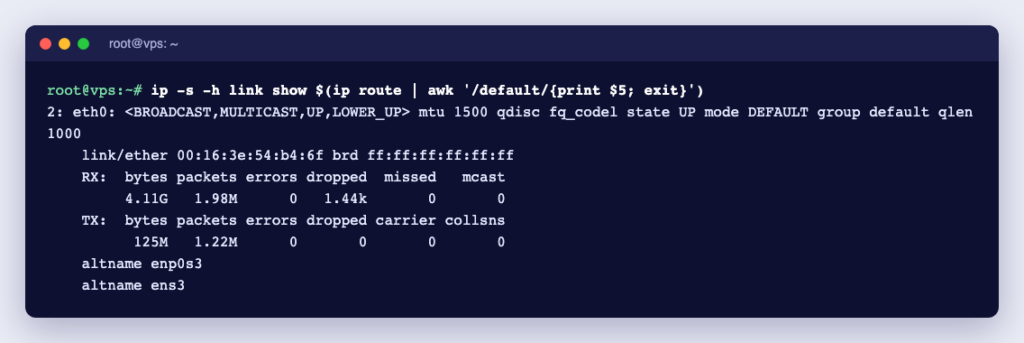
Real numbers beat estimates. On Linux, the kernel counts bytes on each network interface since boot:
ip -s link show eth0Look at the RX: bytes (received) and TX: bytes (sent) lines. Your interface may have another name, such as ens3; ip link lists them. For history, install vnStat, which records traffic over time. We tested vnStat 2.12 on Ubuntu 24.04:
sudo apt install vnstat      # on AlmaLinux: dnf install vnstat (from EPEL)
vnstat -m                    # totals per month
vnstat -d                    # totals per day
vnstat -i eth0 --95th        # 95th percentile rate for the month
The monthly view includes an “estimated” line that projects the whole month from the traffic so far. vnStat shows binary units by default (MiB, GiB, TiB), and 1 TiB is about 1.1 TB, so convert before comparing with a plan. The 95th percentile shows the rate you stay under 95% of the time, which is a better guide to the port speed you need than a single peak. For a full month of it, vnStat asks you to raise 5MinuteHours in /etc/vnstat.conf to at least 744; the default keeps 48 hours.
Your web server logs tell you which content uses the most. In the predefined “combined” log format of nginx, which it uses when no other format is set, the tenth field is $body_bytes_sent, so this adds up the bytes sent in one log file:
awk '{sum += $10} END {printf "%.2f GB\n", sum/1000000000}' /var/log/nginx/access.logWe checked this against nginx 1.30.5. It counts response bodies only, not headers, and only for that one log file. If you are moving from shared hosting, your control panel shows your monthly transfer: see how to check bandwidth usage in cPanel.
Which kind of plan fits you?
| Your traffic | What to look for |
|---|---|
| Modest and predictable, well under the allowance | A metered plan is fine; check the overage terms anyway |
| Large or hard to predict: streaming, downloads, backups | Unmetered on a port that covers your 95th percentile with room to spare |
| Close to the port speed for long periods | A faster port, and a clear answer on whether the port speed is guaranteed |
| Mostly static files to users worldwide | Consider a content delivery network in front of the server to cut its outgoing traffic |
Bandwidth on Ucartz unmanaged dedicated servers
On our unmanaged dedicated servers, each plan card states its bandwidth: either unmetered or unlimited on a given port speed, or a monthly allowance such as 10 TB or 30 TB on a 1 Gbps port. So you can compare plans with the numbers you worked out above. Every plan comes with full root access, a free IPMI KVM console and Free Basic Managed Support, and we do not block any ports by default. If your traffic figures leave you unsure which plan fits, send them to us and ask before you order.