

Short answer: cPanel has raised its prices almost every year since 2019, and it does so again on 16 December 2026. For years most people grumbled and stayed, because moving a server felt harder than paying more. That has changed. In 2026 AI agents such as Claude Code, OpenAI’s Codex and Google’s Antigravity can pack a cPanel account, move it and unpack it on a free control panel like Virtualmin while you watch and approve each step. Free, open-source panels are alive, maintained and able to import cPanel backups. This time, as 2026 ends and the 2027 prices begin, leaving is a choice you can actually make.
Patience is about to break
Talk to anyone who runs servers for a living and mention cPanel pricing. You will rarely get a calm answer. You get a sigh, then a story. Every year the same thing happens: a new price list, a polite FAQ, and the uncomfortable feeling that the company behind the panel acts as if it built the internet and the rest of us only rent space on it.
We feel it too. We run cPanel servers ourselves, and we sell cPanel licences to customers who depend on them. For years the increases were small enough to swallow: a few dollars on a licence, a few cents per account, absorbed into margins or quietly passed on. Nobody liked it, but nobody had to act on it.
Small numbers add up. When cPanel moved to per-account pricing in June 2019, trade press reported a Solo licence at $15 a month. From 16 December 2026 the cPanel Store charges $32.99, more than double, and every other tier went the same way. We put every number and date in our cPanel price increase 2027 article. This increase does not land on a fresh budget. It lands on seven years of increases, and for many people it is the one that finally needs attention.
So why have we not moved already?
Ask the same people why they have not left, and the anger turns into something closer to tiredness. The answer is almost never “we like the panel”. It is time and experience. Most people move a server once every few years. Each time they have to relearn the commands, find a free weekend that does not exist, and hope that nothing breaks while customers are watching.
One missed database or one forgotten mail forwarder, and the phone rings. Measured against that, a small price rise always looked cheaper than a migration. For many small hosting companies, agencies and site owners, the real price of cPanel was never the licence. It was the cost of leaving.
That cost is the thing that has quietly collapsed.
What changed in 2026: you can ask
A year ago, letting an AI agent work on a server sounded like a stunt to most people. In 2026 it is ordinary. The tools are built for exactly this kind of work:
- Claude Code reads files and runs commands, and in its manual permission mode it asks you before it runs anything that changes the system. Its desktop app can run a session directly on a remote Linux server over SSH.
- OpenAI’s Codex runs commands inside a sandbox and asks for approval before it steps outside it, and its desktop app can work on a remote host over SSH. According to OpenAI, Codex is included even in the free ChatGPT plan.
- Google Antigravity is an agent app whose agent can execute system commands, with a setting that makes every terminal command wait for your approval. It has a free weekly quota for personal Google accounts, for users aged 18 and over in supported countries.
You do not need to remember the commands any more. You describe what you want: “Back up the account shop on this cPanel server, copy it to my new server and import it into Virtualmin. Show me each command before you run it.” The agent plans the steps, explains them, and waits for your yes. People call this way of working vibe coding: you bring the intent, the AI brings the syntax. For a migration, it means the long, careful checklist is no longer in your head. It is on the screen, step by step, and you stay in control.
cPanel remembered AI. It forgot that AI works both ways
To be fair, cPanel did not ignore AI. In version 138 it added an AI Assistant inside the panel, a new interface called Meridian, Node.js app hosting and a way for Claude Code to connect to cPanel. All of it is designed to make the panel easier to use, and to give you one more reason to stay.
But an AI that can manage your cPanel account can also pack it up and move it. cPanel’s own backup tool, pkgacct, writes a complete account archive, a single “cpmove” file with the website, databases, mail and DNS zone. And several free control panels can read that file. The same intelligence that makes the panel friendlier makes leaving it simple. That is the part the yearly price rise did not count on.
Where people go: free and open-source panels that are alive
Leaving only works if there is somewhere good to go. There is. These panels are free, their source code is public, and every one of them shipped a new release in September or October 2026:
| Panel | Licence | Latest release | Imports cPanel backups? | Good to know |
|---|---|---|---|---|
| Virtualmin (GPL edition) with Webmin | GPL-3.0 (Webmin: BSD) | 8.3.0, September 2026 | Yes, built in (Migrate Virtual Server) | Web, mail, DNS, databases, Let’s Encrypt, backups. Reseller accounts need the paid Pro edition. |
| HestiaCP | GPLv3 | 1.10.5, September 2026 | Yes, v-import-cpanel | Debian and Ubuntu only. Built-in white-label logo option. |
| CyberPanel | GPL-3.0 core | 3.0.7, September 2026 | Yes, an import script | Built on OpenLiteSpeed. Some extras are paid add-ons. |
| ISPConfig | BSD | 3.3.2, September 2026 | With its paid Migration Toolkit | Strong multi-server and reseller features. |
| Froxlor | GPL-2.0 | 2.3.15, October 2026 | No importer found | Lightweight, Debian and Ubuntu focused. |
Two free options look similar but are different. CloudPanel is free of charge but not open source, has no email, and its licence does not allow hosting it for third parties without permission. aaPanel uses its own licence that limits changes to its source code. Both can be fine for your own projects; neither gives you the freedom of the panels in the table.
The part that excites us: you can make it yours
With cPanel you get what you pay for, and you wait for the vendor to add the rest. With an open-source panel, the missing feature is no longer a support ticket to someone else. It is something you can build, and with an AI agent beside you, building it is within reach of a small team:
- Plugins: Virtualmin plugins are Webmin modules with a few extra files. Need a button that runs your own backup routine, or a page that shows a client’s usage the way you want? Describe it to an agent and review what it writes.
- Your own look: Webmin’s Authentic Theme supports your own logos and custom styles, and HestiaCP can replace its logos with yours and load your own CSS theme.
- Your own panel, for hosting companies: instead of paying per account for someone else’s product, a host can put its own skin and features on a free panel and give customers an interface that carries its brand. The licences allow it: Webmin is BSD, Virtualmin and HestiaCP are GPL (changes you distribute stay under the GPL).
This is not theory for us. One of our own shared hosting plans already runs on Virtualmin instead of cPanel. And inside Ucartz we lean on the database and the command line more than on any panel, with AI agents doing much of the typing, as we described in our price article.
The honest part: what is still hard
Excitement is not a migration plan. Before you move, know where the sharp edges are:
- Email is the delicate part. Mailboxes move, but a new server means a new sending IP. Check its reputation, set SPF, DKIM and DMARC, and keep the old server running until mail flows cleanly.
- Some things do not travel. According to cPanel, its backup does not include two-factor authentication settings. Virtualmin’s cPanel importer has no step for PostgreSQL databases, and it copies SSL certificates only when the account gets its own IP; on a shared IP you issue fresh Let’s Encrypt certificates.
- Resellers need a different setup. Virtualmin’s reseller accounts are a paid Pro feature and some free panels have no reseller role, so the simplest route is one VPS per reseller, as described below, or ISPConfig, whose free edition has reseller and client levels.
- Your clients know cPanel. If they log in themselves, tell them before the move and show them where things are now.
- An AI agent is only as safe as its limits. Back up first, use the agent’s manual approval mode on production servers, read each command before you say yes, and never paste passwords or keys into the chat.
Should you stay or go?
Stay with cPanel only if no one on your team is comfortable reading a command before approving it, or if your customers’ daily routine is built around its interface and you cannot change that yet. For you, the licence buys calm, and that is worth something. We will keep selling and supporting cPanel licences and managed cPanel VPS for exactly that reason.
If you sell reseller hosting, turn the question around. Instead of paying per account for every reseller’s customers on one big cPanel server, move each reseller to their own VPS with Webmin and Virtualmin or another free panel. The reseller becomes the administrator of their own server and creates sites and mailboxes for their clients, with no licence fee per account. Virtualmin’s built-in reseller accounts are a Pro feature, but a reseller who owns the whole VPS does not need them: the free edition already lets the administrator add a virtual server for every client. If you would rather keep resellers together on one server, ISPConfig’s free edition has reseller and client levels. The move itself is the same as in our step-by-step guide, one account at a time.
Go if your server runs your own sites or a handful of client sites, if the panel mostly sits there while you pay for it every month, or if you have wanted a feature cPanel will never add. A KVM VPS with full root access, a free panel and an AI agent will do the job, and the money you save every December stays with you.
How to make the move
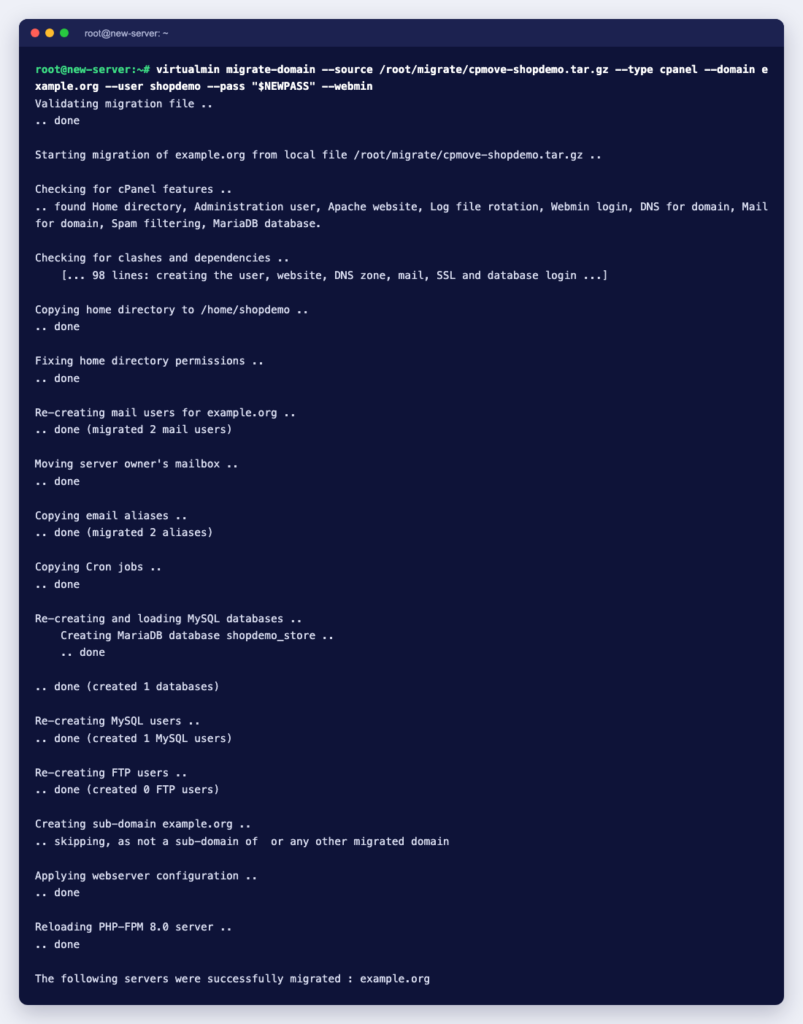
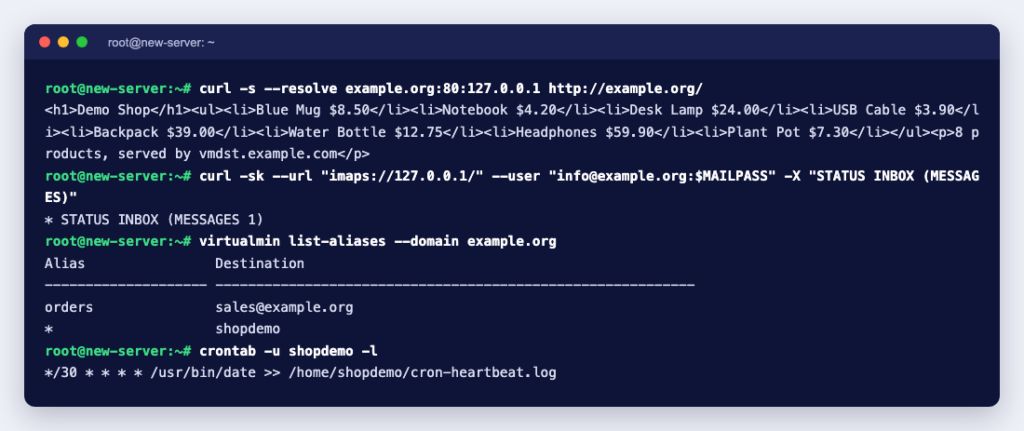
We tested the whole journey on real servers: a cPanel account with a website, a database and mailboxes, moved to Virtualmin with an AI agent doing the work and a person approving each step. Our step-by-step guide, how to migrate from cPanel to Virtualmin with Claude Code, shows every prompt, command and check, with the screenshots. If you would rather not do it yourself, hire an expert by the job: $8 per 15 minutes, $15 per 30 minutes or $28 per hour, with no contract.
At the end of 2026, when the price email arrives, you will feel the same knot of annoyance. The difference is that this time, going into 2027, you have a real answer to it.