

Short answer: a Python for loop runs the same block of code once for each item in a sequence: a list, a string, a dictionary, the lines of a file or a range() of numbers. The syntax is for item in sequence: followed by an indented block. Use range() to repeat something a set number of times, enumerate() when you also need a counter, zip() to walk two lists side by side, break to stop early and continue to skip an item. Every example below was run on Python 3.14.7, and the output shown is what we got.
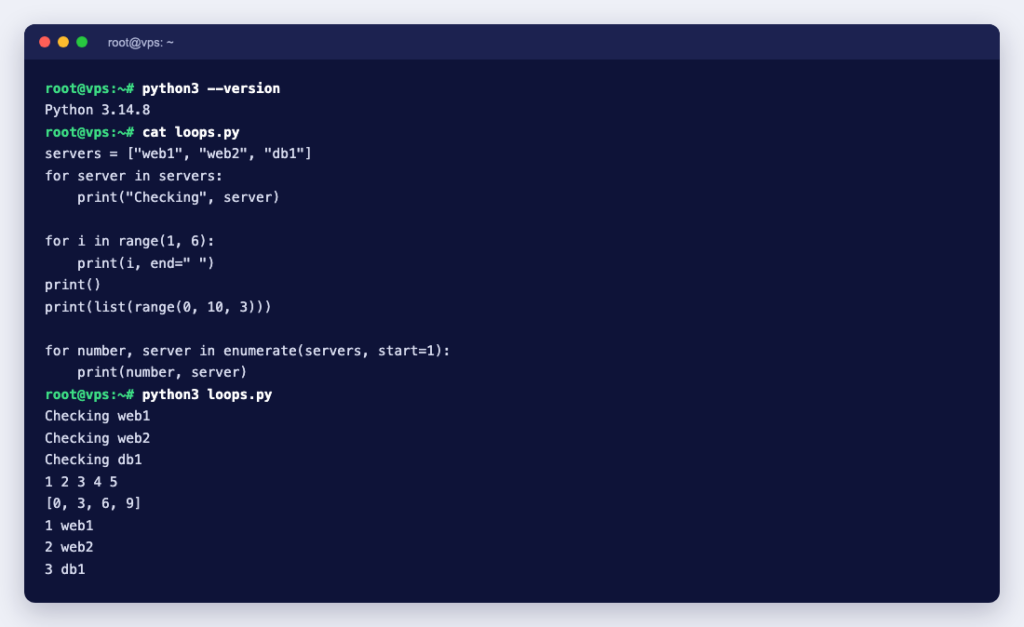
The basic for loop
servers = ["web1", "web2", "db1"]
for server in servers:
    print("Checking", server)
Checking web1
Checking web2
Checking db1The name after for (here server) takes the value of each item in turn. The colon and the indentation matter: everything indented under the for line is the loop body. Python has no for (i = 0; i < n; i++) counter loop like C or Bash; you loop over things directly.
Counting with range()
range() produces numbers on demand. As the Python tutorial points out, the end point is never included: range(10) gives 0 to 9.
for i in range(1, 6):
    print(i, end=" ")
print()
print(list(range(0, 10, 3)))
1 2 3 4 5
[0, 3, 6, 9]The three arguments are start, stop (not included) and step. A negative step counts down: range(10, 0, -1).
enumerate(), dictionaries and zip()
When you need the position as well as the item, use enumerate() instead of range(len(...)):
for number, server in enumerate(servers, start=1):
    print(number, server)
1 web1
2 web2
3 db1Looping over a dictionary gives you its keys. Use .items() to get each key and value together:
disk_used = {"/": 71, "/var": 93, "/home": 45}
for mount, percent in disk_used.items():
    if percent > 90:
        print(f"WARNING: {mount} is {percent}% full")
WARNING: /var is 93% fullzip() pairs up items from two or more lists, which is handy for building a hosts file or a report:
names = ["web1", "web2", "db1"]
ips = ["203.0.113.10", "203.0.113.11", "203.0.113.20"]
for name, ip in zip(names, ips):
    print(f"{ip}\t{name}")
Be careful when the lists are not the same length: plain zip() silently stops at the shorter one, so a missing IP address simply drops a server from the output. Add strict=True and Python raises an error instead:
ValueError: zip() argument 2 is shorter than argument 1break, continue and the loop else
break leaves the loop at once. continue skips the rest of the body for the current item and moves to the next. A for loop can also have an else block, which the Python tutorial describes precisely: it runs when the loop finishes without hitting break. That makes “search, and say so if nothing was found” very clean:
free_gb = {"web1": 3, "web2": 42, "db1": 120}
for server, free in free_gb.items():
    if free >= 40:
        print("Deploy to", server)
        break
else:
    print("No server has enough space")
This prints Deploy to web2. Change the threshold to 500 and nothing matches, so the else block prints No server has enough space.
continue is the natural way to skip blank lines and comments when reading a config file:
with open("app.conf") as config:
    for line in config:
        line = line.strip()
        if not line or line.startswith("#"):
            continue
        key, value = line.split(maxsplit=1)
        print(key, "=", value)
Three loops you can use on a server
Count HTTP status codes in an access log
Looping over an open file reads it one line at a time, so this works on a log of any size without loading it all into memory:
from collections import Counter

statuses = Counter()
with open("/var/log/nginx/access.log") as log:
    for line in log:
        status = line.split('"')[2].split()[0]
        statuses[status] += 1

for status, count in sorted(statuses.items()):
    print(status, count)
On our five-line sample log in the standard combined format, it printed 200 2, 404 2 and 500 1. Adjust the split() if your log format is different.
List log files and their sizes
from pathlib import Path

for path in sorted(Path("/var/log/myapp").glob("*.log")):
    size_mb = path.stat().st_size / 1_000_000
    print(f"{path.name}: {size_mb:.1f} MB")
Check that your sites answer
import urllib.request, urllib.error

urls = ["https://example.com/", "https://example.com/missing.html"]
for url in urls:
    try:
        with urllib.request.urlopen(url, timeout=5) as response:
            print(response.status, url)
    except urllib.error.HTTPError as e:
        print(e.code, url)
    except urllib.error.URLError as e:
        print("DOWN", url, e.reason)
Against a local test server this printed 200 for the home page, 404 for the missing file and, for a port with nothing listening, DOWN ... [Errno 111] Connection refused. The try block inside the loop matters: without it, the first failure would stop the whole loop and the remaining sites would never be checked. To run a script like this every few minutes, schedule it with a cron job.
Common mistakes and the errors they cause
| Mistake | What Python 3.14 said | Fix |
|---|---|---|
for i in 10: | TypeError: 'int' object is not iterable | Use range(10) |
| Loop body not indented | IndentationError: expected an indented block after 'for' statement on line 1 | Indent the body, four spaces is the convention |
range(3) over a list with two items | IndexError: list index out of range | Loop over the list itself, or use enumerate() |
| Removing items from the list you are looping over | No error, but items are skipped | Build a new list instead |
The last one is the sneakiest because nothing crashes. Here we try to remove every port from 8000 upwards:
ports = [22, 80, 8080, 8081, 443]
for port in ports:
    if port >= 8000:
        ports.remove(port)
print(ports)
[22, 80, 8081, 443]Port 8081 survived. Removing 8080 shifted every later item one place to the left, so the loop stepped straight past 8081. The Python tutorial’s advice is to loop over a copy or create a new collection. A list comprehension does it in one line and gives the right answer, [22, 80, 443]:
ports = [port for port in ports if port < 8000]for or while?
- Use for when you know what you are looping over: a list, a file, a set number of retries.
- Use while when you loop until a condition changes, such as waiting for a service to come up, and you cannot know in advance how many rounds that takes.
- If you only need to build a new list from an old one, a list comprehension is usually shorter and clearer than a loop.
Running your scripts on a server
Scripts like the log counter and the site checker are most useful on the server itself, running on a schedule. Check which Python version your server has with python3 --version before you rely on newer features: zip(..., strict=True), for example, arrived in Python 3.10 according to the built-in functions reference. If your script talks to a database, see how to use MySQL from Python, and on a Windows machine, how to install pip on Windows.
For automation that runs around the clock, a KVM VPS gives you full root access to install the Python version and packages you need, and cron or systemd to keep your scripts running.