
Short answer: a KVM VPS is a virtual private server that runs as a full virtual machine on KVM, the virtualization built into the Linux kernel. It has its own kernel, its own share of RAM and CPU, and its own virtual disk and network card, so it behaves like a small dedicated server. You can install almost any operating system on it, including Windows, and run software that container-based VPS hosting can’t, such as Docker or kernel-level VPNs.
What KVM is
KVM stands for Kernel-based Virtual Machine. It is open-source virtualization that has been part of the mainline Linux kernel since version 2.6.20. It uses the virtualization features built into modern processors (Intel VT or AMD-V) and turns a Linux server into a hypervisor that can run many virtual machines side by side.
Each virtual machine gets its own virtual hardware: a network card, disks, a graphics adapter and so on. Because the guest sees what looks like a real computer, it can run unmodified Linux or Windows. That is the key difference from container-based VPS hosting.
KVM VPS vs container VPS (OpenVZ, LXC)
Some VPS hosting uses containers instead of virtual machines. Every container on a host shares the host’s Linux kernel, which is efficient but limits what you can do inside it:
| KVM VPS | Container VPS | |
|---|---|---|
| Kernel | Its own kernel; you can update it or load modules | Shares the host’s kernel |
| Operating systems | Linux, BSD, Windows, or your own ISO | Linux only, from the host’s templates |
| Docker and containers | Works as on any server | Often limited or not possible |
| Kernel-level software | WireGuard, custom firewall modules, filesystems | Only what the host allows |
| Resources | RAM and CPU assigned to the virtual machine | Depends on the host’s limits |
For a deeper comparison, see our earlier post KVM vs OpenVZ.
How to check whether your VPS runs on KVM
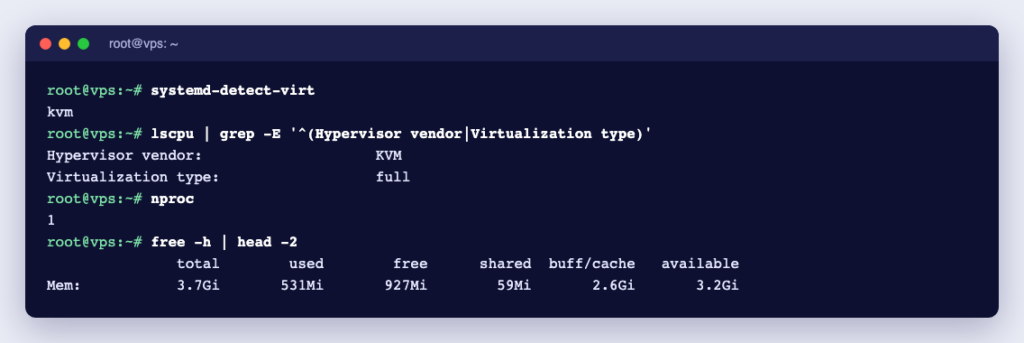
Log in over SSH and run:
systemd-detect-virt
lscpu | grep -i hypervisor
On a KVM VPS the first command prints kvm and the second shows Hypervisor vendor: KVM. A container prints its container type instead, such as openvz, lxc or docker. We checked this on one of our KVM VPS running AlmaLinux 9.
What you can run on a KVM VPS
- Websites and web apps with any stack: Nginx or Apache, PHP, Node.js, Python, databases.
- Docker and Portainer, for running many apps in containers on one server.
- Automation and AI tools such as n8n or small language models.
- Game servers for Minecraft, Counter-Strike 2, Palworld and others.
- VPNs such as WireGuard, which runs in the Linux kernel.
- Windows Server, for Windows-only software or a remote desktop in the cloud.
- Development and test servers that you can rebuild whenever you like.
KVM VPS, shared hosting or a dedicated server?
- Shared hosting is the cheapest way to run a website with cPanel, but you share one server and its software with other customers and have no root access. See when to upgrade from shared hosting to a VPS.
- A KVM VPS gives you root access and your own operating system at a fraction of the cost of a whole server.
- A dedicated server gives you a whole physical machine. Choose it for heavy, constant loads, many CPU cores or a GPU. See how much a dedicated server costs.
What to look for in a KVM VPS plan
- RAM and CPU cores: size them for your software; 4 GB is plenty for many small sites and tools.
- Storage type: NVMe SSDs are much faster than SATA SSDs or hard disks, which matters for databases.
- Bandwidth: check whether traffic is metered or unmetered.
- IP addresses: a public IPv4 address of your own, needed for mail, game servers and many apps.
- Location: a data centre close to your users gives lower latency.
- Management tools: a control panel to reboot, reinstall the operating system and open a console if SSH stops working.
- Support: who helps when something breaks, and what it costs.
Ucartz KVM VPS plans
| Plan | RAM | Cores | NVMe | Price |
|---|---|---|---|---|
| Lite | 4 GB | 1 | 50 GB | $10 |
| Standard | 8 GB | 2 | 100 GB | $20 |
| Pro | 16 GB | 4 | 200 GB | $30 |
| Elite | 32 GB | 8 | 400 GB | $40 |
Prices are per month in US dollars. Every KVM VPS plan includes unmetered bandwidth, one IPv4 address and full root access, in our USA data centre. You manage the VPS from the Ucartz client area, where the VPS control panel lets you start, stop and reinstall it. Deployment is automated and usually takes about a minute once the order is approved.
Windows Server runs on the Pro and Elite plans, with the licence included: see Windows VPS. Every plan includes Free Basic Managed Support for quick tasks, and for bigger jobs you can hire an engineer by the task or the hour. If you would rather not run the server yourself, a managed cPanel VPS includes cPanel, with updates, security and monitoring handled for you.
Frequently asked questions
What does KVM stand for?
Kernel-based Virtual Machine. It is the virtualization technology built into the Linux kernel.
Is a KVM VPS better than an OpenVZ VPS?
For most uses, yes: a KVM VPS has its own kernel, so it runs Docker, VPNs, custom kernels and Windows, and its RAM and CPU are assigned to it. Containers can be cheaper, but they share the host’s kernel and limit what you can install.
Can I run Docker on a KVM VPS?
Yes. A KVM VPS runs Docker like any Linux server.
Can I install Windows on a KVM VPS?
Yes, KVM runs Windows. At Ucartz, Windows Server is available on the VPS Pro and Elite plans with the licence included.
Is a KVM VPS the same as a dedicated server?
No. A dedicated server is a whole physical machine. A KVM VPS is a virtual machine on a shared physical host, with its own operating system and resources. It behaves like a small dedicated server for a much lower price.
Source: the KVM project.