

Short answer: server maintenance is the routine work that keeps a server secure, fast and recoverable: applying updates, watching disks and logs, proving that backups can be restored, and reviewing who has access. A simple rhythm works for most Linux servers: quick health checks every day (automate them), updates and a log review every week, a restore test and access review every month, and a bigger review of hardware, operating-system support and disaster recovery once a year. We checked the commands below on Ubuntu 24.04 and AlmaLinux 9; they also work on Debian and Rocky Linux unless a note says otherwise.
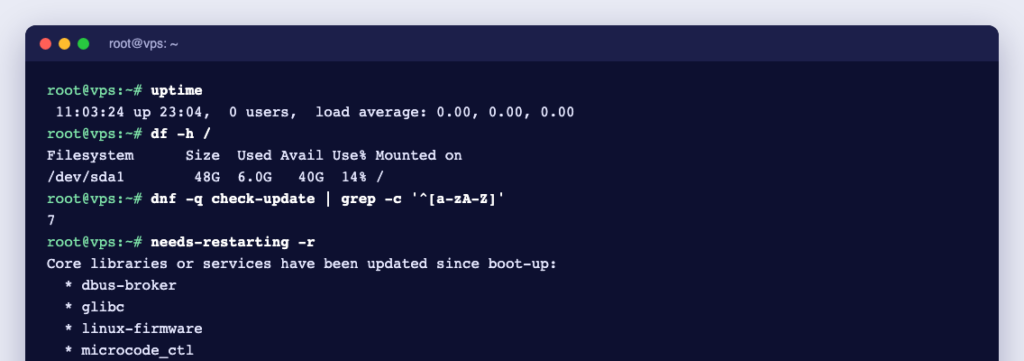
Daily: is everything healthy?
These checks take a minute by hand, but the real goal is to have monitoring alert you, so you only log in when something is wrong.
uptime                      # load averages and time since the last boot
systemctl --failed          # services that have crashed or failed to start
df -h                       # free disk space per filesystem
df -i                       # free inodes (a disk can be "full" with space left)
free -h                     # memory and swap in use
journalctl -p err -b --no-pager | tail -n 20   # latest errors since boot
On a healthy server, systemctl --failed prints 0 loaded units listed. Also confirm that last night’s backup job finished: check its log or the date of the newest backup file. A backup that stopped weeks ago without anyone noticing is a bad thing to discover in an emergency.
Weekly: updates, disks and logs
Install updates
On Ubuntu and Debian:
sudo apt update
apt list --upgradable
sudo apt upgrade
On AlmaLinux and Rocky Linux:
sudo dnf check-update
sudo dnf upgrade
Security updates should not wait for the weekly slot, so let the server install them itself. According to Ubuntu’s documentation, the unattended-upgrades package is installed by default and is switched on by two lines in /etc/apt/apt.conf.d/20auto-upgrades. On our Ubuntu 24.04 test system the file contained:
APT::Periodic::Update-Package-Lists "1";
APT::Periodic::Unattended-Upgrade "1";
On AlmaLinux and Rocky Linux, install dnf-automatic and enable the timer that downloads and installs updates:
sudo dnf install dnf-automatic
sudo systemctl enable --now dnf-automatic-install.timer
systemctl list-timers 'dnf-automatic*'
For more detail, see how to set up automatic updates on Linux.
Check whether a restart is needed
Updated libraries and kernels only take effect after a service restart or a reboot. On Ubuntu, the file /var/run/reboot-required exists when a reboot is needed. On Ubuntu and Debian, needrestart lists services still running old code (-r l means list only, restart nothing):
ls /var/run/reboot-required
sudo needrestart -r l
On AlmaLinux and Rocky Linux:
sudo dnf needs-restarting -rWhen nothing is pending it prints No core libraries or services have been updated since boot-up. and Reboot should not be necessary. Plan reboots for a quiet hour and tell your users.
Check disk health and RAID (dedicated servers)
sudo smartctl -H /dev/sda      # SATA or SAS disk
sudo smartctl -H /dev/nvme0    # NVMe drive
cat /proc/mdstat               # software RAID status
sudo mdadm --detail /dev/md0   # details of one array
These are for physical disks, so run them on a dedicated server. The options come from the smartctl and mdadm manuals. A failing health result, or an array that reports a missing or failed disk, needs action now, not next week. Our guides show how to use smartctl and how to let smartd watch the disks for you.
Review logs and logins
journalctl --disk-usage             # space used by the systemd journal
sudo journalctl --vacuum-size=500M  # trim it if it has grown too big
last -n 20                          # recent logins
sudo lastb -n 20                    # recent failed logins
Logins you do not recognise are worth investigating straight away. Make sure application logs are rotated too; see log rotation with logrotate.
Monthly: restores, access and exposure
- Test a restore. Restore one website’s files and one database dump to a test folder or a spare server, and check they open. For databases, see backups with mysqldump; for files, backups with rsync.
- Review accounts and keys. Remove users and SSH keys that are no longer needed.
- Review open ports and the firewall. Anything listening that you did not expect should be closed or firewalled.
- Check certificates and disk growth. A dry run proves automatic renewal still works; a size check shows what is filling the disk.
awk -F: '$3 >= 1000 && $3 < 65534 {print $1}' /etc/passwd   # normal user accounts
getent group sudo        # admins on Ubuntu and Debian
getent group wheel       # admins on AlmaLinux and Rocky Linux
sudo ss -tulpn           # listening ports and the programs behind them
sudo ufw status verbose  # firewall on Ubuntu (ufw)
sudo firewall-cmd --list-all   # firewall on AlmaLinux and Rocky Linux (firewalld)
sudo certbot renew --dry-run   # if you use Let's Encrypt with Certbot
sudo du -xh --max-depth=1 / | sort -h | tail   # biggest top-level folders
For SSH, key-only logins are safer than passwords; see how to set up SSH keys.
Yearly: the bigger picture
- Operating-system support. Check when your release stops getting security updates, on the Ubuntu release cycle or the AlmaLinux release notes, and plan the upgrade or migration well before that date.
- A full recovery drill. Rebuild the server from backups onto a fresh machine and time it. That number is your real recovery time.
- Hardware and capacity. On dedicated servers, compare this year’s disk health results with last year’s, and check CPU, memory and disk trends against expected growth.
- Credentials. Change administrator passwords and API keys, and remove access for people who have left.
- Documentation. Update your notes: what runs on the server, where the backups are and how to restore them.
The whole checklist at a glance
| How often | Task | Tool |
|---|---|---|
| Daily | Uptime, failed services, disk, memory, errors, backup ran | monitoring, systemctl --failed, df -h, journalctl -p err |
| Weekly | Updates and restart check | apt or dnf, needrestart, dnf needs-restarting |
| Weekly | Disk health and RAID | smartctl -H, /proc/mdstat |
| Weekly | Logs and logins | journalctl, last, lastb |
| Monthly | Restore test | your backup tool |
| Monthly | Users, keys, ports, firewall, certificates, disk growth | getent, ss, ufw or firewall-cmd, certbot, du |
| Yearly | OS support dates, recovery drill, hardware, credentials, documentation | vendor release pages, your runbook |
Keep a short log of what you did and when. It makes the next check quicker and helps anyone who takes over. For a wider set of everyday commands, see our Linux commands cheat sheet for server admins.
Rather hand it over?
If this list is more than you have time for, our server management services cover it: hardening and security updates, backup configuration and restore checks, monitoring, and fixes, on Ubuntu, Debian, AlmaLinux, Rocky Linux and Windows Server, whether the server is with Ucartz or another provider. You can book a single task from $8 per 15 minutes or $28 per hour, with no contract, or hire an administrator by the month.