
tl:dv
n8n wins for general automation, Flowise wins for AI agent workflows, and Activepieces wins for simplicity and team collaboration.
Automation is rapidly moving from simple app integrations to full AI-powered workflows. Developers, startups, and businesses now want tools they can self-host, customize, and scale without depending entirely on expensive SaaS platforms.
Before comparing features and pricing, you need to understand what each tool is designed for. Picking the wrong one means rebuilding your workflows six months later.
Overview of n8n vs Flowise vs Activepieces
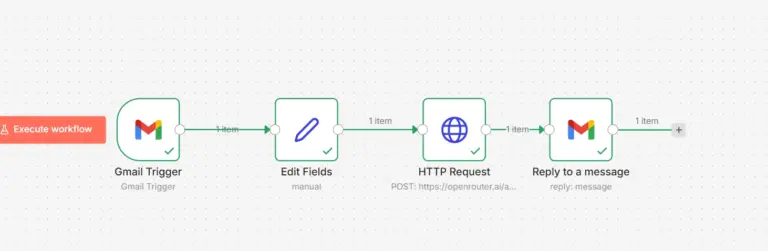
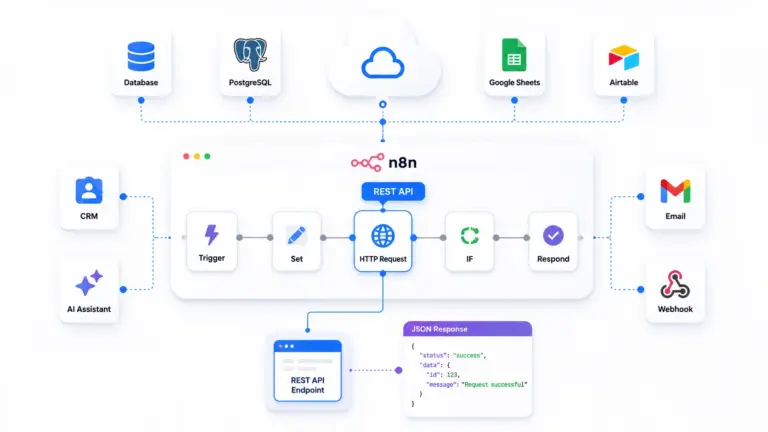
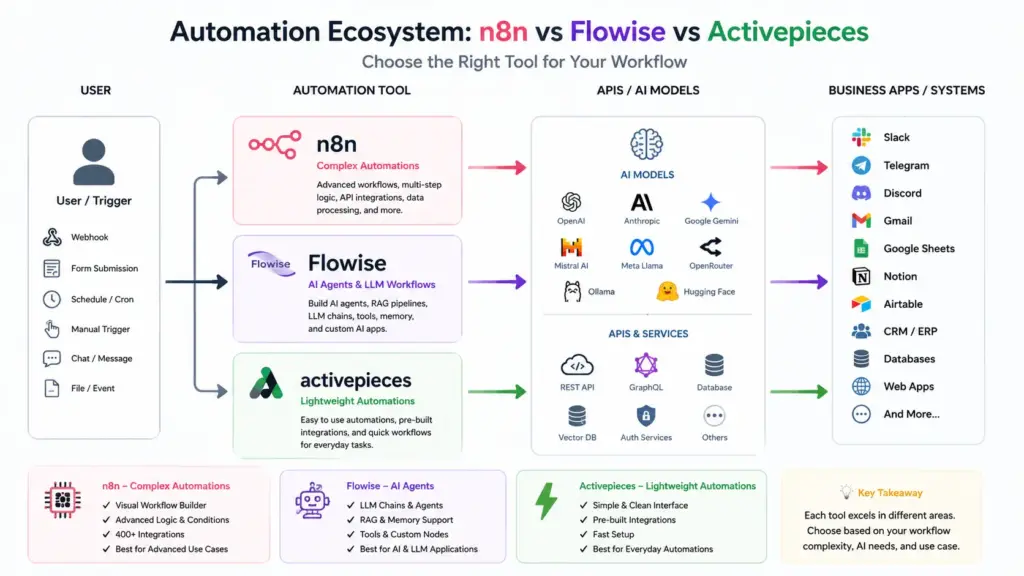
n8n is a general-purpose workflow automation platform. It connects apps, APIs, databases, and services through a visual node-based editor. You build workflows that trigger on schedules, webhooks, or events and execute multi-step logic. It has 400+ built-in integrations and supports custom JavaScript in Code nodes for anything the native integrations do not cover. n8n added AI capabilities through its AI Agent node and LangChain integration, making it capable of AI workflows on top of its automation foundation.
Flowise opensource agentic system is an AI-first workflow builder. Its core purpose is building LLM applications: chatbots, RAG pipelines, AI agents with tools, document processing systems, and conversational interfaces. It is built on LangChain and LlamaIndex, which means every node represents an AI concept like a vector store, an embedding model, a retrieval chain, or an agent executor. If you are not building AI applications, Flowise is the wrong tool.
Activepieces is a Zapier alternative built for teams. It focuses on connecting business apps through pre-built pieces, running automations triggered by events, and making workflow building accessible to non-developers. Also has a cleaner interface than n8n, simpler pricing, and a growing library of integrations. It does not compete with n8n’s code flexibility or Flowise’s AI depth but beats both on ease of use for standard business automation.
Installation and Self-Hosting Difficulty
All three run on Docker. Setup difficulty varies significantly.
n8n on a Ucartz VPS:
docker run -d \
  --name n8n \
  --restart always \
  -p 5678:5678 \
  -e N8N_HOST=yourdomain.com \
  -e N8N_PROTOCOL=https \
  -e WEBHOOK_URL=https://yourdomain.com/ \
  -e N8N_SECURE_COOKIE=true \
  -v n8n_data:/home/node/.n8n \
  n8nio/n8n
n8n runs on port 5678. For production, you need Nginx as a reverse proxy and a Let’s Encrypt certificate. The environment variable configuration is straightforward but requires understanding WEBHOOK_URL and N8N_HOST to avoid broken webhook URLs in production.
Flowise on a Ucartz VPS:
docker run -d \
  --name flowise \
  --restart always \
  -p 3000:3000 \
  -e PORT=3000 \
  -e FLOWISE_USERNAME=admin \
  -e FLOWISE_PASSWORD=yourpassword \
  -e APIKEY_PATH=/root/.flowise \
  -e SECRETKEY_PATH=/root/.flowise \
  -v flowise_data:/root/.flowise \
  flowiseai/flowise
Flowise runs on port 3000. It is the simplest of the three to start. The interface is available immediately after the container starts. No webhook URL configuration, no complex environment variables for basic use.
Activepieces on a Ucartz VPS:
git clone https://github.com/activepieces/activepieces.git
cd activepieces
cp .env.example .env
# Edit .env with your domain, database credentials, and encryption key
docker-compose up -d
Activepieces requires a Docker Compose setup with a PostgreSQL database and Redis. The .env configuration has more fields than n8n but the official documentation covers each one clearly. Plan for 15-30 minutes of setup including database configuration.
Minimum VPS requirements per tool:
| Tool | RAM | Storage | Ucartz Plan |
|---|---|---|---|
| n8n | 1GB | 10GB | VPS Lite ($10/mo) |
| Flowise | 1GB | 10GB | VPS Lite ($10/mo) |
| Activepieces | 2GB | 20GB | VPS Lite ($10/mo) |
| All three | 6GB+ | 40GB+ | VPS Pro ($30/mo) |
Feature Comparison
Integrations and Connectivity
n8n has 400+ native integrations covering databases, CRMs, communication tools, cloud storage, payment processors, and development tools. Every integration is configurable with custom fields, authentication methods, and advanced options. The HTTP Request node connects to any REST API with full control over headers, body, authentication, and response handling. For anything not covered, the Code node runs arbitrary JavaScript.
Activepieces has 200+ pieces covering the most common business tools: Slack, Gmail, Google Sheets, HubSpot, Salesforce, Notion, Airtable, Stripe, and similar. The integration library grows quickly. For standard business app connections, it covers most use cases. Custom API calls are possible through an HTTP piece but with less flexibility than n8n’s HTTP Request node.
Flowise has minimal traditional integrations. Its nodes represent AI components: OpenAI, Anthropic, Hugging Face, Pinecone, Qdrant, Chroma, Redis, PostgreSQL vector stores, and similar. You connect Flowise to external systems through its API or webhook output, then handle the actual integration in another tool. Flowise is not designed to replace Zapier. It is designed to build the AI layer that other tools call.
AI and LLM Capabilities
Flowise leads significantly. Every core concept in modern AI application development is a native node: retrieval augmented generation, conversational memory, tool-calling agents, multi-agent systems, document loaders, text splitters, embedding models, vector stores, and rerankers. Building a RAG chatbot over your documentation takes 15 minutes in Flowise. Building the equivalent in n8n requires custom code nodes and external library calls.
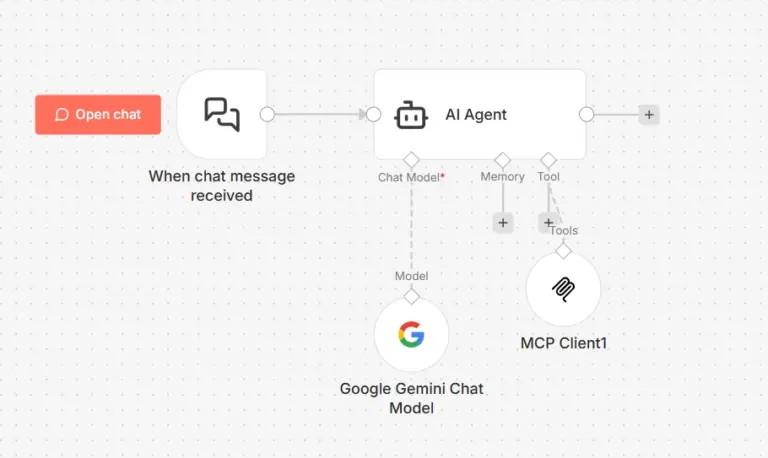
n8n has a growing AI feature set. The AI Agent node supports tool use and conversational memory. LangChain integration is available through community nodes. For AI workflows that combine automation with AI processing, n8n handles it. For pure AI application development, Flowise is faster and more capable.
Activepieces has basic AI integration through OpenAI pieces. You can add AI steps to workflows but you cannot build complex AI pipelines. It is sufficient for adding a summarization or classification step to a business workflow, not for building AI applications.
Code and Custom Logic
n8n gives you a full JavaScript environment in Code nodes. You can import certain npm packages, manipulate data structures, call external services, and implement complex business logic. For developers, this makes n8n extremely flexible.
// n8n Code node example
const items = $input.all();
const results = items.map(item => {
  const data = item.json;
  return {
    json: {
      id: data.id,
      score: calculateLeadScore(data.budget, data.timeline, data.project_type),
      timestamp: new Date().toISOString()
    }
  };
});

function calculateLeadScore(budget, timeline, type) {
  let score = 0;
  if (budget > 5000) score += 4;
  else if (budget > 1000) score += 2;
  if (parseInt(timeline) >= 4) score += 3;
  if (type === "ecommerce") score += 2;
  return Math.min(score, 10);
}

return results;
Activepieces has a Code piece that runs JavaScript with access to the step input data. It is less powerful than n8n’s Code node but handles most custom logic requirements for business automation.
Flowise uses Python functions in custom tool nodes for extending agent capabilities. Developers comfortable with Python can build sophisticated custom tools for their AI agents.
Workflow Triggers
n8n supports webhooks, schedules (cron), polling intervals, manual triggers, and event-based triggers from integrated services. Queue mode with Redis enables high-volume webhook processing as covered in a previous guide.
Activepieces supports webhooks and schedule triggers natively. Its trigger system is simpler than n8n but covers standard business automation needs.
Flowise is triggered primarily through its API or embedded chat widget. It does not have a native scheduler. You trigger Flowise flows from n8n, a cron job, or a webhook call from another system.
Practical Use Cases: Which Tool Fits Which Job
Use n8n when:
You need to connect multiple business apps in a multi-step workflow. A lead comes in through a webhook, gets enriched by an API call, gets scored by an AI model, gets written to a CRM, and triggers a Slack notification. This is n8n’s core strength. The combination of native integrations, HTTP Request flexibility, JavaScript Code nodes, and AI Agent capabilities makes it the right tool for any workflow that moves data between systems and applies logic along the way.
Webhook (lead form)
      ↓
HTTP Request (enrich via Clearbit)
      ↓
HTTP Request (OpenRouter AI scoring)
      ↓
Code (parse score, apply rules)
      ↓
HubSpot (create contact)
      ↓
Slack (notify sales team)
      ↓
Google Sheets (log everything)
Use Flowise when:
You are building a chatbot, a document Q&A system, or any AI application that needs conversational memory, retrieval augmented generation, or multi-agent coordination. A customer support bot that reads your documentation, remembers conversation context, and uses tools to check order status is a Flowise project, not an n8n project.
Flowise flow structure for a RAG support bot:
Chat Input
      ↓
Conversational Retrieval QA Chain
      ├── ChatOpenAI (or any LLM)
      ├── Memory (BufferMemory or Redis)
      └── Retriever
            └── Vector Store (Pinecone/Qdrant)
                  └── Embeddings (OpenAI/HuggingFace)
                  └── Document Loader (PDF/Web/Notion)
Use Activepieces when:
Your team includes non-developers who need to build and maintain automations. Activepieces has the cleanest interface of the three. Setting up a workflow that sends a Slack message when a new row appears in Google Sheets, or creates a HubSpot contact when a Typeform is submitted, takes minutes with no technical knowledge. The piece library covers most standard business workflows and the approval flow feature lets you add human review steps to automations easily.
Pricing Model Comparison
All three are open source with self-hosted options.
n8n offers a free self-hosted Community edition with no workflow or execution limits. The cloud version starts at $20/month. The self-hosted Enterprise license adds SSO, advanced permissions, and support contracts. For a Ucartz VPS deployment, you pay only the VPS cost.
Flowise is fully open source with no paid tiers for self-hosted use. The cloud version exists but self-hosting on a VPS gives you everything with zero software cost. There are no execution limits, no workflow limits, and no feature gating on the self-hosted version.
Activepieces has an open-source self-hosted version with most features available. The cloud version starts at $9/month per user. The self-hosted version supports unlimited flows and executions. Some enterprise features like SSO and advanced audit logs require a paid plan even on self-hosted.
For a Ucartz VPS deployment running all three tools:
VPS Pro ($30/mo) = 4 vCPU, 16GB RAM, 200GB NVMe
+ n8n:           $0 (open source)
+ Flowise:       $0 (open source)
+ Activepieces:  $0 (open source community edition)

Total monthly cost: $30
Running All Three on One Ucartz VPS
If your use cases span all three tools, run them together on a single VPS Pro instance using Docker Compose:
version: "3.8"

services:
  n8n:
    image: n8nio/n8n
    restart: always
    ports:
      - "5678:5678"
    environment:
      - N8N_HOST=n8n.yourdomain.com
      - N8N_PROTOCOL=https
      - WEBHOOK_URL=https://n8n.yourdomain.com/
      - N8N_SECURE_COOKIE=true
    volumes:
      - n8n_data:/home/node/.n8n

  flowise:
    image: flowiseai/flowise
    restart: always
    ports:
      - "3000:3000"
    environment:
      - PORT=3000
      - FLOWISE_USERNAME=admin
      - FLOWISE_PASSWORD=yourpassword
    volumes:
      - flowise_data:/root/.flowise

  postgres:
    image: postgres:15
    restart: always
    environment:
      - POSTGRES_DB=activepieces
      - POSTGRES_USER=ap_user
      - POSTGRES_PASSWORD=yourdbpassword
    volumes:
      - postgres_data:/var/lib/postgresql/data

  redis:
    image: redis:7-alpine
    restart: always
    volumes:
      - redis_data:/data

  activepieces:
    image: activepieces/activepieces:latest
    restart: always
    ports:
      - "8080:8080"
    environment:
      - AP_DB_TYPE=POSTGRES
      - AP_POSTGRES_HOST=postgres
      - AP_POSTGRES_PORT=5432
      - AP_POSTGRES_DATABASE=activepieces
      - AP_POSTGRES_USERNAME=ap_user
      - AP_POSTGRES_PASSWORD=yourdbpassword
      - AP_REDIS_URL=redis://redis:6379
      - AP_ENCRYPTION_KEY=your-32-character-encryption-key
      - AP_JWT_SECRET=your-jwt-secret
      - AP_FRONTEND_URL=https://ap.yourdomain.com
    depends_on:
      - postgres
      - redis

volumes:
  n8n_data:
  flowise_data:
  postgres_data:
  redis_data:
Start the stack:
docker-compose up -dConfigure Nginx to reverse proxy each service to its subdomain:
server {
    listen 443 ssl;
    server_name n8n.yourdomain.com;
    location / {
        proxy_pass http://localhost:5678;
        proxy_set_header Host $host;
        proxy_set_header X-Real-IP $remote_addr;
        proxy_set_header X-Forwarded-Proto $scheme;
        proxy_http_version 1.1;
        proxy_set_header Upgrade $http_upgrade;
        proxy_set_header Connection "upgrade";
    }
}

server {
    listen 443 ssl;
    server_name flowise.yourdomain.com;
    location / {
        proxy_pass http://localhost:3000;
        proxy_set_header Host $host;
        proxy_set_header X-Real-IP $remote_addr;
        proxy_set_header X-Forwarded-Proto $scheme;
    }
}

server {
    listen 443 ssl;
    server_name ap.yourdomain.com;
    location / {
        proxy_pass http://localhost:8080;
        proxy_set_header Host $host;
        proxy_set_header X-Real-IP $remote_addr;
        proxy_set_header X-Forwarded-Proto $scheme;
    }
}
Issue SSL certificates for all three subdomains:
certbot --nginx \
  -d n8n.yourdomain.com \
  -d flowise.yourdomain.com \
  -d ap.yourdomain.com
All three tools run on separate subdomains from the same Ucartz VPS Pro at $30/month.
How the Three Tools Work Together
The most powerful setup uses all three tools for what each does best.
Activepieces handles simple business app automations that team members build and maintain without developer involvement. New HubSpot contact triggers a Slack message. Google Form submission creates a Notion page. Stripe payment triggers an email sequence.
n8n handles complex multi-step automations with custom logic, API integrations, and AI processing steps. Lead qualification pipeline, support ticket triage, data synchronization between systems, scheduled report generation, and webhook-triggered workflows that require conditional routing and error handling.
Flowise handles the AI layer. Your support chatbot, document Q&A system, and AI-powered search interface run in Flowise. n8n calls Flowise via its API when a workflow needs conversational AI or RAG capabilities.
Customer submits support request
              ↓
     Activepieces (trigger)
              ↓
     n8n (classify, route, log)
              ↓
     Flowise API (generate response using RAG over docs)
              ↓
     n8n (send response via email/Slack/ticket system)
n8n calls the Flowise API from an HTTP Request node:
{
  "method": "POST",
  "url": "https://flowise.yourdomain.com/api/v1/prediction/YOUR_FLOW_ID",
  "headers": {
    "Authorization": "Bearer YOUR_FLOWISE_API_KEY",
    "Content-Type": "application/json"
  },
  "body": {
    "question": "{{ $json.customer_message }}",
    "sessionId": "{{ $json.customer_id }}"
  }
}
Decision Framework
Answer these questions to choose your tool:
Are you connecting business apps and automating multi-step processes with conditional logic? Use n8n.
Are you building a chatbot, RAG pipeline, or AI agent application that needs conversational memory and document retrieval? Use Flowise.
Do you need non-developers on your team to build and manage their own automations without writing code? Use Activepieces.
Do you need all three? Run them together on a Ucartz VPS Pro at $30/month and use each for its intended purpose.
The mistake most teams make is picking one tool and forcing every use case into it. n8n can build a basic chatbot but it is harder than Flowise. Flowise can trigger on a schedule but it requires an external cron job. Activepieces can call an API but it has less flexibility than n8n. Each tool has a clear primary use case. Matching the tool to the job produces better results and simpler workflows than making one tool do everything.
Conclusion
There is no universal winner between n8n, Flowise, and Activepieces because each tool is optimized for a different style of automation.
Choose:
- n8n if you want maximum flexibility, advanced workflows, API integrations, and production-grade automation.
- Flowise if your focus is AI agents, LLM chains, RAG systems, and visual AI application building.
- Activepieces if you want a simpler Zapier-style experience with easier onboarding.
The strongest setups often combine multiple tools rather than relying on a single platform. Self-hosting these tools on a VPS gives you lower long-term costs, greater control, better privacy and the freedom to customize your automation stack without vendor lock-in. Build scalable AI workflows faster with Ucartz VPS Hosting today!
FAQ
Is Activepieces easier than n8n?
Yes. Activepieces is generally easier for beginners because the interface is simpler and closer to Zapier-style automation.
Which automation tool is best for AI workflows?
Flowise is strongest for dedicated AI workflows, while n8n is stronger for combining AI with broader business automation.
Can I self-host all three tools?
Yes. All three platforms support self-hosting on VPS servers.
Which tool requires the least coding?
Activepieces usually requires the least technical setup for beginners.