
If your n8n instance is publicly accessible, it is already a security risk.n8n is not just an automation tool it stores API keys, triggers workflows, and connects to critical systems. A single misconfiguration can expose your credentials, allow unauthorized workflow execution, or turn your webhooks into attack entry points.
Many self-hosted n8n automation workflow setups are deployed quickly but left unsecured. Open ports, missing authentication, and unprotected webhooks are common. These issues don’t show up during testing but they become serious vulnerabilities in production.
An n8n instance is secure only when it uses authentication, HTTPS, restricted ports, protected webhooks, and controlled access through a reverse proxy. This guide walks through the exact fixes you need to apply from basic authentication to firewall rules so your automation system runs safely in production without exposing your infrastructure.
Risks of n8n Automation
Before the fixes, it helps to understand what exposure actually looks like in practice. These aren’t edge cases; they happen to real self-hosted setups regularly.
Unauthorized dashboard access means anyone who finds your IP and port can open your n8n interface, browse your workflows, and see every integration you’ve built. No hacking required just a browser.
API key exposure happens because n8n stores credentials for every connected service. If someone gains access to your instance, they gain access to your Stripe account, your SendGrid account, your database everything you’ve authenticated n8n against.
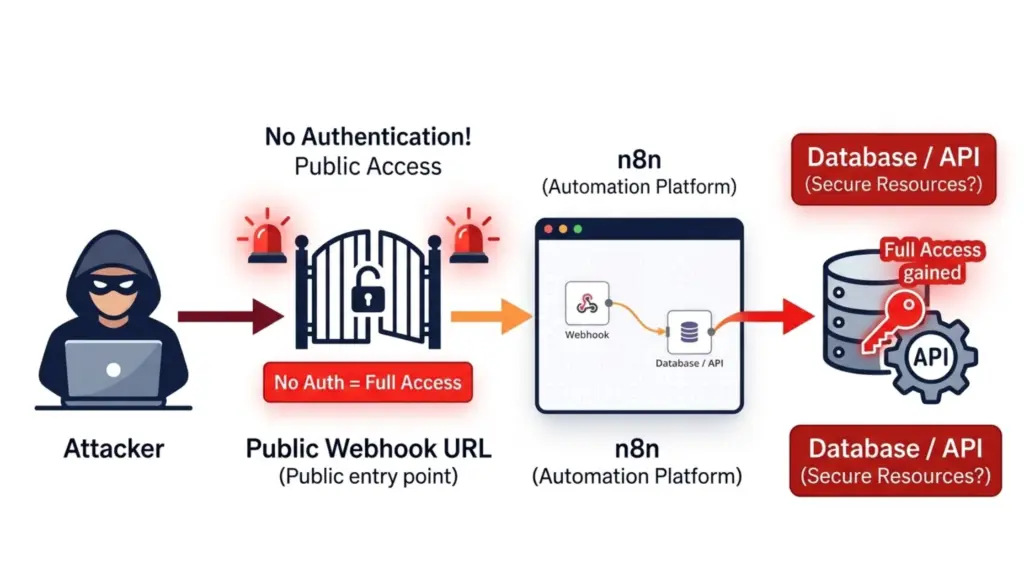
Webhook abuse is the most overlooked risk. Every webhook URL you create is a public HTTP endpoint. Without protection, anyone can trigger your workflows on demand, flood your server with fake requests, or manipulate your automations by sending crafted payloads.
Remote workflow execution means an attacker who can reach your n8n API can trigger executions, modify workflows, and potentially exfiltrate data from every system your automation touches.
Check If You’re Already Exposed (2-Minute Audit)
Run these checks before anything else.
Open a browser and go to:
http://your-server-ip:5678If you can see the n8n dashboard without entering a username and password, you are publicly exposed right now.
From another machine, run:
nmap -p 5678 your-server-ipIf the result shows port 5678 as open, your instance is reachable from the public internet.
Also check:
- Are you running on HTTP instead of HTTPS?
- Is port 5678 open in your firewall?
- Do your webhook URLs contain no secret token?
If the answer to any of those is yes, keep reading. Every fix below directly addresses one of these exposures.
Critical Fix #1 – Enable Authentication
By default, n8n has no login screen. Anyone who can reach the port can use the interface. The first thing you must do is enable basic authentication. Add these environment variables to your n8n configuration:
N8N_BASIC_AUTH_ACTIVE=true
N8N_BASIC_AUTH_USER=admin
N8N_BASIC_AUTH_PASSWORD=strongpassword
Use a strong, unique password . After adding these variables, restart n8n for the change to take effect. This alone closes the most common exposure vector.
Critical Fix #2 – Force HTTPS
Running n8n over plain HTTP means every cookie, every credential, and every piece of data transmitted between your browser and the server travels in plaintext. Anyone on the same network or anyone who can intercept the traffic can read it.HTTPS is non-negotiable for a production n8n instance. Install Certbot and issue a certificate through Let’s Encrypt:
sudo certbot --nginx -d yourdomain.comThis handles certificate issuance and automatic renewal. Your n8n instance should never be accessible over HTTP in production. If someone requests the HTTP URL, Nginx should redirect them to HTTPS automatically.
Critical Fix #3 – Set WEBHOOK_URL Correctly
n8n generates webhook URLs based on the WEBHOOK_URL environment variable. If this isn’t set to your actual domain, webhooks either break or generate URLs pointing to an internal address which can cause security misconfigurations and broken integrations simultaneously.
Set it explicitly:
WEBHOOK_URL=https://yourdomain.com/The trailing slash matters. This ensures every webhook URL n8n generates is tied to your domain over HTTPS, not to a raw IP or a local address.
Critical Fix #4 – Close Port 5678 From Public Access
Even with authentication enabled, there’s no reason for port 5678 to be reachable from the public internet. All traffic should flow through Nginx on ports 80 and 443. Nginx handles the proxying n8n should never be directly accessible. Close port 5678 and open only the ports Nginx needs:
ufw deny 5678
ufw allow 80
ufw allow 443
After applying these rules, your n8n process still runs on port 5678 internally but only Nginx can reach it. The public internet cannot.
Critical Fix #5 – Protect Your Webhooks
This is the most commonly ignored security issue in self-hosted n8n setups. Every webhook URL you create is a public HTTP endpoint. Without any protection, anyone who discovers the URL can trigger your workflow. Depending on what the workflow does, that could mean sending emails on your behalf, inserting records into your database, or processing fraudulent orders. The straightforward fix is to add a secret token to your webhook URLs:
/webhook/order?key=SECRET123Then inside the workflow, add an IF node as the first step. Check that the incoming request contains the correct key value. If it doesn’t match, stop execution immediately and return a 403 response.
This won’t stop a determined attacker who has already discovered the token, but it eliminates opportunistic abuse entirely and makes automated scanning useless against your endpoints.
Critical Fix #6 – Configure Reverse Proxy Headers Correctly
When Nginx proxies requests to n8n, it needs to pass the correct headers so n8n knows the real origin of each request. Without these headers, n8n sees all traffic as coming from localhost, which breaks IP-based logic and can cause routing issues.
Add these to your Nginx proxy configuration:
proxy_set_header Host $host;
proxy_set_header X-Real-IP $remote_addr;
proxy_set_header X-Forwarded-Proto https;
The X-Forwarded-Proto header is particularly important it tells n8n that the original request came in over HTTPS, even though the internal connection from Nginx to n8n is HTTP. Without it, n8n may generate HTTP webhook URLs despite your HTTPS setup.
Critical Fix #7 – Enable Rate Limiting on Webhooks
An unprotected webhook endpoint can be hammered with thousands of requests per second. Even if each request does nothing harmful, the volume alone can take your server down. Add rate limiting in your Nginx configuration:
limit_req_zone $binary_remote_addr zone=limit:10m rate=10r/s;

location /webhook/ {
    limit_req zone=limit burst=20;
}
This allows up to 10 requests per second from any single IP address, with a burst allowance of 20. Anything beyond that gets a 429 response. Legitimate integrations will never hit this limit. Brute force attempts and spam floods will be stopped at the Nginx layer before they ever reach n8n.
Critical Fix #8 – Understand Credential Encryption
n8n encrypts stored credentials using an encryption key. This is enabled by default, but there are two things you need to understand about it.
First, the encryption key itself is stored on your server. If someone gains access to your server and your database, they can decrypt your credentials. Database access equals full system access not just n8n access.
Second, your database backups contain encrypted credentials. Make sure your backup files are themselves encrypted and stored securely. An unencrypted backup file sitting in an S3 bucket with public read permissions is a complete credential leak regardless of n8n’s internal encryption.
Critical Fix #9 – Keep n8n Updated
Security patches are released regularly. Running an outdated n8n version means running with known, publicly documented vulnerabilities. Update n8n:
npm update -g n8nFor Docker installs, update the image tag in your compose file and pull the new image. Set a recurring reminder monthly is reasonable for a production instance. Check the n8n changelog before updating so you know what’s changing.
Critical Fix #10 – Disable Public Execution Logs
n8n’s execution history contains the full input and output of every workflow run including data from connected services. By default, this is only visible to authenticated users, but it’s worth verifying that your setup doesn’t expose it.
Review your n8n environment configuration and ensure no public-facing endpoint exposes execution data. If you are using n8n’s API for external integrations, scope the API key permissions to the minimum required. Never use a global API key for a single-purpose integration.
Critical Fix #11 – Monitor Your Logs
You cannot secure what you cannot see. Log monitoring is how you catch problems before they become breaches. For native installs, view logs with:
pm2 logsFor direct installs:
n8n startWatch for two things specifically: unusual webhook request spikes, which suggest your endpoints are being probed or abused, and repeated failed authentication attempts, which indicate someone is trying to brute-force your login.
If you’re running a serious production instance, consider shipping logs to an external aggregator even a basic setup that alerts you on anomalies is significantly better than nothing.
Critical Fix #12 – Use a VPS, Not Shared Hosting
Shared hosting environments are fundamentally unsuitable for self-hosted n8n. The isolation between tenants is weak by design. Your firewall rules may be overridden by platform-level controls. CPU throttling kicks in exactly when you need burst capacity. Other users on the same physical machine can create side-channel risks.
A VPS gives you full control. You manage the firewall. You own the network configuration. No other tenant’s traffic shares your resources. You can apply every fix in this guide without platform-level restrictions blocking you.
For production n8n, a KVM-based VPS hosting with dedicated CPU and RAM is the correct infrastructure choice. Services like Ucartz offer KVM VPS plans specifically suited for self-hosted workloads dedicated resources, full root access, and no noisy-neighbour throttling.
Common Security Mistakes – Are You Making These?
Let’s be direct. These are the mistakes that leave n8n instances exposed:
Running n8n on a raw public IP with port 5678 open. This is the most common setup and the most dangerous one.
No authentication enabled. The default n8n install has no login screen. If you haven’t added basic auth or set up n8n’s user management, your instance is open to anyone.
HTTP instead of HTTPS. Every credential you type, every API response you view, transmitted in plaintext.
Open webhooks with no token validation. Every workflow with a webhook trigger is a public API endpoint anyone can call.
Never updating n8n. Old versions carry documented CVEs. Attackers scan for them.
Running n8n on a raw public IP with port 5678 open. This is the most common setup and the most dangerous one.
No authentication enabled. The default n8n install has no login screen. If you haven’t added basic auth or set up n8n’s user management, your instance is open to anyone.
HTTP instead of HTTPS. Every credential you type, every API response you view, transmitted in plaintext.
Open webhooks with no token validation. Every workflow with a webhook trigger is a public API endpoint anyone can call.
Never updating n8n. Old versions carry documented CVEs. Attackers scan for them.
Quick Security Checklist
Before considering your n8n instance production-ready, verify every item on this list:
✔ HTTPS enabled with valid SSL certificate
✔ Authentication enabled (basic auth or user management)
✔ Port 5678 blocked from public internet
✔ WEBHOOK_URL set to your HTTPS domain
✔ Webhook endpoints protected with secret tokens
✔ Reverse proxy headers correctly configured
✔ Rate limiting active on webhook routes
✔ Credential backups encrypted
✔ n8n version up to date
✔ Execution logs not publicly accessible
✔ Log monitoring in place
✔ Running on a VPS with dedicated resources
Conclusion
n8n is one of the most powerful self-hosted automation platforms available. That power is exactly why security matters so much. Every integration you connect through n8n is an asset an attacker would want access to. Your workflows are logic that an attacker could abuse. Your credentials are keys an attacker would use.
Most self-hosted n8n instances are insecure by default not because n8n is poorly built, but because the default configuration prioritises getting started over locking things down. The fixes in this guide are what close that gap.
Secure your automation before you scale it. A misconfigured instance with 5 workflows is a manageable problem. A misconfigured instance with 50 production workflows connected to your entire business stack is a serious one.
The infrastructure layer matters too. Running a properly configured n8n setup on shared hosting still leaves you exposed to risks outside your control. A dedicated KVM VPS with full firewall control, isolated resources, and root access is the environment where every fix in this guide actually works as intended.
FAQ
1. Is n8n secure for production use?
Yes, n8n is secure for production when configured properly with HTTPS, authentication, firewall rules, and protected webhooks.
2. How do I secure my n8n instance?
You can secure n8n by enabling basic authentication, using HTTPS, restricting port access, securing webhooks, and running it behind a reverse proxy like Nginx.
3. Are n8n webhooks safe to use?
n8n webhooks are safe only when protected with secret tokens, validation logic, and rate limiting to prevent unauthorized access.
4. Why should I disable public access to port 5678?
Port 5678 should be blocked because exposing it publicly allows direct access to the n8n editor, increasing the risk of unauthorized control.