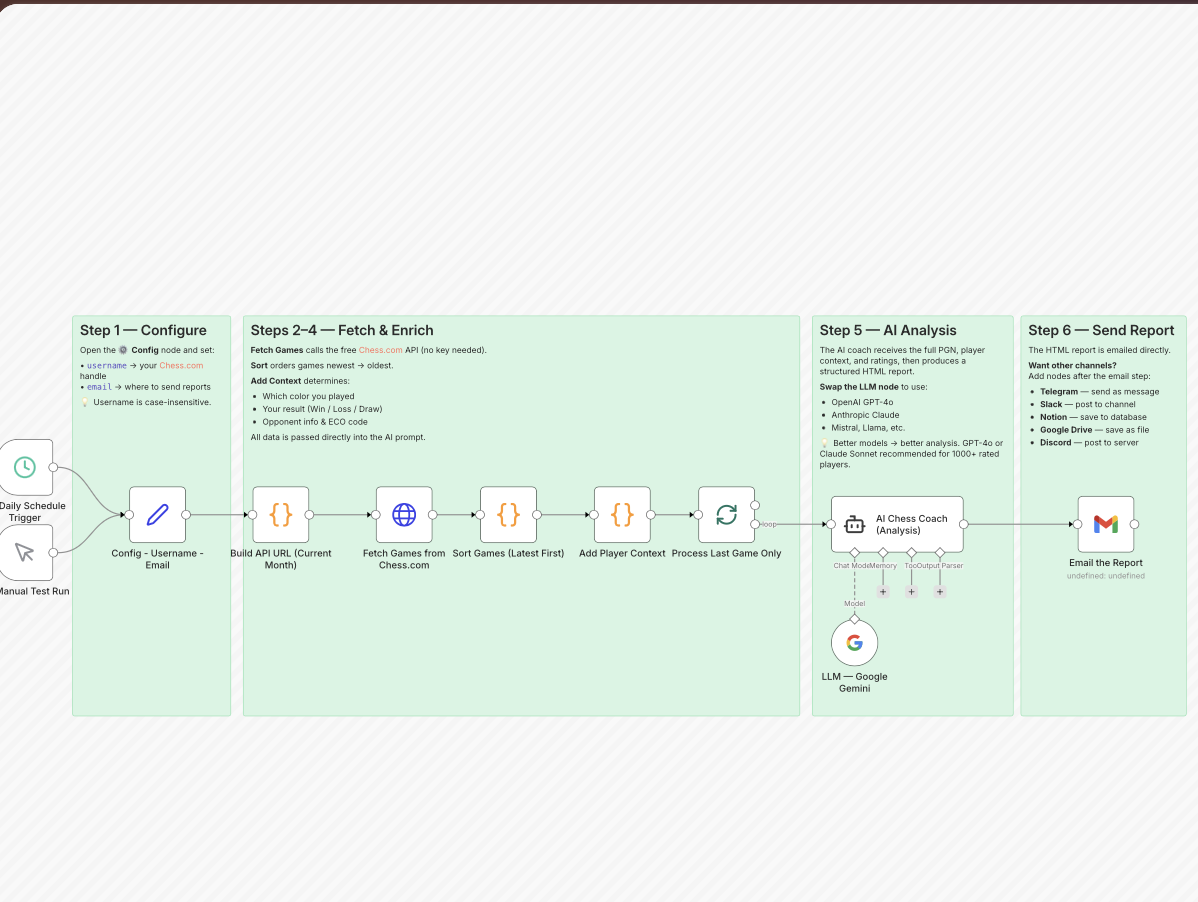

Improving at chess requires consistent practice and, more importantly, regular game analysis. However, many players struggle to review their games due to time constraints or lack of structured guidance.
What if your chess games could be automatically analyzed and delivered to your inbox with personalized feedback?
At Ucartz, we built a powerful automation workflow using n8n that acts as an AI-powered chess coach. This system automatically fetches your latest games from Chess.com, analyzes them using artificial intelligence, and sends you a detailed coaching report via email.
You can explore and use the workflow here:
https://n8n.io/workflows/14165-get-chesscom-game-reviews-by-email-using-google-gemini-or-other-llms
What Is the AI Chess Coach Workflow
The AI Chess Coach is an automated workflow developed by Ucartz to help chess players improve through consistent and structured game analysis.
Instead of manually reviewing your games, this workflow handles everything automatically in the background. From fetching your latest match to delivering a detailed coaching report, the entire process is fully automated.
Once configured, it works continuously without any manual intervention.
How the Workflow Works
Automated Trigger System
The workflow begins with a scheduled trigger that runs once per day. This ensures that your latest game is analyzed regularly. There is also an option to run the workflow manually for testing or on-demand analysis.
Simple Configuration Setup
To get started, you only need to provide two inputs:
- Your Chess.com username
- Your email address
The system does not require any API keys, making it easy to set up even for beginners.
Fetching Chess Games from Chess.com
The workflow dynamically builds an API request to fetch your games for the current month from Chess.com. Since Chess.com provides a public API, this step works without authentication.
The system retrieves all games and prepares them for processing.
Sorting and Selecting the Latest Game
Once the data is fetched, the workflow sorts all games in descending order based on time. This ensures that the most recent game is selected for analysis.
By default, only the latest game is processed. This helps control AI usage costs and keeps the report focused.
Enriching Game Data with Context
Before sending the data to the AI model, the workflow enhances the game information with useful context such as:
- The color you played
- Game result from your perspective
- Opponent details and ratings
- Opening classification using ECO codes
This step is crucial because it allows the AI to generate more accurate and personalized insights.
AI-Powered Game Analysis
The core of the workflow is the AI analysis engine. It processes the full game data, including the PGN and contextual details, and generates a structured coaching report.
The report includes:
- A detailed summary of the game covering opening, middlegame, and endgame
- Key turning points and critical mistakes
- Categorized errors such as tactical or positional issues
- Positive highlights showing what you did well
- Five actionable lessons tailored to your game
- A personalized training plan with exercises and study suggestions
- A short motivational conclusion to guide your next steps
This structured format ensures that players not only understand their mistakes but also learn how to improve.
Email Delivery of the Report
Once the analysis is complete, the workflow sends the report directly to your email in a clean HTML format. The email is optimized for readability and works well with platforms like Gmail.
This makes it easy to review your games anytime without logging into additional tools.
Customization Options
One of the biggest advantages of this workflow is its flexibility.
You can easily replace the AI model with other providers such as OpenAI, Anthropic, or Google Gemini, depending on your preference and budget.
You can also extend the workflow to send reports to other platforms like Slack, Telegram, or Notion.
If you want deeper insights, you can modify the workflow to analyze multiple games instead of just the latest one. This is especially useful for identifying recurring mistakes and long-term patterns.
Who Should Use This Workflow
This AI chess coach is ideal for:
- Beginners and intermediate players looking to improve consistently
- Club-level players who want structured feedback
- Chess coaches who want to automate analysis for students
- Content creators analyzing games for educational purposes
- Automation enthusiasts exploring AI workflows
Cost and Efficiency
The workflow is cost-effective and efficient:
- Chess.com API access is free
- n8n can be self-hosted or used via cloud
- AI costs depend on the model you choose
To keep costs low, it is recommended to analyze one game at a time unless you need deeper analysis.
Final Thoughts
Consistent improvement in chess comes from understanding your mistakes and learning from them. This AI-powered workflow transforms game analysis into a fully automated system.
Instead of relying on discipline to review your games, the system ensures that every game is analyzed and delivered with actionable insights.
By combining automation with artificial intelligence, you can focus more on playing and improving while the system takes care of the analysis.
Need Help Setting This Up
If you would like assistance in deploying or customizing this workflow for your needs, you can reach out to Ucartz for support and guidance.