
The web hosting industry runs on speed, uptime, and responsiveness. Whether you’re offering shared hosting, VPS, or dedicated servers, your operations are constantly under pressure from handling support tickets to provisioning servers and managing billing cycles. But here’s the problem: most hosting companies are still relying heavily on manual processes. This creates three major bottlenecks:
- High support volume that overwhelms teams
- Repetitive server and operational tasks
- Billing and provisioning delays that frustrate customers
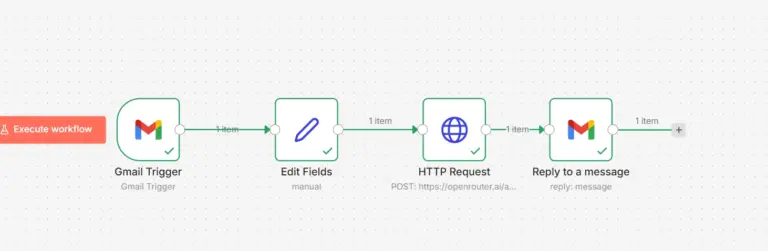
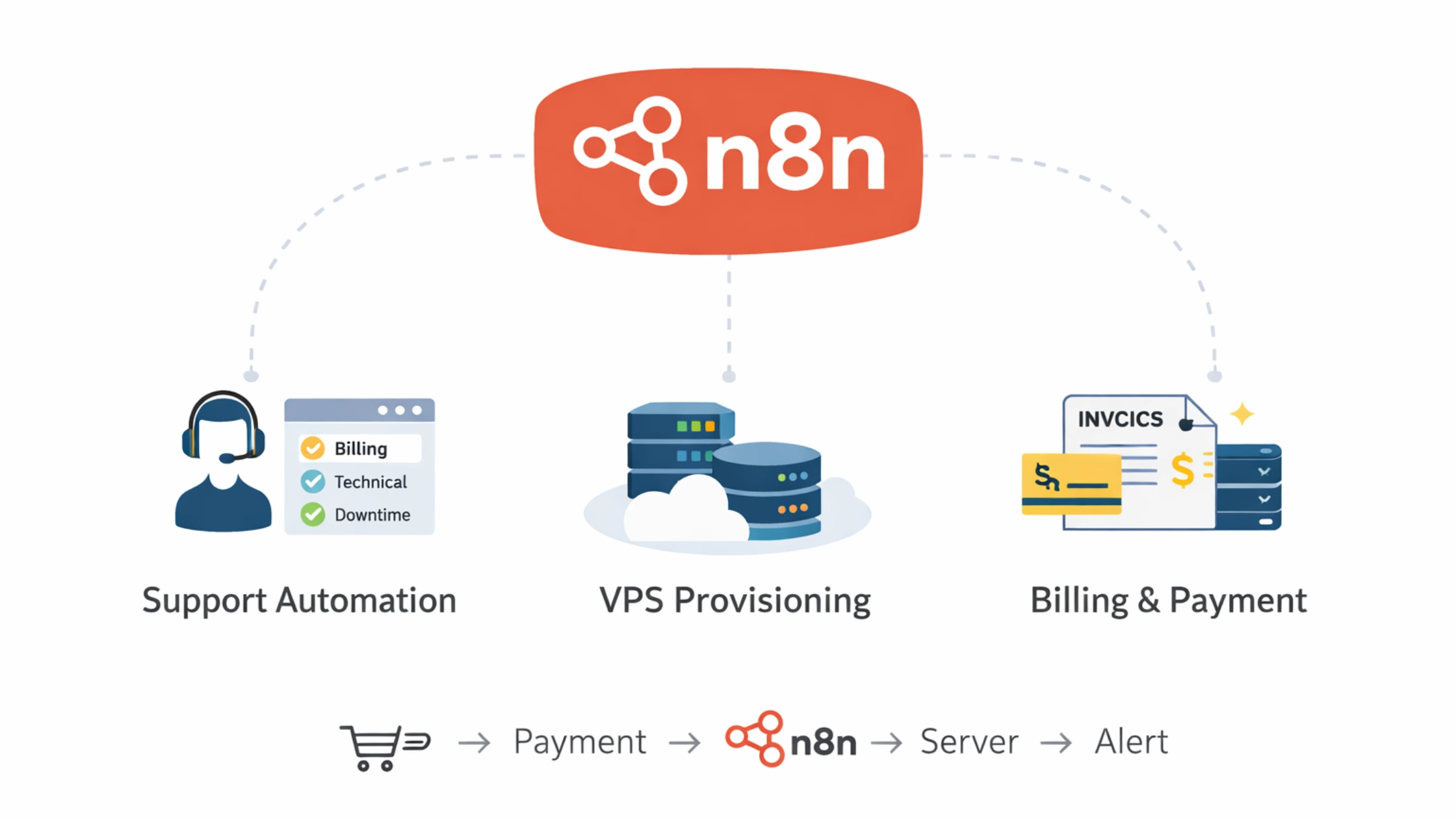
This is where n8n workflow automation for hosting companies becomes a game changer. n8n is a powerful workflow automation tool that allows hosting providers to connect systems, automate repetitive processes, and orchestrate operations without heavy development effort. Automate your hosting operations without building complex backend systems.
Why Automation Matters for Hosting Providers
Automation is no longer optional for hosting businesses it’s a competitive necessity.
1.Scale Without Increasing Support Team
As your customer base grows, support tickets grow exponentially. Without automation, you’ll need to keep hiring, which directly impacts margins.
2. Reduce Manual Errors
Manual provisioning, billing follow-ups, and ticket routing often lead to:
- Wrong server allocations
- Missed payments
- Delayed responses
Automation eliminates these inconsistencies.
3.Faster Response Times
Customers expect instant responses especially during downtime. Automation ensures:
- Immediate ticket acknowledgment
- Real-time alerts
- Faster issue resolution
4.Improve Customer Experience
A smooth onboarding flow, proactive alerts, and timely communication significantly improve retention and trust.
Core Areas Where n8n Helps Hosting Companies
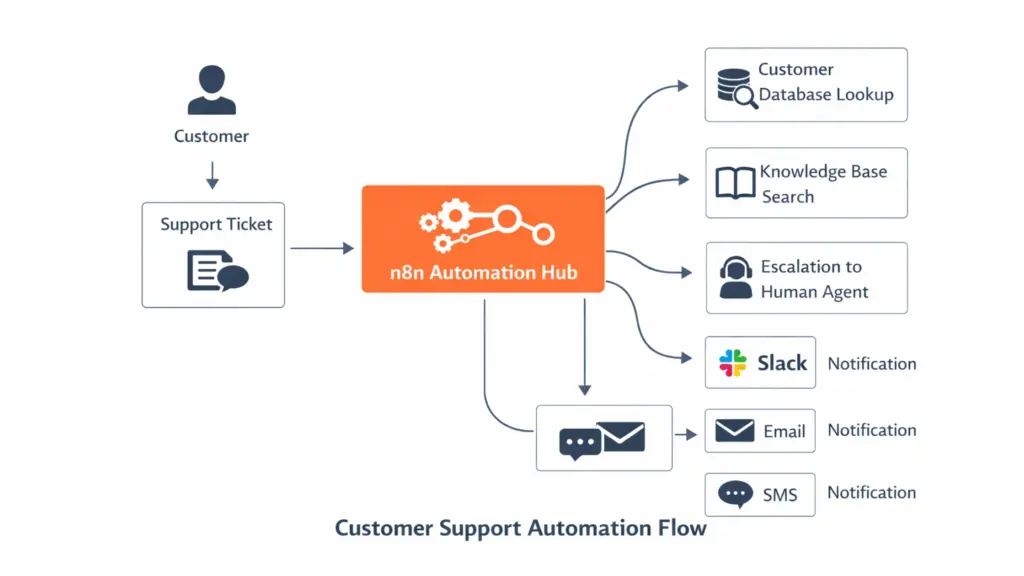
1. Customer Support Automation
Automate ticket routing, responses, and escalation paths to reduce workload and response time.
2. Billing & Payment Workflows
Handle invoice reminders, payment confirmations, and overdue escalations automatically.
3. Server Monitoring & Alerts
Integrate monitoring tools and trigger alerts instantly when something goes wrong.
4. Client Onboarding
Deliver a seamless onboarding experience with automated emails, guides, and system setup.
5. Internal Operations Automation
Reduce operational overhead by automating internal communication, reporting, and task management.
Real Use Cases
This is where n8n hosting automation delivers real ROI.
Use Case 1: Support Ticket Auto-Triage
Problem:
Support teams waste time manually categorizing tickets.
Trigger:
New support ticket created
Workflow:
- Capture incoming ticket (email/helpdesk)
- Analyze content (keywords or AI node)
- Categorize:
- Billing
- Technical
- Downtime
- Assign to appropriate team
- Send auto-response to customer
Tools:
- Email systems
- Helpdesk platforms
- Slack/Discord for internal alerts
Impact:
- Faster ticket resolution
- Reduced manual triage
- Improved SLA compliance
Use Case 2: VPS Provisioning Notification
Problem:
Delays between payment and provisioning create customer frustration.
Trigger:
New order placed
Workflow:
- Detect successful payment
- Trigger provisioning API (or notify team)
- Generate server credentials
- Send login details via email
- Notify internal team on Slack
Impact:
- Near-instant provisioning experience
- Reduced manual coordination
- Better customer onboarding
Use Case 3: Server Downtime Alerts
Problem:
Delayed detection of downtime damages trust.
Trigger:
Monitoring tool sends webhook
Workflow:
- Receive downtime alert
- Validate server status
- Send alerts:
- Slack (internal team)
- Telegram (on-call engineer)
- Notify affected customers via email
- Create incident ticket automatically
Impact:
- Faster incident response
- Proactive communication
- Reduced churn
Use Case 4: Payment Reminder Automation
Problem:
Unpaid invoices lead to revenue leakage.
Trigger:
Invoice due date approaching
Workflow:
- Send reminder email (X days before due)
- Send second reminder (on due date)
- Follow-up after X days
- Escalate (final notice or service suspension alert)
Impact:
- Improved cash flow
- Reduced manual follow-ups
- Consistent billing communication
Use Case 5: Customer Onboarding Flow
Problem:
New users feel lost after signup.
Trigger:
New customer signup
Workflow:
- Send welcome email
- Share tutorials and setup guides
- Add customer to CRM
- Schedule onboarding tips over time
- Notify support team for high-value customers
Impact:
- Better first impression
- Reduced support tickets
- Higher activation rate
Use Case 6: Abuse & Security Alerts
Problem:
Delayed response to suspicious activity can cause serious issues.
Trigger:
Suspicious behavior detected (e.g., high CPU usage, spam activity)
Workflow:
- Receive alert from monitoring/security tool
- Flag account
- Notify admin team
- Auto-create support ticket
- (Optional) Temporarily restrict account
Impact:
- Faster mitigation
- Improved platform security
- Reduced abuse incidents
Use Case 7: Backup & Reporting Automation
Problem:
Backup monitoring is often neglected until failure occurs.
Trigger:
Daily cron job
Workflow:
- Check backup status across servers
- Log results
- Identify failures
- Send summary report to admin
- Trigger alerts for failed backups
Impact:
- Reliable backup monitoring
- Reduced data risk
- Better operational visibility
Common Automation Architectures for Hosting Companies
To scale effectively, hosting providers must design workflows using proven architecture patterns. These patterns define how VPS automation workflows operate in real environments.
Pattern 1: Event-Driven Automation
Flow:
Webhook → n8n → Action
How it works:
An external system (billing, monitoring, signup form) sends a webhook to n8n.
n8n instantly processes the event and triggers actions.
Example:
- Payment successful → n8n → Provision VPS → Send login email
Why it matters:
- Real-time execution
- No delays
- Ideal for provisioning and alerts
Pattern 2: Scheduled Automation
Flow:
Cron → n8n → Check → Alert
How it works:
n8n runs at scheduled intervals to check system states.
Example:
- Daily cron → Check backup status → Send report
Use cases:
- Backup monitoring
- Usage reports
- Invoice reminders
Why it matters:
- Reliable for periodic checks
- Simple to implement
Pattern 3: Hybrid Automation Model
Flow:
Webhook + Cron + Manual triggers
How it works:
Combines real-time triggers with scheduled checks and optional manual control.
Example:
- Webhook → Instant provisioning
- Cron → Daily server health audit
- Manual → Admin-triggered restart workflow
Why it matters:
- Maximum flexibility
- Covers edge cases
- Ideal for production environments
Sample Workflow Architecture
A typical automation for web hosting business looks like this:
Order → Payment → n8n → Server Provision → Email → Slack
- Order System: Customer places order
- Payment Gateway: Confirms transaction
- n8n (Orchestration Layer):
- Acts as the central automation engine
- Connects APIs and services
- Provisioning System: Server is created
- Communication Layer:
- Email → Customer notification
- Slack → Internal alert
n8n is not replacing your systems it connects and orchestrates them.
Benefits of Using n8n in Hosting Business
Reduced Support Workload: Automating repetitive queries and routing cuts down support effort significantly.
Faster Response Time: Real-time workflows ensure instant reactions to events.
Lower Operational Cost: Less manual intervention means fewer resources required.
Full Control (Self-Hosted): Unlike SaaS tools, n8n can be self-hosted ideal for hosting companies concerned about data control.
Easy Integration with APIs: n8n works with:
- Internal scripts
- Billing systems
- Monitoring tools
- Cloud providers
Beginner vs Production Setup
| Stage | Setup Description |
|---|---|
| Beginner | Basic workflows (email, ticket automation) |
| Growth | Add monitoring, alerts, and billing automation |
| Production | Queue mode, horizontal scaling, advanced workflows |
Beginner Stage
Start with:
- Email automation
- Ticket routing
- Basic notifications
Growth Stage
Introduce:
- Monitoring integrations
- Payment workflows
- Slack/Telegram alerts
Production Stage
Implement:
- Queue mode for scalability
- Distributed workers
- High-availability setup
ROI of n8n Hosting Automation
Automation is a business decision that directly impacts revenue and costs. Here’s what hosting companies typically achieve with n8n use cases for hosting providers:
1. Reduce Support Tickets by 30–60%
Automating repetitive queries like:
- Billing reminders
- Account setup
- Basic troubleshooting
…significantly reduces ticket volume.
2. Cut Response Time by Up to 70%
With automation:
- Tickets are instantly routed
- Customers receive immediate responses
- Alerts are triggered in real-time
This drastically improves SLA performance.
3. Lower Operational Costs
Less manual work means:
- Smaller support teams
- Reduced overhead
- Better resource allocation
Automation allows you to scale without increasing costs proportionally.
4. Improve Customer Retention
Faster responses + proactive communication = happier customers.
Automation helps:
- Prevent downtime frustration
- Ensure timely billing communication
- Deliver smoother onboarding
5. Increase Operational Efficiency
By automating workflows like:
- VPS provisioning
- Monitoring alerts
- Reporting
Your team can focus on growth instead of maintenance.
Common Mistakes Hosting Companies Make
Not Setting Proper Error Handling
If workflows fail silently, automation becomes unreliable.
Fix:
Always use error workflows and fallback paths.
Overloading a Single Workflow
Large workflows become hard to debug and maintain.
Fix:
Split workflows by function:
- Billing
- Support
- Infrastructure
Ignoring Logs
Without logs, diagnosing issues becomes difficult.
Fix:
Monitor execution logs regularly.
No Backup Strategy
Ironically, many automation setups lack backup.
Fix:
- Backup workflows
- Backup database
- Version control
Best Practices
Use Webhooks for Real-Time Automation
Avoid polling when possible webhooks are faster and more efficient.
Separate Workflows by Function
Keep workflows modular:
- Support automation
- Billing workflows
- Infrastructure monitoring
Use Environment Variables
Store sensitive data (API keys, credentials) securely.
Monitor Execution Logs
Track:
- Failures
- Execution time
- Bottlenecks
Scale Using Queue Mode
For high-volume hosting environments:
- Use queue mode
- Add workers
- Balance load
Hosting Automation Trends You Can’t Ignore
The hosting industry is rapidly evolving, and automation is at the center of this transformation. If you’re not adapting, you’re already behind.
1. Shift Toward Zero-Touch Operations
Modern hosting companies are moving toward fully automated infrastructure, where provisioning, monitoring, and issue resolution happen with minimal human intervention.
This reduces operational overhead and allows teams to focus on high-impact tasks.
2. Instant Provisioning is Now Expected
Customers no longer tolerate delays. Whether it’s VPS or shared hosting, users expect:
- Immediate server deployment
- Real-time account activation
- Instant access to credentials
Automation tools like n8n hosting automation enable this by connecting billing, provisioning, and communication systems seamlessly.
3. Real-Time Alerts & Proactive Support
Reactive support is outdated. Hosting providers now rely on:
- Real-time monitoring
- Instant downtime alerts
- Automated incident notifications
This shift improves uptime perception and builds customer trust.
4. AI + Automation Replacing Tier-1 Support
Basic support queries (password resets, billing questions, setup help) are increasingly handled by:
- AI-based classification
- Automated workflows
- Predefined response systems
This reduces support load and speeds up response times.
5. Event-Driven Infrastructure is Becoming Standard
Instead of scheduled checks, modern systems respond to events:
- Payment received → trigger provisioning
- Server down → trigger alert workflow
- New signup → trigger onboarding
This is where automation for web hosting business becomes highly efficient.
When NOT to Use n8n
n8n is powerful but not universal.
Avoid using n8n for:
Heavy Computation Tasks: n8n is not designed for CPU-intensive processing.
Real-Time Systems (Millisecond Latency): If you need ultra-low latency, use dedicated systems.
Deep Backend Logic: Complex application logic is better handled with:
- Custom scripts
- Backend services
Best approach:
Use n8n as an orchestration layer, not a replacement for core systems.
Conclusion
n8n for hosting companies acts as a central automation layer that connects your entire infrastructure from billing systems to monitoring tools and support platforms. The real power lies in combining n8n with your existing stack. Start with small workflows using KVM VPS hosting to start your automation journey.
FAQ
1. How can hosting companies use n8n?
Hosting companies can use n8n to automate support ticket routing, billing reminders, server monitoring alerts, provisioning workflows, and customer onboarding.
2.Is n8n secure for hosting businesses?
Yes. Since n8n can be self-hosted, hosting companies maintain full control over data, credentials, and infrastructure security.
3.Can n8n automate VPS provisioning?
Yes. n8n can trigger VPS provisioning by integrating with APIs or executing scripts after payment confirmation.
4. Does n8n work with WHMCS or billing systems?
Yes. n8n integrates with billing platforms like WHMCS using APIs, webhooks, or database triggers.