
Most people don’t need a long article to decide. Here’s the fast answer:
Choose OpenClaw for production if:
- You have a technical team or DevOps support
- You want AI-native automation (not just triggers → actions)
- You’re okay with early-stage tooling and building guardrails
- You’re automating internal ops, support triage, lead routing, or non-critical workflows
Avoid OpenClaw in production if:
- You’re running finance, payments, or compliance-heavy workflows
- You expect plug-and-play like Zapier
- Your team has zero infra or monitoring setup
- You can’t afford silent failures or unpredictable AI behavior
OpenClaw sits in an interesting space. It’s not just another automation tool like Zapier. It’s closer to an AI agent that can understand instructions, make decisions, and take actions across your stack. If you would like to visit the fundamentals of OpenClaw,you can refer previous blogs. That’s exciting. So is OpenClaw production-ready? It depends on what you mean by production, and what you’re willing to own.
Production-Ready Defined
Production-ready means surviving real traffic with 99.9%+ uptime, full observability (structured logs, traces, metrics), robust retries, and security that withstands attacks.
OpenClaw handles demos well via natural language triggers across WhatsApp, Slack, or Discord, but lacks built-in enterprise features like auto-scaling or compliance audits.
“Demo works” ignores on-call realities: debugging AI hallucinations or plugin crashes under load requires custom tooling, unlike mature platforms.
The Honest Pros of Using OpenClaw in Production
1. Full Control Over Your Data
Unlike SaaS automation platforms, OpenClaw runs on your infrastructure. Your data doesn’t leave your VPC. For companies with strict data governance requirements or those handling sensitive information, this is a significant advantage.
2. AI-Native Workflows
OpenClaw is built for the AI era. It natively supports:
- Document classification and routing
- Intelligent summarization
- Sentiment analysis
- Entity extraction
- Context-aware decision trees
You’re not retrofitting AI into a traditional automation tool it’s designed for this from the ground up.
3. Cost Efficiency at Scale
For teams running hundreds or thousands of workflows monthly, OpenClaw’s self-hosted model becomes dramatically cheaper than per-execution SaaS pricing.
The math: At 10,000 workflow runs/month:
- Zapier Professional: ~$600-1,200/month
- OpenClaw self-hosted: Server costs (~$50-200) + maintenance time
- Break-even point: Usually around 2,000-5,000 runs/month
4. No Vendor Lock-In
Your workflows are code. Your data is yours. If OpenClaw stops working for you, migration is painful but possible. With closed SaaS platforms, you’re often stuck.
5. Extensibility for Dev Teams
If you have developers, OpenClaw’s open architecture means you can:
- Build custom integrations
- Extend functionality with plugins
- Integrate with internal APIs
- Modify behavior to match your exact needs
Key Cons & Risks
- Stability gaps: Probabilistic AI outputs cause non-deterministic failures; scales poorly without validation layers, leading to context leakage or crashes.
- Security exposures: Prompt injection via websites exfiltrates data; default configs leak API keys; unvetted plugins introduce malware. China/Cisco flagged it as high-risk.
- Debugging overhead: No visual UI, CLI-only; tracing AI decisions lacks correlation IDs, complicating root-cause analysis.
- Maintenance burden: Manual credential mgmt, no native enterprise support; broad perms (system access) amplify blast radius.
Real failure: Malicious site injects commands during summarization, modifying files or stealing tokens.
When OpenClaw Is (and Is NOT) Worth Using in Production
Good Fit Scenarios
Internal ops automation Automating Slack notifications, internal reports, data syncs between tools. Low stakes, high ROI.
Lead routing and qualification With proper guardrails, AI-powered lead classification works well. Just add manual review for high-value leads.
Support ticket triage Automatically categorizing, tagging, and routing support requests. Errors are annoying but not catastrophic.
Content workflows Summarizing documents, extracting key points, organizing content libraries. Perfect use case for AI automation.
Non-critical business processes Order confirmations, reminder emails, status updates. Things that should work but won’t destroy your business if they occasionally fail.
Teams with DevOps maturity If you already run self-hosted infrastructure, monitoring, and on-call rotations, adding OpenClaw is manageable.
Bad Fit Scenarios
Payments and financial ledgers Anything touching money needs rock-solid reliability. OpenClaw isn’t there yet.
Compliance-heavy workflows If you need SOC 2, HIPAA, or PCI-DSS compliance for a specific workflow, use certified tools. The risk isn’t worth it.
Founders expecting plug-and-play If you want to “set it and forget it,” use Zapier or Make. OpenClaw requires ongoing attention.
Teams without monitoring infrastructure If you can’t observe what’s happening in your workflows, you can’t run them safely in production.
Mission-critical customer-facing processes Anything that directly impacts customer experience in real-time needs higher reliability guarantees.
Best Practices for Running OpenClaw in Production
If you’ve decided OpenClaw fits your use case, here’s how to run it safely:
1. Use Proper Environment Separation
Run OpenClaw in staging before production. Test every workflow change in a safe environment that mirrors production but doesn’t impact real operations.
Setup: staging.openclaw.yourdomain.com and prod.openclaw.yourdomain.com with separate databases and API keys.
2. Implement Logging and Monitoring
You need visibility into what’s happening:
- Log every workflow execution (inputs, outputs, errors)
- Set up alerts for failure rates above threshold
- Monitor API rate limits and quota usage
- Track execution times to catch performance degradation
Tools: Use the ELK stack, Grafana, Datadog, or even simple log files with monitoring scripts.
3. Add Manual Approval Gates
For high-stakes decisions, inject human checkpoints:
- AI suggests classification → human approves
- System drafts response → human reviews before sending
- Workflow identifies action → notification sent for manual execution
This dramatically reduces the blast radius of AI errors.
4. Secure Your Secrets Properly
Never hardcode API keys or credentials. Use:
- Environment variables
- Secrets managers (AWS Secrets Manager, HashiCorp Vault)
- Encrypted configuration files
Rotate credentials regularly. Limit access to production secrets.
5. Implement Retry Logic and Fallbacks
Workflows should handle transient failures gracefully:
- Retry failed API calls with exponential backoff
- Fall back to alternative workflows when primary fails
- Queue tasks for manual review if automation can’t decide
6. Version Control Everything
Treat your workflows like code:
- Store configurations in Git
- Use branches for changes
- Require PR reviews for production updates
- Tag releases
This gives you rollback capability and change history.
7. Limit and Vet Plugin Sources
Only use plugins from trusted sources. Review code before deploying. Keep a whitelist of approved plugins and block everything else.
8. Document Your Workflows
Future you (or your replacement) needs to understand:
- What the workflow does
- Why design decisions were made
- How to debug common failures
- Who owns it
Documentation is production-readiness insurance.
9. Set Up Proper Alerting
You should know about failures before users complain:
- Slack/email alerts for critical failures
- Daily digests of warning-level issues
- On-call rotation for production incidents
10. Plan Your Rollback Strategy
Before deploying any change, know how to undo it:
- Keep previous workflow versions
- Have documented rollback procedures
- Test rollback process in staging
Mini Case Scenarios
Scenario 1: Startup Ops Team Success
Company: 40-person SaaS startup Use case: Automating lead qualification from web forms Setup: OpenClaw self-hosted on AWS, routing leads to Salesforce
Results:
- Reduced manual lead review time by 60%
- Cost: $100/month vs $800 with Zapier
- Required 2 weeks initial setup, ~3 hours/month maintenance
Key success factors:
- CTO directly owned the system
- Non-critical workflow (sales team still reviewed all leads)
- Team had existing DevOps practices
Scenario 2: Agency Internal Automation
Company: Digital marketing agency Use case: Client reporting automation, pulling data from multiple sources Setup: OpenClaw running on DigitalOcean, generating weekly reports
Results:
- Saved 10 hours/week of manual report compilation
- Occasional failures required manual intervention
- System paid for itself in 3 weeks
Key success factors:
- Internal tool (only team impacted by failures)
- Gradual rollout (started with 3 clients, expanded to 20)
- Simple fallback: manual report generation
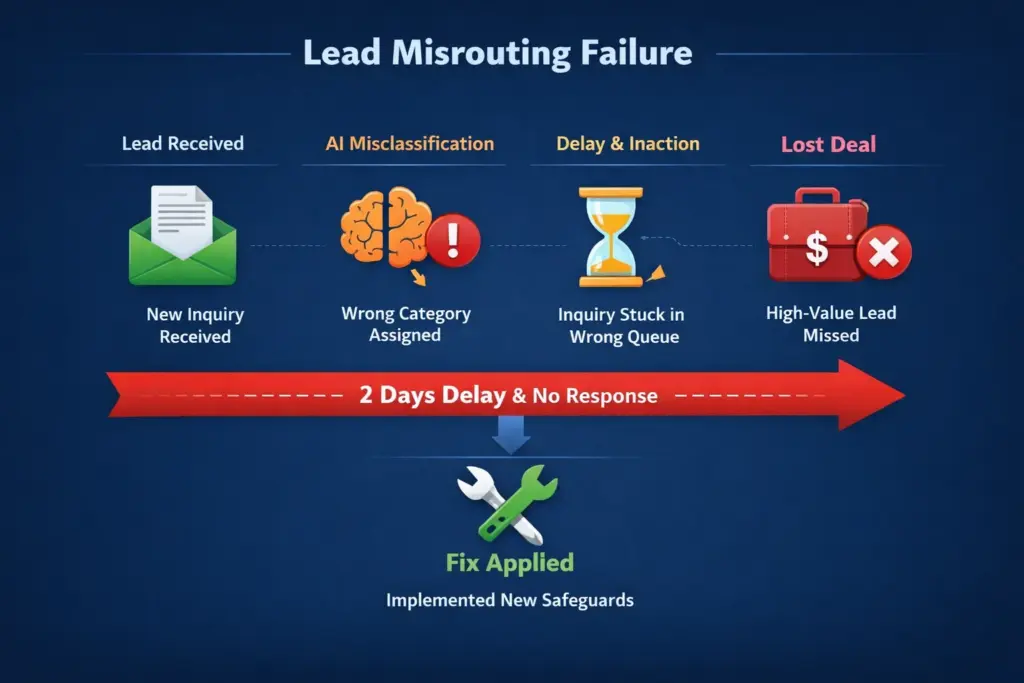
Scenario 3: Failure Scenario – Misrouted Critical Lead
What happened: E-commerce company used OpenClaw to route sales inquiries. AI misclassified a $200K wholesale inquiry as a customer service question. Inquiry sat in wrong queue for 2 days.
Impact: Lost deal, embarrassed sales team
Root cause:
- No confidence threshold checking
- No alert for unreviewed high-value inquiries
- No manual review gate for large potential deals
How they fixed it:
- Added confidence score checking
- Implemented manual review for inquiries mentioning “wholesale,” “bulk,” or “$” amounts
- Set up daily Slack digest of all routed leads
- Created fallback rule: when uncertain, route to senior sales rep
AI automation needs guardrails, especially for high-stakes workflows.
OpenClaw vs Safer Production Alternatives
For traditional workflow automation, n8n is more mature. For AI-heavy automation, OpenClaw has advantages.OpenClaw is best when AI capabilities are essential to your workflow and you have the technical capacity to manage early-stage tooling.For a deeper feature-by-feature breakdown, refer this blog OpenClaw vs n8n vs Zapier.
Failure Modes, Blast Radius & AI Guardrails
Here’s the part most OpenClaw tutorials don’t talk about.In production, tools don’t just “work” or “not work.”They fail in specific ways. And those failure modes matter. When you introduce an AI agent like OpenClaw into real workflows, you’re also introducing new operational questions:
1. Failure Modes: How Exactly Can This Break?
Every production system fails. The real question is how:
- Does OpenClaw fail loudly (you get alerts)?
- Or silently (things just stop happening)?
- What happens when:
- An API changes?
- A skill crashes?
- The AI model returns unexpected output?
If your automation fails silently, you don’t just lose tasks.You lose trust in the system.In production, silent failure is worse than visible failure.
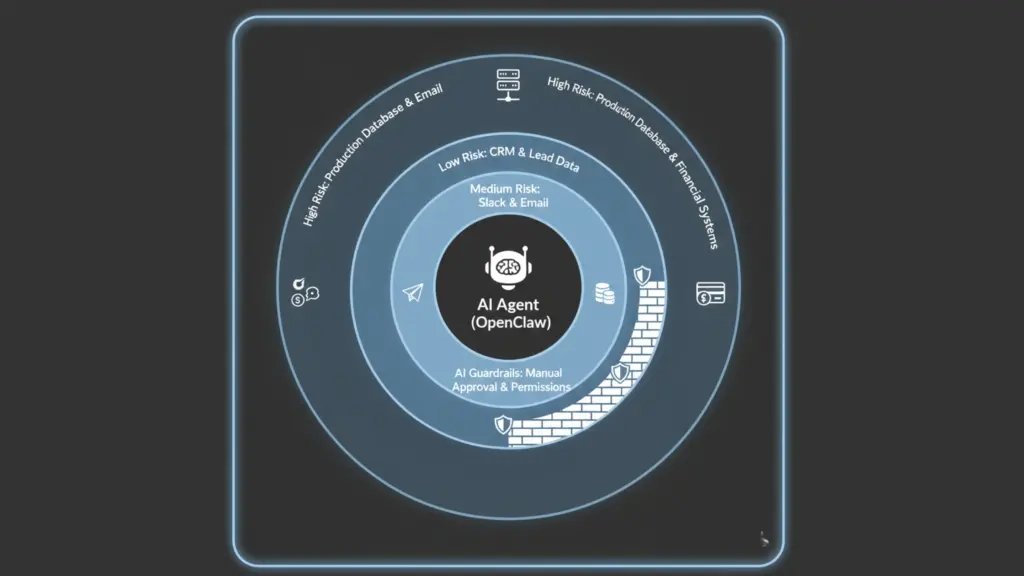
2. Blast Radius: How Much Can One Mistake Break?
“Blast radius” is a simple but powerful concept:If something goes wrong, how much of your system gets affected? With OpenClaw, blast radius can be bigger than traditional automation because:
- The agent may have access to:
- Files
- Messages
- CRMs
- Scripts
- A single bad instruction or hallucinated decision can impact multiple systems.
This doesn’t mean OpenClaw is unsafe.It means you need to design for containment:
- Limit permissions
- Separate environments (dev vs prod)
- Don’t give the agent “root access to your business” on day one
Start small. Contain the blast radius. Then expand.
3. Rollbacks: Can You Undo Damage?
In classic engineering, rollbacks are normal:
- Bad deployment? Roll back.
- Buggy release? Revert.
With AI-driven automation, rollback is trickier because:
- Actions may already be executed
- Emails sent
- CRM records modified
- Files deleted or moved
Ask yourself before going live:
- Do I have logs of what OpenClaw changed?
- Can I reverse critical actions?
- Do I have human-in-the-loop for high-impact workflows?
Production readiness isn’t about never breaking.It’s about recovering fast when things break.
4. Observability: Can You See What the Agent Is Doing?
If you can’t observe a system, you can’t trust it.At minimum, production use of OpenClaw should have:
- Clear logs of:
- What the agent decided
- What action it took
- What failed and why
- Basic monitoring:
- Failed runs
- API errors
- Execution latency
Without observability, OpenClaw becomes a black box. And black boxes are scary in production.
5. Guardrails for AI
OpenClaw’s biggest strength is autonomy.That’s also its biggest risk. AI guardrails are about setting boundaries like:
- What the agent is allowed to do
- What it must never do
- When it should ask for human approval
- Which systems it can touch
Think of this like onboarding a new team member:You don’t give them access to finance, production databases, and customer comms on day one.Same logic applies to AI agents.
Using OpenClaw in production isn’t about “Is the tool powerful?”It’s about:
- How do you contain failure?
- How do you limit blast radius?
- How do you roll back damage?
- How do you observe behavior?
- How do you put guardrails around autonomy?
If you think about these upfront, OpenClaw can be a serious production asset.
If you skip them, even the smartest AI agent will eventually create chaos not because it’s bad tech, but because production always finds your weak spots.
Production Readiness Checklist
Before deploying OpenClaw workflows to production, verify:
Infrastructure
- Dedicated production environment (not sharing with staging)
- Monitoring and logging configured
- Automated backups enabled
- SSL/TLS properly configured
- Firewall rules limiting access
Workflow Design
- Retry mechanisms for API failures
- Timeout limits set appropriately
- Error handling for all external dependencies
- Fallback workflows for critical paths
- Manual approval gates for high-stakes decisions
Security
- Secrets stored in secrets manager (not hardcoded)
- API keys rotated regularly
- Plugin sources vetted and whitelisted
- Access controls configured
- Audit logging enabled
Operations
- Clear owner assigned to each workflow
- On-call rotation includes OpenClaw responsibilities
- Runbook documentation created
- Rollback procedure tested
- Alerting configured for critical failures
Testing
- Workflow tested in staging environment
- Edge cases identified and handled
- Performance under load validated
- Failure modes documented
- Recovery procedures tested
Final Verdict: Is OpenClaw Worth It in Production?
Here’s my nuanced take after evaluating production deployments:
Adopt OpenClaw now if:
You’re a technically mature team (have DevOps practices, monitoring, on-call) running AI-heavy automation for internal processes or non-critical workflows. You value cost efficiency and data control more than hand-holding support. You understand you’re trading stability guarantees for flexibility and cost savings.
Best candidates: Growth-stage startups with engineering resources, agencies automating internal ops, SaaS companies with strong DevOps culture.
Wait 6-12 months if:
You need enterprise-grade reliability, operate in heavily regulated industries, or lack technical resources to manage self-hosted infrastructure. The ecosystem needs more time to mature, documentation to improve, and stability to increase.
Best candidates: Early-stage founders without technical backgrounds, finance/healthcare companies with strict compliance, teams without DevOps capabilities.
How to pilot safely:
- Start small: Pick one non-critical internal workflow
- Set success metrics: Define what “working” means before you start
- Run parallel: Keep manual process running alongside automation initially
- Monitor closely: Watch the first 100 executions carefully
- Iterate: Fix issues, add guardrails, improve monitoring
- Expand gradually: Only add workflows after proving reliability
My recommendation:
OpenClaw is powerful but immature. It’s excellent for teams who can absorb early-stage tool risk and have the technical capacity to manage self-hosted infrastructure. It’s a poor fit for teams needing guaranteed uptime or operating in regulated environments.
Think of it like adopting Kubernetes in 2016 vs 2024. Early adopters got significant advantages but paid in complexity and stability. If you can handle that trade-off, OpenClaw offers compelling value. If you can’t, stick with more mature platforms for now.
Ucartz help companies make smarter decisions about automation tools and infrastructure. We’ve evaluated dozens of automation platforms in real production environments so you don’t have to learn the hard way.Have questions about running OpenClaw in production? Contact our team for a free consultation.
Frequently Asked Questions
1.Is OpenClaw stable enough for production use?
It depends on your definition of “production.” For internal tools and non-critical workflows with technical oversight, yes. For mission-critical customer-facing processes, not yet.
2.What’s the biggest risk of using OpenClaw in production?
AI unpredictability combined with early-stage software stability. You can mitigate this with proper testing, monitoring, and manual approval gates.
3.How much DevOps expertise do I need to run OpenClaw?
You should be comfortable with: deploying applications to servers, configuring environment variables, reading logs, setting up monitoring, and debugging infrastructure issues. If that sounds intimidating, you’re not ready.
4.Can OpenClaw replace Zapier completely?
For some use cases, yes. But Zapier’s reliability, integration breadth, and support make it worth the premium for many teams. OpenClaw is an alternative, not a universal replacement.
5.What happens when OpenClaw breaks at 2 AM? Y
ou debug it yourself. There’s no enterprise support. This is why having on-call capacity and good monitoring is essential.
6.How do I prevent AI from making wrong decisions in workflows?
Use confidence thresholds, implement manual approval for high-stakes decisions, add validation rules, and maintain human-in-the-loop checkpoints for anything that matters.