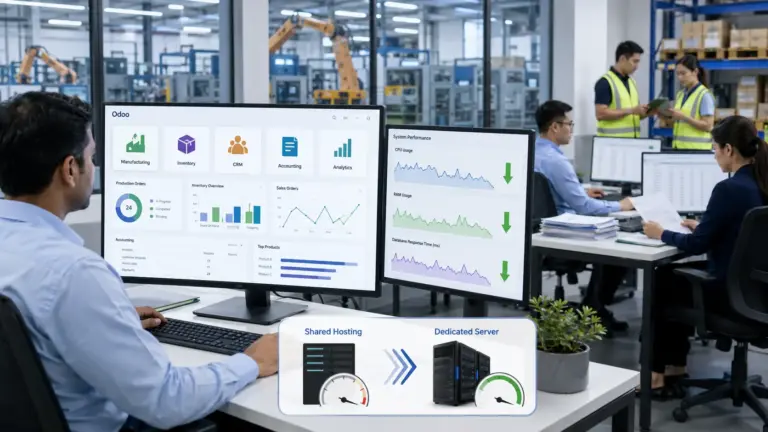

Starting With a Story: Why Your Web Host Is More Than Just Hardware
Picture this: you’ve spent months building a sleek online shop, invested in beautiful product photos and polished descriptions, only to watch potential customers disappear before the homepage even loads. That slow start isn’t just annoying for visitors – it signals to Google that something is a miss. Search engines pay attention to how quickly your pages appear and whether your site is even up when they send their bots to crawl it. If you’re squeezed into a shared host with dozens of strangers and one of them hogs the processor, your pages can crawl and your rankings can suffer.
I’ve watched small projects limp along on cheap shared plans for years because they didn’t realize there was another way. A dedicated server flips that equation: instead of carving out a tiny slice of someone else’s machine, you lease an entire box just for your self You choose the hardware, the operating system and the software. It’s more expensive up front, but the performance and control can be game‑changing.
In the sections that follow, we’ll talk about what makes these servers tick, why they might matter to you, who really needs them and when the cost is justified. We’ll also look at how your choice of hosting can influence everything from uptime to SEO.
The Basics: One Box, One Customer
At its core, a server is just a beefed‑up computer that sits in a data centre and serves content over the internet. In shared hosting, that machine is like a communal apartment block: lots of tenants, lots of competition for hot water and bandwidth. A dedicated server is more like owning your own house. You aren’t sharing the kitchen or the wiring, so your neighbour’s party doesn’t blow your fuses. Every bit of CPU power, memory and disk speed belongs to your website or application.
That exclusivity doesn’t only affect performance. On a shared IP, if another tenant sends spam or is hacked, your domain can suffer guilt by association. Dedicated servers come with their own IP addresses, so you’re not lumped together with bad actors.
A Quick Tour of the Hardware
When you rent a dedicated machine, you get to spec it out like you would a custom PC. You’ll decide on:
- Processor: Modern servers use multi‑core CPUs that juggle many tasks at once. If you need to crunch numbers or handle large traffic bursts, choose more cores
- RAM: Memory is where your applications store data they’re actively working with. More RAM helps when you’re running databases or content management systems because it keeps everything snappy.
- Storage: Spinning disks are cheap and spacious, while SSDs and NVMe drives are blazing fast For sites with lots of read/write operations (think e‑commerce or SaaS platforms), solid‑state is worth the premium.
- Networking: Dedicated servers usually connect to the web via one or more network cards. Port speeds range from 1 Gbps to 100 Gbps, and you can add more cards for redundancy
- Software: You’re not locked into whatever the hosting company wants to install. Linux, Windows Server, virtualization tools if it runs on a standard server, you can usually run it here.
How It Differs From VPS and Cloud Hosting
You may have heard about VPS and cloud plans. A VPS (Virtual Private Server) sits somewhere between shared and dedicated hosting: it’s one physical machine carved into many virtual slices. Each slice has guaranteed resources, but all the slices still share the underlying hardware. It’s cheaper than a full dedicated server, but you still don’t have full isolation.
Cloud hosting distributes your site across many physical machines. It’s fantastic for scaling up and down quickly you only pay for what you use but performance can be less consistent, and the pricing can be harder to predict. Dedicated servers offer the opposite: fixed, predictable costs and rock‑solid performance, but scaling up often means migrating to a bigger box.
Why People Love Dedicated Servers
The fans of dedicated hardware tend to talk about a few key advantages. Here’s my take on them, based on what the research says and what I’ve seen in practice.
It’s Fast and It Stays Fast
One of the biggest headaches with cheap hosting is inconsistency. One moment your blog is lightning quick; the next, it slows to a crawl because some other site on the server suddenly goes viral. With a dedicated machine, nobody else can eat up your resources. PhoenixNAP points out that this consistency makes dedicated servers ideal for busy e‑commerce stores and media sites. It’s also why webmasters notice a drop in bounce rates after moving off a shared plan: users don’t bail while waiting for pages to load.
You’re in Charge of Security
Shared hosting providers do their best to isolate accounts, but the very fact that multiple users share a machine increases the attack surface. With a dedicated server, you decide which ports are open, which services are running and how to harden the system. Bacloud notes that complete isolation prevents cross‑site contamination, and you can set up custom firewalls and encryption to meet standards like PCI DSS or GDPR. Having your own IP also keeps you from being lumped in with spammers or hacked neighbours.
It’s Reliable
Hardware failures happen. The difference with dedicated hosting is that providers often build redundancy into the system dual power supplies, RAID arrays to guard against disk failure and proactive monitoring. Service level agreements (SLAs) frequently promise 99.9 % uptime or better. If your site is your storefront, that kind of stability can make or break your reputation.
You Can Do Whatever You Want (Within Reason)
If you’ve ever been frustrated because you couldn’t install a particular PHP extension on a shared host, you’ll appreciate the freedom of a dedicated box. Want to run a custom database? Need a non‑standard version of Python? With root access, it’s your call. You can automate tasks with tools like Ansible, set up your own caching layers or run multiple applications side by side.
The Trade‑Offs: Not Everything Is Rosy
There are downsides. The most obvious is price: Ucartz estimates that renting a dedicated server will cost anywhere from 20 $ to 200 $ per month, and that doesn’t include licences or optional managed services. You’ll also have to decide whether to manage the server yourself or pay extra for a managed plan. Self‑managed means you’re responsible for updates, backups and security; managed plans cost more but take some of that work off your hands.
Scalability is another consideration. While you can add more RAM or storage to a dedicated box, you can’t instantly double your CPU cores during a holiday rush the way you might in a cloud environment. Planning for growth is essential so you’re not under‑provisioned or paying for capacity you never use.
Who Really Needs One?
You might be wondering, “Do I actually need a dedicated server, or am I fine with a VPS?” Here are a few scenarios where it makes sense:
- Your site handles a lot of traffic. Busy e‑commerce stores, popular blogs and news sites all fall into this category. The PhoenixNAP guide notes that high‑traffic sites benefit from the guaranteed resources.
- You run heavy applications. Big data analytics, machine learning workloads, scientific simulations and complex financial models devour CPU and memory. A shared host just won’t cut it.
- You host games. Multiplayer titles like Minecraft need low latency and predictable performance. Dedicated servers keep gamers happy.
- Your data must stay private and compliant. If you process payment information or medical records, isolation and custom security are essential.
- You want to build your own private cloud or virtualization environment. A dedicated machine provides the foundation for running multiple virtual servers or containers with full control.
If none of these sound like you and you’re just starting out, a VPS or even shared hosting might suffice. You can always upgrade later.
How Much Should You Budget?
As mentioned, renting dedicated hardware isn’t cheap. Ucartz quotes monthly costs between 9.99 $ and 200 $ for basic to mid‑range servers. Premium plans with top‑of‑the‑line CPUs, massive amounts of RAM and managed services can soar higher. Here’s what drives the price:
- Hardware specs: The more cores, RAM and SSD space you need, the more you pay.
- Bandwidth: Plans include a certain amount of data transfer each month. Surpassing that cap incurs fees.
- Managed services: Paying the provider to handle software updates, security and backups will raise your bill.
- Data centre location: Servers in regions with expensive power or real estate cost more; proximity to your customers can improve load times.
- Extras: Control panel licences (cPanel, Plesk), advanced firewalls and backups are usually add‑ons.
A practical tip: start with what you need now and make sure the provider allows hardware upgrades. That way you’re not overpaying for unused capacity.
What to Look for in a Provider
Not all hosting companies are created equal. Here are a few points to consider when shopping around:
- Reputation and uptime. Look for providers with verifiable uptime guarantees and read independent reviews.
- Support. Do they offer 24/7 help? Is support by chat, phone or ticket? Fast, knowledgeable support is vital if you’re not a sysadmin.
- Data centre location. Choose a server close to your primary audience to cut down latency. Data sovereignty rules may also influence your choice.
- Hardware flexibility. Can you customize your specs? Do they let you pick your OS and control panel?
- Scalability. It should be possible to upgrade or migrate without excessive downtime.
- Security features. Check for DDoS protection, physical security at the facility and optional managed services.
- Transparent pricing. Understand what’s included in the base price and what costs extra.
Hosting and SEO: Why Google Cares About Your Server
Although Google doesn’t rank sites higher simply because they’re on dedicated hardware, the technical environment affects SEO in several ways:
- Speed matters. Google considers page load times when ranking pages, especially on mobile A dedicated server, with its private resources, can serve pages faster and more consistently.
- Uptime is crucial. Frequent downtime means search engine crawlers encounter errors, which can lead to pages dropping from the index Dedicated servers typically offer better reliability.
- Security protects your reputation. A hacked site can be removed from search results or flagged as dangerous. Running your own server lets you implement the security measures you need
- No bad neighbours. Sharing an IP with spammers on a shared host can hurt email deliverability and even search rankings. Your own IP keeps you out of that mess.
- Customization enables optimization. With root access, you can install caching tools, tweak server settings and fine‑tune your stack for Core Web Vitals, tweaks that aren’t possible on most shared plans.
Wrapping Up: Is It Worth It?
Dedicated servers represent a significant upgrade in power, control and responsibility. They shine when you’re serving lots of visitors, running complex software or handling sensitive data. They’ll improve your site’s stability and give you the freedom to optimize performance and security according to your own standards. On the flip side, they’re more expensive and require either technical know‑how or a managed service.
If you’re just starting a blog or small business site, don’t feel pressured into going dedicated immediately. Begin with a good shared or VPS plan, monitor your traffic and performance, and plan to upgrade when your growth justifies it. When you do need it, choosing a reputable provider and sizing your hardware carefully will set you up for a faster, safer and more professional online presence.