
Short answer: TCP (Transmission Control Protocol) is the part of the internet’s protocol stack that gives two programs a reliable, in-order stream of bytes. It numbers the data it sends, spots lost or damaged pieces, sends them again and slows down when the network is busy. Web browsing over HTTP/1.1 and HTTP/2, SSH, email and most database connections run on TCP. The current standard is RFC 9293, which replaced the original RFC 793.
What TCP does for an application
IP, the Internet Protocol, moves packets from one address to another, but it makes no promises: packets can arrive late, out of order, twice or not at all. TCP sits on top of IP and hides that from the application. According to RFC 9293:
- Reliable, in-order byte stream. What one side writes, the other side reads in the same order.
- Segments inside IP packets. The stream is cut into TCP segments, and each segment travels as an IP datagram.
- Loss and error detection. Sequence numbers show what is missing, a checksum on every segment shows what is damaged, and missing data is sent again.
- Connections. Both sides set up a connection before sending data and close it afterwards. Data can flow both ways.
- Ports. Port numbers identify the service (443 for HTTPS, 22 for SSH) and let one server handle thousands of connections at once.
- Congestion control. Every TCP implementation must slow down when the network is congested, so one busy connection does not swamp everyone else.
The three-way handshake
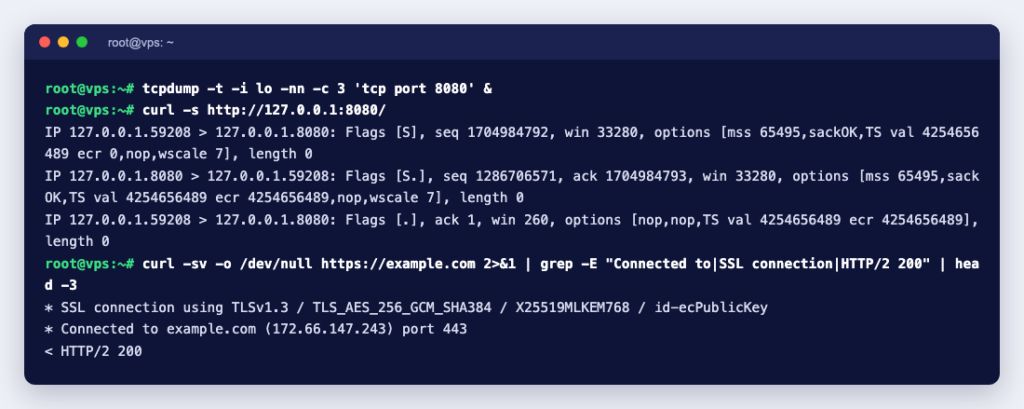
Before any data moves, the client and server exchange three segments. We captured this with tcpdump 4.99.5 in a Debian 13 container while curl requested a page from a small web server on port 8080 (output trimmed to the important parts):
127.0.0.1.41380 > 127.0.0.1.8080: Flags [S],  seq 4210159877, win 65495, options [mss 65495,...]
127.0.0.1.8080 > 127.0.0.1.41380: Flags [S.], seq 4120032608, ack 4210159878, win 65483, ...
127.0.0.1.41380 > 127.0.0.1.8080: Flags [.],  ack 4120032609, win 512, ...
127.0.0.1.41380 > 127.0.0.1.8080: Flags [P.], seq 4210159878:4210159956, ... length 78: HTTP: GET / HTTP/1.1- SYN (
[S]): the client asks to open a connection and sends its starting sequence number. - SYN-ACK (
[S.]): the server agrees, sends its own starting number and acknowledges the client’s number plus one. - ACK (
[.]): the client acknowledges the server’s number. The connection is now ESTABLISHED and the HTTP request follows ([P.], 78 bytes).
In tcpdump’s notation, S is SYN, F is FIN, P is PUSH, R is RST and a dot means ACK. The win value is the receive window: how many bytes the sender of that segment can accept right now. That is how TCP stops a fast sender from overrunning a slow receiver.
Closing a connection and TIME-WAIT
Each side sends a FIN when it has finished sending, and the other side acknowledges it. The side that closes first then stays in the TIME-WAIT state for twice the Maximum Segment Lifetime, so that stray segments from the old connection cannot be mistaken for a new one. RFC 9293 takes the MSL to be 2 minutes as an engineering choice.
After our test request, ss -tan showed the finished connection in that state (other lines removed):
State     Recv-Q Send-Q Local Address:Port   Peer Address:Port
LISTEN    0      5          127.0.0.1:8080        0.0.0.0:*
TIME-WAIT 0      0          127.0.0.1:41380     127.0.0.1:8080
On a busy web server you will often see many TIME-WAIT entries. On their own they are part of normal TCP behaviour, not a sign of an attack.
Ports: how one server runs many services
A TCP connection is identified by four values: client IP, client port, server IP and server port. RFC 6335 splits the 65,536 port numbers into three ranges: System Ports 0 to 1023, User Ports 1024 to 49151 (both assigned by IANA) and Dynamic Ports 49152 to 65535, which are never assigned. Operating systems pick the client side from a local range; on our Debian 13 test container it was 32768 to 60999 (/proc/sys/net/ipv4/ip_local_port_range).
Common TCP ports from the IANA port registry:
| Port | Service |
|---|---|
| 22 | SSH (and SFTP) |
| 25 | SMTP, server-to-server email |
| 53 | DNS (TCP and UDP) |
| 80 | HTTP |
| 443 | HTTPS |
| 587 | Email submission from mail clients |
| 993 | IMAP over TLS |
| 3306 | MySQL and MariaDB |
| 3389 | Remote Desktop (RDP) |
| 5432 | PostgreSQL |
For the email and TLS ports in more detail, see HTTPS and SSL port numbers.
TCP vs UDP
UDP, the User Datagram Protocol (RFC 768), is TCP’s lightweight sibling. It sends single messages with “a minimum of protocol mechanism”, and delivery and duplicate protection are not guaranteed. Applications that need ordered, reliable delivery are pointed to TCP by the UDP standard itself.
| TCP | UDP | |
|---|---|---|
| Connection | Handshake first, then data | No handshake, just send |
| Delivery | Lost data is resent | Not guaranteed |
| Order | Always in order | May arrive out of order |
| Header | 20 bytes plus options | 8 bytes |
| Speed control | Flow and congestion control built in | Up to the application |
| Typical uses | Websites, SSH, email, databases, file transfer | DNS queries, QUIC (HTTP/3), game traffic such as Minecraft Bedrock gameplay |
Two things blur the line. DNS uses both: RFC 7766 makes TCP support a requirement for DNS software (see also when DNS uses TCP or UDP). And HTTP/3 runs over QUIC, a newer connection-oriented transport that carries its packets in UDP datagrams (RFC 9000). That is why IANA lists port 443 for both TCP and UDP.
For game servers, the protocol decides which firewall rule you need. A Minecraft Java Edition 26.3 server, for example, listened on TCP port 25565 in our test. Open the port for the right protocol, or players will not get in.
Checking TCP on your own server
These commands were run on Debian 13 and work the same on Ubuntu and AlmaLinux.
Which services are listening?
sudo ss -tlnpState Recv-Q Send-Q Local Address:Port Peer Address:Port Process
LISTEN 0 5 127.0.0.1:8080 0.0.0.0:* users:(("python3",pid=3691,fd=3))-t means TCP, -l listening sockets, -n numbers instead of names and -p the process. A service bound to 127.0.0.1 only accepts connections from the server itself. More options are in how to find which process is using a port.
Can I reach a port from outside?
nc -vz 127.0.0.1 8080
nc -vz 127.0.0.1 8081
Connection to 127.0.0.1 8080 port [tcp/http-alt] succeeded!
nc: connect to 127.0.0.1 port 8081 (tcp) failed: Connection refused“Connection refused” means the server answered with a reset: RFC 9293 says a SYN that does not match a connection is rejected this way, so nothing is listening on that port. A connection that hangs until it times out usually means a firewall is dropping the packets instead. That difference tells you where to look. The nc guide has more examples.
UDP has no handshake, so this kind of check is far less useful there. In our test, nc -vzu against a UDP port with nothing listening printed nothing at all, neither success nor failure.
Open a port in the firewall
sudo ufw allow 25565/tcp
sudo ufw allow 51820/udp     # a UDP service, for example WireGuard
With ufw 0.36.2 each command answered Rules updated and Rules updated (v6). Name the protocol every time; the TCP rule does nothing for UDP traffic on the same number.
Count connections by state
ss -s
ss -tan state established
ss -tan state time-wait
ss -s prints a summary line such as TCP: 126 (estab 0, closed 126, orphaned 0, timewait 2). A sudden jump in established connections to your web port is worth a closer look. To watch ports change live, see how to watch TCP and UDP ports in real time.
TCP connection states at a glance
| State | Meaning (from RFC 9293) |
|---|---|
| LISTEN | Waiting for a connection request |
| SYN-SENT | Sent a SYN, waiting for the reply |
| SYN-RECEIVED | Received and sent a SYN, waiting for the final ACK |
| ESTABLISHED | Open connection, data flowing |
| FIN-WAIT-1 / FIN-WAIT-2 | This side closed, waiting for the other side |
| CLOSE-WAIT | The other side closed, waiting for the local program to close |
| LAST-ACK / CLOSING | Waiting for the final acknowledgement |
| TIME-WAIT | Closed, waiting for stray segments to die out |
Many connections stuck in CLOSE-WAIT usually point at the application: the other side has hung up, but the program on your server has not closed its end.
Knowing TCP makes most “cannot connect” problems quicker to solve: check that the service listens, that the firewall allows the right protocol, and whether you get a refusal or a timeout. If you would rather have someone else do the digging, our Linux server management team can check ports, firewalls and services for you.